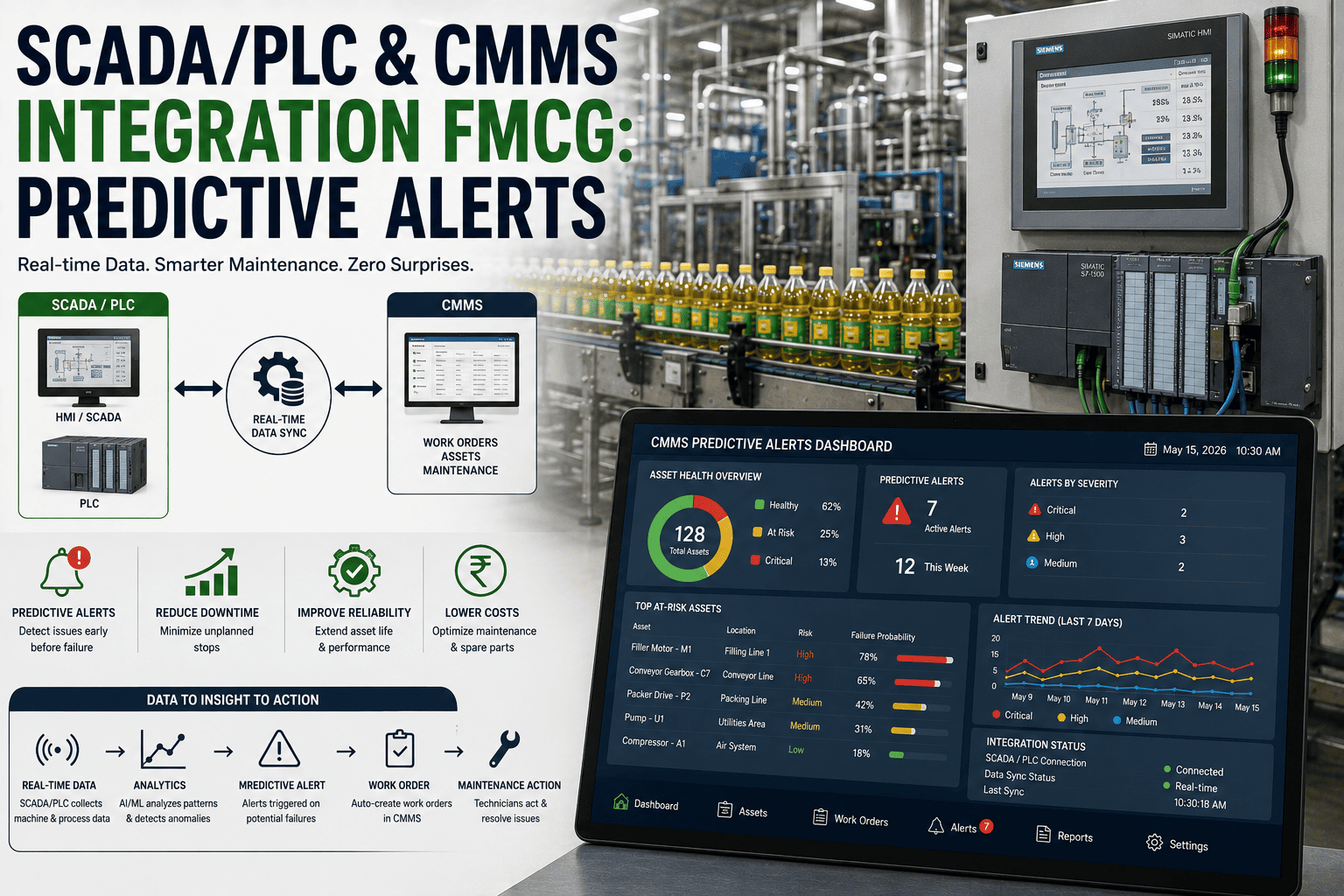
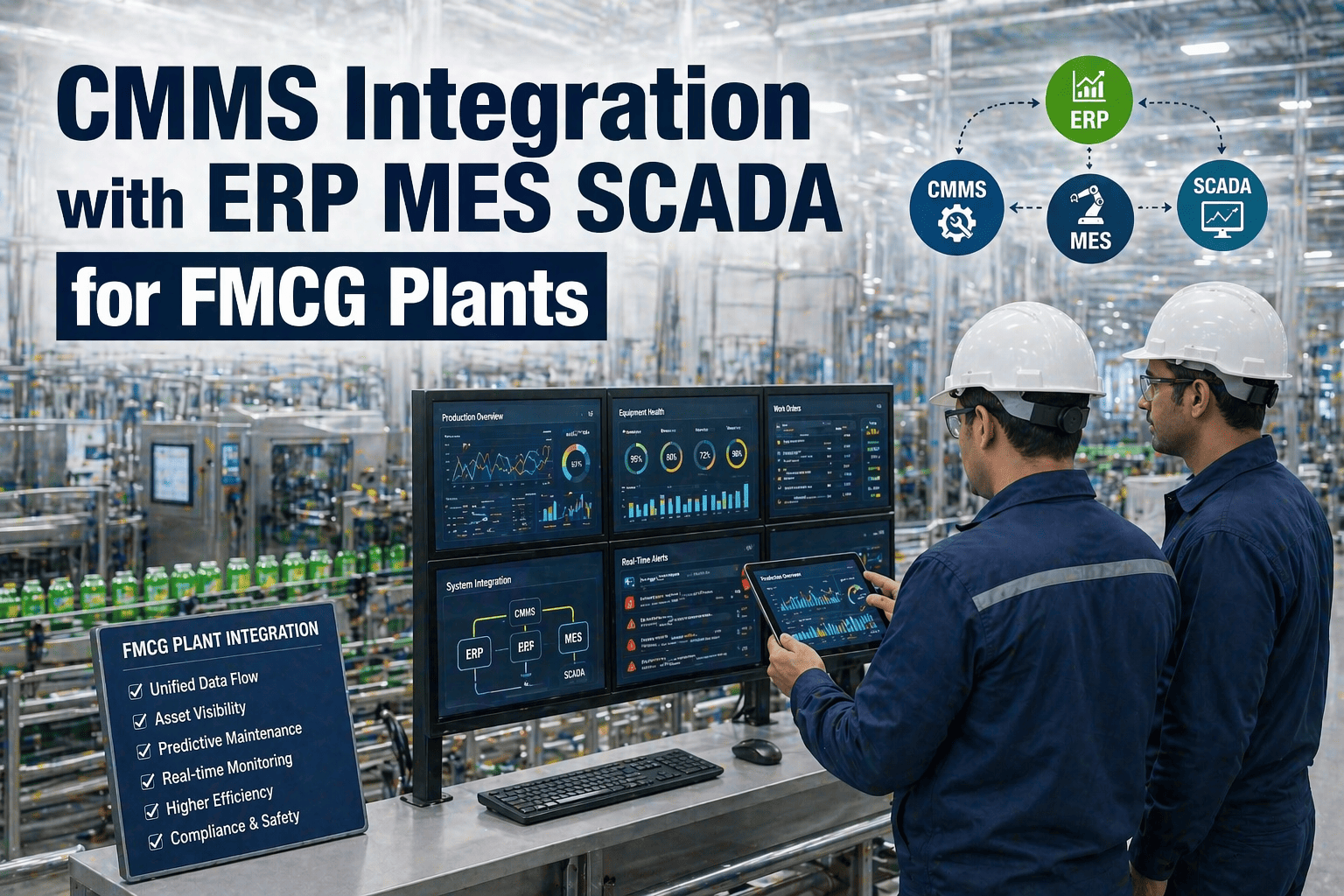
Most FMCG plants run four separate software systems that should be talking to each other but aren't. The ERP knows the purchase order but not why the part was needed. The MES knows the line stopped but not what maintenance action fixed it. The SCADA knows the motor temperature is rising but nobody in maintenance receives the alert. The CMMS has the work order history but it lives in isolation, disconnected from financial data, production records, and the sensor signals that could predict the next failure. This disconnection costs real money — a Gujarat beverage plant calculated that 34% of their total maintenance spend was caused by information gaps between systems: emergency parts orders placed because nobody checked the CMMS before the ERP purchase order was raised, repeat failures because the MES downtime code never linked to the CMMS root cause record, and energy waste that SCADA was logging but maintenance never acted on because nobody connected the dots. Integration is not a technology problem. It is a data strategy problem — and this guide covers the architecture, data flows, implementation approach, and practical decisions that FMCG maintenance and IT teams need to build connected manufacturing operations. Start your free trial to connect Oxmaint with your existing systems, or book a demo to see Oxmaint's ERP, MES, and SCADA integration capabilities on live FMCG data.
ERP / MES / SCADA Integration — Oxmaint
One Integration Point. All Your Manufacturing Systems Connected to Maintenance.
Oxmaint connects bidirectionally with SAP, Oracle, Microsoft Dynamics, major MES platforms, and SCADA systems — synchronising asset data, work orders, purchase requisitions, production downtime, and sensor alerts across your entire FMCG manufacturing stack.
34%
of total maintenance spend caused by information gaps between disconnected ERP, MES, SCADA, and CMMS systems
4 systems
average number of disconnected platforms managing production, maintenance, procurement, and monitoring in a typical FMCG plant
$180K
average annual premium paid on emergency parts orders in FMCG plants where CMMS is not connected to ERP procurement
6 weeks
typical implementation time for a full Oxmaint ERP/MES/SCADA integration in an FMCG facility
The Four-System Architecture: How CMMS, ERP, MES, and SCADA Fit Together
Before designing integrations, it helps to be clear about what each system is responsible for and where the natural data exchange points exist. Most integration failures happen not because of technical difficulty but because the business logic of what data flows in which direction — and what triggers each exchange — was never properly defined.
CM
CMMS
Maintenance Intelligence Layer
Owns
Work orders — creation, assignment, completion
Asset register — full equipment hierarchy and history
PM schedules — all planned maintenance programmes
Spare parts inventory and BOM linkage
Maintenance cost tracking per asset
Compliance and audit documentation
Needs from other systems
Runtime hours from SCADA/MES for meter-based PM triggers
Production schedule from MES for PM window planning
PO status from ERP for parts procurement visibility
Sensor alerts from SCADA for condition-based maintenance
ERP
ERP
Financial and Procurement Layer
Owns
Purchase orders and supplier management
Financial posting — maintenance cost to GL accounts
Asset financial records — depreciation, book value
Inventory valuation and stock levels
Labour cost and payroll integration
Budget management and cost centre allocation
Needs from other systems
Parts requisitions from CMMS to generate purchase orders
Work order cost data for financial posting and reporting
Asset data from CMMS for maintenance cost allocation
Actual vs budget maintenance spend by asset class
MES
MES
Production Execution Layer
Owns
Production orders and scheduling
OEE data — availability, performance, quality per line
Downtime events — classification and duration
Quality inspection results and batch records
Runtime counters per production asset
Changeover and setup time records
Needs from other systems
Planned maintenance windows from CMMS for scheduling
Equipment status (in maintenance / available) from CMMS
Maintenance root cause codes to close downtime records
Calibration status from CMMS for quality hold decisions
OT
SCADA / IoT
Operational Technology Layer
Owns
Real-time sensor data — temperature, pressure, vibration, flow
Equipment runtime hours from PLC counters
Alarm and fault code history
Energy consumption per equipment circuit
Process parameter trends and excursion records
Motor and drive performance data
Needs from other systems
Alert threshold configurations from CMMS condition monitoring
Maintenance activity confirmation to reset alarm states
Asset identity mapping — PLC tag to CMMS asset ID
PM completion confirmation for runtime counter reset
The Six Critical Integration Data Flows
Not all integration data flows are equally valuable. These six exchanges deliver 80%+ of the financial and operational value from connected systems — prioritising them in implementation sequencing maximises early ROI before tackling more complex integrations.
01
SCADA Runtime Hours → CMMS PM Trigger
SCADA / PLC→Oxmaint CMMS
PLC runtime counters feed actual operating hours directly into Oxmaint, triggering PM work orders when the correct hour threshold is reached — regardless of calendar date. A filler running 18 hours/day reaches its 500-hour greasing interval in 28 days; one running 8 hours/day reaches it in 63 days. Without this integration, both get the same monthly calendar PM — one over-maintained, the other dangerously under-maintained.
Value: Eliminates over/under-maintenance · Reduces PM cost 15–25% · Zero missed runtime-based intervals
02
CMMS Parts Requisition → ERP Purchase Order
Oxmaint CMMS→ERP (SAP / Oracle)
When a CMMS work order requires a part below minimum stock, Oxmaint automatically creates a purchase requisition in the ERP — without a maintenance manager raising a manual PO request. The requisition carries the work order number, asset ID, and required-by date, allowing procurement to distinguish planned replenishment from emergency orders and negotiate accordingly. This integration eliminates the emergency premium on planned parts orders.
Value: $180K+ annual emergency premium reduction · 100% PO traceability to work order · Zero manual PR creation
03
MES Downtime Event → CMMS Work Order Creation
MES / Production System→Oxmaint CMMS
When MES records an unplanned equipment stoppage above a threshold duration (typically 5 minutes), it automatically creates a breakdown work order in Oxmaint — pre-populated with the asset, time, and MES downtime code. The maintenance team receives the mobile alert immediately. When the work order is closed with root cause and corrective action, this data flows back to MES to close the downtime event record. Both systems maintain a complete, linked record with zero manual data re-entry.
Value: Response time reduction 40% · Zero lost downtime records · Complete OEE-to-maintenance traceability
04
SCADA Condition Alert → CMMS Predictive Work Order
SCADA / Sensor Platform→Oxmaint CMMS
When a SCADA sensor value crosses a defined threshold — motor temperature +10°C above baseline, vibration above 5mm/s, pressure deviation beyond ±5% — Oxmaint automatically creates a condition-based maintenance work order with the sensor reading, trend data, and recommended action. Maintenance acts before failure rather than after. This is the data flow that transforms SCADA from a monitoring system into a maintenance intelligence system.
Value: Predictive maintenance from existing sensors · 60–80% failure prevention rate · No new hardware required
05
CMMS PM Schedule → MES Production Planning
Oxmaint CMMS→MES / Production Scheduling
Oxmaint publishes upcoming planned maintenance windows — which assets, which dates, estimated durations — to the MES production scheduling system. Production planners see maintenance constraints before finalising the production schedule, allowing them to align changeover windows with PM activities and avoid scheduling production runs that would conflict with planned maintenance. Eliminates the "maintenance had to stop the line mid-run" scenario.
Value: Zero unannounced maintenance stops · Changeover-aligned PM · Production and maintenance planned together
06
CMMS Work Order Cost → ERP Financial Posting
Oxmaint CMMS→ERP Finance Module
Completed work order costs — labour hours at standard rates, parts consumed from inventory, contractor invoices — post automatically to the correct GL accounts and cost centres in the ERP. Finance sees real maintenance spend by asset, by line, and by category without waiting for month-end manual reconciliation. Maintenance managers see their budget vs actual in real time without running ERP reports they can't access or understand.
Value: Real-time maintenance cost visibility · Month-end close time ↓80% · TCO data by asset from day one
ERP / MES / SCADA Integration — Oxmaint
All Six Data Flows. Pre-Built Connectors for SAP, Oracle, and Major MES Platforms.
Oxmaint delivers all six critical integration flows out-of-the-box — with pre-built connectors for SAP PM, Oracle EAM, Siemens MES, Rockwell FactoryTalk, and SCADA platforms via OPC-UA and MQTT. No custom development required for standard integrations.
ERP Integration Deep Dive: SAP, Oracle, and Microsoft Dynamics
ERP integration with CMMS is the most financially consequential connection in the manufacturing systems stack — it determines whether maintenance costs are visible, whether procurement is efficient, and whether capital replacement decisions are made with real data or estimates. The integration architecture differs significantly between the three dominant ERP platforms in FMCG.
SAP (S/4HANA and ECC)
Most Complex
Integration methodSAP Plant Maintenance (PM) module coexistence or replacement — Oxmaint connects via SAP RFC, BAPI, or REST API on S/4HANA. BAPIs used: BAPI_EQUI_CREATE, BAPI_ALM_ORDER_MAINTAIN for work order sync
Key data flowsAsset master sync (equipment numbers), PM notifications to work orders, parts consumption posting to materials management (MM), cost posting to controlling (CO-PC), purchase requisition creation in MM-PURCHASING
Common challengeSAP PM is often only partially configured — many FMCG plants have SAP licences but use only basic MM and FI modules. Oxmaint connects to what is actually used, not the full theoretical SAP PM scope
Implementation time4–8 weeks for standard integration scope with SAP basis team support — longer if custom ABAP development is required
Oracle (Fusion / EBS)
REST API Native
Integration methodOracle Fusion REST APIs or Oracle EBS XML Gateway / OAF for older EBS deployments. Oracle Integration Cloud (OIC) used as middleware layer for complex orchestration scenarios
Key data flowsAsset master from Oracle Assets to Oxmaint, purchase requisitions to Oracle iProcurement, work order costs to Oracle Projects or Cost Management, inventory transactions via Oracle Inventory REST API
Common challengeOracle EBS versions pre-R12.2 have limited API support — middleware layer (OIC or MuleSoft) often required to bridge older EBS to modern REST integration patterns
Implementation time3–6 weeks for Fusion Cloud — 6–10 weeks for EBS depending on version and available middleware
Microsoft Dynamics 365
Fastest Integration
Integration methodD365 Finance and Operations REST API or Power Platform connectors — Microsoft's Dataverse makes Oxmaint integration particularly clean for D365 environments already using Power Automate workflows
Key data flowsAsset data from D365 Fixed Assets, purchase requisitions to D365 Procurement, work order cost posting to D365 Finance project accounts, inventory transactions to D365 Inventory Management
Common challengeD365 is often deployed in a heavily customised state by Microsoft partners — custom field mapping and workflow modifications frequently required to match the specific D365 configuration in place
Implementation time2–4 weeks for standard D365 F&O — faster if Power Platform middleware is already in use
SCADA and IoT Integration: Connecting OT to IT Maintenance
SCADA integration is the connection that transforms condition monitoring from a passive historical record into an active maintenance trigger system. The technical architecture of OT-to-IT integration has specific requirements that differ from standard IT-to-IT integrations — particularly around real-time data rates, network security boundaries, and protocol translation between industrial communication standards and REST APIs.
OPC-UA (Standard Industrial Protocol)
Recommended Standard
OPC Unified Architecture is the standard protocol for industrial data exchange between PLCs, SCADA, DCS, and IT systems. Oxmaint connects to OPC-UA servers running on Siemens, Rockwell, Schneider, and most other major automation platforms — reading tag values at configured polling rates and translating them into CMMS condition monitoring data points. OPC-UA supports both polling (read on schedule) and subscription (push on change) models — use subscription mode for alarm and fault data to minimise latency between fault event and CMMS work order creation.
Protocols: OPC-UA (IEC 62541) · Polling: 1–60 second configurable · Latency: <5 seconds alert to work order
MQTT for IoT Sensor Networks
Modern IoT Standard
MQTT is the dominant protocol for IoT sensor devices — vibration monitors, wireless temperature sensors, ultrasonic leak detectors, and edge computing devices. Oxmaint subscribes to MQTT broker topics and processes incoming sensor payloads against configured threshold rules, creating maintenance work orders when conditions breach defined limits. MQTT's lightweight publish-subscribe architecture makes it ideal for high-frequency sensor data (100+ readings per second from vibration sensors) without overwhelming the CMMS with raw data — threshold filtering happens at the edge before CMMS trigger.
Protocol: MQTT 3.1.1 / 5.0 · Broker: Mosquitto, HiveMQ, AWS IoT Core · QoS: Level 1 minimum for alarm data
Industrial Data Historian Integration
Legacy Plant Infrastructure
Many FMCG plants have OSIsoft PI, Honeywell Uniformance, or similar historian systems storing years of process data. Oxmaint integrates with PI via the PI Web API — retrieving historical trends for root cause analysis, pulling equipment runtime totals for meter-based PM triggers, and querying energy consumption data for sustainability reporting. Historian integration is particularly valuable for plants that already have condition monitoring data captured but have no system acting on it for maintenance decisions.
Supported: OSIsoft PI Web API, Honeywell Uniformance REST, AspenTech IP.21 via ODBC, InfluxDB time-series API
IT/OT Network Security Boundary
Critical Architecture Requirement
SCADA-to-CMMS integration requires traversing the IT/OT security boundary — the network separation between operational technology (plant floor PLCs and SCADA) and information technology (enterprise systems and cloud). The standard architecture uses a DMZ with a data diode or one-way gateway at the OT boundary: data flows from OT to IT (sensor data, runtime hours, fault codes) but the CMMS cannot write directly back to PLCs. All CMMS-to-OT data flows use indirect channels — operator-executed changes informed by CMMS instructions rather than automated write-back to PLC setpoints.
Architecture: OT network → DMZ gateway → IT network → cloud CMMS · Standards: IEC 62443, NIST SP 800-82
SCADA Integration — Oxmaint
Your SCADA Already Has the Data. Oxmaint Turns It Into Maintenance Actions.
Connect existing SCADA and sensor platforms to Oxmaint via OPC-UA or MQTT — no new hardware, no new sensors. Threshold breaches become maintenance work orders in under 5 seconds. Your condition data finally drives maintenance decisions.
Integration Implementation: The 6-Week Deployment Roadmap
Week 1–2
Discovery and Mapping
Inventory all source systems — ERP version, MES platform, SCADA protocols
Define data flows required — which of the 6 critical flows are in scope
Map asset IDs across systems — CMMS asset tag = ERP equipment number = SCADA PLC tag
Identify data owners — who approves each data flow in each system
IT/OT security architecture review — DMZ placement, firewall rules needed
Output: Integration design document
Week 3–4
Connection and Configuration
API credentials provisioned — ERP service account, SCADA OPC-UA certificates
Asset master synchronisation — import ERP asset/equipment list to Oxmaint
SCADA tag mapping — link PLC tags to Oxmaint asset IDs and threshold rules
Parts catalogue sync — ERP material master to Oxmaint spare parts library
Test data flows in sandbox — verify each integration point with sample data
Output: All connections live in test environment
Week 5
Testing and Validation
End-to-end flow testing — simulate each trigger scenario and verify output
Error handling verification — test what happens when source system is unavailable
Data quality check — verify asset IDs, cost centres, and GL accounts mapped correctly
User acceptance testing with maintenance manager and procurement team
Performance testing — verify SCADA data ingestion rate under production conditions
Output: Signed off integration test results
Week 6
Go-Live and Monitoring
Production cutover — enable live data flows in sequence (SCADA first, ERP second, MES third)
First 48-hour monitoring period — verify data integrity and error rates
Integration health dashboard configured — alert on failed syncs and data gaps
Rollback procedure documented and tested — reverting each flow independently if needed
Handover to operations — monitoring responsibilities and escalation contacts
Output: Live integrated platform
Common Integration Failures and How to Avoid Them
✗
Asset ID Mismatch Across Systems
The most common integration failure: the CMMS calls a filler "PKG-FILL-003", the ERP calls it "10000234", and the SCADA PLC calls it "L3_FILLER_01". Without a master cross-reference table mapping these identifiers, every data flow fails to link correctly. Build the asset ID mapping table before writing a single line of integration code — this is the foundation everything else depends on. Dedicate 2–3 days to this task and involve maintenance, IT, and operations in validating completeness.
✗
Integrating Too Many Flows Simultaneously
Integration projects that try to go live with all data flows simultaneously create situations where a problem in one flow is indistinguishable from a problem in another. Go live with one flow at a time — SCADA runtime hours first, then ERP parts requisitions, then MES downtime events. Prove each flow is stable before adding the next. A clean, stable 2-flow integration in month 1 is worth more than a flaky 6-flow integration that the team doesn't trust.
✗
No Error Monitoring or Alert on Integration Failure
Integrations fail silently. A broken SCADA connection stops sending runtime data to the CMMS — PM intervals revert to calendar-based and nobody notices for weeks. A broken ERP connection stops posting purchase requisitions — emergency orders return and nobody connects the cause. Every integration must have a health monitoring dashboard with alerts when data flows stop. In Oxmaint, integration health is visible in the administration dashboard with alerts on stale data and failed sync events.
✗
Flooding the CMMS with Raw SCADA Data
A SCADA system generating 10,000 sensor readings per minute cannot pipe all data directly into a CMMS work order engine — it will create thousands of duplicate work orders and bury the maintenance team. All SCADA-to-CMMS integration requires threshold logic, deduplication, and hysteresis (a sensor must be out of threshold for a defined minimum time before a work order is created) at the integration layer. Filter and aggregate at the edge; only actionable events reach the CMMS.
Frequently Asked Questions
ERP / MES / SCADA Integration — Oxmaint
Connect Your Entire Manufacturing Stack to Maintenance in 6 Weeks.
6 wks
full integration deployment
$180K
emergency parts savings yr 1
<5 sec
SCADA alert to work order
✓SAP, Oracle, Dynamics 365 — pre-built ERP connectors, no custom development
✓OPC-UA and MQTT — standard industrial protocol connections to any SCADA platform
✓MES downtime events → automatic CMMS work orders with mobile technician alerts
✓Runtime-hour PM triggers from PLC counters — not calendar intervals
✓Parts requisitions → ERP POs automatically — zero emergency premium on planned parts
✓REST API for custom MES and in-house systems — OpenAPI documented, OAuth 2.0