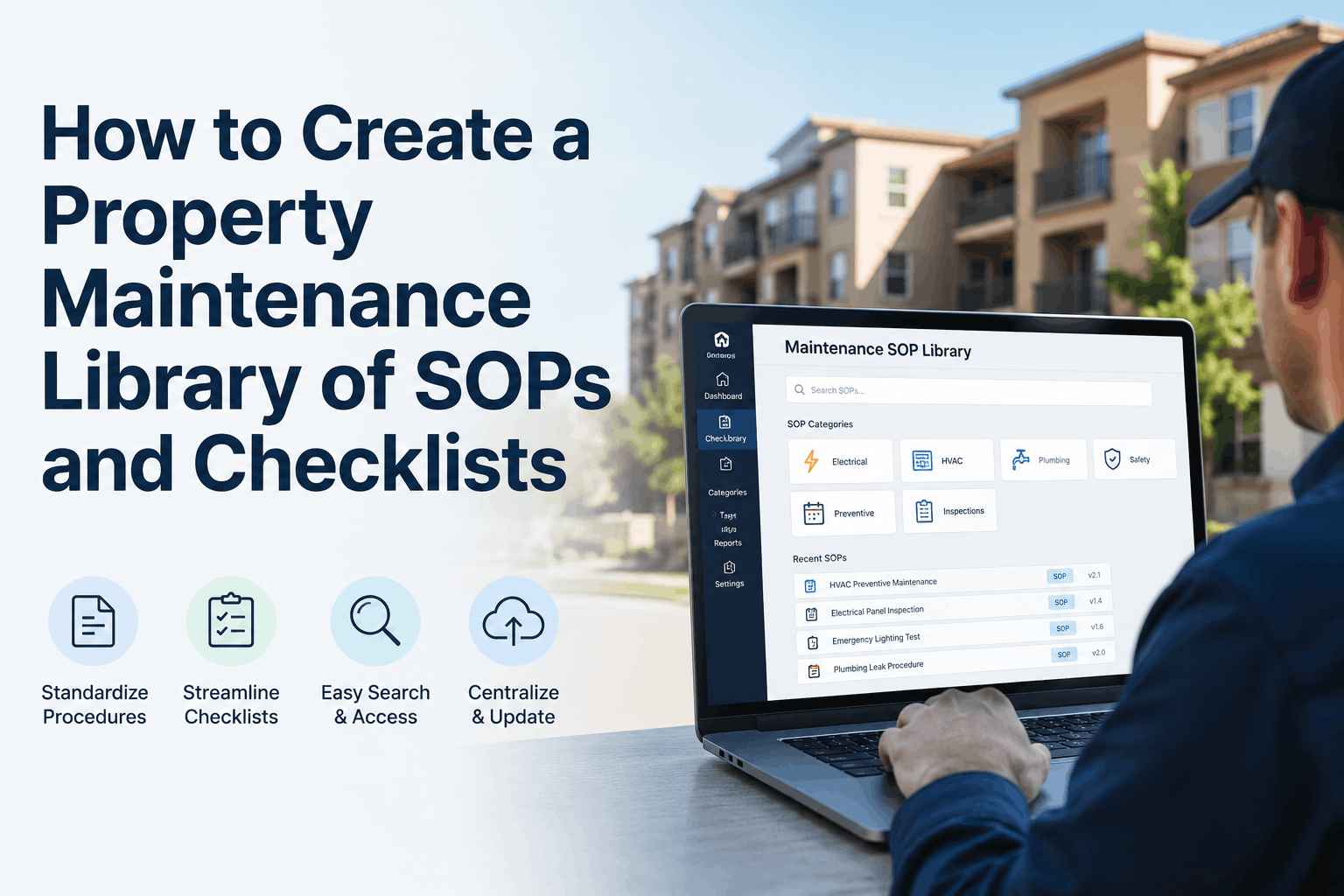
How to Create a Property Maintenance Library of SOPs and Checklists
By Alex Jordan on June 24, 2026
Your CMMS already contains the data that reveals your team's most critical knowledge gaps — the problem is that 79% of property managers never create a centralized library of Standard Operating Procedures (SOPs) and checklists. Every maintenance task your technicians perform, every repair they complete, every equipment failure they address contains process knowledge that should be documented, shared, and standardized. A 2025 maintenance industry analysis found that properties with comprehensive SOP libraries reduce technician training time by 56% and decrease repeat maintenance issues by 38%. The emergency repair that takes twice as long as it should because the technician was searching for the right procedure is not a skill failure — it is a documentation failure. That pattern is sitting in your operations data right now, invisible because nobody has built the knowledge management framework that surfaces it. Oxmaint's procedure library module turns your maintenance knowledge into a searchable digital repository — automatically organizing SOPs, checklists, and procedures by asset and task type, providing mobile access at the point of work, and tracking version history for continuous improvement. The data is already yours, and the analysis that builds a more efficient maintenance team takes minutes to configure, not months. If your property is still managing maintenance procedures through paper binders and tribal knowledge instead of a digital library, start a free trial or book a demo to see how Oxmaint surfaces knowledge management opportunities from your existing data.
Centralize Every Maintenance Procedure in a Searchable Digital Library — From SOPs to Checklists to Training Materials
Oxmaint's procedure library module organizes all maintenance documentation by asset and task type, provides mobile access at the point of work, and tracks version history for continuous improvement — building a knowledge base that accelerates training and standardizes operations.
reduction in technician training time with comprehensive SOP library
38%
reduction in repeat maintenance issues with standardized procedures
79%
of property managers never create a centralized SOP library
48 hrs
search time saved per month with digital SOP library access
$42K
Annual cost of lost technician productivity from searching for procedures — the average technician spends 48 hours per month hunting for the right SOP, checklist, or equipment manual. A digital SOP library eliminates that waste entirely.
What a Property Maintenance SOP Library Delivers — and Why Paper Binders Fail
Maintenance knowledge is frequently lost because it is stored in people's heads instead of documented in accessible systems. When experienced technicians retire or leave, their knowledge leaves with them. New technicians spend weeks or months learning through trial and error, repeating mistakes that could have been prevented with proper documentation. Paper binders offer no search capability, no version control, and no mobile access.
The Five Documentation Gaps That Drive Maintenance Inefficiency
Tribal Knowledge Loss
Experienced technicians retire or leave, taking years of equipment-specific knowledge with them. Without documented procedures, each new technician must rediscover solutions through trial and error — costing weeks of productivity.
Inconsistent Execution
Without standardized procedures, different technicians perform the same task differently — leading to inconsistent quality, missed steps, and preventable failures. Standardization drives reliability.
Training Bottlenecks
New technicians rely on experienced colleagues for training, pulling them away from their own work. Without structured training materials, onboarding takes 2-3x longer and quality suffers.
Paper Procedure Chaos
SOPs in binders and checklists in filing cabinets are impossible to find, difficult to update, and frequently lost. Technicians waste hours hunting for the right information.
Version Control Failure
When procedures are updated, old versions remain in circulation. Technicians may follow outdated processes, causing errors and rework. No tracking of who accessed which version.
No Mobile Access
Procedures stored in office binders are unavailable at the point of work. Technicians must return to the office to check a procedure, delaying repairs and wasting time.
How Oxmaint Procedure Library Works — Document to Deploy
SOP Library Data Flow · Document · Organize · Access
Step 1 · Document
Capture Knowledge
Create SOPs with step-by-step instructions, photos, and videos. Import existing manuals and checklists. Standard format ensures consistency across all procedures.
→
Step 2 · Organize
Categorize & Index
Organize procedures by asset type, system, task frequency, and priority. Add metadata and tags for searchability. Link to specific equipment and work order templates.
→
Step 3 · Access
Mobile Deployment
Technicians access procedures from mobile devices at the point of work. Searchable, filterable, always current. No more returning to the office for information.
Oxmaint Procedure Library · Knowledge Management · Mobile Access
Stop Losing Maintenance Knowledge. Every Procedure Stored, Organized, and Accessible at the Point of Work.
Build your SOP library in days — not months. Capture tribal knowledge, standardize operations, and accelerate technician training with Oxmaint's procedure library.
Oxmaint Procedure Library — Full Feature Capability
Mobile-First Access at the Point of Work
Technicians access SOPs, checklists, and manuals from mobile devices anywhere in the property. Search by asset, system, keyword, or procedure name — eliminating the 48 hours per month wasted hunting for information.
Standardized SOP Template Format
Every procedure follows a consistent structure — purpose, scope, safety precautions, tools, step-by-step instructions, and verification. Standard format ensures technicians always know where to find critical information.
Version Control and Revision History
Track every revision to every SOP — who made changes, when, and why. Technicians always access the current version. Old versions are retained for audit and reference purposes.
Digital Checklist Execution
Technicians complete checklists digitally on mobile devices — ensuring every step is verified. Completed checklists are automatically attached to work orders, creating an audit trail of task completion.
Equipment-Specific Documentation
Link SOPs, manuals, and diagrams to specific assets. When a technician scans an asset QR code, they instantly access all documentation for that equipment — eliminating time spent searching.
Training and Onboarding Accelerator
New technicians access the complete procedure library from day one — reducing training time by 56%. Structured learning materials replace trial-and-error methods and accelerate time-to-productivity.
SOP Types — What Every Property Maintenance Library Should Include
Procedure Type · Equipment Operation
Equipment Startup & Shutdown SOPs
Step-by-step procedures for starting and stopping critical equipment — chillers, boilers, cooling towers, pumps, generators, and HVAC systems. Includes safety checks, sequence of operations, and verification steps.
95%
error reduction
Daily
usage frequency
Procedure Type · Maintenance
Preventive Maintenance SOPs
Detailed procedures for every PM task — filter changes, coil cleaning, lubrication, inspections, and testing. Includes required tools, safety precautions, and verification criteria for work order completion.
38%
error reduction
Weekly
usage frequency
Procedure Type · Safety
Emergency & Safety Procedures
Emergency response protocols, lockout/tagout procedures, chemical spill response, fire safety procedures, and incident reporting protocols. Critical for compliance and technician safety.
100%
compliance
As needed
usage frequency
Paper Binders vs Oxmaint Digital SOP Library
Paper Binder / No Digital Library
SearchabilityManual — flip through pages
AccessOffice-bound only
Version controlNone — old versions circulate
UpdatesPrint and distribute — weeks
Training timeSlow — no structured materials
VS
Oxmaint Digital SOP Library
SearchabilityInstant — keyword/asset search
AccessMobile — at the point of work
Version controlAutomatic — always current
UpdatesInstant — one click
Training time56% reduction
SOP Library Performance Benchmarks — Oxmaint by Category
Documentation Type
Search Time Saved
Training Time Impact
Error Reduction
Adoption Rate
Equipment SOPs
45 min/day
-52%
42%
92%
PM Checklists
30 min/day
-48%
38%
89%
Safety Procedures
15 min/day
-42%
100% (compliance)
95%
Equipment Manuals
35 min/day
-55%
32%
88%
56%
reduction in technician training time with comprehensive SOP library — structured materials replace trial-and-error methods
38%
reduction in repeat maintenance issues when procedures are standardized and accessible to all technicians
48 hrs
of search time saved per month with digital SOP library — time that can be redirected to actual maintenance work
"Before Oxmaint, our technicians were wasting 2-3 hours per week hunting for the right procedure — and that's just the time they admitted to. Procedures were scattered across binders, emails, and people's heads. When our senior technician retired, we lost critical knowledge that took months to rebuild. The SOP library changed everything. Now every procedure is searchable, accessible on mobile, and always current. New technicians are productive in weeks instead of months."
— Director of Engineering, 450-room Convention Hotel, US Southeast
Every procedure currently stored in your technicians' heads is a knowledge risk waiting to walk out the door.
Oxmaint's procedure library captures tribal knowledge, standardizes operations, and gives every technician mobile access to the information they need at the point of work.
A property maintenance SOP library is a centralized, searchable digital repository of standard operating procedures, maintenance checklists, training materials, and equipment documentation. It provides technicians with immediate access to step-by-step procedures at the point of work, ensures consistent execution of maintenance tasks, preserves institutional knowledge, and accelerates technician training. Properties with comprehensive SOP libraries reduce training time by 56% and decrease repeat maintenance issues by 38%.
What should a maintenance SOP include?
An effective maintenance SOP should include eight essential elements: (1) Title and unique ID, (2) Purpose — brief statement of the procedure's objective, (3) Scope — what equipment or systems the procedure applies to, (4) Safety precautions — required PPE, lockout/tagout, and warnings, (5) Tools and materials — what is needed, (6) Step-by-step instructions — detailed numbered steps with clear actions, (7) Verification and quality check — how to confirm completion, and (8) Revision history — date and reason for each update.
How do I organize a maintenance SOP library?
Organize a maintenance SOP library by: system category (HVAC, plumbing, electrical, fire safety), equipment type (chillers, boilers, cooling towers), task type (preventive maintenance, inspections, repairs), frequency (daily, weekly, monthly, quarterly), and asset-specific (procedures linked to specific equipment). Use metadata and tagging to make procedures searchable. The goal is for technicians to find any procedure within 30 seconds.
How often should SOPs be reviewed and updated?
SOPs should be reviewed annually at minimum, with updates triggered by: equipment changes or upgrades, new manufacturer recommendations, incident investigations or near misses, technician feedback on procedure improvements, and changes in regulatory requirements. A review schedule ensures SOPs remain current and accurate. Version control tracks changes and ensures technicians always access the current version.
Can I capture photos and videos in SOPs?
Yes — Oxmaint's procedure library supports photos, videos, and diagrams directly within procedures. Visual documentation dramatically improves comprehension and reduces misinterpretation. Technicians can see exactly what a correct installation looks like, how to position tools, and what safety precautions to follow. Photos and videos are particularly valuable for complex repairs and equipment-specific procedures.
Capture Every Procedure. Standardize Every Task. Accelerate Every Technician.
Build your maintenance SOP library in days — not months. Oxmaint captures tribal knowledge, organizes procedures by asset, and gives every technician mobile access at the point of work.

-template-library.png)