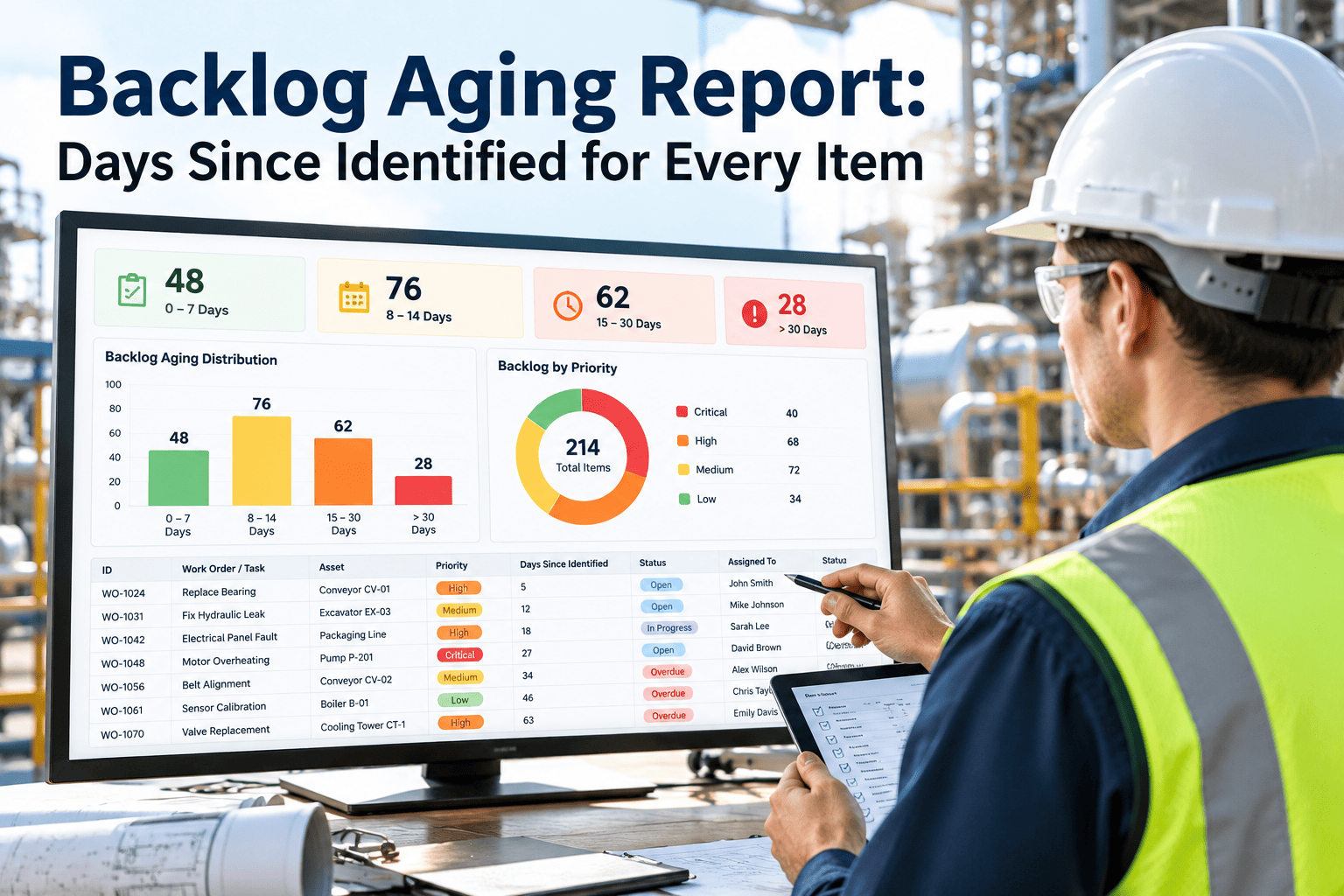
A backlog count tells you how much work is waiting. It says nothing about how long each item has been waiting, and that is the number that separates a healthy queue from a growing risk. A ceiling stain logged yesterday and a failing valve logged fourteen months ago both count as one item. A backlog aging report fixes that by showing days since identified for every item, grouped by priority and system. With work order and backlog management software, the identified date is captured at the source, so aging is calculated instead of guessed.
Backlog aging report: days since identified for every item
Turn a flat backlog list into an aging view by priority and system, so the oldest and riskiest items are impossible to overlook.
Which date starts the aging clock
Aging is only meaningful if everyone measures from the same event. Three dates are commonly confused.
Why identified date is the honest measure
- It reflects how long the organization has known about the condition.
- It cannot be reset by re-entering or re-prioritizing the item.
- It lines up with inspection records and audit trails.
Protect the date
Copy the identified date from the original inspection or request onto the work order. Block edits except by a supervisor, with a recorded reason.
What the aging report should look like
A usable report is sorted by age, filterable by priority and system, and readable in one screen. The sample below uses made-up rows to show the layout.
| Item | Asset | System | Priority | Days since identified | Bucket |
|---|---|---|---|---|---|
| BL-0412 | Chiller 2 isolation valve | HVAC | High | 412 | 365+ |
| BL-0388 | Stair 3 emergency light | Life safety | High | 203 | 181-365 |
| BL-0451 | Roof drain, east wing | Roofing | Medium | 128 | 91-180 |
| BL-0473 | Lobby door closer | Doors | Low | 54 | 31-90 |
| BL-0502 | Pump seal weep | Plumbing | Medium | 12 | 0-30 |
Columns worth adding
- Estimated cost, so aging can be read beside financial exposure.
- Owner and next action date.
- Reason for deferral, when the item is intentionally waiting.
- Number of times the item was re-prioritized.
Reading age against priority
A grid of priority against age bucket shows at once where the real exposure sits. Counts below are illustrative.
How to interpret the grid
- High priority items in the right-hand columns are the first agenda item at every review.
- A large low-priority tail may be candidates for closure, bundling, or formal acceptance of risk.
- A growing middle band suggests capacity or funding is not keeping pace with intake.
See how old your backlog really is
Capture the identified date once and get aging by priority, system, and site without manual spreadsheets.
What to do with items in each age bucket
Each bucket calls for a different decision. The goal is that no item ages without someone choosing to let it.
Aging by system shows where neglect concentrates
Average age per system points to the discipline that is quietly falling behind. The bars are illustrative.
Questions this view answers
- Is one trade starved of crew time or budget?
- Are life safety items being kept young as intended?
- Does a vendor-managed system age faster than in-house systems?
Rules that keep the backlog honest
Aging reports lose value when items are quietly deleted or reset. A few rules protect the data.
- No silent closure. Every closed item needs a completion record or a documented decision.
- Deferral needs a reason and a review date. Deferred is a status, not a hiding place.
- Do not reset the clock. Re-prioritizing changes priority, not the identified date.
- Review on a fixed cadence. Weekly for high priority, monthly for the whole list.
- Merge duplicates carefully. Keep the earliest identified date.
KPIs to run alongside the aging report
| KPI | Calculation | Use |
|---|---|---|
| Average backlog age | Mean days since identified, all open items | Overall health trend |
| Items over 180 days | Count and share of open backlog | Deferred maintenance exposure |
| High priority over target | High items older than their target days | Risk escalation |
| Backlog intake versus closure | Items added compared with items closed per month | Whether the queue is growing |
| Backlog cost by bucket | Estimated cost summed per age bucket | Capital planning input |
Compare against your own history
Industry averages vary by building type and policy, so measure trend first. Improvement against your own baseline is the most honest benchmark.
How Oxmaint supports backlog aging
- Inspections and requests: findings enter the system with a date, photos, and asset link.
- Work orders: track status, owner, priority, and completion for every backlog item.
- Preventive and corrective workflows: convert aged items into scheduled work.
- Dashboards and reports: filter open items by priority, system, site, and age.
- Asset history: see whether an aged item belongs to a repeat failure pattern.
Start with a one-time cleanup
Import the current backlog, confirm identified dates, close what is already done, and run the first aging report as your baseline.
Why backlog items grow old
Old items are rarely ignored on purpose. They stall for identifiable reasons, and each reason has a different remedy.
| Cause | Signal in the data | Response |
|---|---|---|
| Waiting for funding | Item has an estimate but no approval date | Move to a capital request with the age shown |
| Waiting for parts | Long gap after parts order | Track lead time and stock critical spares |
| Access or shutdown required | Linked to an outage that keeps slipping | Tie to the next planned shutdown with a firm date |
| No owner | Assignee blank or generic | Assign a named person at triage |
| Unclear scope | Vague description, no estimate | Inspect again and write a clear scope |
| Low perceived priority | Repeated re-prioritization | Re-score using consequence and likelihood |
Backlog, deferred maintenance, and planned work
Mixing these terms causes arguments about the size of the problem. Agree on clear definitions first.
Why the split matters
Backlog tells you about workload. Deferred maintenance tells you about accumulated risk and capital need. The aging report should let you filter for each.
A weekly backlog review built around the aging report
Thirty focused minutes each week keep the oldest items moving.
- Start with the right-hand columns. Review every high priority item older than 90 days first.
- Ask one question per item. What is the blocker, and who will clear it by when?
- Convert decisions into dates. An item should leave the meeting with a scheduled date or a recorded deferral.
- Check intake against closure. If more is arriving than leaving, discuss capacity or scope.
- Escalate stuck items. Anything blocked by funding goes to the manager with its age.
When an old item becomes a liability
Age does not equal risk by itself, but it changes how a condition is viewed.
- An item that has been known for a long time is harder to explain after a failure.
- Small defects left open can grow, such as a minor roof leak causing wider water damage.
- Safety and compliance items carry more weight than comfort or appearance items.
- Repeated re-prioritization without action is itself a warning sign.
Use a simple risk score alongside age
Multiply a consequence rating by a likelihood rating and view the score beside days since identified. Old, high-scoring items rise to the top of the list.
Five practical ways to reduce the oldest items
Comparing aging across buildings and teams
When one report covers several sites, the same age bucket can mean very different things. Normalise before drawing conclusions.
- Compare average age and the share of items over 180 days, not raw counts.
- Express backlog per thousand square feet or per hundred assets so large sites do not look worse by size alone.
- Show intake and closure per month beside age, since a young backlog with rising intake is a different problem from an old, stable one.
- Break results out by in-house team and contractor to see who is clearing work and who is not.
Use the comparison to share practice
If one site keeps its high priority items young, ask what they do differently in triage, planning, or contractor management, and copy it.
Giving life safety and statutory items their own aging view
Items tied to fire protection, lifts, pressure equipment, and similar systems should not be mixed into the general age distribution.
| Item type | Why view it separately | Suggested control |
|---|---|---|
| Fire detection and suppression defects | Impairments may need notification and interim measures | Short age threshold with automatic escalation |
| Lift and escalator defects | Statutory inspections may set expected response | Track against the contractor agreement |
| Electrical safety findings | Consequence of failure can be severe | Manager sign-off for any item left open |
| Water treatment and backflow items | Health and regulatory exposure | Compliance review on a fixed cycle |
Check the response times and records your local regulations require, since they vary by place and building type.
Taking a month-end snapshot
A single aging report shows today. A monthly snapshot shows whether you are winning.
- Save the bucket counts each month. Plot them so you can see the right-hand buckets shrinking or growing.
- Record backlog cost by bucket. Rising cost in old buckets signals growing capital need.
- Track items that moved between buckets. Items that age out of a bucket without action are the ones to discuss.
- Note major events. Storms, shutdowns, and staffing changes explain spikes and should be annotated.
Producing your first aging report in a week
You do not need perfect data to start. A rough first report already shows where the oldest risk sits.
- Export all open items with their earliest known date.
- Remove items that are already complete and confirm the rest are still valid.
- Calculate days since identified and assign each item to a bucket.
- Sort by priority and age, then walk the top twenty with the team.
- Save the result as your baseline and repeat it every month.
Accept imperfect dates at first
Flag estimated dates and improve them over time. A consistent, slightly imperfect clock is more useful than no clock at all.
Backlog aging, answered
What age buckets should we use?
Common starting points are 30, 90, 180, and 365 days. Adjust them to match your planning cycle.
What if the original identified date is unknown?
Use the earliest documented record, flag it as estimated, and keep it consistent going forward.
Should low priority items stay forever?
No. Review them periodically and close, bundle, or formally accept them with a recorded reason.
Where do I capture the identified date?
At inspection or request entry in Oxmaint, so it carries through to the work order.
Can we see an aging report with our data?
Yes. Book a demo and bring a backlog export.
Make every backlog item show its age
Give your team an aging report they can act on, with dates, owners, and decisions in one place.