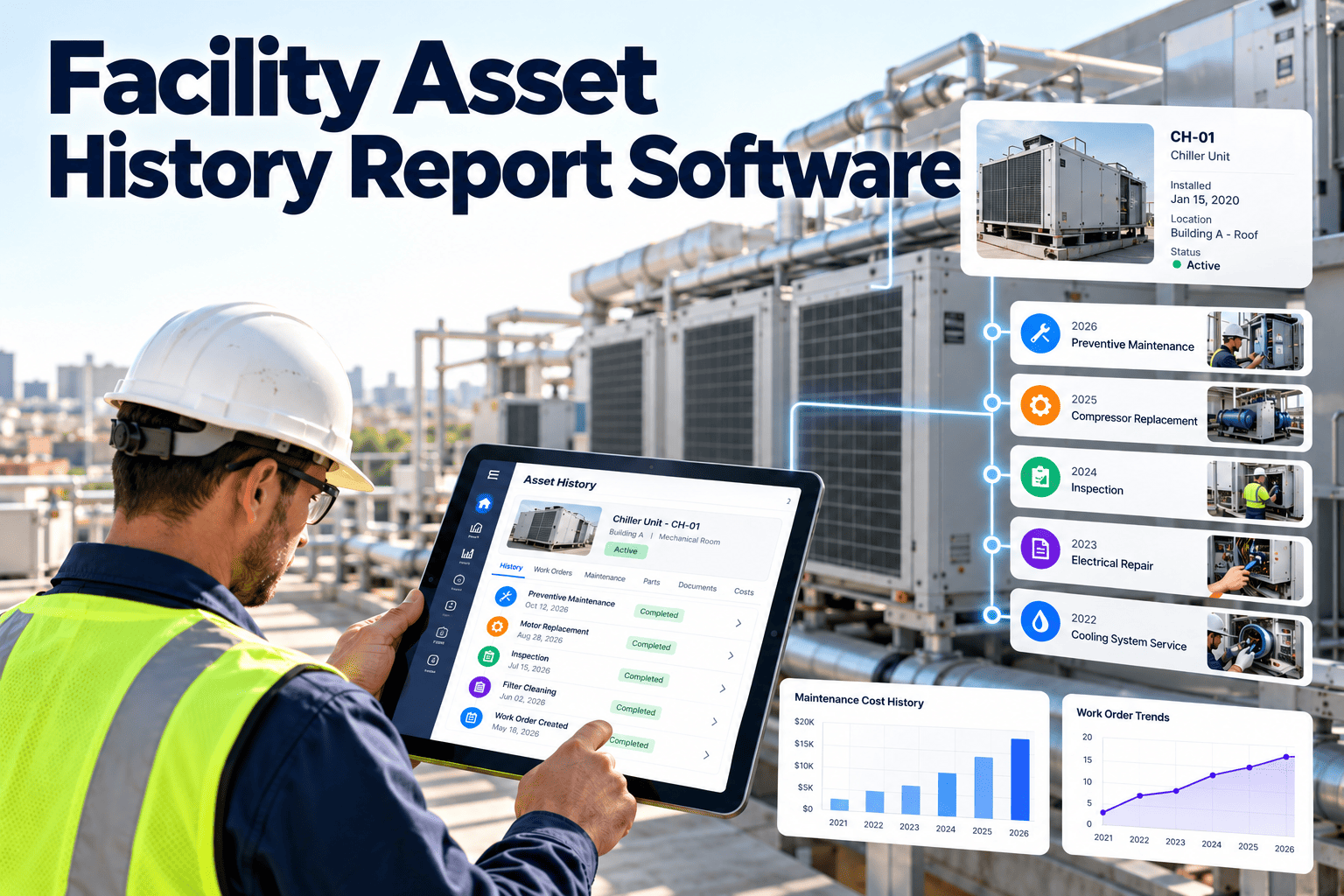
When a chiller trips on a hot afternoon, the first question is always the same: what has this machine been through? In many facilities the answer is scattered across old work orders, a contractor's email, a technician's memory and a spreadsheet nobody updates. Facility asset history report software pulls that story into one place, from the day an asset was installed to its latest repair. If you want to see how that looks in practice, you can start with Oxmaint and build your first asset records today.
Every asset has a story. Your reports should tell all of it.
Generate complete asset history reports for HVAC, electrical, life safety and building systems, covering installation, service, failures, costs and compliance in one record.
- Stage 1InstalledSerial, vendor, warranty
- Stage 2CommissionedBaseline readings
- Stage 3MaintainedPMs and inspections
- Stage 4RepairedFailures, parts, labor
- Stage 5TodayCost, condition, decision
What a complete asset history record contains
A history report is only as good as the record behind it. Strong records capture eight layers, and a gap in any one of them weakens every decision that follows.
Identity
Asset tag, make, model, serial number, location, parent system and installation date.
Acquisition and warranty
Purchase cost, supplier, warranty start and end dates, and commissioning paperwork.
Planned work
Preventive maintenance schedules, task lists, completion dates and who performed each visit.
Unplanned work
Breakdown reports with symptom, cause, fix, downtime and the person who responded.
Inspections and readings
Checklist results, meter readings, pass or fail outcomes and attached photos.
Parts, labor and vendors
Spares consumed, technician hours, contractor visits and invoiced amounts.
Documents
Manuals, drawings, test certificates, calibration records and safety data.
Status changes
Relocations, modifications, derating, decommissioning and disposal.
Why asset history disappears in most facilities
History rarely vanishes in one event. It leaks away through small habits, and each one makes the next breakdown harder to diagnose.
Without a central history
- Repairs recorded on paper or in personal notes
- Contractor reports filed in one inbox only
- Asset names differ between teams and sites
- Warranty dates found only after they expire
- Repeat failures treated as new problems
- Replacement budgets based on age alone
With a connected history
- Every work order closes against an asset record
- Vendor reports attached to the job they belong to
- One naming and tagging convention across sites
- Warranty status visible before approving a repair
- Repeat failures flagged automatically
- Replacement cases built on actual cost and failures
The hidden cost of staff turnover
When an experienced technician retires, years of tacit knowledge go with them. A written, searchable history keeps that knowledge in the building instead of in someone's head.
Where missing history costs facilities money
Every record gap has a predictable consequence. Mapping gaps to outcomes helps you decide which data to fix first.
Why this matters to budgets
Capital and operating budgets are only as credible as the evidence behind them. History lets you show leadership why a replacement is justified instead of asking them to trust a feeling.
Questions a good asset history report answers
Reports matter because they settle arguments. These are the questions facility managers ask most often, and the evidence needed to answer each one.
Compare cumulative repair spend, failure frequency and downtime against replacement cost.
Check start and end dates, covered components and previous claims before paying a contractor.
Search past work orders by failure code to see causes, fixes and how long each fix lasted.
Show preventive maintenance completion dates against the schedule for auditors or insurers.
Compare repeat visits, response time and cost per job across contractors.
Use condition, age and repair trends to forecast major repairs and capital requests.
Asset history reports facility teams actually use
One record can feed several reports. The right format depends on who is reading and what they must decide.
| Report | Main reader | Decision supported | Key data |
|---|---|---|---|
| Asset lifetime history | Facility manager | Overall health review | All work orders, costs, inspections |
| Repair versus replace | Finance and operations | Capital request | Repair spend, downtime, age |
| Warranty and claims | Procurement | Vendor recovery | Warranty dates, past claims |
| Compliance evidence | Auditor, safety officer | Pass or fail of audit | Inspection logs, certificates |
| Failure and repeat repair | Reliability engineer | Root cause priority | Failure codes, intervals |
| Contractor performance | Maintenance lead | Contract renewal | Visits, response, cost per job |
How to build reliable asset history, step by step
Accurate reports are a by-product of disciplined daily work. This flow keeps the record growing without extra paperwork.
Register every asset
Create a record with a unique tag, location and parent system. Scan or label each item.
Load the baseline
Import install dates, warranty terms, manuals and commissioning documents.
Schedule preventive work
Attach recurring tasks so each visit writes itself into the history.
Close jobs on mobile
Technicians log findings, parts, time and photos at the asset, not at the end of the shift.
Code the failures
Use consistent problem, cause and remedy codes so patterns can be searched later.
Review and report
Run history reports monthly and before budget, audit or contract meetings.
How one rooftop air handler's history builds over time
This is a simplified scenario, not a customer case study. It shows how routine entries combine into a useful report.
- Year 1
Installed and registered
The unit is tagged, warranty dates are entered and quarterly filter and belt checks are scheduled.
- Year 2
First fault logged
A technician records a failed drive belt with a photo, the part used and 40 minutes of labor.
- Year 4
Pattern appears
Three belt failures share one cause code, pointing to pulley misalignment rather than bad belts.
- Year 6
Decision made
A history report compares repair spend and downtime with replacement cost, supporting a clear budget request.
See a full asset history before the next breakdown
Set up a few critical assets in Oxmaint and watch their work orders, costs and inspections form a single timeline.
Checklist: is your asset history report-ready?
Before trusting any report, test the data underneath it. A single missing field can distort cost and failure totals.
- Every critical asset has a unique tag and a physical label or QR code
- Installation and warranty dates are filled in, not estimated
- Work orders are closed against the correct asset, not a generic location
- Labor hours and parts are recorded on every closed job
- Failure, cause and remedy codes are mandatory at close-out
- Contractor reports are attached to the work order
- Inspection results store readings, not just pass or fail
- Retired or relocated assets keep their history and change status
Start with the assets that hurt most
You do not need perfect data everywhere on day one. Begin with life safety systems, HVAC plant and any equipment whose failure stops operations, then widen the scope each quarter as habits settle and the team sees the reports paying off.
Five mistakes that weaken asset history reports
Most reporting problems are process problems. Avoid these and your first reports will already be useful.
- 1
Tracking everything at once
Start with critical assets and expand. A clean record for fifty assets beats a messy one for five thousand.
- 2
Optional close-out fields
If cause and labor are optional, they will be skipped under pressure. Make them required.
- 3
Free-text only descriptions
Notes are valuable, but codes make patterns searchable. Use both.
- 4
Ignoring contractor work
Outside visits are part of the asset story. Require reports to be uploaded before invoices are approved.
- 5
Never reviewing the reports
Schedule a monthly review so the history drives action instead of gathering dust.
Metrics your history report should calculate
Raw logs become useful when they turn into a few trusted numbers. These are standard reliability measures that history data supports directly.
What is changing in facility asset records
Asset history used to mean a filing cabinet. Several shifts are making records richer and easier to trust.
Capture at the asset
Mobile apps and QR labels let technicians open the right record and close the job on site, so entries are timely and tied to the correct asset.
Condition data alongside work orders
Meter readings and sensor values can sit next to repair records, supporting condition-based and predictive maintenance decisions.
Standardized failure coding
Teams increasingly adopt consistent failure classifications, such as those in ISO 14224 for reliability data, so history can be compared across assets.
Portfolio-level analytics
Multi-site operators want one view of cost, downtime and vendor performance rather than separate spreadsheets for each building.
Asset history as audit evidence
Regulators and insurers rarely ask whether you maintain equipment. They ask you to prove it, with dated records for each asset.
Requirements vary by jurisdiction and building type, so confirm which records your authority requires.
One asset history, four different ways to use it
A shared record keeps every team working from the same facts, even though each role asks different questions of it.
- See what was fixed last time before arriving
- Find the manual and parts list on the record
- Avoid repeating a fix that already failed
- Spot repeat failures and chronic problem assets
- Check PM completion against the schedule
- Judge contractor quality with real data
- Review lifetime cost by asset or building
- Approve replacements with evidence
- Forecast spend from repair trends
- Verify dated inspection and test records
- Confirm corrective actions were closed
- Review documents without chasing paper
Keeping the record trusted
People only rely on history they believe is accurate. Assign an owner for asset data quality and review exceptions, such as jobs closed without labor or assets with no activity, every month.
What to look for in asset history report software
When comparing CMMS platforms, test how easily each one turns daily work into history. Use this scorecard in your evaluation.
| Capability | Why it matters | Ask the vendor |
|---|---|---|
| Asset hierarchy | Roll costs up from component to building | Can parent and child assets be reported together? |
| Mobile work orders | History is captured at the point of work | Can technicians close jobs with photos on site? |
| Preventive scheduling | Planned visits log automatically | Are schedules time-based and meter-based? |
| Inspections | Readings become trendable evidence | Can checklists store values and attachments? |
| Inventory | Parts cost is tied to the asset | Does issuing a part post cost to the work order? |
| Reporting and dashboards | History is useful only if it can be read | Can reports be filtered by asset, site or vendor? |
How Oxmaint supports the workflow
Oxmaint links preventive maintenance, work orders, inspections, inventory and asset records so that each job adds to the same timeline. Dashboards and reports then summarize that record for managers and auditors.
Asset history report software FAQs
What is an asset history report?
It is a dated record of everything done to an asset, including installation, maintenance, repairs, inspections and cost.
Can I import existing asset data?
Yes, most teams load asset lists from spreadsheets first. You can book a demo to plan the import.
How far back should history go?
Capture all available records for critical assets, then build forward. Even a partial timeline improves repair decisions.
Does it help with repair or replace decisions?
Yes. Cumulative repair cost, downtime and failure frequency give a factual basis for replacement requests.
Is it suitable for multi-site portfolios?
Yes. A shared structure lets you compare sites and vendors. Create an account to try it.
Turn scattered records into one reliable asset history
Give your team the evidence to repair smarter, replace on time and pass audits with confidence.