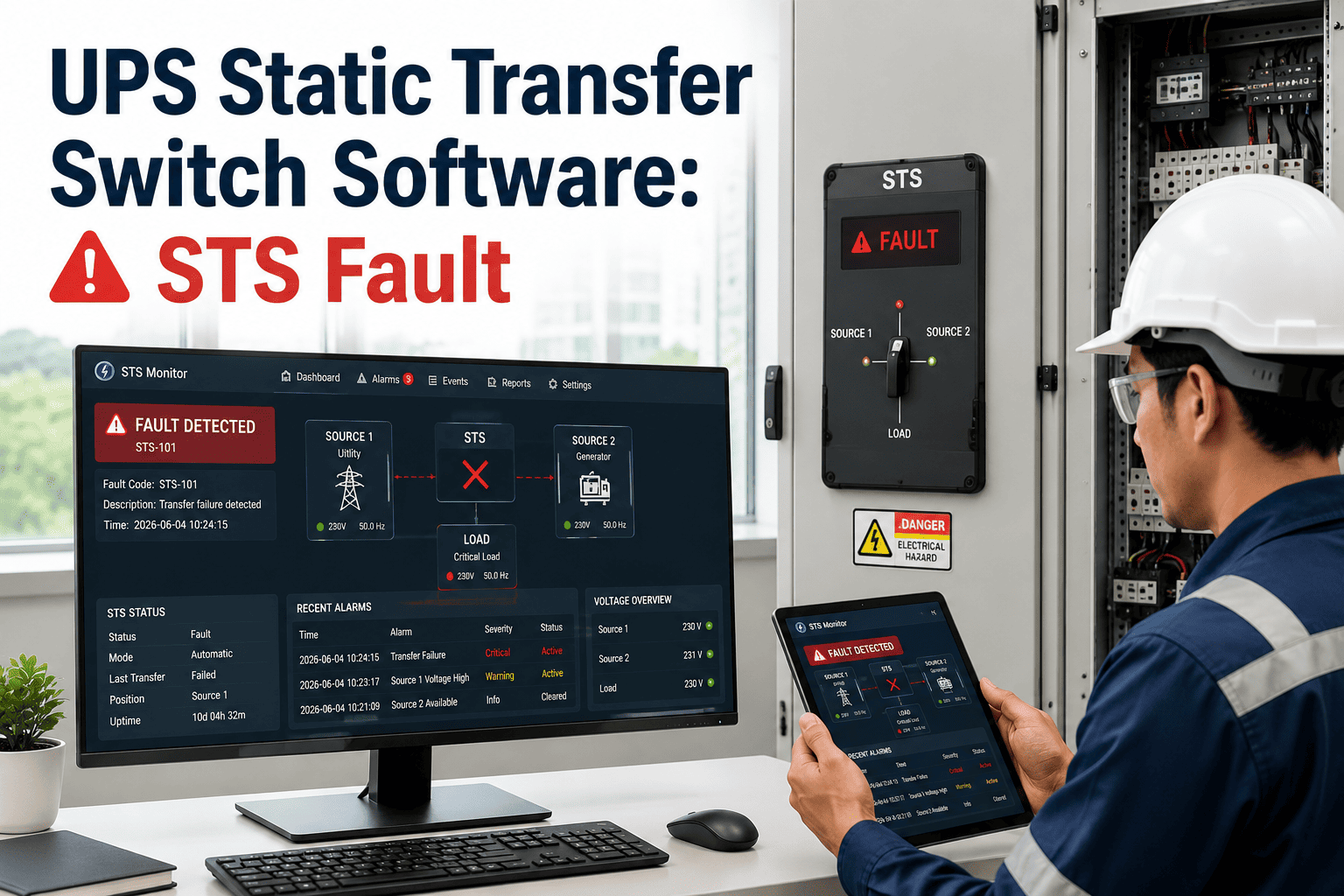
Every data center operator has faced the moment when a static transfer switch doesn't behave the way the drawings promised: a source transfer that takes longer than the spec sheet claims, an SCR module that runs hot during a routine test, or a fault ride-through that trips downstream breakers instead of isolating the problem. These aren't rare edge cases — an STS sits at the exact point where two independent power paths converge, and if switching logic, thermal condition, or firmware health isn't tracked continuously, small deviations quietly become outages that take the whole critical load down. Facility teams running CMMS-based STS health tracking catch semiconductor degradation, control logic drift, and synchronization faults weeks before they cause a failed transfer. Book a demo with Oxmaint to see how STS fault monitoring fits inside your facility CMMS.
Static Transfer Switch · Fault Monitoring · Facility CMMS
UPS Static Transfer Switch Software for STS Fault Monitoring
An STS failure doesn't announce itself with a loud noise — it shows up as a slow transfer, a missed synchronization window, or a semiconductor that has been quietly overheating for months. Oxmaint tracks every one of those signals so your team acts before the switch fails during the one transfer that actually mattered.
Under 4 ms
is the expected transfer window for a healthy STS — anything slower signals a developing fault
1 point
of failure — an unmonitored STS can become the single cause of downtime it was installed to prevent
Weeks
of early warning that thermal and SCR trend data gives before a semiconductor actually fails
The Four Fault Paths That Take Down an STS
An STS is a solid-state device built around silicon-controlled rectifiers and a fast decision-making control loop. Most failures trace back to one of four root causes, and each one leaves a trail long before the switch actually fails to transfer.
Semiconductor Wear
SCR Junction Degradation
Repeated thermal cycling gradually breaks down the silicon-controlled rectifiers that carry the load during a transfer. Rising junction temperature and increasing forward voltage drop are early indicators, well before the SCR actually fails to conduct.
Logic Fault
Control Firmware Drift
The switching decision runs through firmware timing algorithms. Outdated firmware, unlogged configuration changes, or a corrupted parameter set can delay a transfer decision by cycles that a critical load cannot tolerate.
Source Fault
Synchronization Loss
A static transfer depends on both sources staying within a tight phase and voltage window. When one source drifts out of tolerance, the STS may hesitate or transfer at the wrong point in the waveform, causing an inrush spike.
Thermal Fault
Overload & Heat Rejection
Undersized cooling, blocked airflow, or a load that has grown past the original design rating pushes internal temperatures up across every component, shortening the working life of the whole assembly at once.
Turn STS Trend Data Into a Work Order Before It Turns Into an Outage
Oxmaint logs SCR temperature, transfer time, and firmware version against every STS asset and opens a work order the moment a reading drifts out of range.
What an STS Monitoring Program Actually Tracks
Fault monitoring only works when it is tied to specific, measurable parameters. Here is what a facility CMMS should be logging against every static transfer switch in the building.
From Sensor Reading to Closed Work Order
Here is how an STS anomaly moves through a CMMS-connected monitoring workflow, from the first out-of-range reading to a documented repair.
1
Continuous Parameter Logging
Transfer time, SCR temperature, and source voltage are logged against the asset record on a fixed interval, building a baseline for that specific switch.
2
Threshold Breach Detected
When a reading drifts past the tolerance set for that parameter, the system flags the asset and timestamps the exact deviation for later review.
3
Work Order Auto-Generated
A work order is created automatically with the asset's fault history and last inspection attached, so the assigned technician starts with full context.
4
Technician Dispatched
The nearest qualified technician receives the work order on mobile with the specific parameter that triggered it and the recommended inspection steps.
5
Root Cause Logged & Closed
Findings, parts replaced, and corrective action are recorded against the asset, feeding the next baseline and closing the audit trail.
Monitoring Benchmarks Facility Teams Should Track
Once STS data is flowing into a CMMS, these are the benchmarks that separate a well-monitored switch from one that is quietly drifting toward failure.
Under 4 ms
Target Transfer Time
Any sustained increase above this window across repeated tests points to firing-circuit or SCR degradation worth investigating.
Quarterly
Load Bank Transfer Test
Regular scheduled transfer tests under real load catch issues that idle monitoring alone will not surface.
100%
Fault Log Capture Rate
Every nuisance transfer and fault event should be timestamped and attached to the asset record, not left in a local switch log.
Zero Drift
Firmware Baseline Match
Active firmware and configuration should match the tested baseline on every audit, with any change logged and justified.
Expert Review
CI
Critical Infrastructure Reliability Desk
Power Continuity Analysis
Static transfer switches are built to be the invisible layer of a facility's power design, which is exactly why they are so often left out of routine maintenance programs. An STS that never gets a load-tested transfer or a thermal trend review can carry a degrading SCR for months without anyone noticing, because the switch keeps working right up until the one time it doesn't. The facilities that avoid this failure mode treat the STS as an actively monitored asset rather than a set-and-forget component — logging transfer time, junction temperature, and firmware state the same way they would track any other critical piece of rotating or electrical equipment. Tying that data into a CMMS work order workflow closes the gap between a sensor catching a deviation and a technician actually addressing it, which is the difference between a scheduled repair and an unplanned outage.
Frequently Asked Questions
What causes most static transfer switch faults?
Most STS faults trace back to SCR thermal degradation, control firmware drift, or source synchronization loss. Each leaves a measurable trend in temperature, timing, or voltage data well before an actual failed transfer occurs.
Book a demo to see how Oxmaint tracks these trends per asset.
How often should an STS be load tested?
A quarterly transfer test under real load is a common baseline for mission-critical facilities, supplemented by continuous parameter monitoring between tests.
Start free on Oxmaint to schedule and log recurring STS tests automatically.
Can a CMMS actually monitor STS health, or just log maintenance?
A CMMS connected to STS sensor data can log transfer time, SCR temperature, and fault history against the asset record, then auto-generate a work order the moment a reading drifts out of tolerance.
Book a demo to see the workflow end to end.
What happens if firmware drifts from the tested baseline?
Unlogged firmware or configuration changes can shift switching timing enough to turn a routine transfer into a nuisance event. Tracking firmware version against the asset record makes drift visible during routine audits.
Try Oxmaint free to log firmware baselines per switch.
Why is an unmonitored STS considered a single point of failure?
If the switch itself is not redundant and its condition is not tracked, a degrading component inside it can take down the critical load it was installed to protect.
Book a demo to add STS assets to your monitoring program.
Stop Finding Out About STS Faults During the Outage
Oxmaint tracks transfer time, SCR temperature, source synchronization, and firmware baseline against every static transfer switch in your facility — and turns a drifting reading into a work order before it becomes a failed transfer.