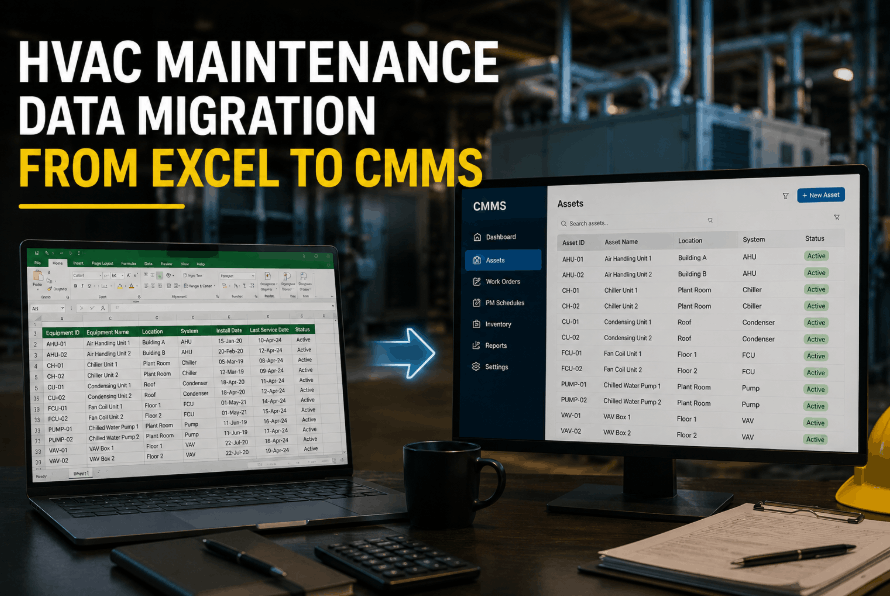
Most HVAC maintenance teams managing equipment records in Excel are one hard drive failure or one departed technician away from losing years of asset history. Spreadsheets that started as simple PM trackers evolve into hundreds of tabs, mismatched column formats, and duplicate asset entries that no one can reconcile. When facility teams finally decide to move into a modern CMMS, the data migration step stops them cold — not because the technology is hard, but because no one documented how to structure asset data, PM schedules, and work history for a clean import. Sign Up Free to explore how OxMaint's guided data import tools reduce HVAC migration time from months to days with pre-built templates, field mapping wizards, and bulk asset upload workflows. Migrating HVAC data correctly on the first attempt eliminates the duplicate cleanup and missing records that derail CMMS adoption before the system ever goes live. Book a Demo to see a live walkthrough of OxMaint's migration toolkit and how it handles real-world Excel data from AHUs, chillers, cooling towers, rooftop units, and BAS-connected equipment.
Move Your HVAC Records Into a CMMS That Actually Works
OxMaint's migration toolkit maps your existing Excel fields to structured CMMS data — assets, PMs, work history, vendors, and spare parts in one clean import.
The Hidden Costs of Keeping HVAC Data in Excel
HVAC maintenance teams that rely on spreadsheets face an invisible tax on every work order, every PM cycle, and every compliance audit. When technicians cannot find current equipment specs, filter replacement intervals, or refrigerant charge records without digging through forty-column tabs, they skip steps or rely on memory. Facilities that migrate to a structured CMMS report an average 34% reduction in time spent locating asset records, and a 28% improvement in PM schedule adherence in the first quarter after go-live. Sign Up Free to access OxMaint's HVAC asset import templates pre-configured for AHUs, RTUs, chillers, FCUs, and exhaust fans. The risk of staying in Excel is not just inefficiency — it is undetected compliance gaps, missed warranty claims, and equipment failures that documented service history would have predicted. Book a Demo to understand exactly which Excel data fields map to OxMaint's asset register and how historical work orders are imported without losing technician notes or timestamps.
What HVAC Data Must Be Migrated — and How to Structure Each Category
A complete HVAC CMMS migration covers six distinct data categories. Each has its own import format requirements, field mapping logic, and validation rules. Attempting to migrate all six simultaneously without category-specific templates is the primary reason migrations fail or result in corrupted records. Sign Up Free to download OxMaint's HVAC migration workbook with category-specific import sheets pre-formatted for each data type.
Asset Register and Equipment Hierarchy
Every HVAC unit requires a unique asset ID, equipment type, location code, manufacturer, model, serial number, install date, and criticality tier. OxMaint's import template enforces field validation so equipment hierarchy — building, floor, zone, unit — is preserved from your existing naming convention.
Preventive Maintenance Schedules
PM records include task descriptions, trigger types (calendar, runtime, meter), frequency intervals, assigned trade, estimated labor hours, and required parts. Migrating PMs incorrectly orphans tasks from their parent asset — OxMaint's asset-linked import prevents this mapping failure automatically.
Work Order History and Service Records
Historical work orders preserve MTBF baselines, warranty documentation, and compliance audit trails. Import fields include work order date, type, technician, labor hours, parts consumed, failure code, and resolution notes. OxMaint retains original timestamps so trend analysis begins on day one.
Vendor and Contractor Records
Vendor data includes company name, contact, trade specialty, service contract coverage, and preferred status by equipment type. Migrating vendor records into OxMaint links them directly to work order assignment rules, so contractors receive automated dispatch for covered equipment.
Spare Parts and Inventory Data
Parts records require part number, description, unit of measure, reorder point, stocking location, and compatible asset linkage. Migrating parts without asset linkage disconnects inventory from PM tasks — a common cause of stockout delays on scheduled maintenance.
Inspection Checklists and Compliance Records
Inspection templates carry checklist items, pass/fail criteria, photo requirements, and regulatory reference tags. OxMaint's checklist import preserves item sequence and conditional logic so digital inspections match your existing paper or Excel-based formats without rebuilding from scratch.
HVAC Data Migration Maturity: Assess Your Starting Point
| Data Category | Unstructured (High Risk) | Partially Structured (Medium Risk) | Migration-Ready (Low Risk) |
|---|---|---|---|
| Asset Register | Mixed naming, no IDs, inconsistent location codes | Consistent naming, missing serial numbers or install dates | Unique IDs, full manufacturer data, location hierarchy defined |
| PM Schedules | Freeform text, frequency noted in comments only | Frequency defined, no task-to-asset linkage | Tasks linked to assets, intervals documented, trade assigned |
| Work Order History | No historical records or paper-only logs | Dates and descriptions only, no labor or parts data | Full records with timestamps, technician, parts, and failure codes |
| Spare Parts | No inventory records, parts tracked verbally | Part list exists, no asset linkage or reorder levels | Part numbers, reorder points, and compatible asset list complete |
| Vendor Records | Contact list only, no coverage documentation | Vendor list with specialties, missing contract terms | Full vendor profiles with trade, coverage scope, and contacts |
| Inspection Checklists | Paper forms, no digital equivalent | Excel checklist, no pass/fail criteria or photo requirements | Structured checklist with criteria, sequence, and regulatory tags |
How to Migrate HVAC Maintenance Data from Excel to OxMaint CMMS
Audit and Export All Existing Excel Sources
Identify every spreadsheet containing HVAC asset data, PM schedules, work history, parts, vendors, and inspection logs. Consolidate sources into a single folder before touching any data. OxMaint's pre-migration audit checklist documents which sheets require cleanup before import begins.
Standardize Naming Conventions and Asset IDs
Assign a unique asset ID to every HVAC unit if one does not exist. Standardize equipment type labels — "AHU-01" and "Air Handler 1" are the same asset and must be deduplicated before import. Consistent naming prevents the ghost asset problem that forces manual cleanup after go-live.
Map Excel Columns to OxMaint Import Fields
Use OxMaint's field mapping wizard to align your existing column headers with required import fields. Custom columns from your Excel files can be mapped to OxMaint's configurable attribute fields — refrigerant type, filter size, warranty expiry, and similar HVAC-specific data points are preserved without being discarded.
Run Validation Pass Before Full Import
OxMaint's import validator flags missing required fields, duplicate asset IDs, and broken PM-to-asset links before committing data to the system. Resolving validation errors on a test import of 10% of records prevents bulk failures that corrupt the full dataset. Book a Demo to see the validation workflow live before starting your migration.
Import by Category in Dependency Order
Import in sequence: assets first, then PMs linked to assets, then work history linked to both, then parts linked to assets and PMs, then vendors linked to work orders, then checklists linked to PM tasks. Importing out of order creates orphaned records that require manual reassignment after the fact.
Verify PM Schedules and Trigger Dates Post-Import
After import, confirm that every PM task has a next-due date populated and is linked to the correct asset. Run OxMaint's PM schedule report to verify no tasks are stuck in a future-overdue state due to incorrect last-completion date imports. Sign Up Free to access post-migration verification checklists included in OxMaint's CMMS onboarding package.
What HVAC Teams Achieve After a Successful CMMS Migration
How OxMaint Simplifies HVAC Data Migration from Excel
Pre-Built HVAC Asset Import Templates
OxMaint provides equipment-class templates for AHUs, RTUs, chillers, cooling towers, FCUs, boilers, and exhaust fans. Each template pre-maps standard HVAC fields so teams spend hours on data cleanup instead of weeks rebuilding structure from scratch.
Bulk PM Schedule Upload with Asset Linking
Import hundreds of PM tasks simultaneously with automatic asset association based on asset ID. OxMaint's PM import engine validates trigger intervals, trade assignments, and next-due calculations without requiring manual schedule reconstruction after upload.
Work Order History Import with Timestamp Preservation
Historical work orders retain original completion dates, technician assignments, parts consumed, and failure codes. Preserved history enables immediate MTBF and MTTR analysis from the first day the CMMS goes live — without waiting to accumulate new data.
Migration Validation and Error Reporting
OxMaint's pre-import validator produces a field-level error report identifying every record with missing required data, duplicate identifiers, or broken asset references. Teams fix identified issues in the source Excel file and re-validate before committing the full import.
Your HVAC Data Belongs in a CMMS, Not a Spreadsheet
OxMaint gives facility teams the migration templates, field mapping tools, and validation workflows to move HVAC asset data, PMs, work history, and checklists out of Excel — permanently.
HVAC Data Migration from Excel to CMMS — Common Questions
Ready to Migrate Your HVAC Records Out of Excel?
OxMaint's migration toolkit, HVAC asset templates, and validation workflows give your team everything needed for a clean, complete data migration — from first export to go-live in days.