Property Handover & Shift Log Template for Maintenance Teams
By Alex Jordan on June 4, 2026
Seamless shift changes are the difference between a well-run property and a property where urgent repairs fall through the cracks. A maintenance team handover missing open tasks, overnight events, or next-shift priorities leads to guest complaints, equipment damage, and liability exposure. Oxmaint's property handover and shift log template ensures every shift change captures: open work orders and pending approvals, urgent repairs requiring immediate attention, overnight events (floods, power outages, HVAC failures), equipment condition changes, critical spare parts consumed, outstanding safety observations, and next-shift priorities with assigned owners. Oxmaint's digital shift logbook automates this template — timestamped entries, mandatory fields, and audit trails for every shift change across your entire property portfolio.
PROPERTY MANAGEMENT · TEMPLATE · 2026
Property Handover & Shift Log Template for Maintenance Teams
Ensure seamless shift changes with Oxmaint's property maintenance handover template — open tasks, urgent repairs, overnight events, and next-shift priorities all captured in one structured log.
+42%Information loss reduction with digital shift log vs. paper handover
5 minAverage time to complete Oxmaint shift handover — vs. 20 min for paper logs
100%Mandatory field completion — no skipped critical information
Audit-ReadyTimestamped shift records exportable for compliance review
Why Paper Shift Logs Fail — The Information Loss Problem
Paper shift logs create four structural failures that digital handover eliminates. First, incomplete entries — technicians skip fields perceived as "optional," leaving critical gaps. Second, illegible handwriting — overnight event descriptions become unreadable to the next shift. Third, no accountability — unsigned logs cannot prove who left which task incomplete. Fourth, lost logs — paper logs disappear from clipboards, fall behind equipment, or degrade in wet environments. Oxmaint's digital shift logbook solves all four problems — mandatory fields, typed entries, digital signatures, and permanent cloud storage.
Property Handover Information Loss — 6 Critical Gaps in Paper Logs
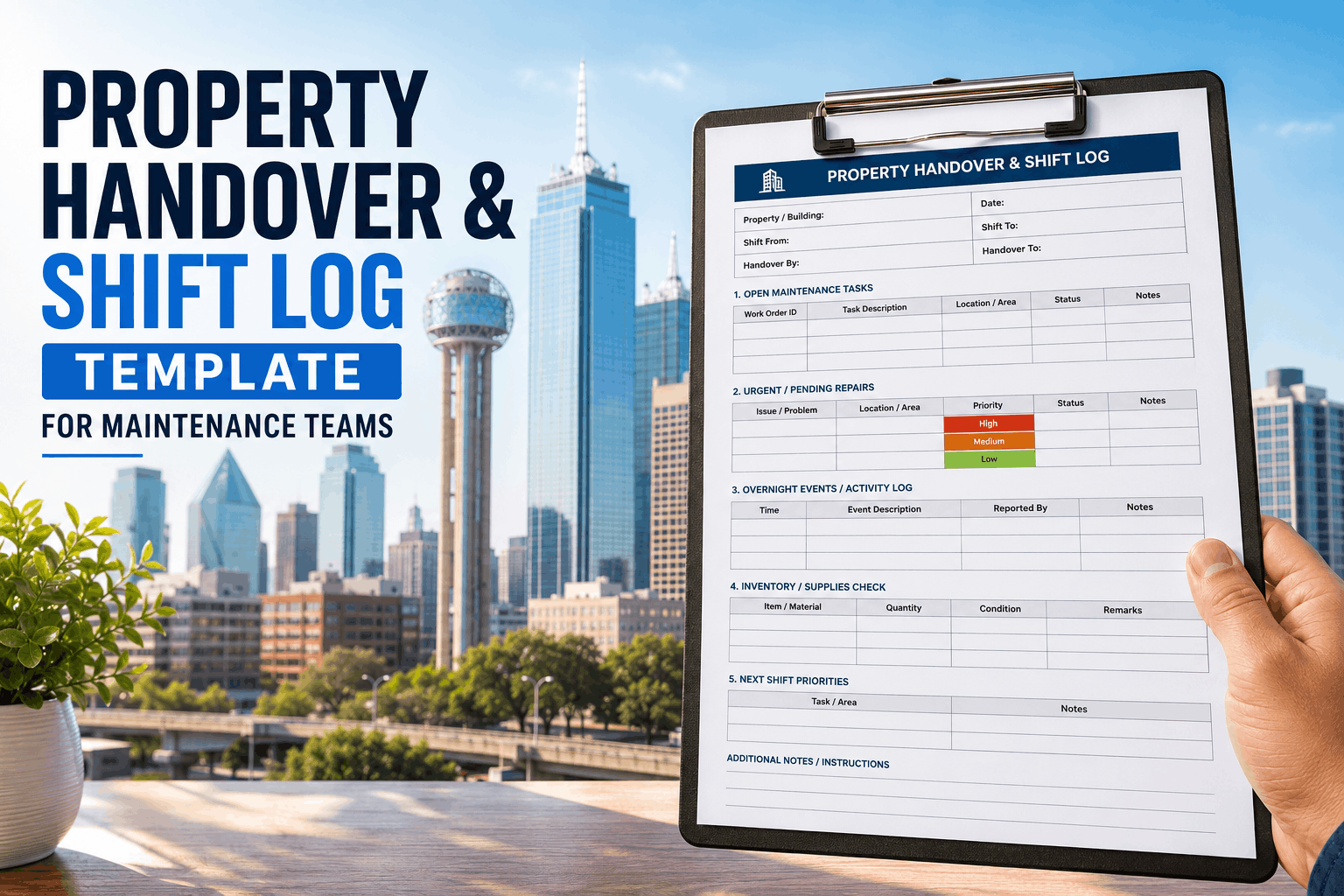
This template structures every shift handover into six mandatory sections. Download and use as a paper form, or start a free Oxmaint trial to use the digital version with mandatory fields, timestamps, and digital signatures automatically enforced.
Open Work Orders
Mandatory
WO# · Priority · Status · Technician · Expected completion
Template field: List all open work orders carried over from previous shift, including those awaiting parts, manager approval, or vendor dispatch.
Urgent Repairs
Mandatory
Location · Issue · Guest impact · Time reported
Template field: Flag any active emergency work orders requiring immediate attention — guest safety issues, active leaks, no heat or AC, lock failures.
Overnight Events
Essential
Time · Event type · Response taken · Outstanding actions
Template field: Document any after-hours incidents — power outage, flooding, security breach, equipment failure, guest incidents. Include who responded and what remains open.
Equipment Condition
Essential
Asset ID · Condition change · Action taken
Template field: Note any equipment that changed status during shift — HVAC unit shut down, elevator out of service, pool pump replaced, boiler in alarm mode.
Parts Inventory
Recommended
Part number · Quantity used · Reorder triggered
Template field: Document any critical spare parts consumed during shift — especially those with long lead times or single-source suppliers. Flag parts that reached reorder point.
Safety Observations
Mandatory
Hazard location · Risk level · Corrective action
Template field: Report any safety hazards observed during shift — slip hazards, exposed wiring, blocked egress, missing guardrails, chemical spills, PPE violations.
Minor landscape issues, light bulb replacements, deferred non-critical items
Assigned to: _______ Due by: ______
Digital Shift Log vs Paper Log — Key Differences
The shift log template works on paper, but digital handover through Oxmaint adds capabilities that paper cannot match: mandatory fields, timestamped entries, photo attachments, digital signatures, and permanent audit trails. Start a free Oxmaint trial to use the digital shift logbook — includes all template fields plus automation.
Shift Handover Comparison — Paper vs Oxmaint Digital Logbook
Why digital shift logs produce better outcomes for property maintenance teams
Paper Logbook
Manual Entry — No Fixed Fields — No Enforcement
Handwritten entries with no structured fields. Critical information routinely skipped. Illegible handwriting causes confusion. No photo documentation. No digital signatures for accountability. Logs can be lost or destroyed.
Common failure: "Check boiler" written in log — no details on what to check, why, or who should do it. Information lost between shifts. No audit trail for liability defense.
All template fields mandatory — incomplete handover cannot be submitted. Timestamped entries with technician ID. Photo attachments for equipment condition. Digital signatures create accountability. Permanent cloud storage.
Outcome: 100% of handovers complete, searchable, and legally defensible. Export complete shift history for compliance audit, insurance claim, or incident investigation in under 5 minutes.
Technology: How Oxmaint's Digital Shift Logbook Works
Oxmaint's shift logbook is built on four technology layers that transform handover from administrative burden to operational asset. The mobile-first interface allows technicians to complete handover from any location — control room, shop floor, or field. Mandatory field enforcement ensures no critical information slips through. Photo capture documents equipment condition at shift change. Digital signatures create legally defensible accountability records.
Mobile-First Interface
Any Device
Complete handover from phone, tablet, or desktop
Technicians complete shift logs from wherever they are at shift end — no return to office required. Offline mode stores entries until connectivity restored.
Mandatory Field Enforcement
100% Complete
Cannot submit until all required fields filled
Configurable mandatory fields per property. Prevents incomplete handover that leaves next shift guessing about open issues.
Photo Documentation
Visual Evidence
Attach photos of equipment condition at shift change
Capture before and after photos of repairs, equipment status, or hazard conditions. Photos timestamped and linked to shift log entry.
Audit Trail
Permanent Record
Every shift log timestamped, signed, immutable
All shift logs stored permanently. Exportable for compliance review, insurance claims, or incident investigation. No paper logs lost to fire, water, or neglect.
"
Before Oxmaint, our maintenance team used a whiteboard in the shop for shift handover — at best. Open work orders were erased when complete, but sometimes erased before complete. Urgent repairs were communicated via text message, never logged. When a guest slipped on a wet floor that the previous shift noted was "still wet from cleaning" — but that note was only verbal — we had no documentation. After implementing Oxmaint's digital shift logbook, every handover is complete, timestamped, and signed. Our team completes handover in under 5 minutes now, compared to the 15–20 minutes of chaos before. And when an insurance claim questioned our maintenance response time, we exported 3 months of shift logs showing every urgent repair acknowledged and assigned within the SLA. The claim was dismissed.
Director of Engineering — 450-Unit Multifamily Property Portfolio, Texas, USA
Frequently Asked Questions — Property Handover and Shift Logs
What sections are mandatory in the property handover template?
Six sections are mandatory: open work orders (including status and expected completion), urgent repairs requiring immediate attention, overnight events (floods, outages, failures), equipment condition changes, safety observations, and next-shift priorities with assigned owners. Parts inventory is recommended but not mandatory. Start a free trial to use the digital template with mandatory field enforcement.
How does Oxmaint enforce mandatory fields in shift logs?
Oxmaint's shift logbook prevents submission until all configured mandatory fields are complete. If a technician tries to submit an incomplete handover, they receive an error message identifying which section is missing. This ensures 100% of shift logs contain complete information for the next team.
Can the shift log template be customized for different property types?
Yes. Oxmaint allows property managers to customize mandatory fields, priority definitions, and template sections for each property. A luxury high-rise may require elevator status reporting; a resort may require pool equipment condition; an industrial property may require loading dock and warehouse floor reporting. Templates are fully configurable per asset class.
Does Oxmaint integrate shift logs with work orders?
Yes. When a shift log references a specific work order number, Oxmaint automatically links the shift entry to that work order's history. Incoming technicians see shift notes directly on the work order page. Closed-loop integration prevents information silos between shift handover and work order execution.
How long are shift logs retained in Oxmaint?
Shift logs are retained indefinitely by default. For properties requiring specific retention periods (e.g., 3 years for liability defense, 7 years for insurance claims), Oxmaint supports configurable retention policies. All logs are exportable in PDF or CSV format for external compliance review. Book a demo to discuss your retention requirements.
What if a technician works offsite — can they still complete shift log?
Yes. Oxmaint's mobile app works in offline mode — technicians complete shift logs without internet connection. When connectivity is restored, logs sync automatically to the central database. Timestamps reflect when the entry was created, not when it synced, preserving accurate shift-end records.
Stop Losing Critical Information Between Shifts
Oxmaint's digital shift logbook captures open tasks, urgent repairs, overnight events, equipment conditions, and next-shift priorities — with mandatory fields, photo documentation, and permanent audit trails. Free to start.


-request-template-for-building-owners.png)