Rental Property Asset Register Template: Track Every Building Asset
By Alex Jordan on May 25, 2026
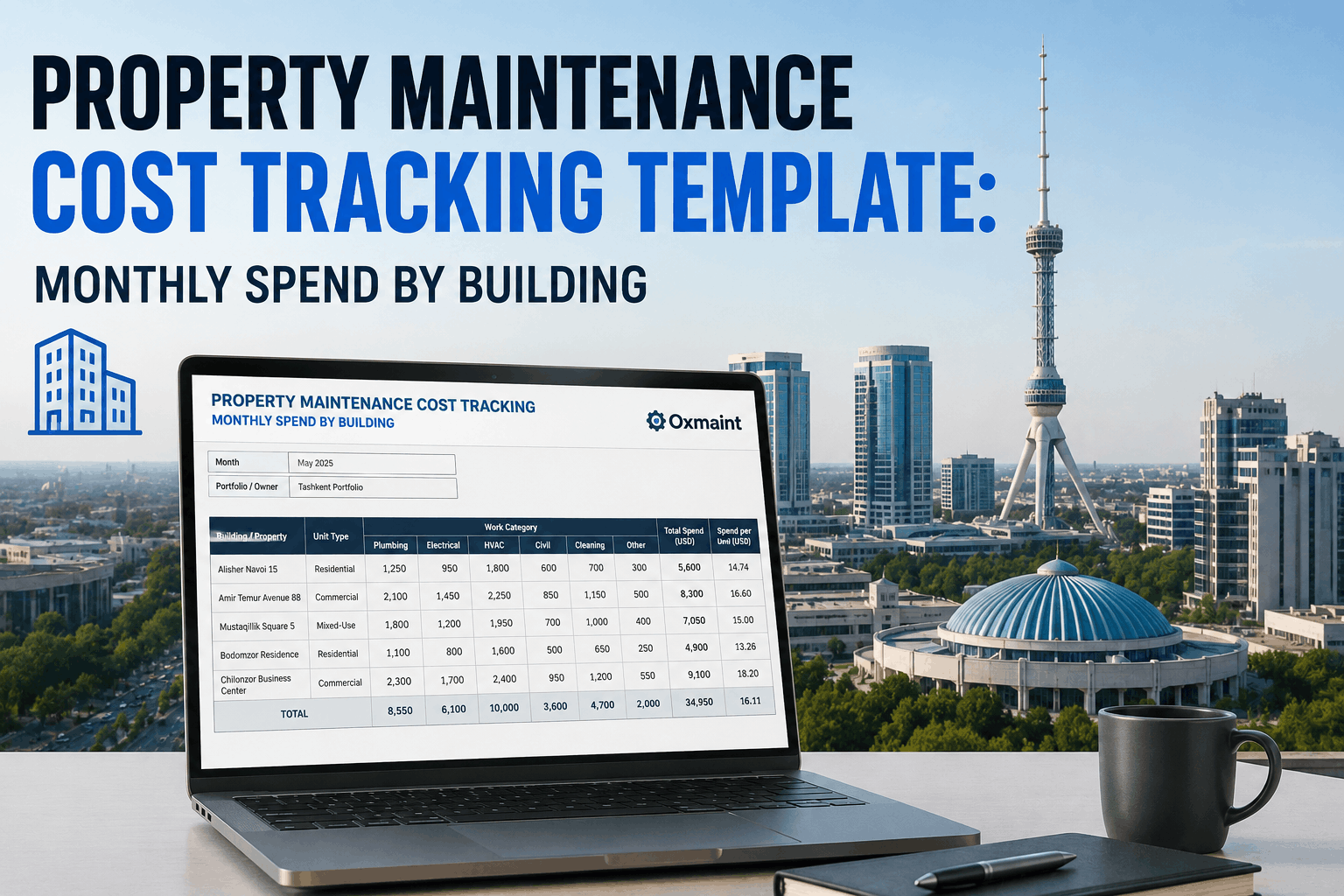
Rental property owners managing portfolios across multiple buildings lose track of what they own, where warranties expire, when equipment needs replacing, and what maintenance history exists. An asset register creates a living inventory of every significant component — HVAC systems, water heaters, appliances, roofs, flooring — linked to purchase dates, warranty terms, maintenance schedules, and replacement values. Oxmaint's free rental property asset register template tracks 50+ asset categories across residential and commercial properties, automatically flagging warranty expiration dates, calculating asset age, forecasting replacement timelines, and linking to maintenance records. For property portfolio managers, a comprehensive asset register is the foundation of accurate capital expenditure budgeting, insurance claim documentation, warranty claim processing, and tax depreciation calculations. Without it, you're replacing equipment blindly, missing warranty claims worth $2,000-$10,000 per property, and overpaying taxes by misestimating useful life.
Roof warranties, HVAC protection plans, and appliance coverage often go unclaimed because owners forget when equipment was purchased. An asset register with warranty expiration dates automatically alerts you before claims lapse.
Capital Expenditure Forecasting
Know when major systems reach end-of-life. A roof with 18 years of a 20-year lifespan needs replacement budgeting now. HVAC at year 14 of 15 requires contingency reserves. Asset age data drives accurate CapEx planning.
Tax Depreciation & Basis Tracking
Separate building structure ($X) from personal property assets like appliances, flooring, HVAC ($Y). Correct asset categorization and purchase price documentation optimize depreciation schedules and avoid IRS audit red flags.
Insurance Documentation
Insurance adjusters require itemized asset lists with replacement values for claim processing. An organized asset register with photos and cost data accelerates claim approval and prevents lowball settlement offers.
Maintenance History Continuity
Link every asset to its maintenance log. Know exactly when the HVAC was last serviced, what repairs have been attempted, what contractor performed the work. Prevents duplicate repairs and informs replacement decisions.
Sale/Refinance Documentation
Lenders and buyers demand detailed property condition reports. An comprehensive asset register with age, condition rating, and maintenance history accelerates appraisals and refinancing, demonstrating responsible ownership.
Asset Categories Tracked in the Template
50+ ASSET TYPES ACROSS RESIDENTIAL & COMMERCIAL PROPERTIES
MECHANICAL SYSTEMS
• HVAC (heating, cooling, components)
• Water heater & tankless systems
• Boiler & furnace
• Heat pump
• Ventilation system
ELECTRICAL & PLUMBING
• Main electrical panel
• Wiring & circuits
• Main water line & shutoff
• Sewer line
• Gas line & shutoff
• Fire extinguisher & system
• Smoke/CO detectors
• Security system
• Emergency lighting
• Handrails & barriers
OUTDOOR & LANDSCAPE
• Driveway (asphalt, concrete)
• Parking lot & striping
• Deck/patio
• Landscaping & trees
• Irrigation system
"We owned four rental properties across two states but had no idea when our HVAC units were purchased, what warranties were active, or when the roof needed replacement. When a water heater failed, we had no service records to show the contractor it had never been maintained — cost us $500 extra for urgency. After implementing Oxmaint's asset register, I discovered we had an active warranty on one HVAC unit we didn't know about — claimed $3,200. Plus, seeing that two roofs would need replacement in 3 years let us budget properly instead of facing surprise $15K bills. The template integrates with my maintenance schedule so every repair gets logged against the correct asset. Game-changer for portfolio management."
James W. — Portfolio Investor
4-property portfolio, 12 units, Multi-state owner
Core Asset Register Data Fields Explained
Asset ID & Location
Unique identifier for each asset (e.g., "ROOF-101", "HVAC-BuildingA"). Property address, unit number (if multifamily), and room/area where asset is located. Enables quick reference and prevents duplicate entries.
Asset Category & Description
Type of asset (HVAC, Appliance, Structural, etc.) and specific model/brand. Example: "Trane XR15 Central Air Conditioner, Model #XR15036". Specific details help with warranty claims and replacement specifications.
Purchase Date & Vendor
Original installation/purchase date and contractor/vendor name. Critical for warranty claim processing (many warranties start from purchase, not installation). Helps verify age and remaining life expectancy.
Original Cost & Current Value
Purchase price and current replacement value estimate. Used for depreciation calculations, insurance coverage verification, and capital budget planning. Updates annually based on market rates.
Warranty Info & Expiration
Warranty type (manufacturer, extended, parts/labor coverage). Warranty expiration date prominently displayed so claims don't lapse. Includes warranty claim contact and policy number.
Expected Useful Life & Age
Standard lifespan for asset type (HVAC = 15 years, roof = 20 years, appliance = 10 years). Current age calculated automatically. Shows remaining lifespan for replacement planning (e.g., "3 years remaining").
Maintenance Schedule Link
Reference to preventive maintenance tasks for this asset. Example: "HVAC-101: Annual tuneup (April), filter change (quarterly)". Connects assets to maintenance calendar for coordinated tracking.
Maintenance & Repair History
Running log of all work performed (date, description, contractor, cost). Example: "2024-01-15: Refrigerant refill, $350; 2024-06-10: Compressor replacement, $2,100". Informs condition assessment and replacement timing.
Condition Rating & Notes
Visual condition (Excellent / Good / Fair / Poor) and detailed notes. Example: "Good condition, occasional noise — monitor for bearing wear". Updated during inspections, flags items needing attention.
Insurance & Depreciation
Useful life for tax depreciation purposes and insurance classification. HVAC = 15 years (IRS Table). Linked to Schedule C depreciation calculations. Auto-calculates annual depreciation amount.
Asset Replacement Timeline & CapEx Planning
FORECAST MAJOR CAPITAL EXPENSES — TYPICAL USEFUL LIFE RANGES
Roof
20-25 years
$8,000-$25,000
Asphalt shingles (20yr), metal (30yr). Annual inspections detect leaks early.
HVAC System
15-20 years
$5,000-$12,000
Regular service extends life. Monitor efficiency decline as indicator.
Water Heater
8-12 years
$1,500-$4,000
Tank fails rapidly after 10yr. Plan replacement before failure.
Electrical Panel
40-50 years
$3,000-$8,000
Long lifespan but certain brands are recalled. Update if unsafe.
Plumbing/Pipes
40-100 years (varies)
$10,000-$30,000
Copper/PVC last longer. Galvanized may fail 50-70yr. Inspection critical.
Flooring
10-20 years
$3,000-$15,000
Varies by material: carpet (7yr), hardwood (25yr), tile (20yr).
Siding/Exterior
20-40 years
$10,000-$30,000
Wood needs more maintenance. Vinyl/fiber cement last longer.
Appliances
10-15 years
$300-$3,000 each
Commercial-grade appliances last longer. Plan coordinated replacement.
Notes
Monitor for compressor wear. Budget replacement by 2031. Consider upgrade to higher efficiency unit.
Using Asset Register for Tax Depreciation
ASSET DEPRECIATION CALCULATIONS FOR SCHEDULE E
Building Structure
27.5 years (residential) / 39 years (commercial). Cannot be separated from land in asset register — track separately for tax purposes only.
Appliances & Personal Property
5-10 years (IRS Table). HVAC, water heater, appliances, flooring depreciate faster than building. Separate tracking qualifies for accelerated depreciation methods (MACRS).
Improvements vs. Repairs
Improvements increase asset life (roof replacement = depreciable). Repairs restore to original condition (painting, fixing leak = deductible expense). Asset register helps distinguish for correct tax treatment.
Section 179 Deductions
Equipment under $2.7M can be expensed immediately instead of depreciated. Asset register with purchase dates helps identify Section 179 candidates. Consult CPA for optimal tax strategy.
Printable asset inventory form with fields for each property. Suitable for property managers to conduct physical walkthroughs and document assets on-site.
Printable asset inventory report with photos, warranty information, and condition ratings. Suitable for insurance claims, refinancing, or property sale documentation.
Digital asset register with linked maintenance history, warranty tracking, photo upload, condition monitoring, depreciation auto-calculation. Mobile app for field inspections.
Q1 What happens if I buy a property with existing equipment — how do I value it for the asset register?
Use the purchase appraisal that breaks down personal property value (appliances, HVAC, etc.) separately from building structure. If unavailable, get a professional property condition assessment ($500-$1,500). This establishes cost basis for depreciation and insurance coverage.
Q2 How often should I update the asset register?
Update immediately after any maintenance, repair, or replacement. Review entire inventory annually before tax year ends to ensure accuracy for Schedule E. Update condition ratings during annual property inspections.
Q3 Should small items like light fixtures and cabinet hardware be tracked?
Only track assets exceeding $500 purchase cost or with significant lifespan (10+ years). Light fixtures, outlet covers, and handles are maintenance/repair expenses, not capital assets. Focus on major systems and appliances.
Q4 Can I use the asset register to support insurance claims for damage?
Yes — insurance adjusters require detailed asset lists with replacement values and condition photos. An asset register with purchase dates and maintenance history accelerates claim processing and prevents settlement disputes.
Q5 How do I track assets across multiple properties in one spreadsheet?
Use property address/code as a filter column. Oxmaint's Excel template includes property identifier tabs so you can manage 5-50+ properties while maintaining clean, searchable records by location.
Q6 What if I sell a property — how do I transfer the asset register?
Export asset register with full maintenance history for buyer disclosure (recommended). Archive final register copy for your tax records (7+ years). The new owner inherits maintenance history, accelerating their property management.
Q7 Should warranty information be digitized or kept as PDFs?
Reference warranty documents in the asset register (store PDFs in cloud folder linked to the spreadsheet). Include expiration dates prominently so you receive alerts before claims lapse. Digital centralization prevents lost warranties.
Q8 How do I forecast capital budgets using the asset register?
Filter assets by "Years Remaining." Assets with 0-3 years need replacement budgeting. Use "Replacement Estimate" values to forecast annual CapEx. Group by property to allocate reserves appropriately across your portfolio.
Know Your Property's True Condition & Investment Value
Download the free asset register template and start tracking every major component — or activate Oxmaint's digital system with automatic warranty alerts, maintenance history linking, depreciation calculations, and replacement forecasting. Build a complete inventory today, prevent costly surprises tomorrow.