It's 2:14 a.m. and a tenant's ceiling is raining. What happens in the next ten minutes decides two things at once: whether that unit floods the one below it, and whether the tech you woke up is still on your team in six months. After-hours coverage is the part of property management that never shows up in the brochure and always shows up in the reviews — a five-star manager and an "I begged for help and no one came" complaint are separated almost entirely by what happens between midnight and dawn. Most operators get this wrong in one of two directions: no real coverage (voicemail and hope), or coverage that quietly burns out the same two people until they quit. The fix is a designed on-call rotation — clear emergency criteria, a fair schedule, a triage tree, and an escalation path — not a hero culture. This guide lays out that design, and how OxMaint's maintenance management software runs it.
Property Management · After-Hours Coverage · On-Call Design · 2026
After-Hours Emergency Coverage: On-Call Rotation Design
The 2 a.m. call is where reputations and retention are made. A designed rotation — real emergency criteria, a fair schedule, a triage tree, a backup path — keeps tenants safe and keeps your techs from quitting.
2 failures
the traps: no real coverage, or coverage that burns techs out
Same-day
the response window a true habitability emergency demands
Primary + backup
every shift needs a second name, or one no-answer becomes a crisis
Triage first
most after-hours calls aren't emergencies — sort before you dispatch
First, Define What Actually Counts as an Emergency
The single biggest driver of after-hours burnout isn't the real emergencies — it's the non-emergencies dispatched as if they were. Before you build a schedule, publish a clear, tenant-facing definition of what warrants a 2 a.m. call versus what waits for morning. This one document protects the tech's sleep, the tenant's expectations, and your liability all at once. Sign up free and OxMaint encodes these tiers so priority is set the moment a request lands.
True Emergency — dispatch now
Active flooding or burst pipe, gas smell, fire or electrical hazard, no heat in freezing weather, sewage backup, total loss of water, a security breach (broken exterior door/lock), or anyone trapped. Life-safety and habitability — the clock is minutes.
Urgent — next-morning, not overnight
No hot water, a single non-functioning AC in mild weather, a contained leak the tenant can bucket, a fridge out. Real, but safely handled at the start of business — set that expectation clearly.
Routine — normal queue
Dripping faucet, running toilet, appliance quirk, cosmetic damage. Never an after-hours dispatch — logged and scheduled like any standard request.
A hard line worth stating out loud: a gas leak, fire, or medical emergency is a 911 call first, a property call second. Put that at the top of every after-hours instruction you publish.
The Triage Tree: What Happens When the Phone Rings
A call coming in isn't a dispatch — it's a decision. The on-call person (or the answering service) runs the same tree every time, so a burst pipe gets a truck and a running toilet gets a work order for morning. Consistency here is what keeps trucks rolling only when they must. Book a demo to see this triage encoded in the intake flow.
Step 1
Life-safety check
Gas, fire, injury? → 911 first, then log. Everything else continues down the tree.
↓
Step 2
Emergency criteria?
Match against the published list. Flooding, no heat in winter, sewage, security breach → dispatch on-call now.
↓
Step 3
Can it be mitigated till morning?
Talk the tenant through a shutoff valve or breaker; if it holds safely, convert to an urgent morning job.
↓
Step 4
Log, confirm, set expectation
Every call becomes a work order with a timestamp and a told-you-when — even the ones that wait.
Pick a Rotation Model That Fits Your Team Size
There's no universal rotation — the right pattern depends on how many techs you have and how heavy the call volume is. What every model shares: fixed, published shifts so no one is surprised, and a clear handoff. Here are the three that cover most portfolios. Sign up free to build and publish the schedule your team can see.
Weekly Rotation
3+ techs
One tech holds the phone Mon–Sun, then hands off. Simple and predictable; the on-call week is intense but bounded, and everyone gets multiple weeks off between.
Split Weekday / Weekend
4+ techs
Separate the brutal weekend nights from weekday evenings so no one carries both. Weekends rotate faster because they're the heaviest load.
Primary + Backup Pairs
Any size
Every shift has two names: primary answers, backup catches the missed call. The one model that survives a phone left on silent — layer it over either pattern above.
A Rotation Without a Backup Is a Single Point of Failure Asleep.
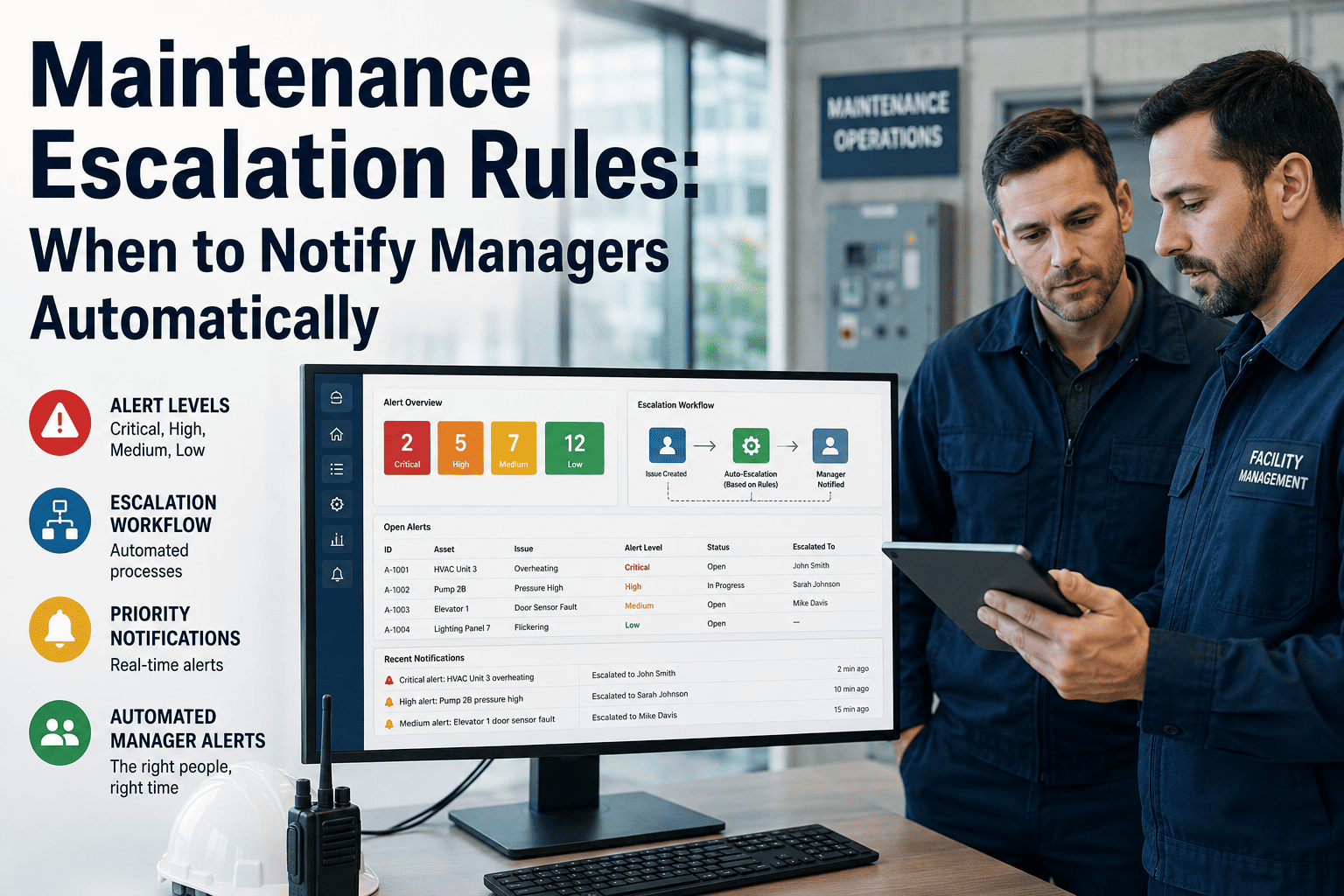
The on-call phone will be missed — a dead battery, a shower, a genuinely exhausted tech who slept through it. Without a backup and an auto-escalation path, that one missed call is the flooded building and the one-star review. Every shift needs a second name and a rule: no answer in X minutes, it rings the backup, then the manager. OxMaint escalates automatically when the response window is missed, so a missed call becomes the next phone ringing, not a disaster.
Keep the Techs Sane — the Rules That Prevent Quitting
A rotation that treats on-call as free labor doesn't last — your best techs leave, and coverage collapses back onto the two people who can't say no. Designing for sustainability isn't soft; it's what keeps the schedule staffed. These are the guardrails that make on-call survivable. Book a demo to see fair-rotation tracking.
Compensate it
On-call pay for carrying the phone, plus call-out pay (often at a premium) for a real dispatch. Unpaid on-call is a resignation on a timer.
Protect rest
A tech up at 3 a.m. shouldn't open at 7. Build in a late start or a swap after a heavy night — fatigue is a safety issue, not just a morale one.
Share the load evenly
Track who took which nights and holidays. "Fair" has to be visible and measured, or resentment quietly builds.
Cut the false alarms
Every non-emergency you keep out of the night is the single biggest gift to the rotation — which is why the criteria and triage tree come first.
Give them the info
Unit history, shutoff locations, access notes on the phone at 2 a.m. — a tech armed with context resolves faster and goes back to bed.
Honor swaps
Life happens; let techs trade shifts through a visible schedule. Flexibility bought cheaply buys loyalty.
Voicemail-and-Hope vs. OxMaint After-Hours Coverage
The difference between the two failure modes and a real program is whether the system carries the load or a person does. Here's what changes when the rotation, triage, and escalation live in software. Start free and stand up real coverage before the next 2 a.m. call.
What OxMaint Gives the After-Hours Program
OxMaint turns after-hours from a hope into a system — rotation, triage, escalation and the record, all automated — so tenants get a real response and techs get a survivable schedule. Here's the concrete mapping. Book a demo to see it on your portfolio.
Published On-Call Schedule
Primary and backup per shift, visible to the whole team, with swap support — no one is surprised to be holding the phone.
Priority Tiers at Intake
Emergency, urgent and routine set the moment a request lands, so the triage tree runs the same way every time.
Auto-Escalation
A missed response window rings the backup, then the manager — the single feature that turns a missed call into a caught one.
Emergency Push to On-Call
A true-emergency submission bypasses the queue and pushes straight to the on-call tech and property manager, day or night.
Context on Mobile
Unit history, shutoff locations and access notes in the tech's hand at 2 a.m. — faster fix, back to bed sooner.
Timestamped Record & SLA
Every after-hours call becomes a logged work order with response times — the accountability and liability trail you need.
Use this design plus OxMaint to build after-hours coverage that answers the 2 a.m. call, sorts the emergency from the can-wait, and rotates the load fairly enough that your techs stay — turning the hardest hours in property management from a reputation risk into a five-star differentiator. Try OxMaint free or book a demo to see it on your properties.
"
For years our after-hours was two guys and their cell numbers, and it showed — missed calls sat till morning, one flooded a downstairs unit, and both of them were fried and threatening to quit. We rebuilt it properly in OxMaint: a published rotation with a primary and a backup on every shift, clear emergency criteria the answering flow follows, and auto-escalation so a missed call rings the next person instead of sitting. The night volume didn't change, but the chaos did — techs get the unit history on their phone, the non-emergencies wait for morning like they should, and the load is finally spread across the team. Our reviews stopped mentioning "no one answered," and nobody's quit since.
Director of Operations · Residential Property Management
Frequently Asked Questions
What actually qualifies as an after-hours emergency?
Life-safety and habitability issues: active flooding or burst pipes, gas smell, fire or electrical hazard, no heat in freezing weather, sewage backup, total loss of water, or a security breach. Gas, fire and medical situations are a 911 call first. Everything else waits for morning or the normal queue.
Why does the on-call rotation need a backup?
Because the primary phone will eventually be missed — a dead battery, a shower, a sleeping tech. Without a backup and auto-escalation, one missed call becomes a flooded building and a one-star review. Every shift needs a second name.
How do I keep on-call from burning out my techs?
Compensate it, protect rest after a heavy night, share the load evenly and visibly, arm techs with unit context, allow swaps — and above all cut false alarms with clear emergency criteria, since non-emergencies dispatched at night are the biggest burnout driver.
Which rotation model should I use?
It depends on team size: weekly rotation for three-plus techs, split weekday/weekend for four-plus, and primary-plus-backup pairs layered over either. The constant is fixed, published shifts and a clear handoff so no one is caught off guard.
How does OxMaint support after-hours coverage?
It publishes the rotation with primary and backup, sets priority tiers at intake, auto-escalates missed calls, pushes true emergencies to the on-call tech, and logs every call as a timestamped work order.
Sign up free to build it.
Answer the 2 a.m. Call — Without Burning Out the Team.
OxMaint runs your after-hours as a designed system: a published primary-plus-backup rotation, emergency criteria and triage at intake, auto-escalation on a missed call, and a timestamped record for every one — so tenants get a real response and techs get a schedule they can live with. Start free — no credit card, unlimited users, forever.