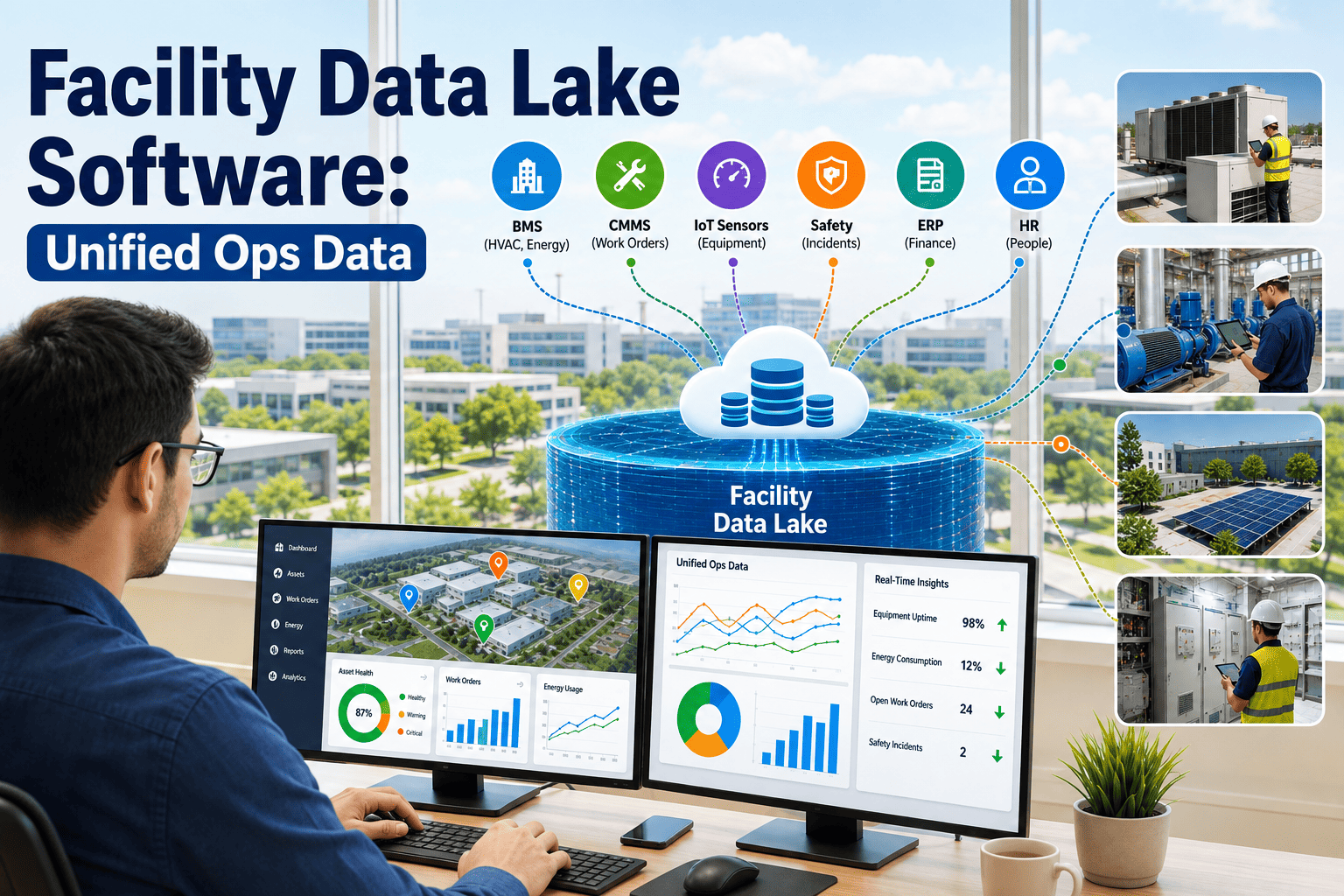
Facility Data Lake Software: Unified Ops Data

By Corin Hale on August 22, 2026

facility-data-lake-software-unified-ops-data

Every commercial building now produces more operational data than any team can track by hand — HVAC alarms and setpoints from the BMS, vibration and temperature readings from IoT sensors, work order history inside the CMMS, energy meter readings, and compliance test logs. Facility managers report that most of that sensor data never reaches the maintenance team in a format anyone can act on, because it sits scattered across three or four systems that were never built to talk to each other. A facility data lake fixes that by pulling every one of those sources into a single, queryable layer that both BI teams and maintenance teams can trust. Start a free OxMaint trial to connect your systems into one warehouse, or book a demo below to see the architecture.

The Silo Tax

What Disconnected Facility Data Actually Costs

None of this data is missing. It is being generated constantly by sensors, controllers, and technicians every single day. The problem is that it lives in separate systems with separate schemas, and nobody has built the layer that reconciles them into one trustworthy source. The numbers below are what that disconnect costs in practice.

68%
of IoT sensor data never reaches the maintenance team in a usable format
4.8x
higher cost for an emergency repair compared to one planned from unified data
30%
average energy savings once IoT monitoring and CMMS data are combined
$121B
global smart building market in 2026 — most of its data still sitting unused

Turn Scattered Building Data Into One Trusted Source

OxMaint unifies IoT streams, BMS alarms, CMMS work orders, and compliance logs into a single facility data layer — built for maintenance teams and BI teams to query the same numbers.

Where the Handoff Breaks

Four Layers of Facility Data, One Missing Link

Sensor data does not disappear on its way to the maintenance team — it stalls at a specific handoff between systems. Tracing the path from a raw sensor reading to a completed work order shows exactly where most facilities lose the thread.

Field Sensors
Temperature, vibration, pressure, and occupancy readings generated continuously across every floor and mechanical room.
→
BMS / BAS
Controls equipment and raises alarms, but stores that history in a proprietary format most other systems cannot read.
→
CMMS
Should turn alarms into work orders automatically. Without integration, someone has to notice the alarm and enter it manually.
→
Data Lake
Unifies sensor, alarm, work order, energy, and compliance data into one warehouse that reporting and analytics can query directly.
System Comparison

What Each System Holds — and Where It Gets Stuck

System What It Captures Where the Data Usually Gets Stuck What a Data Lake Adds
BMS / BAS Setpoints, alarms, equipment states Proprietary protocol, no export path Normalized alarm history queryable with everything else
CMMS Work orders, asset records, technician logs Manual entry, inconsistent asset naming One asset ID linked across every source system
IoT Sensor Platform Continuous vibration, temperature, and usage data Own dashboard, rarely exported anywhere Raw streams joined directly to maintenance history
Energy & Utility Meters Consumption, demand, cost per building or zone Utility portal or spreadsheet, updated monthly Real-time cost tied back to the asset driving it
Compliance & Test Logs Water tests, inspections, certifications Paper or PDF records filed by site Searchable audit trail across every location

Stop Losing Sensor Data Between Systems

OxMaint reads BMS, IoT, and CMMS data through native protocol connections and reconciles every asset under one consistent ID — no middleware, no manual re-entry.

What Feeds the Lake

Six Data Sources Every Facility Data Lake Should Include

A facility data lake is only as useful as what flows into it. These six sources cover the operational picture most BI teams and facility leaders are trying to reconstruct manually today, usually across several disconnected spreadsheets and portals.

IoT & Sensor Streams
BMS / BAS Alarms & Setpoints
CMMS Work Orders & Asset History
Energy & Utility Meters
Compliance & Water Test Logs
Financial & CapEx Records
Before and After

Siloed Systems vs. a Unified Data Lake

The same building, the same sensors, and the same maintenance team can look completely different depending on whether the data behind them is scattered or unified. Here is what changes on each side of that line.

Siloed Systems
Same pump has four different names across systems
Alarms sit in the BMS until someone checks manually
Energy costs updated once a month from a utility portal
Compliance records filed as PDFs per building
Reporting takes days of manual spreadsheet reconciliation
Unified Data Lake
One consistent asset ID across every connected system
Alarms auto-generate work orders in real time
Energy cost visible per asset as it happens
Compliance records searchable across the full portfolio
Portfolio reporting available on demand, not on request
Expert Review

What Data and Facility Operations Leaders Say

The technical challenge is rarely the connection itself — BACnet and Modbus are well-documented protocols. The real work is identity resolution: making sure the chiller called AHU-3B in the BMS, Chiller-North in the CMMS, and Asset 00214 in the spreadsheet are recognized as the same physical object. Skip that step and your data lake just becomes a bigger, more expensive spreadsheet.
SA
Sofia Alvarez
OT/IT Systems Architect, Smart Building Integration
Facility leaders ask me for a dashboard, but what they actually need first is a warehouse. A dashboard built on three disconnected exports breaks the moment one source changes format. A warehouse that normalizes the data once means every dashboard, report, and audit built on top of it stays reliable for years, not weeks.
TM
Tobias Mensah
Head of Facility Analytics, Multi-Site Portfolio Operations
Frequently Asked Questions

Facility Data Lake Software — Common Questions

A CMMS manages maintenance workflows — work orders, assets, and technician assignments. A facility data lake sits underneath or alongside it, unifying CMMS, BMS, IoT, energy, and compliance data into one warehouse that reporting and analytics tools can query directly. OxMaint combines both roles in a single platform.
No. A properly built facility data lake reads from your existing BMS, IoT platform, and CMMS through native protocol connections, without requiring hardware changes or system replacement. Book a demo to see a connectivity assessment for your current stack.
Each physical asset is assigned one master ID, and every source system's naming convention — BMS point name, CMMS asset tag, spreadsheet reference — is mapped back to that single ID, so history, alarms, and work orders always join correctly.
Yes. Once water test results, inspection records, and certifications flow into the same warehouse as maintenance and sensor data, audit-ready reports can be generated across an entire portfolio instead of building them site by site. Start a free trial to see multi-site compliance reporting in action.
With native protocol connections and no middleware layer, most facilities see live alarm and sensor data flowing into the unified platform within days, though full historical backfill and asset identity mapping typically takes a few weeks depending on portfolio size.

Build the Data Layer Your Reporting Deserves

OxMaint unifies every source of facility data into one warehouse — so maintenance teams get automated work orders and BI teams get numbers they can finally trust.


Share This Story, Choose Your Platform!