The City Hall chiller just tripped offline an hour before the council meeting. The elementary school's heating boiler is showing an error code, and the only technician who knows the system is on vacation. Meanwhile, your facilities director is digging through a basement filing cabinet trying to find the warranty paperwork from 2018. Welcome to public building HVAC management without digital asset tracking.
Public building facility teams face unique pressure. You manage aging infrastructure in schools, courthouses, and libraries where budget scrutiny is high and tolerance for discomfort is low. When a critical air handler goes down, you aren't just dealing with a repair; you're dealing with school closures, public complaints, and the scramble to find maintenance history that exists only in a lost logbook.
This case study examines how public works departments are using QR code workflows integrated with CMMS platforms to transform reactive scrambling into organized efficiency. Teams implementing these strategies report 40% faster mean-time-to-repair (MTTR) and 25% reduction in administrative labor. Ready to modernize your facilities? Start your free trial with Oxmaint CMMS.
What if every mechanical asset in your buildings could reveal its entire history with a single scan?
QR Code Integration for Asset Intelligence: Case Study for Public HVAC Teams
Strengthen Service Quality with "Scan-to-Action" Workflows
Smart maintenance isn't about working harder—it's about eliminating the "information hunt." When a QR code workflow feeds directly into your maintenance software, you shift from searching for manuals to fixing the problem immediately.
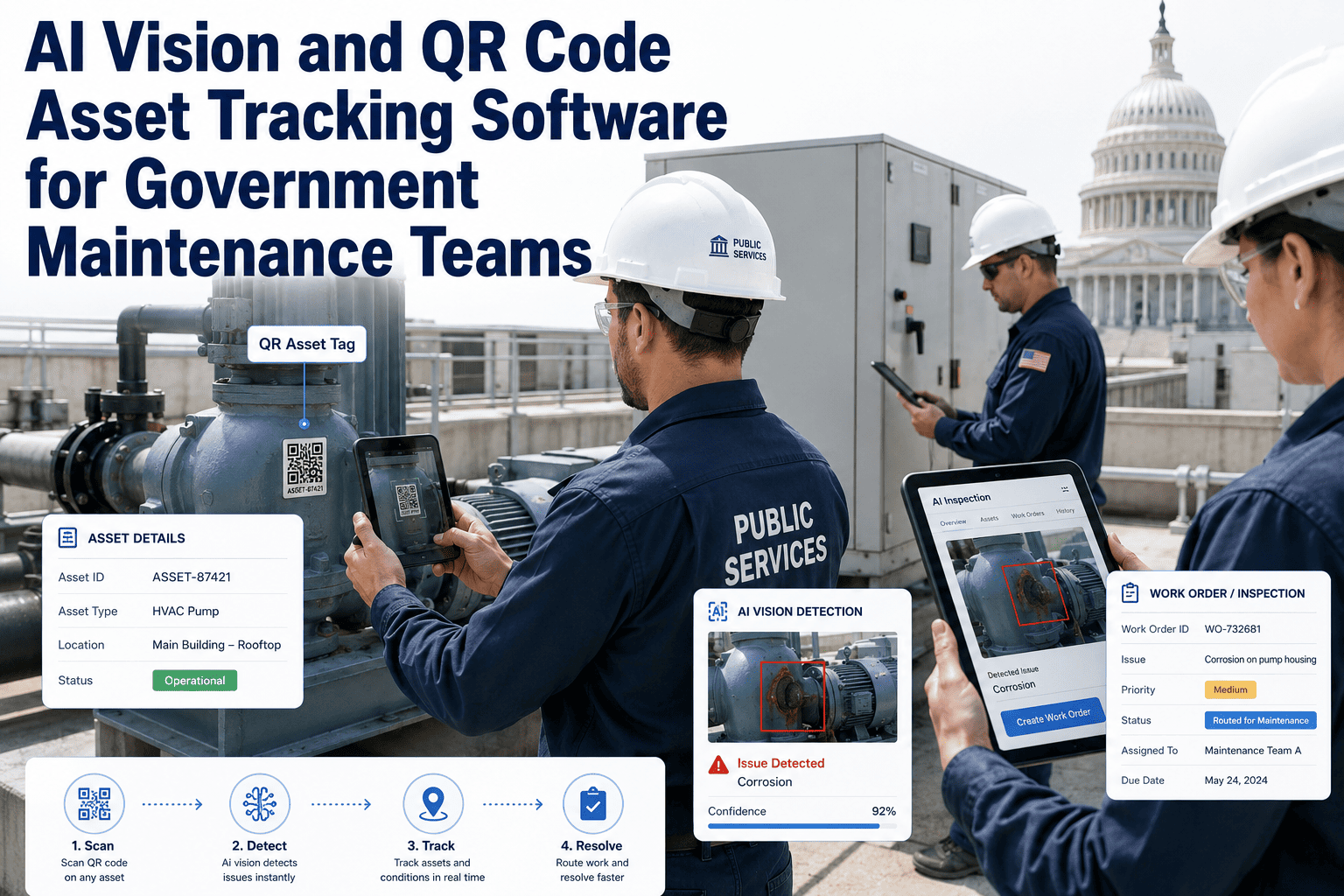
Technicians scan a durable QR tag on the unit using their mobile device, instantly pulling up the unique asset ID, ensuring 100% accurate record-keeping.
The scan reveals the "digital logbook"—showing every filter change, belt replacement, and repair attempted by previous technicians over the asset's life.
Technicians access O&M manuals, wiring diagrams, and spare parts lists directly on their phone, eliminating trips back to the shop.
The technician logs the repair details, uploads photos of the fix, and closes the work order on-site, instantly updating the central database.
| Factor | Paper/Manual Process | QR-Based Digital Workflow | Impact |
|---|---|---|---|
| Information Retrieval | 15-30 mins searching files/binders | Instant scan (Seconds) | Save 3-5 hours per week/tech |
| Maintenance History | Fragmented or non-existent | Complete chronological timeline | Eliminates repeat guesswork |
| Parts Ordering | Guessing part numbers on site | Link to exact parts list | 20% reduction in wrong orders |
| Technician Efficiency | Multiple trips to find info | First-time fix capability | 25% increase in productivity |
| Audit Readiness | Scramble to find paper logs | One-click compliance reports | Zero stress during inspections |
The Public Sector HVAC Challenge
Public building HVAC isn't like commercial property management. You have a diverse portfolio—from historic city halls with steam radiators to modern high schools with VAV systems. Assets are spread across the city, and budgets are defined by fiscal years, not operational needs. A single failure in a critical zone (like a server room or 911 dispatch) becomes a public safety issue.
Chillers, cooling towers, and large boilers. These are high-stakes assets where deferred maintenance leads to massive capital expenditure requests that take years to approve.
Rooftop Units (RTUs), Split Systems, and Air Handlers. Spread across dozens of roofs, these are the most commonly neglected assets due to "out of sight, out of mind" syndrome.
VAV boxes, fan coil units, and exhaust fans. While cheaper individually, the sheer volume (hundreds per district) creates a maintenance management nightmare without digital tracking.
What Data Does a QR Code Reveal?
A QR sticker is just a gateway. The value lies in the data structure connected to that code. Structuring your CMMS asset records correctly transforms a simple scan into a powerful diagnostic tool.
| Data Category | Information Stored | Technician Benefit | Operational Value |
|---|---|---|---|
| Asset Specs | Model #, Serial #, Belt Sizes, Filter Types, Refrigerant Type | Knows correct parts before opening the panel | Reduces "parts run" travel time |
| Service History | Dates of last PM, past repairs, notes on recurring issues | Identifies chronic problems instantly | Prevents paying for the same fix twice |
| Documentation | PDF Manuals, Wiring Schematics, Warranty Certificates | Access to troubleshooting guides on roof | Increases first-time fix rate |
| Procedures | LOTO steps, Start-up/Shut-down checklists, Safety warnings | Ensures safety compliance | Reduces liability and injury risk |
| Vendor Info | Contractor contact, Warranty expiration dates, Install date | Knows who to call for warranty work | Avoids paying for covered repairs |
| Logbooks | Digital log of readings (psi, temp, amps) | Trends performance over time | Enables predictive maintenance |
Case Study: Municipal Facilities Department Transformation
A mid-sized city Facilities Department managing 42 buildings (schools, libraries, police stations) implemented Oxmaint's QR-based asset tracking. Here's what changed over 12 months:
- Clipboards and paper work orders
- "Mystery" assets with no service history
- Technicians spent 20% of time driving for parts/manuals
- PM compliance was estimated at 65%
- Budget requests based on guesswork
- Zero visibility into contractor performance
- 100% Mobile workflow via QR scans
- Full digital history for every chiller and boiler
- First-time fix rate improved by 35%
- PM compliance verified at 96%
- Data-backed capital replacement planning
- Contractor warranty claims tracked automatically
Simplifying Audits — A Governance Model for Public Buildings
Public entities face audits from everywhere: OSHA safety checks, ASHRAE air quality standards, insurance risk assessments, and school board budget reviews. Without digital records, proving you changed the filters in the high school gym three months ago is impossible.
Technician scans QR, performs PM, and completes digital checklist with photos
Record is timestamped, geo-tagged, and signed digitally, then synced to the cloud
Manager can filter history by building, asset type, or date range instantly
Generate PDF compliance reports for Indoor Air Quality (IAQ) or safety audits
Prove filter changes and outdoor air damper inspections to meet ventilation standards for schools and public offices.
Use accurate repair cost history to justify capital equipment replacement requests to the city council or school board.
Demonstrate documented inspections of boilers and pressure vessels to maintain coverage and lower premiums.
Track coil cleaning and tuning schedules to ensure systems are running efficiently, supporting sustainability goals.
Stop fearing the auditor. Make compliance a byproduct of your daily work.
Implementation Roadmap: From Chaos to Control
Tagging thousands of assets sounds daunting. It doesn't have to be. This roadmap provides a phased approach to rolling out a QR asset management system in public facilities.
- Identify the top 20% of assets (Chillers, Boilers, Main AHUs)
- Create digital profiles in CMMS (Model, Serial, Photos)
- Apply QR tags to these critical units first
- Upload existing PDFs of manuals for these units
- Build digital checklists for monthly/quarterly PMs
- Train technicians on the mobile app "Scan-to-Start" workflow
- Establish naming conventions for smaller assets
- Begin tagging secondary assets (RTUs, Exhaust Fans)
- Enable "Scan-to-Report" for building occupants (optional)
- Integrate spare parts inventory with asset records
- Start tracking labor hours per asset via the app
- Tag terminal units (VAVs, Unit Heaters) as you service them
- Analyze "Cost of Ownership" reports for replacement planning
- Refine PM checklists based on failure data
- Expand system to Plumbing and Electrical assets
- Conduct annual audit of asset condition scores
Tagging Strategy: What to Prioritize
You can't tag everything at once. Prioritize assets based on their criticality to building operations, cost to repair, and maintenance frequency.
| Priority Level | Asset Types | Why Tag First? | Tagging Difficulty |
|---|---|---|---|
| Critical (P1) | Chillers, Boilers, Main AHUs, Cooling Towers | Single point of failure for entire buildings; high capital cost. | Low (Accessible mech rooms) |
| High (P2) | Rooftop Units (RTUs), Split Systems, Generators | Affects zones/classrooms; frequent maintenance needs. | Medium (Roof access req.) |
| Medium (P3) | Exhaust Fans, Unit Heaters, Sump Pumps | Hidden failures cause damage over time; often neglected. | High (Ladders/Ceilings) |
| Low (P4) | VAV Boxes, Thermostats, Fire Dampers | High volume; tag opportunistically during inspections. | High (Above drop ceilings) |
| Compliance | Backflow Preventers, Fire Extinguishers | Required by law to show inspection history. | Low (Wall mounted) |
Asset Management CMMS Best Practices
A QR code is only as good as the process behind it. These best practices ensure your public building asset management system delivers maximum return for the taxpayer.
Paper stickers fade on rooftops. Use metal or polyester tags resistant to UV, rain, and heat for outdoor units.
Use a consistent format (e.g., "BLDG-FLR-ASSET-01") so lists sort logically in the digital database.
Require techs to photograph the "before" and "after." It proves work was done and helps diagnose future issues.
Associate specific filter sizes and belt numbers with the asset record so techs know what to bring before climbing the roof.
Place tags near the control panel or service disconnect, not just on the manufacturer nameplate (which might be faded).
Enforce the habit: The tool bag doesn't open until the QR code is scanned. This ensures the logbook is always accurate.
ROI Calculator: Value for Public Facilities
Justifying software to a board requires hard numbers. Here is how a typical district with 20 buildings calculates the return on QR-based asset management:
Expert Review
- Start with your "frequent flyers"—the assets that generate the most work orders
- Involve your technicians in the tagging process to ensure buy-in
- Don't over-complicate the data import; start with Make/Model/Serial and build history over time
- Use the data to defend your budget requests during council meetings
Conclusion
Public building teams operate in a fishbowl. Every boiler failure in a school or A/C outage in a library is scrutinized by the public. Relying on institutional memory and paper logbooks in this environment is a recipe for stress and inefficiency. QR code asset workflows provide the transparency and organization required to manage modern public infrastructure.
The technology exists today to put the entire history of a building's mechanical systems in the palm of your technician's hand. The scan provides the data. The data drives the decision. The result is comfortable buildings, safe occupants, and efficient use of public funds.
Start with your mechanical rooms. Tag the critical assets. The efficiency will follow.