AI Camera Alerts to Maintenance Work Orders for Healthcare Facilities

By James Smith on June 15, 2026

ai-camera-alerts-to-maintenance-work-orders-for-healthcare-facilities

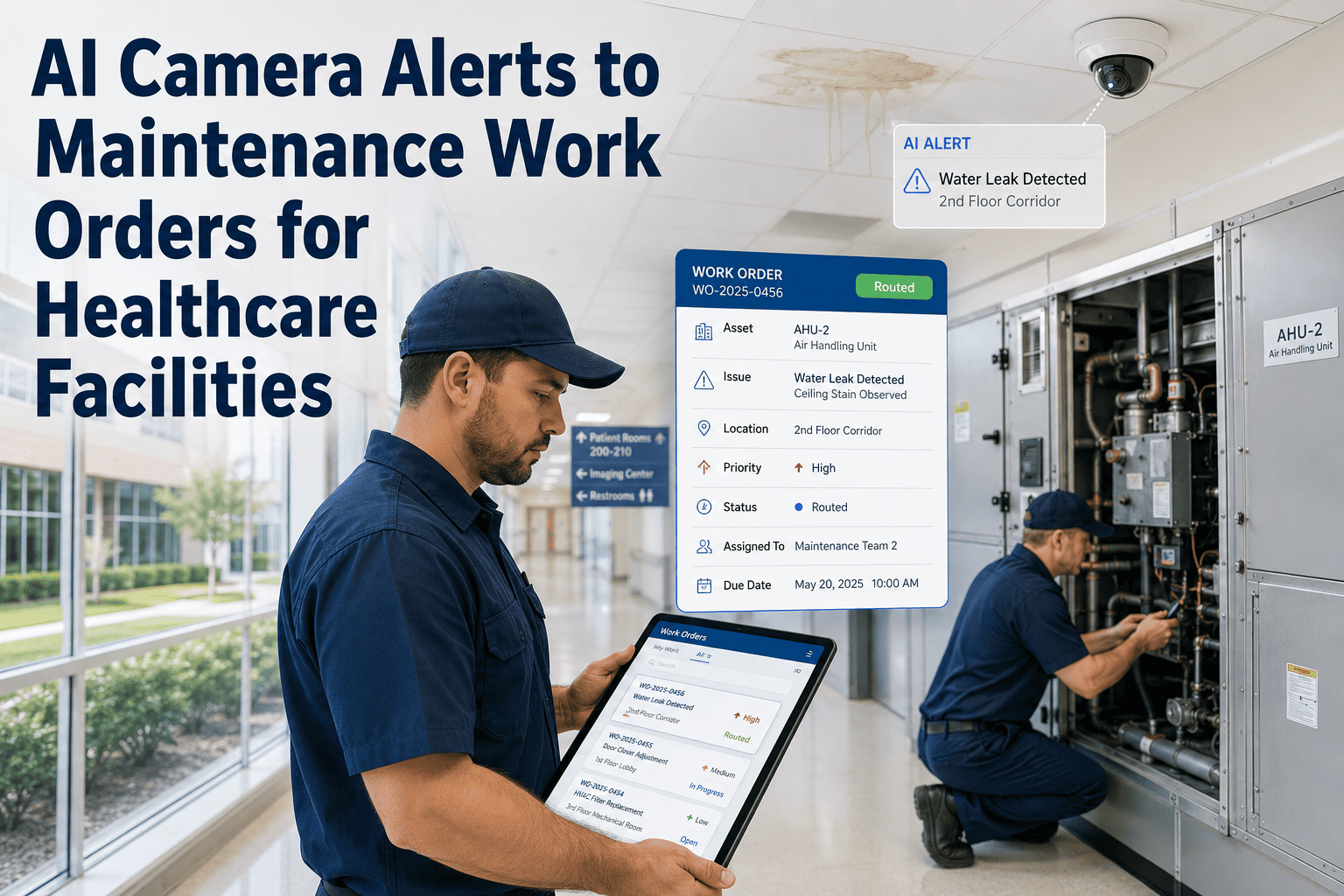
AI camera systems in healthcare facilities generate hundreds of alerts every week — but most of them end as a push notification that a security guard reads, closes, and forgets. When a camera alert never becomes a maintenance work order, there is no documentation of who responded, what was found, what was repaired, or whether the risk was resolved. OxMaint's Work Order Automation module eliminates this gap by converting AI camera alerts directly into structured, assigned, and tracked work orders — with PM schedules, evidence capture, risk follow-up tasks, and healthcare-grade reports built into every response cycle. If your facility is running AI cameras without connecting them to a CMMS, you are generating risk documentation gaps with every alert your team closes manually. Book a demo to see the alert-to-work-order workflow live.

The Documentation Gap Every Healthcare Facility Has

Without OxMaint
Camera fires alert
Security reads notification
Verbal radio call to facilities
Someone checks and leaves
No record. No evidence. No audit trail.
VS
With OxMaint
Camera fires alert
OxMaint auto-creates work order
Technician assigned with evidence
On-site inspection documented
Signed record. Photo proof. Audit trail sealed.

What OxMaint Automates When a Camera Alert Fires

Each AI camera alert triggers a structured chain of automated actions in OxMaint — removing manual steps that cause documentation gaps and delayed responses in healthcare facilities.

Instant
Work Order Creation
Work order generated in under 90 seconds from alert, pre-populated with location, asset, alert type, and camera snapshot.
Rule-Based
Technician Assignment
Assignment rules route the task to the correct team based on zone type, time of day, and staff availability — no dispatcher required.
Automatic
PM Schedule Link
If the alert relates to equipment in a PM schedule, OxMaint cross-references the maintenance history and flags any overdue tasks at the same location.
Built-in
Evidence Attachment
Camera image or video clip is embedded in the work order before the technician even opens the task — visual context at every step.
Configurable
Risk Follow-Up Tasks
For high-priority alerts, OxMaint generates linked follow-up tasks for risk assessment, repair, or re-inspection — preventing unresolved events from falling through.
On Demand
Healthcare KPI Reports
Response time, resolution rate, alert volume by zone, and overdue follow-ups — all reportable in one click, formatted for healthcare compliance reviews.
OxMaint Work Order Automation

Stop Closing Camera Alerts Manually. Start Closing Work Orders With Evidence.

OxMaint automates every step from camera trigger to signed, documented, evidence-backed work order closure — so your healthcare facility builds an audit trail automatically, not retroactively.

Healthcare Camera Alert Types and OxMaint Work Order Response

Camera Alert Type Healthcare Zone Work Order Priority Auto-Actions in OxMaint PM Link
Unauthorized entry Plant room / restricted zone Critical Work order + supervisor alert + evidence attach Equipment inspection task added
Door left open — plant room HVAC / electrical corridor High Corrective task + facilities team notify Door hardware PM flagged if overdue
Perimeter line crossing Building perimeter / loading dock High Work order + security coordinator copy Perimeter inspection checklist triggered
Equipment proximity anomaly Biomedical / pharmacy storage Critical Asset-linked work order + biomedical dispatch Asset inspection task auto-added
After-hours zone activity Any clinical or utility area High Escalation to on-call + work order created Area access log reviewed on next shift
Loitering — extended dwell Waiting area / service entrance Medium Security work order + camera clip attached No PM link — security classification

Expert Review

The single most common documentation failure I see in healthcare facility assessments is camera alerts that generate no maintenance record. Security teams close the notification and move on — and three months later, during a Joint Commission review, the facility cannot demonstrate that a high-priority alert was responded to. Connecting your AI camera system to a CMMS that auto-generates work orders is not a nice-to-have for healthcare compliance — it is the minimum documentation standard accreditors are now applying to AI-monitored facilities.

Patricia Novak
Healthcare Facility Accreditation Specialist, former TJC Environment of Care surveyor

Frequently Asked Questions

How quickly does OxMaint generate a work order after a camera alert fires?
OxMaint generates a work order within 90 seconds of receiving the camera alert payload via webhook or API. The work order is pre-populated with the zone name, asset ID, alert type, camera snapshot, and assigned technician — ready for the team member to acknowledge and act without manual data entry. Start free or book a demo to see alert ingestion speed in your camera environment.
Can OxMaint connect AI camera alerts to existing preventive maintenance schedules?
Yes. When a camera alert work order is created for a zone containing equipment on a PM schedule, OxMaint cross-references the PM record and flags any overdue tasks at the same location. This means a camera event can surface a missed PM that would otherwise go unnoticed — creating a compliance benefit beyond just the immediate alert response and giving your healthcare team a more complete view of equipment status during every incident response.
What healthcare compliance reports can OxMaint generate from camera alert work orders?
OxMaint produces alert-to-response time reports, zone-level event frequency analysis, resolution rate by technician, overdue follow-up task lists, and evidence-backed work order closure summaries — all filterable by date range, zone, and priority level. Reports export as PDF or CSV and are formatted to support Joint Commission, CMS, and DNV Environment of Care documentation requirements. Book a demo to review healthcare report templates.
What happens if a technician does not acknowledge the camera alert work order in time?
OxMaint applies escalation rules based on alert priority and zone type. If a critical work order is not acknowledged within the configured window, OxMaint automatically escalates to the supervisor or on-call technician and logs the escalation event in the audit trail. Every escalation step — who was notified, when, and whether they responded — is captured in the work order record, providing a complete documentation chain for compliance reviewers.
Your Cameras Are Already Detecting Events. Now Document Them Properly.

AI Camera Alerts Become Compliance-Ready Work Orders in OxMaint

Connect your healthcare facility's AI camera system to OxMaint and turn every alert into a signed, evidence-backed, audit-ready work order — automatically.
Share This Story, Choose Your Platform!