Ask any HVAC service manager a simple question—how many Carrier 50XC rooftop units are in your portfolio, what are their serial numbers, and which ones are still under warranty—and watch the scramble begin. Someone checks a spreadsheet that was last updated eight months ago. Someone else digs through a filing cabinet for installation records. A third person calls the manufacturer's warranty line, reads off a serial number from a faded equipment tag, waits on hold, and hopes the information they get matches what's actually on the roof. This is the reality for most commercial HVAC service organizations: equipment data is scattered across spreadsheets, paper files, technician memories, and manufacturer databases with no single source of truth connecting serial numbers, model numbers, installation dates, warranty status, service history, and parts compatibility. The consequences compound invisibly. Technicians arrive at job sites without knowing the equipment model, order wrong parts because they don't have the serial number to verify compatibility, and waste 20–45 minutes per call researching equipment specifications that should be available in seconds. Warranty claims are missed because nobody tracked the installation date against the manufacturer's coverage period—and a $4,200 compressor that should have been a warranty replacement becomes a billable expense the customer shouldn't have paid. Recall notices go undelivered because no one can identify which serial numbers in the portfolio are affected. Equipment replacement planning happens by gut feel instead of age and service cost data because the data doesn't exist in a usable form. Serial number and model tracking is the foundational data layer that every other HVAC management function depends on—maintenance scheduling, parts ordering, warranty management, cost tracking, compliance reporting, and replacement planning all start with knowing exactly what equipment you're responsible for.
You Can't Manage What You Can't Identify
Every maintenance decision, parts order, warranty claim, and replacement plan starts with one question: what exact equipment is this? Serial number and model tracking answers that question instantly—for every unit, at every site, every time.
68% of technicians spend 20+ min per call researching equipment they're servicing
$15K–$50K per year in missed warranty claims from untracked coverage periods
12% of parts orders are wrong-part shipments caused by missing or incorrect model data
40% of HVAC companies cannot produce a complete equipment inventory on demand
What Gets Lost Without Equipment Tracking
The absence of centralized serial number and model tracking creates a cascade of operational failures that most HVAC organizations experience daily but rarely quantify. Each failure has a direct cost, and the costs compound across hundreds or thousands of service events per year. Facilities that sign up to build their equipment registry on a centralized maintenance platform eliminate these failures at the source.
Without verified model and serial numbers, technicians order parts based on visual identification or memory. A Lennox 13ACX compressor is not the same as a 14ACX—but they look identical from the ground. Wrong parts mean return shipments, restocking fees, delayed repairs, and a second truck roll.
Annual cost: $8K–$25K per 50-tech operation in wrong-part returns, restocking fees, and wasted labor
Manufacturer warranties on commercial HVAC equipment range from 1 year (labor) to 10 years (compressor). Without installation dates linked to serial numbers, warranty coverage is unknowable at the point of service. Technicians default to billing the customer, and nobody realizes the repair should have been a warranty claim until—if ever—someone reviews the records months later.
Annual cost: $15K–$50K in warranty-eligible repairs billed to customers or absorbed by the service company
No Lifecycle Cost Visibility
When service history isn't linked to specific serial numbers, it's impossible to calculate total cost of ownership for individual units. A rooftop unit that has consumed $12,000 in repairs over 8 years should have been replaced 3 years ago—but without serial-number-level cost tracking, the cumulative spend is invisible across disconnected invoices and work orders.
Annual cost: $20K–$80K in deferred replacements where repair costs exceed the value of continued operation
Undelivered Safety Recalls
Manufacturer safety recalls identify affected units by serial number range. Without a searchable serial number database, identifying which units in your portfolio are affected requires physically inspecting every unit at every site—a process that takes weeks and is almost never completed fully. Affected units continue operating with known safety defects.
Risk: Liability exposure, regulatory non-compliance, and potential injury from unaddressed safety recalls
Technician Time Wasted on Research
Without pre-populated equipment data on the work order, technicians spend 20–45 minutes per service call identifying the equipment: climbing to the roof to read nameplate data, photographing model plates, calling the office to look up history, and searching manufacturer websites for specifications and parts lists. This is non-billable time on every single call.
Annual cost: $60K–$180K per 50-tech operation in non-billable research time (25 min × 8 calls/day × 250 days)
The Complete Equipment Record: What to Track
An effective equipment tracking system captures more than just the serial number. It builds a complete digital identity for each unit that connects identification, configuration, warranty, service history, and parts compatibility into a single, accessible record.
Identification
Manufacturer Brand name (Carrier, Trane, Lennox, Daikin, York, etc.)
Model number Full alphanumeric model including series, capacity, and configuration codes
Serial number Unique manufacturer-assigned identifier linking to production records and warranty
Equipment type RTU, split system, chiller, VRF, air handler, condenser, furnace, etc.
Nominal capacity Tonnage (cooling) and BTU/h (heating) ratings
Installation & Location
Site / Building Physical location with address and building identifier
Roof / Floor / Zone Specific placement within the building for technician routing
Installation date Date of original installation — triggers warranty period calculation
Installing contractor Company that performed original installation (warranty labor responsibility)
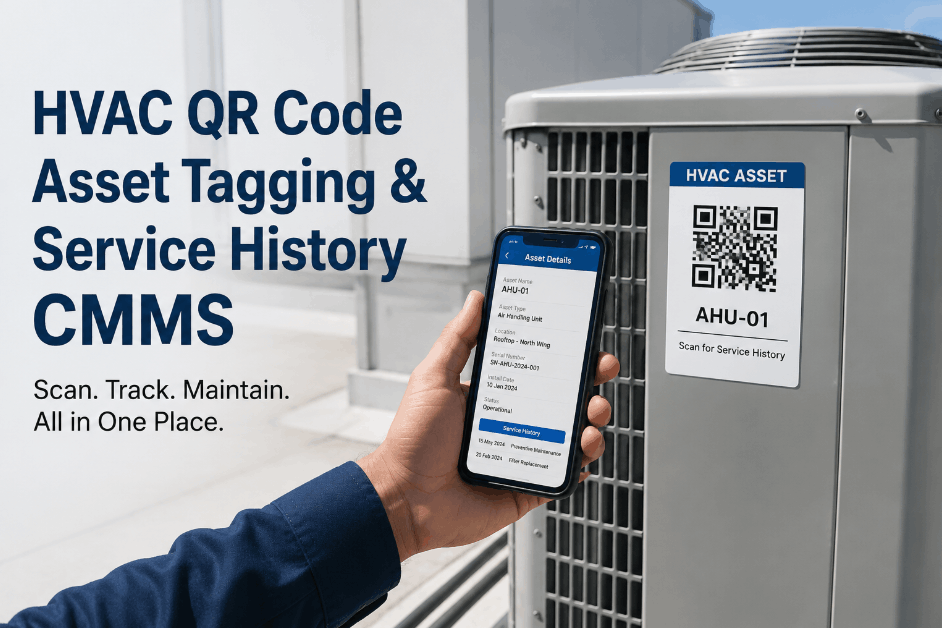
Asset tag / QR code Scannable identifier linking physical unit to digital record
Specifications
Refrigerant type R-410A, R-22, R-407C, R-32, R-454B — critical for service and compliance
Refrigerant charge Factory charge and any field-added amounts (lbs)
Electrical specifications Voltage, phase, amperage, circuit breaker size
Filter specifications Size, type, quantity, and MERV rating for PM scheduling
Belt specifications Belt number, quantity, and size for PM kits
Warranty & Coverage
Base warranty expiration Parts coverage period (typically 1–5 years from install)
Compressor warranty Extended compressor coverage (typically 5–10 years)
Heat exchanger warranty Extended coverage on furnace heat exchangers (often 10–20 years)
Extended warranty Any purchased extended coverage with provider and terms
Registration status Whether warranty has been registered with manufacturer (required by many brands)
Service History
All work orders Complete service history linked to this specific serial number
Parts consumed Every part installed on this unit with date, cost, and technician
Refrigerant history All additions and recoveries with quantities — feeds EPA compliance
Total cost to date Cumulative maintenance and repair spend for replacement planning
Condition notes Technician observations, photos, and recommendations from each visit
Build Your Equipment Registry Once. Use It Forever.
OxMaint creates a complete digital identity for every piece of HVAC equipment — serial numbers, model data, warranty dates, service history, and parts compatibility linked together in a single scannable record that technicians access instantly from the field.
How Equipment Tracking Transforms Every HVAC Function
Serial number and model tracking is not a standalone feature—it's the data foundation that makes every other HVAC management function work properly. When every work order, parts order, warranty claim, and cost record is linked to a specific serial number, the entire operation becomes more efficient, more accurate, and more profitable.
Without tracking: Technician arrives blind — no equipment info, no history, no parts list. Spends 30 minutes on research before work begins.
With tracking: Work order pre-populated with equipment model, serial, specs, service history, and recommended parts. Tech arrives prepared, starts work immediately.
Without tracking: Tech identifies part visually, orders by description or guessed model number. 12% wrong-part rate requiring returns and reorders.
With tracking: Equipment record shows exact compatible parts by serial number. One-tap ordering from verified parts list. Wrong-part rate drops below 1%.
Without tracking: Nobody checks warranty status before repair. Claims discovered retroactively (if ever). $15K–$50K in missed claims annually.
With tracking: Warranty status displayed automatically on every work order. System alerts when repair may be warranty-eligible. Claims filed immediately with documented serial number and service history.
Without tracking: Generic PM schedules applied to all equipment regardless of manufacturer-specific requirements. Filter sizes unknown until tech inspects unit.
With tracking: PM schedules customized to manufacturer specifications. Filter sizes, belt numbers, and consumables pre-populated for PM kits staged before the visit.
Without tracking: Replacement decisions based on complaint frequency or catastrophic failure. No lifecycle cost data. Reactive replacement only.
With tracking: Equipment age, total repair cost, and maintenance trend data drive proactive replacement recommendations. Capital budgets based on fleet age analysis, not guesswork.
Without tracking: EPA refrigerant records incomplete — refrigerant additions not linked to specific equipment. Leak rate calculations impossible.
With tracking: Every refrigerant transaction linked to equipment serial number. Automatic leak rate calculation. Audit-ready EPA Section 608 compliance reports generated on demand.
Building the Registry: QR Codes, Mobile Capture, and Ongoing Maintenance
The biggest barrier to equipment tracking isn't technology—it's the initial data collection effort. Building an accurate equipment registry for hundreds or thousands of units requires a systematic approach that leverages every site visit to capture and verify data, rather than treating it as a one-time project that disrupts normal operations.
Weeks 1–4
Import Existing Data & Define Standards
Import equipment data from existing sources — spreadsheets, legacy systems, manufacturer registration records, and service databases. Standardize naming conventions (manufacturer names, equipment type categories, location hierarchies). Define the minimum required fields for a valid equipment record. Identify gaps where data is missing or unverified.
Deliverable: Draft equipment registry with known data populated and data gaps identified for field verification
Weeks 5–16
Field Verification During Normal Service Visits
Add a 5-minute equipment verification step to every service call. Technicians photograph the equipment nameplate, scan or apply a QR code asset tag, and verify/update the digital record from their mobile device. Prioritize high-value sites. Over 12 weeks of normal service activity, 60–80% of the portfolio gets verified without any dedicated audit visits.
Deliverable: 60–80% of equipment records verified with photos, QR tags applied, and complete data fields populated
Weeks 17–20
Targeted Audit Visits for Remaining Gaps
For equipment not visited during normal service, schedule targeted audit visits to capture remaining data. These are typically low-service-frequency sites. A dedicated tech with a mobile device can audit 30–50 units per day — capturing nameplate photos, applying QR tags, and completing the digital record.
Deliverable: 95%+ equipment registry completion with verified data, QR tags, and nameplate photographs
Ongoing
Continuous Data Maintenance
New installations are added to the registry at the time of commissioning. Equipment replacements update the record with the new unit's serial and model data. Annual PM visits serve as verification touchpoints — technicians confirm that the physical unit matches the digital record. Registry accuracy stays above 98% permanently through workflow integration.
Deliverable: Living equipment registry that stays accurate through embedded maintenance workflows — not periodic audits
The key insight is that building the equipment registry is not a one-time project with a start and end date. It's a process embedded into daily service operations that achieves critical mass within 4–5 months and maintains itself permanently through normal work order execution. Facilities that sign up to manage their HVAC service operations on a mobile-first platform make data capture a natural part of the technician's workflow rather than an extra burden.
ROI: Equipment Tracking for HVAC Service Operations
$145K
Recovered Technician Productive Time
20–30 minutes saved per service call × 8+ calls/day × 50 techs — converted to additional billable work
$42K
Recovered Warranty Claims
Automated warranty status checking catches eligible claims that were previously missed or discovered too late
$28K
Eliminated Wrong-Part Orders
Serial-number-verified parts compatibility eliminates wrong-part orders, returns, and restocking fees
$35K
Optimized Replacement Planning
Data-driven replacement timing avoids over-maintaining aging units where cumulative cost exceeds replacement value
$18K
Improved PM Efficiency
Pre-staged PM kits with correct filters, belts, and consumables based on equipment-specific data
Expert Perspective: Getting Equipment Tracking Right
"
We manage 4,200 pieces of commercial HVAC equipment across 380 sites. Before we implemented serial number tracking, we had three different spreadsheets with conflicting information, technicians who could tell you from memory what was on a roof they visited last week but not what was at a site they hadn't been to in six months, and a warranty recovery rate that was embarrassingly low. We started tracking properly by adding a 5-minute nameplate verification step to every PM visit. Within four months, we had verified 72% of our portfolio without a single dedicated audit visit. We applied QR code asset tags to every unit we touched. Now, a technician walks up to a rooftop unit, scans the QR code, and instantly sees the model, serial number, installation date, warranty status, complete service history, refrigerant charge, filter specifications, and the last three technician notes. Parts ordering is one tap from the verified compatible parts list. Warranty status is automatic — the system flags every work order where the equipment is still under coverage. We recovered $38,000 in warranty claims in the first year that we would have missed entirely under the old system. Our wrong-part order rate dropped from 14% to under 2%. And the biggest impact was technician efficiency — eliminating the 25-minute research ritual at the start of every call gave us back the equivalent of 2.5 additional technicians across our fleet.
Start with PM visits — every maintenance touch is an opportunity to verify and enrich the equipment record
Apply QR codes to every unit you touch — the physical link to the digital record is what makes it usable in the field
Capture warranty dates at installation — a warranty you don't track is a warranty you can't claim
Link every work order to a serial number — this is the single rule that makes all downstream analytics possible
Equipment serial number and model tracking is the foundational investment that makes every other HVAC management improvement possible. Without it, you're managing a fleet you can't see. With it, every decision — maintenance, parts, warranty, replacement — is informed by complete, accurate, equipment-specific data. If you're ready to build the equipment registry that your operation deserves, book a free demo to see how QR-code-based equipment tracking works in the field.
Every Unit. Every Serial Number. Every Detail. One Scan Away.
OxMaint gives every piece of HVAC equipment a complete digital identity — scannable from the field, linked to full service history, parts compatibility, and warranty status. Build the foundation that makes everything else work.
Frequently Asked Questions
How do QR code asset tags work for HVAC equipment tracking?
QR code asset tags are durable, weather-resistant labels affixed to each piece of HVAC equipment. Each QR code contains a unique identifier that links to the equipment's complete digital record in the CMMS platform. When a technician arrives at a unit, they scan the QR code with their smartphone camera — no special app required — and instantly access the equipment's model, serial number, specifications, warranty status, service history, applicable parts list, and previous technician notes. The tags are designed for outdoor use on HVAC equipment — UV-resistant, waterproof, and adhesive-backed to withstand roof temperatures, rain, snow, and direct sunlight for 5–10 years. Tags cost $0.50–$2.00 each depending on material and can be applied in under 30 seconds. The QR code approach is superior to barcode scanning because QR codes can be scanned from greater distances, at angles, and even when partially damaged. For new installations, the QR tag is applied during commissioning and the equipment record is created simultaneously.
How do we handle equipment with unreadable or missing nameplates?
Faded, damaged, or missing nameplates are a common challenge — especially on older equipment exposed to weather for years. Several approaches can recover the data. First, many manufacturers encode model and date-of-manufacture information in the serial number format. A partial serial number can often be decoded to determine the model family and approximate manufacturing date. Second, physical characteristics of the equipment — cabinet dimensions, configuration, compressor type, and visible component details — can be matched against manufacturer product databases to identify the model. Third, manufacturer technical support lines can often identify equipment from partial data, photographs, or physical descriptions. Fourth, installation records from the building owner, original contractor, or permitting authority may contain the missing data. Fifth, for equipment where identification is impossible, the system should record what is known, flag the record as incomplete, and flag it for resolution during the next physical access opportunity. The goal is progress, not perfection — even a partial equipment record with manufacturer and approximate model is dramatically more useful than no record at all.
Can equipment tracking work across multiple service companies managing the same sites?
Yes — and this scenario is increasingly common in commercial HVAC where building owners use different service companies for different equipment types, different geographic regions, or as primary and backup providers. The equipment record belongs to the site (owned by the building owner or property manager), not to the service company. When the building owner uses a cloud-based CMMS platform, all authorized service companies access the same equipment records and contribute to the same service history. This eliminates the information fragmentation that occurs when multiple companies maintain separate records for the same equipment — a new service company inheriting a site gets immediate access to complete equipment data and service history rather than starting from scratch. Role-based access controls ensure each service company sees only the sites and equipment they're authorized to work on. The building owner benefits from a single, complete equipment registry regardless of how many service companies are involved. This is particularly valuable during service company transitions, where historically the incoming company has zero equipment data and must rebuild everything from field visits.
How does equipment tracking integrate with manufacturer warranty databases?
Integration with manufacturer warranty databases varies by manufacturer but follows two primary approaches. First, some manufacturers provide API access or bulk warranty lookup tools that allow the CMMS to automatically verify warranty status by submitting serial numbers and receiving coverage dates in return. Major brands including Carrier, Trane, and Lennox offer dealer and contractor portal access where warranty status can be verified by serial number. Second, for manufacturers without automated lookup, the CMMS stores warranty terms based on standard manufacturer warranty policies and calculates coverage dates from the installation date recorded in the equipment record. When a technician creates a work order for a unit with active warranty coverage, the system displays a warranty alert with the coverage terms, expiration date, and the manufacturer's claim procedure. The most sophisticated implementations automatically populate warranty claim forms with the required data — serial number, installation date, failure description, parts used, and technician certification — reducing the claim filing process from 30–45 minutes to under 5 minutes.
What is the time investment for technicians to capture equipment data during service calls?
The additional time per service call is minimal when integrated into the normal workflow. For a unit that already has a QR tag and verified record, the time investment is zero — the technician scans the QR code in 3 seconds and the complete record appears. For a unit being verified for the first time, the process takes 3–7 minutes: scan or photograph the nameplate (30 seconds), apply a QR asset tag (30 seconds), enter or verify the data fields on the mobile device (2–4 minutes), and take a photo of the unit for the record (15 seconds). This is a one-time investment per unit that pays back immediately on the next service call to that equipment. For technicians concerned about the additional time, the math is persuasive: investing 5 minutes once to verify and tag a unit saves 20–30 minutes on every future service call to that unit. A unit visited 4 times per year returns 75–115 minutes of saved time annually from a 5-minute investment. Across a portfolio of 2,000+ units, the cumulative time savings are equivalent to adding 2–3 full-time technicians.