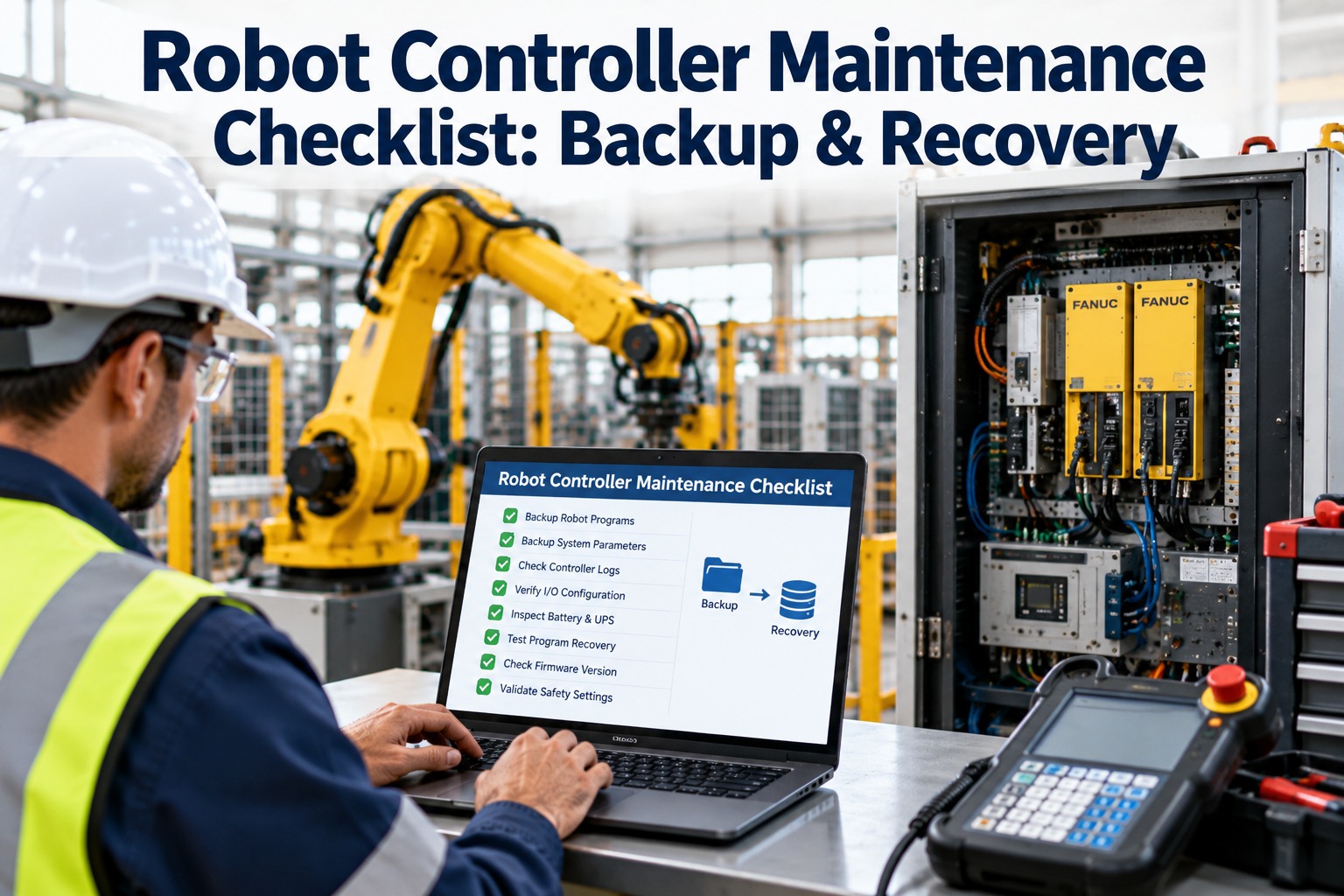
An industrial robot program is a tiny file holding years of commissioning, path-teach, PLS fixture offsets, tool-center-point calibration and process variables. The controller the file lives on is a dusty cabinet in a weld cell, running on a lithium coin cell and an SSD that nobody has looked inside for four years. When the controller dies, the plant has one question: when was the last verified backup. Half the time the answer is six months ago; a third of the time nobody can locate it. This checklist walks the controller anatomy, the daily / monthly / quarterly cadence, the 3-2-1 backup rotation and the recovery-drill schedule. OXMAINT AI is the AI-powered industrial robot maintenance software that holds every controller's backup register, fires the cadence, verifies the recovery drill and keeps the program lineage audit-ready.
Three cadence sections, 36 native-checkbox items, one 3-2-1 backup rotation. OXMAINT AI holds every controller's backup register, fires the cadence and verifies the recovery drill so the last-verified-backup question has a clean answer.
A robot controller is a hostile environment pretending to be an industrial PC. Six components live inside the cabinet; each one has its own failure mode and its own backup responsibility. OXMAINT AI stores each as a sub-asset so the recovery WO lands with the right parts in the robot maintenance software.
01
Teach pendant
The handheld. Takes abuse, cable fatigue, button wear. The visible failure.
02
CPU / main board
The processor. Fan-cooled, dust-prone, capacitor-aged. Carries the OS.
03
SRAM / battery-backed memory
Holds program + variables when powered off. CR2032 or equivalent coin cell — the silent killer.
04
Servo amplifiers
One per axis. Thermal cycling, cap drying. Replace at EOL, not at failure.
The 90% cause of thermal shutdowns. A $4 filter prevents a $4,000 CPU failure.
The 3-2-1 Backup Rotation — What Every Controller Deserves
The standard is 3-2-1: three copies, on two different media, with one copy off-site. For a robot controller, that translates concretely. OXMAINT AI enforces the schema per controller.
3
Three copies
On-controller + USB in the cabinet + network/cloud archive. The on-controller copy is working-state; the other two are recovery.
2
Two different media
Local flash + cloud / network share. Different failure modes — a cell fire or a ransomware event does not take both.
1
One off-site
Cloud archive or physically off-site drive. The last-resort copy for a site-level event.
Section 1 · Daily Visual & Log Check Checklist
Twelve items. Walked by the on-shift automation tech per robot cell; findings close before shift handover.
Section 2 · Monthly Backup Verify Checklist
Twelve items. Driven monthly per controller; the backup is the one PM that pays back in a crisis moment.
Twelve items. Driven quarterly per cabinet. Hardware wear catches the controller before the controller catches the plant.
Recovery Drill — The Backup Nobody Tests Is The Backup That Fails
A backup that has never been restored is theoretical. The recovery drill runs twice a year per controller against a lab or spare controller — OXMAINT AI holds the drill cadence and the pass/fail record.
01
Pull current backup
Current cloud + USB backup pulled; checksum verified between copies before the drill begins.
→
02
Restore to spare controller
Backup restored to a lab-grade spare or decommissioned controller of matching model and firmware.
→
03
Verify boot & load
Controller boots to normal state; program list present; TCP / frames / I/O maps match the active controller.
→
04
Log pass/fail & refresh
Drill result logged; a fail triggers immediate re-backup of the active controller and a root-cause investigation.
The Backup You Can Restore Is The Only Backup That Counts.
OXMAINT AI runs the 3-2-1 rotation per controller, holds the drill cadence and surfaces the one controller whose last recovery test failed. The audit opens the system; the system has the answer.
Weld-cell A · FANUC M-10Backup 12 d ago · drill passed AugOK
Weld-cell C off-site copy corrupted · on-site USB and network copy verified intact · re-sync to off-site in progress
How OXMAINT AI Runs The Robot Controller Program
The controller register, 3-2-1 backup rotation, three-cadence checklists, SRAM-battery clock, recovery-drill schedule and the live board all live natively in the OXMAINT AI industrial robot maintenance software — bring the robot fleet onto one register in OXMAINT AI.
Controller Register
Every controller as a tracked asset with model, firmware, SRAM battery age, backup location and recovery-drill history.
3-2-1 Enforced
Monthly backup cadence enforces three copies on two media with one off-site; a missed copy flags the controller.
Mobile Checklist Walk
Daily / monthly / quarterly checklists on the tech's phone; photo per critical item; sign-off against controller serial.
Recovery Drill Scheduler
Biannual drill scheduled per controller against a lab spare; pass/fail logged with checksum evidence.
SRAM Battery Clock
Battery age tracked per controller; replace WO auto-raised at 24 months (configurable per OEM).
Live Fleet Board
38+ controllers on one board; last-backup / drill-status / battery-age / open-WO visible at a glance.
Frequently Asked Questions
How often should we back up a robot controller?
Monthly for most industrial controllers in production; immediately before and after any program edit, teach-pendant change or firmware upgrade. OXMAINT AI makes the pre-change / post-change backup a required step on edit-WOs so it is never skipped.
How often should we actually test recovery?
Twice a year per controller against a lab spare of matching model and firmware. A backup never restored is a backup you cannot trust. OXMAINT AI tracks the drill cadence and flags any controller whose last drill is past 7 months.
What's the single highest-risk component inside the cabinet?
The SRAM / memory-backup battery. A silent failure means that on the next power-off the controller forgets its program and mastering. 2-3 year OEM calendar replacement — non-negotiable. OXMAINT AI auto-raises the WO on the age clock, not on the low-voltage alarm.
Do we need the same OEM to run the recovery?
In practice yes — FANUC backups are not interchangeable with KUKA or ABB. The lab spare must match the controller model and firmware line. OXMAINT AI stores the compatibility matrix per controller so the drill schedule confirms the right spare is available.
Register The Controller · Rotate The Backup · Drill The Recovery · Keep The Plant.
Load the robot fleet into the OXMAINT AI industrial robot maintenance software — controller register, 3-2-1 rotation, three-cadence checklists, recovery-drill scheduler, SRAM-battery clock and the live board. The last-verified-backup question has an answer, every day.