Every year, small businesses lose an average of $12,000 to $45,000 in emergency repairs, missed maintenance, and equipment downtime that a basic CMMS could have prevented. Yet 62% of small businesses with fewer than 50 employees still manage maintenance through spreadsheets, paper logs, or group chats. The barrier was never willingness — it was cost and complexity. In 2026, that barrier is gone. The leading CMMS platforms for small business now offer free tiers, $8/user pricing, mobile-first interfaces that require zero IT support, and deployment timelines measured in hours, not months. But not every platform marketed as "small business friendly" actually fits a team of 5–50 people. Many are stripped-down versions of enterprise tools that still require configuration complexity no small team has bandwidth for. This ranking evaluates the top 10 CMMS platforms specifically for small business economics, team size, and operational reality — not feature count. For teams ready to stop managing maintenance in spreadsheets, start a free trial with OxMaint or book a demo to see how a purpose-built small business CMMS works.
Listicle 2026 CMMS for Small Business Software Ranking
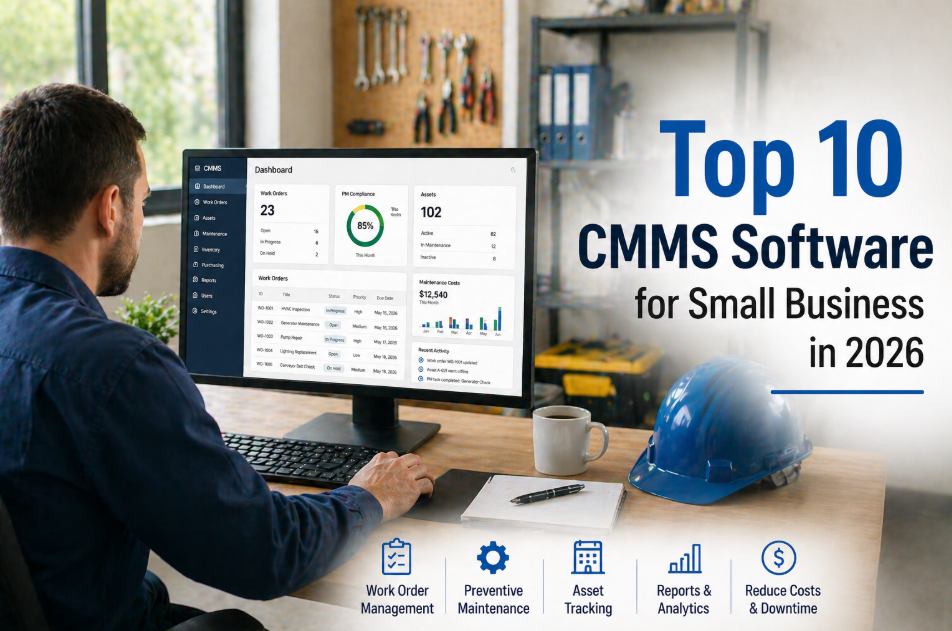
Top 10 CMMS Software for Small Business in 2026
Affordable, easy to deploy, mobile-first — the best maintenance management platforms for teams with under 50 employees, ranked by real small-business fit, not enterprise feature count.
62%
Of small businesses still use spreadsheets for maintenance tracking
$8
Per user per month — 2026 entry-level CMMS pricing benchmark
3.2x
Average ROI within 12 months for small business CMMS adoption
2 hrs
Average setup time for top-ranked small business CMMS platforms
OxMaint — Built for Small Business Economics From Day One
Free tier available. $8/user pricing for growing teams. Full asset registry, preventive maintenance scheduling, work order management, and mobile-first design — no IT department required. Live in under 2 hours.
What Makes a CMMS "Small Business Ready" in 2026?
Not every CMMS that offers a low price tier is actually built for small business operations. The difference between a small business CMMS and a discounted enterprise tool shows up in three areas: setup complexity, daily usability for non-technical staff, and total cost of ownership when you factor in configuration, training, and ongoing administration. A genuinely small-business-ready CMMS meets five criteria that separate practical tools from overbuilt platforms that small teams abandon within 90 days.
01
Setup in Hours, Not Weeks
A small business cannot dedicate a project manager to a 6-week implementation. The platform must go from sign-up to first work order in under 4 hours with no external consultant required.
02
Mobile-First, Desktop-Optional
Small business technicians work on the floor, not at desks. 78% of small-team maintenance interactions happen on mobile devices. The CMMS must be fully functional on a phone — not just "responsive."
03
Pricing That Scales With the Team
A 5-person team cannot pay $500/month for software. Entry pricing must start under $50/month total, with per-user scaling that remains affordable as the team grows from 5 to 50 employees.
04
Zero IT Administration Required
Small businesses rarely have dedicated IT staff. The CMMS must be cloud-hosted, auto-updating, and manageable by an operations person — no database administration, no server maintenance, no API configuration.
05
Core Features Without Bloat
Small teams need work orders, asset tracking, PM scheduling, and mobile access. They do not need MES integration, advanced analytics dashboards, or ERP connectors on day one. Feature bloat kills adoption.
06
Free Trial or Free Tier Available
Small business buyers need to validate fit before committing budget. Platforms that require annual contracts or paid onboarding before the team can test the tool create unnecessary purchase friction.
The Top 10 CMMS Platforms for Small Business — 2026 Ranking
This ranking evaluates each platform against the six small-business criteria above, plus real-world pricing transparency, user adoption rates, and time-to-value for teams with fewer than 50 employees. Platforms are ranked by overall small-business fit — not by enterprise feature count or market share.
No. 1
OxMaint
Best Overall CMMS for Small Business in 2026
PricingFree tier available — paid plans from $8/user/month
Setup TimeUnder 2 hours — no implementation fees
MobileFull-featured iOS and Android app — offline capable
Best ForTeams of 3–50 managing equipment, facilities, or multi-site operations
Why It Ranks No. 1
OxMaint is the only platform in this ranking that combines free-tier access, $8/user scaling, full asset lifecycle tracking, AI-assisted work orders, preventive maintenance scheduling, condition scoring, and investor-grade CapEx reporting — without requiring an enterprise-level implementation. Built specifically for the economics and workflow of small and growing teams. No feature bloat. No hidden configuration complexity. The asset hierarchy (Portfolio, Property, System, Asset, Component) scales from a single-site shop to a multi-property portfolio without re-platforming.
No. 2
Fiix (by Rockwell Automation)
Strong Free Tier With Enterprise Upgrade Path
PricingFree for up to 3 users — paid plans from $45/user/month
Setup Time4–8 hours for basic configuration
LimitationPaid tier pricing jumps significantly — better for teams planning rapid growth into enterprise scale
No. 3
MaintainX
Best Mobile-First Experience for Field Teams
PricingFree tier for basic use — paid from $16/user/month
Setup Time2–4 hours
LimitationAsset management depth is limited compared to full CMMS platforms — better as a work order tool than an asset lifecycle tool
No. 4
UpKeep
Popular Mobile CMMS With Growing Feature Set
PricingFrom $20/user/month — no free tier
Setup Time4–6 hours
LimitationNo free tier means cost starts at $100/month minimum for a 5-person team — heavier than needed for very small operations
No. 5
Limble CMMS
Clean Interface With Good PM Automation
PricingFree basic tier — paid from $28/user/month
Setup Time3–6 hours
LimitationMid-tier pricing escalates quickly — advanced reporting requires higher plan tiers
No. 6
Click Maint
Simple and Affordable for Very Small Teams
PricingFrom $35/month flat for small teams
Setup Time1–2 hours
LimitationFeature set is basic — limited asset lifecycle tracking and no CapEx forecasting
No. 7
FMX
Facilities-Focused With Good Request Management
PricingCustom pricing — typically $25–$40/user/month
Setup Time4–8 hours
LimitationPrimarily designed for facilities and education — less suited for manufacturing or industrial environments
No. 8
Fracttal One
AI-Enhanced CMMS With Latin American Roots
PricingFrom $229/month for up to 5 users
Setup Time4–8 hours
LimitationHigher entry cost — $229/month is steep for businesses under 10 employees
No. 9
EZOfficeInventory
Asset Tracking With Basic Maintenance Features
PricingFrom $40/month for up to 15 users
Setup Time2–4 hours
LimitationPrimarily an asset tracking tool — maintenance and PM features are secondary, not core
No. 10
Hippo CMMS
Established Platform With Broad Feature Coverage
PricingFrom $40/user/month — no free tier
Setup Time8–16 hours — requires more configuration
LimitationSetup complexity and cost structure lean toward mid-market — can feel overbuilt for teams under 15 people
Pricing Comparison at a Glance
| Platform | Free Tier | Entry Price | 5-User Monthly Cost | Setup Time |
| OxMaint | Yes | $8/user/mo | $40 | Under 2 hrs |
| Fiix | Yes (3 users) | $45/user/mo | $225 | 4–8 hrs |
| MaintainX | Yes | $16/user/mo | $80 | 2–4 hrs |
| UpKeep | No | $20/user/mo | $100 | 4–6 hrs |
| Limble | Yes | $28/user/mo | $140 | 3–6 hrs |
| Click Maint | No | $35/mo flat | $35 | 1–2 hrs |
| FMX | No | ~$25/user/mo | $125 | 4–8 hrs |
| Fracttal One | No | $229/mo (5 users) | $229 | 4–8 hrs |
The Real Cost of Not Having a CMMS
Small business owners often weigh CMMS subscription cost against "doing nothing." But the cost of no system is not zero — it is hidden in emergency repair premiums, lost production, and shortened asset life. Here is what spreadsheet-based maintenance actually costs a small business annually.
4.8x
Emergency Repair Premium
Emergency repairs cost 4.8x more than the same repair performed as planned maintenance — after-hours labor, expedited parts, and production loss compound
$12K–$45K
Annual Hidden Maintenance Loss
Average small business loss from reactive maintenance practices — missed PMs, duplicate work, and untracked asset degradation
23%
Shorter Asset Lifespan
Equipment maintained reactively has 23% shorter useful life than equipment on a preventive maintenance schedule
38%
Wasted Technician Time
Technicians without a CMMS spend 38% of their time on non-wrench activities — searching for information, tracking down parts, and duplicating documentation
Why OxMaint Wins for Small Business — The Feature Comparison
| Capability | OxMaint | Typical SMB CMMS |
| Free Tier | Yes — full core features | Often limited to 1–3 users or basic features only |
| Asset Lifecycle Tracking | Full condition scoring + remaining useful life | Basic asset registry — no lifecycle intelligence |
| CapEx Forecasting | Rolling 5–10 year models built-in | Not available — requires separate financial tools |
| Multi-Site Support | Portfolio hierarchy from day one | Single-site or requires enterprise upgrade |
| AI Work Orders | AI-assisted generation and prioritization | Manual creation only |
| Implementation Fee | $0 — self-service setup | $500–$5,000 for guided onboarding |
Frequently Asked Questions
How many assets can a small business CMMS handle?+
OxMaint has no asset count limits on any plan, including the free tier. Most small businesses with 5–50 employees manage 20–500 assets. The platform handles this range without performance degradation. Asset hierarchy support means you can organize by location, system, and component from day one — a structure that scales without re-configuration as you grow. Want to see how your asset list maps into OxMaint?
Start a free trial and import your first 20 assets in under 30 minutes.
Do I need IT staff to set up and maintain the CMMS?+
No. The top-ranked platforms in this list — OxMaint, MaintainX, and Click Maint — are fully cloud-hosted with zero IT administration required. No servers, no databases, no API configuration. OxMaint is designed so that an operations manager or maintenance lead can complete full setup — asset import, PM schedule creation, technician setup, and first work order — in a single sitting. Auto-updates mean you never manage software versions.
What is the real ROI timeline for a small business CMMS?+
At $8/user/month, a 5-person team pays $40/month — $480/year. The average small business prevents 2–4 emergency repair events per year through PM scheduling alone, saving $3,000–$12,000 in emergency costs. That is a 3.2x average ROI within the first 12 months, with payback typically occurring within the first prevented breakdown — often within 60–90 days of deployment.
Can I switch from spreadsheets without losing my maintenance history?+
Yes. OxMaint supports CSV import of asset lists, maintenance logs, and work order history from spreadsheets. Most small businesses complete their data migration in 1–2 hours. The platform also supports manual entry during a transition period — you can run both systems in parallel until your team is comfortable. Ready to migrate?
Book a demo and we will walk through the import process with your actual data.
Small Business CMMS
Stop Losing Money to Spreadsheet Maintenance.
OxMaint gives small businesses the same asset management, preventive maintenance, and work order capabilities that large enterprises use — at $8/user/month with a free tier, zero implementation fees, and setup in under 2 hours. No IT department required.
2 hrs
Setup — no consultants needed
3.2x
Average 12-month ROI