Every CMMS implementation fails the same way when it fails: bad asset data at the foundation. A system that knows an HVAC unit exists but doesn't know its model, installation date, condition, or where it sits in the building hierarchy can generate work orders — but it can't generate maintenance intelligence. Organizations with structured asset registers see 2.4× better CMMS adoption rates and 31% lower maintenance costs within 18 months of deployment, compared to organizations that loaded asset data without a defined hierarchy or coding standard. The asset register isn't setup housekeeping — it's the entire foundation of your maintenance program. Start a free trial on Oxmaint and use the built-in asset register framework to get your first assets structured correctly from day one.
CMMS Setup · Asset Register · Asset Hierarchy · Data Standards
Build the Asset Register That Powers Every Maintenance Decision.
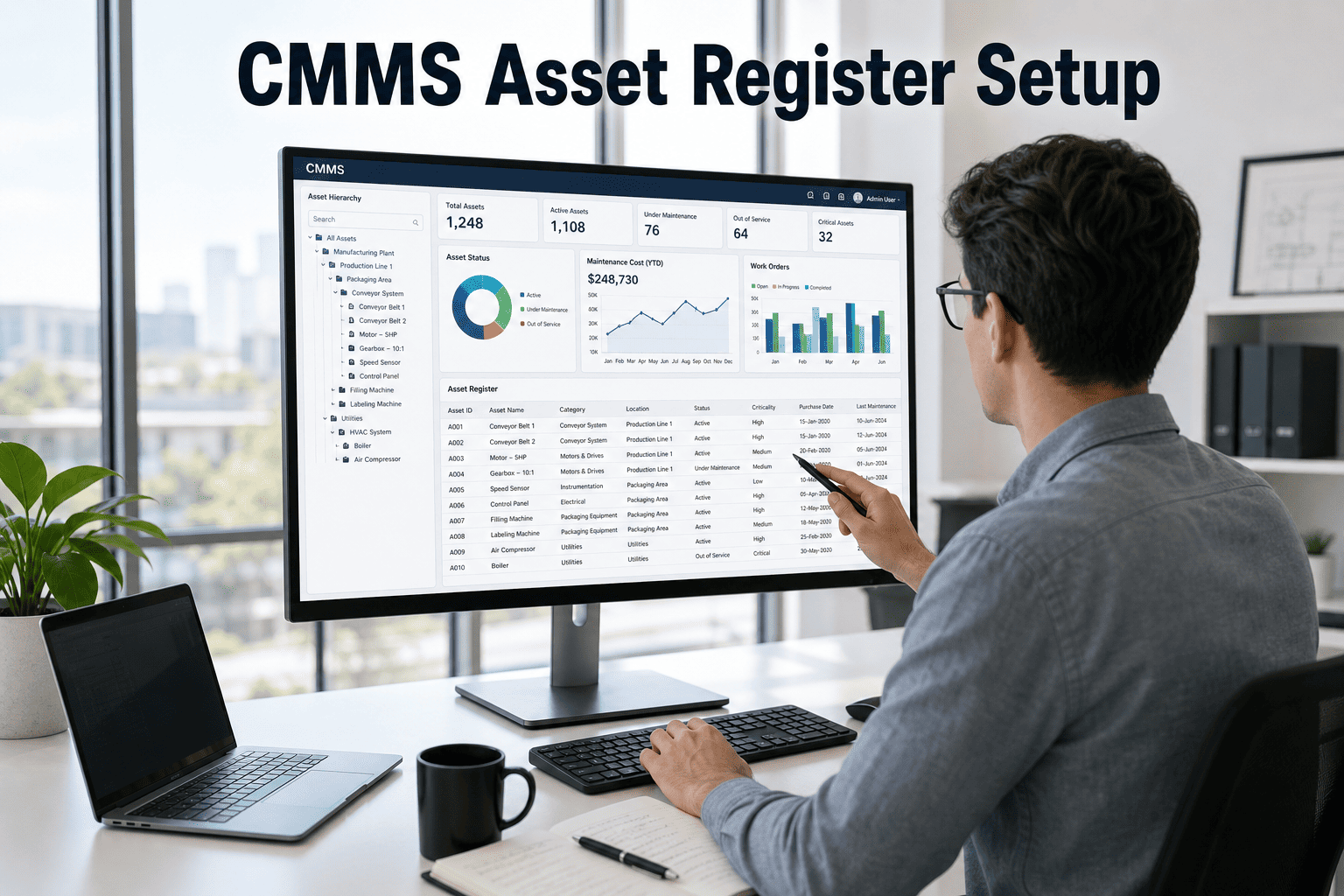
Oxmaint's structured asset hierarchy — Portfolio, Property, System, Asset, Component — makes it impossible to build a flat, unstructured asset list. Every asset is linked, coded, and analysis-ready from the first entry.
2.4×
Better CMMS adoption with structured asset register vs. flat asset lists
Verdantix CMMS Study
31%
Lower maintenance costs within 18 months with structured asset hierarchy
Aberdeen Group
60%
Of CMMS implementations fail or underdeliver due to poor asset data quality
Gartner
5yr
Useful life of maintenance intelligence generated from a well-structured asset register
Industry benchmark
What Is a CMMS Asset Register?
The CMMS Asset Register: Definition and Strategic Role
A CMMS asset register is the structured database of every physical asset — equipment, systems, and components — that your maintenance program is responsible for. Each asset record contains identity data (make, model, serial number, installation date), location data (where it sits in the property or facility hierarchy), condition data (current score and historical trend), financial data (purchase cost, current value, replacement cost), and operational data (criticality, runtime, linked PM schedules). The asset register is not a static inventory — it's a living data structure that updates with every work order, PM completion, and condition assessment.
The strategic value of a well-built asset register compounds over time: three years of linked maintenance history and condition data per asset enables failure prediction, CapEx forecasting, and repair-vs-replace decisions that are impossible with flat spreadsheet records. Most organizations underinvest in asset register setup because the payoff isn't immediate — then spend years trying to retrofit structure onto a CMMS that was loaded with flat, uncoded data. Getting the hierarchy and coding standards right on day one is worth every hour of upfront investment. Book a demo to see how Oxmaint's asset register framework guides setup from the first record.
Setup Framework
8 Steps to Build a CMMS Asset Register That Lasts
Step 1
Define Your Hierarchy
Establish the levels before entering any data: Portfolio → Property → System → Asset → Component. Every subsequent record must fit into this structure. Changing the hierarchy after data entry is expensive and error-prone.
Step 2
Establish Asset Coding Standards
Create a systematic asset ID format before loading data: e.g., PROP01-HVAC-AHU-001. Consistent coding enables filtering, reporting, and PM schedule assignment at scale. Random naming conventions compound into a data management crisis at 500+ assets.
Step 3
Prioritize by Criticality
Classify every asset as Critical, Important, or Standard based on failure consequence. Critical assets get full data entry and PM schedules first. Standard assets can be loaded with minimal data initially and enriched over time.
Step 4
Capture Required Data Fields
Mandatory fields per asset: make, model, serial number, installation date, location in hierarchy, replacement cost, current condition score, and criticality rating. Optional but valuable: OEM documentation links, warranty expiry, runtime meter linkage.
Step 5
Conduct a Physical Asset Walk
Validate the asset register against physical reality before going live. Nameplates corrode, equipment gets replaced without records, and locations change. A physical walk with mobile data entry typically finds 15–30% discrepancies vs. existing records.
Step 6
Link PM Schedules to Assets
Every critical and important asset needs at least one linked PM schedule before going live. PM schedules without asset linkage are maintenance checklists — not asset management. The asset-PM link creates the history accumulation that drives future intelligence.
Step 7
Set Baseline Condition Scores
Score every asset 1–5 on initial physical walk: 5 = new or excellent, 1 = end-of-life. These baseline scores start the condition trend that enables predictive alerts and CapEx forecasting. No score = no lifecycle intelligence.
Step 8
Establish Data Governance
Define who can create, edit, and deactivate asset records. Set a mandatory review cycle for asset data (typically annual). Assign data stewardship to a named role. Without governance, asset registers drift into inaccuracy within 18 months.
Common Mistakes
4 Asset Register Setup Mistakes That Break CMMS Performance
⚠
Flat Asset Lists Without Hierarchy
Loading assets without a defined hierarchy produces a database that can track individual work orders but cannot generate system-level reports, property-level cost summaries, or CapEx forecasts. The hierarchy is the reporting architecture — skip it and you lose most of the platform's value.
⚠
Inconsistent Asset Naming
Assets named "HVAC 1," "Hvac unit one," "Air handler building B" in the same system cannot be filtered, grouped, or compared in reports. One week of inconsistent naming creates months of data cleanup. Establish the naming standard before the first record is created.
⚠
Skipping Replacement Cost Data
Asset replacement cost is the core input for CapEx forecasting. Without it, condition scores are observations with no financial consequence. A CMMS that tracks condition but not replacement cost produces operational data — not capital planning intelligence.
⚠
No Criticality Classification
Treating all assets equally means PM resources get spread uniformly instead of concentrated on high-consequence equipment. Criticality classification is what makes PM scheduling a risk management tool rather than a compliance exercise.
These mistakes are avoidable with the right setup framework — and correctable early if caught within the first 90 days. After 12 months of bad data accumulation, the cost of correction approaches the cost of a fresh implementation. Start a free trial on Oxmaint and use the built-in hierarchy to prevent every one of these mistakes from day one.
How Oxmaint Helps
Oxmaint's Asset Register: Structure Built Into the Platform
Pre-Built Hierarchy Enforcement
Oxmaint enforces Portfolio → Property → System → Asset → Component hierarchy at the data entry level. Assets cannot be created outside the hierarchy — eliminating flat list errors before they occur.
Asset Coding Generator
Oxmaint auto-generates consistent asset IDs based on location in the hierarchy. Teams don't need to design coding standards manually — the platform enforces them through the hierarchy structure itself.
Condition Scoring at Every PM
PM completion forms include mandatory condition scoring fields. Every PM visit updates the asset's condition score — creating continuous condition trending without any additional data entry burden on technicians.
Replacement Cost and CapEx Linkage
Asset replacement costs entered at setup flow directly into rolling CapEx forecasting models. Condition score × replacement cost × remaining useful life produces 5–10 year capital expenditure projections automatically.
Criticality and Priority Tiers
Criticality classification drives PM scheduling priority, work order escalation rules, and minimum inspection frequencies. Critical assets surface automatically in manager dashboards when condition scores decline or PM dates pass.
Bulk Import with Validation
Import existing asset lists from spreadsheets with built-in validation that flags missing required fields, duplicate records, and hierarchy mismatches before data goes live — preventing bad data from entering the system.
Teams that use Oxmaint's structured onboarding framework average 48 hours from first login to a fully operational asset register with linked PM schedules. Book a demo to walk through the Oxmaint asset setup process with your specific asset types.
Flat vs. Structured
Flat Asset List vs. Structured CMMS Asset Register: What You Gain
| Capability |
Flat Asset List / Spreadsheet |
Structured Oxmaint Asset Register |
| System-Level Reporting |
Not possible without manual sorting and grouping per report |
Automatic — assets roll up to system, property, and portfolio with one filter |
| PM Schedule Assignment |
Manual linking per asset, breaks if asset naming is inconsistent |
Hierarchy-based assignment — PM templates apply to asset classes across all sites |
| CapEx Forecasting |
Not possible without separate model built in Excel from CMMS exports |
Automatic from condition score × replacement cost — updated at every PM |
| Asset Cost History |
Manual linkage if asset naming matches between maintenance records and invoices |
Automatic accumulation — every work order cost links to the asset on close |
| Condition Trending |
Not available without manual inspection records entered in spreadsheet |
Automatic from PM condition scoring — chart shows condition over time per asset |
| Failure Pattern Detection |
Requires manual cross-referencing across multiple records and dates |
Automatic MTBF calculation and repeat-failure alerts per asset from linked WO history |
ROI and Results
What a Well-Built Asset Register Delivers Over Time
31%
Lower maintenance costs vs. flat-list CMMS
Organizations with structured hierarchy vs. unstructured data entry — within 18 months
2.4×
Better CMMS adoption rate
Technicians use structured systems consistently; flat lists create inconsistent behavior
48hr
To first live PM schedule in Oxmaint
Using Oxmaint's structured onboarding framework — including asset hierarchy and coding setup
5yr
Before structured register data predicts failures accurately
MTBF calculations, condition trends, and CapEx forecasting deepen over time
FAQ
CMMS Asset Register Setup — Frequently Asked Questions
How many assets should I enter in the CMMS before going live?
Start with your Critical assets — those where failure has the most severe operational, safety, or financial consequence. A typical manufacturing facility or commercial property will have 15–40 critical assets. Get these fully set up with data, condition scores, linked PMs, and replacement costs before expanding to Important and Standard assets. Going live with 30 fully structured assets is more valuable than going live with 300 incomplete records. Incomplete records create false confidence and bad data accumulation.
Start a free trial on Oxmaint to build your critical asset register first and expand from there.
What data is required for each asset record in a CMMS?
The minimum viable asset record contains: asset name (following your naming convention), location in the hierarchy (system, property, portfolio), make and model, installation date, criticality rating, and current condition score. Recommended fields that unlock additional capability: serial number (enables warranty tracking), replacement cost (enables CapEx forecasting), OEM PM interval (enables PM schedule generation), and runtime meter linkage (enables runtime-based PM triggers). Optional but valuable over time: OEM documentation links, preferred vendor for maintenance, spare parts linkage. The minimum viable set takes 10–15 minutes to complete per asset during a physical walk.
How do I import existing asset data from spreadsheets into CMMS?
Most CMMS platforms including Oxmaint support CSV or Excel bulk import with column mapping. The critical preparation steps before import: standardize your asset naming to match your chosen coding convention, add hierarchy location columns (property, system), add criticality and condition score columns with values if known, and remove duplicate records. During import, Oxmaint's validation layer flags missing required fields and hierarchy mismatches before the data goes live. Plan to spend 2–4 hours on spreadsheet cleanup for every 100 assets if your existing records are in a typical unstructured format.
How often should the asset register be reviewed and updated?
Asset records update automatically through the CMMS as work orders are closed and PMs are completed — condition scores, cost history, and maintenance dates stay current without manual intervention. A formal annual asset register review should validate physical-to-digital accuracy: check for equipment that was replaced without a record update, confirm replacement costs are current against today's market pricing, and identify assets whose condition scores have declined into CapEx planning territory. The annual review typically takes 1–2 hours per facility when the CMMS has been maintained consistently throughout the year.
Book a demo to see how Oxmaint surfaces asset register discrepancies for annual review.
CMMS Setup · Asset Register · Hierarchy · Condition Scoring · CapEx Forecasting
Your Asset Register Is Either Your Biggest Asset or Your Biggest Liability. Build It Right.
Oxmaint's structured hierarchy, built-in condition scoring, and CapEx forecasting linkage turn your asset register from a record-keeping exercise into the intelligence layer that drives every maintenance decision for the next decade.