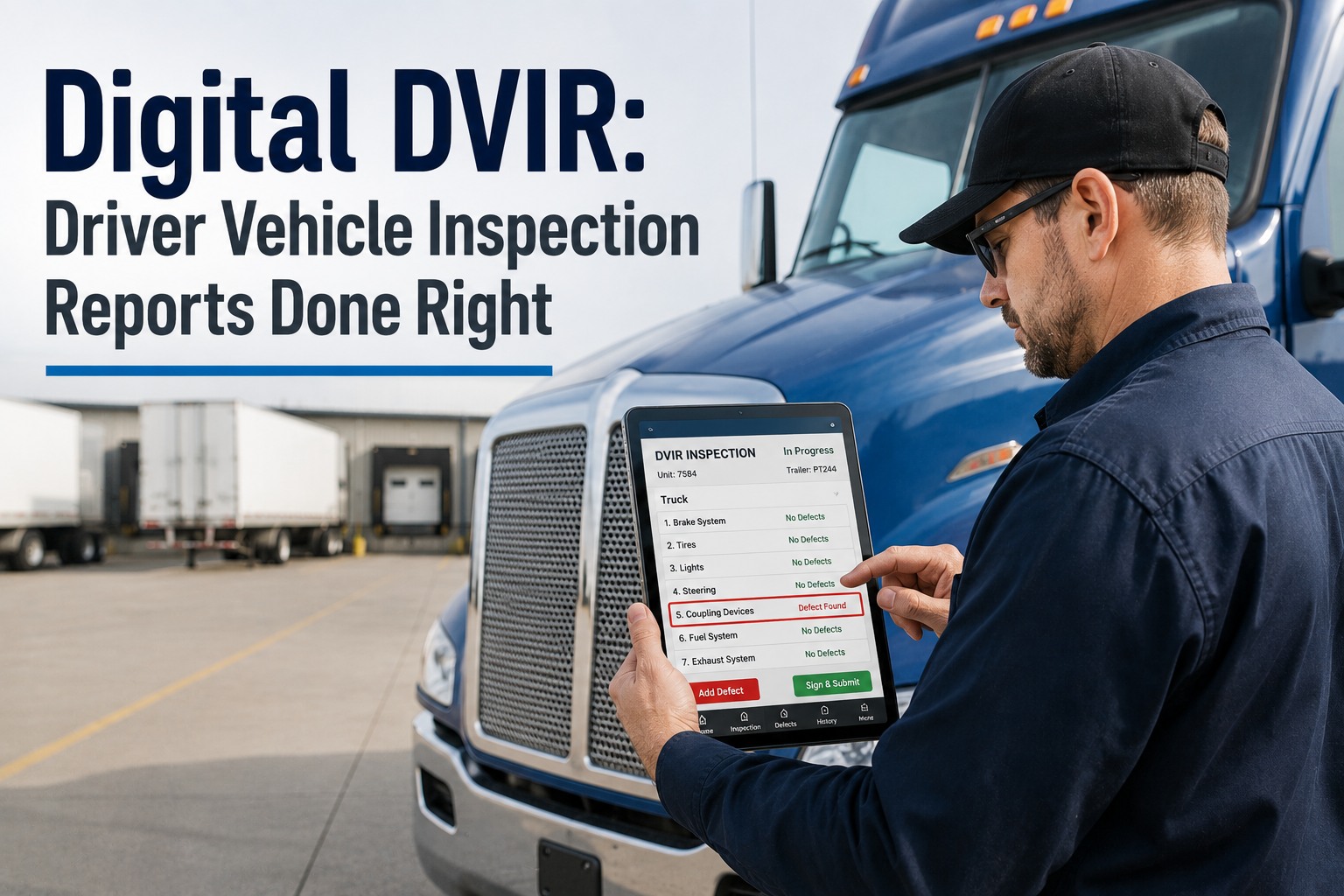
Paper inspection forms are liability time bombs. A clipboard checklist completed in haste, filed in a cabinet, and never referenced again until an auditor requests it — by which time it is illegible, incomplete, or missing entirely. A safety inspection skipped because the technician was pulled to an emergency. A DVIR form filled out identically every day because the process rewards speed over accuracy. Meanwhile, regulatory agencies are tightening enforcement, digital audit trails are becoming mandatory across industries, and organizations still relying on manual inspection processes face a widening compliance gap that no amount of filing cabinet organization can close. The inspection management software market was valued at approximately $9.2 billion in 2024 and is projected to reach $18.86 billion by 2030, growing at a 13.2 percent CAGR — driven by organizations replacing paper-based methods with digital platforms that increase operational accuracy by 42 percent and reduce audit preparation time by 38 percent. OxMaint digitizes your entire inspection workflow — sign up free and eliminate paper-based audit trails permanently.
Paper Inspections Miss Things.
Digital Checklists Catch Everything.
OxMaint Proves It to Auditors.
Every inspection your team completes should be timestamped, geotagged, photo-documented, and instantly searchable. Every missed inspection should trigger an automatic escalation. Every corrective action should be tracked to completion. OxMaint makes all of this happen — from the technician's phone to the auditor's report — without a single sheet of paper.
Why Paper Inspections Are a Compliance and Safety Liability
Organizations running paper-based or spreadsheet inspection processes face three compounding failure modes — each invisible until an incident, an audit, or a lawsuit makes them catastrophically visible.
Inspections Are Skipped Without Detection
When inspection schedules exist only on a wall calendar or in a supervisor's memory, missed inspections are invisible. No alert fires. No escalation occurs. The gap only surfaces when an auditor asks for records that do not exist — or when the uninspected equipment fails and the absence of documentation becomes a liability finding.
Findings Are Recorded but Never Resolved
A technician notes a deficiency on a paper checklist. The form goes into a filing cabinet. The corrective action is never assigned, never tracked, and never completed. Weeks later, the same deficiency causes a safety incident. The paper trail proves the organization knew about the problem and failed to act — the worst possible audit outcome.
Audit Preparation Consumes Days, Not Minutes
When a regulator arrives for an unannounced inspection, facilities teams scramble to locate paper records across filing cabinets, binders, and desk drawers. Organizations report spending an average of 18 or more hours preparing for a single compliance audit — time that disappears entirely when records are digital, searchable, and exportable in one click.
The 5 Pillars of Digital Inspection Management
OxMaint replaces every component of the paper inspection process — from checklist design through field execution, corrective action tracking, and audit reporting — in a single connected platform.
Customizable Digital Checklists
Build inspection forms tailored to any equipment type, regulatory standard, or operational requirement. Drag-and-drop checklist builder supports pass/fail items, numeric ranges, dropdown selections, text fields, required photo captures, and conditional logic that shows or hides questions based on previous answers. Templates can be duplicated, versioned, and assigned to specific asset types — so every technician follows the exact same inspection protocol every time.
Mobile Field Execution — The Point of Truth
Technicians complete inspections on mobile devices directly at the asset. Every response is timestamped and geotagged automatically. Photo and video attachments are captured in-app and linked to specific checklist items — no separate camera roll, no email attachments, no lost images. Offline mode ensures inspections can be completed in basements, mechanical rooms, and remote sites with zero connectivity — all data syncs when reconnected.
Automated Scheduling and Escalation
Inspection schedules are configured by frequency — daily, weekly, monthly, quarterly, annually — or triggered by events such as runtime hours, meter readings, or work order completion. When an inspection is due, the assigned technician receives a mobile notification. When an inspection is overdue, supervisors receive automatic escalation alerts. No inspection falls through the cracks because no one is manually tracking a calendar.
Corrective Action Tracking to Completion
When an inspection reveals a deficiency, a corrective action work order is generated directly from the failed checklist item — with the deficiency description, photo evidence, asset details, and priority level pre-populated. The work order is assigned, tracked, and closed within the same platform. Nothing falls into a filing cabinet void. Supervisors see open corrective actions in real time and can verify resolution before the next inspection cycle.
Audit-Ready Reporting and Compliance Trail
Every inspection, every response, every photo, every corrective action, every technician signature — stored in a searchable, exportable digital archive. Generate compliance reports by date range, asset, building, inspector, or regulation type in seconds. When an auditor arrives, the evidence is one click away — not 18 hours of filing cabinet archaeology.
What OxMaint Manages at Every Inspection Category
From daily vehicle checks to annual regulatory audits — OxMaint handles every inspection type with configurable checklists, automated scheduling, and complete digital documentation.
Six Industries Where Digital Inspection Management Delivers the Fastest ROI
Every industry that performs inspections benefits from digitization — but these six sectors face the highest regulatory pressure, the greatest liability exposure, and the most immediate return on investment.
What Changes When Inspections Go Digital
Deployment Roadmap — 4 Phases
OxMaint inspection management deploys in days, not months. Most organizations complete their first digital inspection within the first week and achieve full rollout within 30 days.
Checklist Configuration
Convert your existing paper inspection forms into digital checklists using OxMaint's drag-and-drop builder. Add pass/fail items, numeric fields, photo requirements, and conditional logic. Assign checklists to equipment types. Most organizations digitize their first 5 to 10 inspection forms within the first day — no IT support required.
Schedule Activation and Team Onboarding
Configure inspection frequencies per asset or area. Assign inspectors. Enable mobile app access for field technicians. The mobile interface is intuitive enough that most technicians complete their first digital inspection without formal training — the app guides them through each checklist item step by step.
Corrective Action Workflow Integration
Connect inspection findings to the work order system. Configure rules so that failed checklist items automatically generate corrective action work orders — pre-populated with deficiency details, photo evidence, and asset information. Set up escalation paths so unresolved corrective actions alert supervisors before the next inspection cycle.
Compliance Reporting and Continuous Optimization
Configure compliance dashboards and automated report generation. Monitor inspection completion rates, corrective action closure times, and recurring deficiency patterns. Refine checklists based on field feedback. Expand to additional inspection types and asset categories as the team builds confidence with the platform.
Three Capabilities That Separate OxMaint from Basic Checklist Apps
Many tools digitize checklists. OxMaint connects inspections to the entire maintenance ecosystem — so findings drive action, not just documentation.
Inspection-to-Work-Order Integration
When an inspection item fails, a work order is generated instantly — not as a separate process, not as a manual step, but as an automatic, configurable workflow built into the inspection itself. The work order inherits the asset, location, deficiency description, and photo evidence from the checklist. This closed-loop system ensures that every finding is assigned, tracked, and resolved.
Asset Condition Intelligence
Inspection results feed directly into OxMaint's asset condition scoring system. Repeated failures on the same equipment, declining numeric readings over time, and increasing deficiency frequency all update the asset's health score automatically. This transforms inspections from compliance checkboxes into predictive maintenance data sources — identifying equipment approaching failure before it reaches the emergency threshold.
Multi-Site Compliance Dashboard
Organizations with multiple facilities, buildings, or fleet locations see inspection completion rates, overdue inspections, open corrective actions, and compliance scores across every site in a single real-time dashboard. Drill down to individual buildings, assets, or inspectors. Identify which sites are falling behind before auditors do — and take corrective action proactively.
Common Questions About Digital Inspection Management
Can we convert our existing paper inspection forms into digital checklists?
Yes. OxMaint's checklist builder is designed specifically for this purpose. Drag-and-drop form creation supports every field type found on paper forms — pass/fail, numeric readings, text fields, dropdown selections, date fields, and required photo captures. Most organizations convert their first 5 to 10 paper forms within the first day. Conditional logic allows you to build smarter forms that show or hide questions based on previous answers, making digital checklists more efficient than their paper predecessors.
Does the mobile app work offline for inspections in areas without connectivity?
Yes. OxMaint's mobile app is built for field environments where connectivity is unreliable — basements, mechanical rooms, remote sites, underground facilities. Technicians can load their assigned inspections, complete every checklist item, capture photos, and record readings entirely offline. All data syncs automatically when the device reconnects to the network. No data is lost, and all timestamps reflect the actual time of completion, not the sync time.
How does OxMaint handle DVIR inspections for fleet compliance?
OxMaint supports Driver Vehicle Inspection Reports (DVIRs) with configurable pre-trip and post-trip checklists aligned to FMCSA and DOT requirements. Drivers complete inspections on their mobile device before departure. Failed items automatically generate maintenance work orders routed to the fleet shop. Digital DVIRs include timestamps, driver identification, and photo documentation — replacing handwritten forms that are often incomplete or illegible.
What happens when an inspection item fails?
The failed item is flagged immediately in the completed inspection record. Based on your configuration, OxMaint can automatically generate a corrective action work order — pre-populated with the deficiency description, photo evidence, affected asset, and priority level. The work order is assigned to the appropriate technician or team and tracked to completion. Supervisors receive visibility into all open corrective actions and can verify resolution before the next scheduled inspection.
Can we track inspection completion rates and compliance metrics across multiple sites?
Yes. OxMaint's compliance dashboard provides real-time visibility into inspection completion rates, overdue inspections, average completion times, recurring deficiencies, and corrective action closure rates — across every site, building, and asset in your portfolio. Drill down by location, inspector, inspection type, or time period. Export reports for internal reviews, board presentations, or regulatory submissions in one click.
How long does it take to deploy OxMaint inspection management?
Most organizations complete their first digital inspection within the first week. The platform requires no on-premises infrastructure, no IT department involvement, and no lengthy implementation project. Sign up, build your first checklist, assign it to an inspector, and complete it on mobile — all achievable in the same day. Full organizational rollout with multiple inspection types, corrective action workflows, and compliance reporting typically completes within 30 days.
Every Inspection. Every Photo. Every Corrective Action. Tracked.
Your next audit will ask for inspection records. When that moment arrives, the answer should be a one-click report — not 18 hours of filing cabinet archaeology. OxMaint makes that the reality for every inspection, every asset, every facility you manage.
Unlimited users. No credit card required. First digital inspection in under 60 minutes.