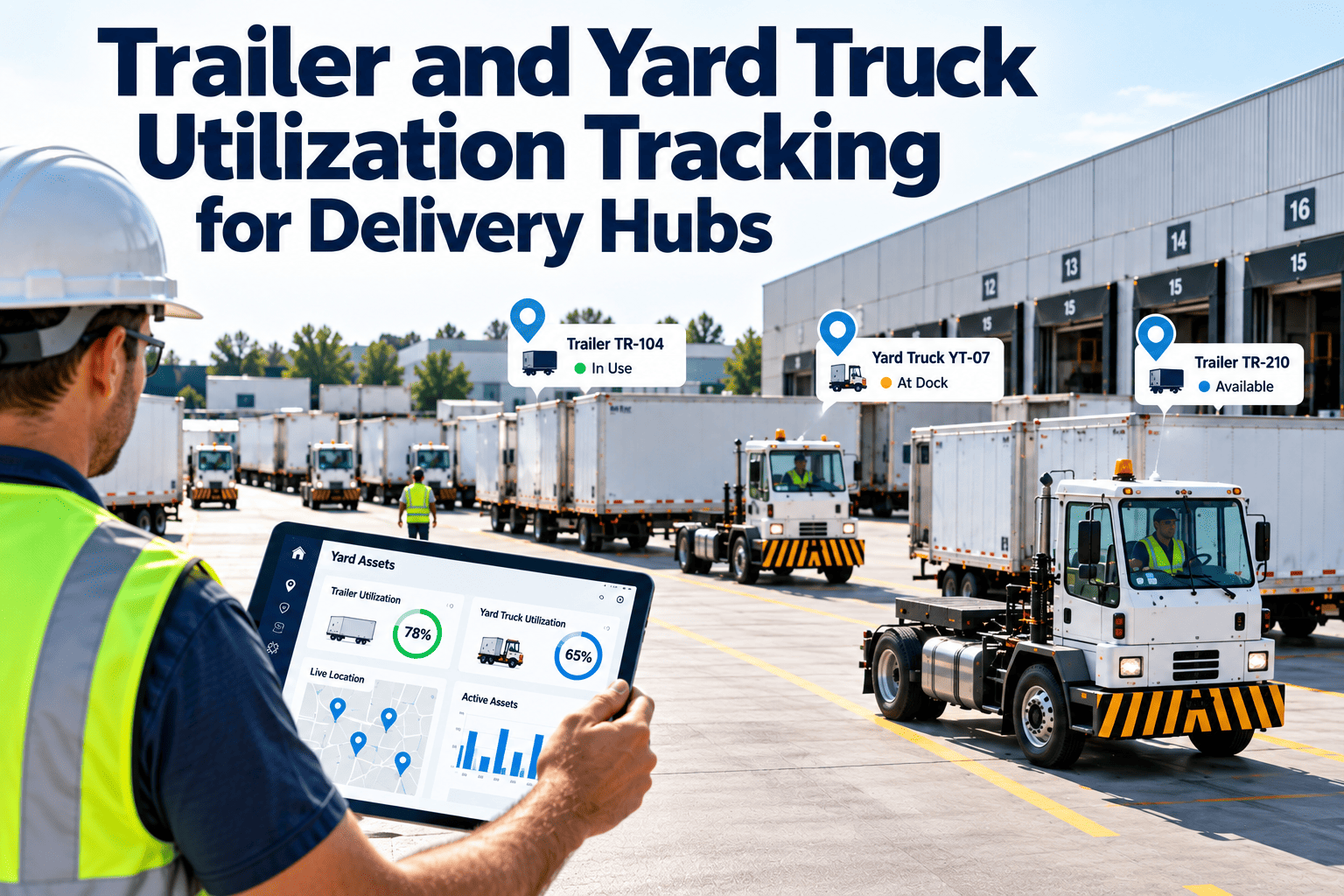
Walk any busy delivery hub and count the trailers that have not moved since yesterday. Some are waiting for a load, some for a door, some for a repair nobody logged, and a few for reasons nobody can name. Each one ties up capital, yard space and a driver or yard truck sooner or later. Utilization tracking turns that guesswork into a live picture of where every trailer is, what state it is in and how long it has been there. The picture only stays accurate when equipment condition is tracked as carefully as location, which is why many hubs link yard data to maintenance management software for trailer and yard truck upkeep.
Trailer and Yard Truck Utilization Tracking for Delivery Hubs
Know where each trailer is, why it is idle and what it costs, then right-size the fleet and speed up dock operations with data you can trust.
Why trailer and yard truck utilization stays hidden
Utilization is hard to see because trailers are passive assets. They do not announce when they are idle, and the cost of waiting is spread across detention charges, extra equipment purchases, yard congestion and delayed departures.
Manual yard checks
A clerk walks the lot with a clipboard a few times a day. By the time the sheet is typed up, half the positions have changed.No shared definition of idle
Is a loaded trailer waiting for a driver idle? Is an empty one with a flat tire? Without agreed states, every report disagrees.Repair status is invisible
Trailers waiting for brakes, tires or reefer repair look available on a map but cannot actually be dispatched.Buying is easier than analyzing
When loads cannot be matched to trailers, the quick answer is to add equipment rather than find the ones already sitting idle.Defining utilization so everyone measures the same thing
Several metrics are called utilization, and each answers a different question. Decide which ones the hub will track, write the formulas down and apply them consistently across sites.
The trailer lifecycle in the yard
A trailer is always in one state, and each change of state is a data point. Mapping the lifecycle first tells you which events must be captured by a gate scan, a sensor or a yard driver.
Side paths that quietly consume time
- A trailer pulled for inspection or repair, which should leave the available pool until released.
- Loaded trailers held for a late appointment, missing paperwork or a customer hold.
- Empty trailers parked far from where they are needed next, creating avoidable yard moves.
- Misplaced trailers that exist in the system but are not at the recorded location.
- Trailers used as temporary storage during peaks, which look productive on a map but are not moving freight.
- Customer-owned or pooled trailers that follow different return rules and often escape the normal tracking routine.
Telematics and yard data: what to deploy and what each tells you
Start with the data needed for decisions, not the most sensors. The table pairs common devices with the decisions they support.
| Data source | What it captures | Decision it supports |
|---|---|---|
| Trailer GPS or asset tracker | Location, movement, time stationary | Find idle and misplaced trailers, measure dwell by zone |
| Door or cargo sensors | Door open and close events, load state | Separate loaded from empty and track loading duration |
| Gate scanning or plate reading | Arrival and departure times, trailer identity | Calculate yard dwell and detect unscheduled arrivals |
| Yard truck telematics | Engine hours, idle time, location, move counts | Measure yard truck productivity and size the yard fleet |
| Reefer unit data | Temperature, alarms, run hours, fuel | Protect cargo, schedule service, spot repeat faults |
| Tire pressure and brake monitors | Pressure, temperature, wear indicators | Prevent roadside failures and schedule repairs |
| Maintenance system | Open work orders, inspections, repair history | Mark trailers available or blocked and plan service |
Deployment tips
- Pilot on a subset of trailers and one yard, and compare device data against a manual check before scaling.
- Define geofenced zones for doors, staging, repair and exit so location converts into a meaningful state.
- Assign one owner for device health, since dead batteries and missing trackers quietly degrade the data.
- Review exceptions weekly, such as trailers reporting no movement for an unusually long time, and confirm them physically.
Dashboards for three audiences
A yard clerk, a fleet planner and a regional manager need different views of the same data. Designing separate screens keeps each one useful.
- Map or grid of trailers by state
- Trailers over a dwell threshold
- Doors waiting for equipment
- Trailers blocked by open repairs
- Utilization by trailer type and lane
- Dwell trends by customer and shift
- Yard truck moves and idle time
- Trailers with repeated repairs
- Pool size versus demand
- Cost per trailer and yard truck
- Detention and demurrage exposure
- Candidates for disposal or purchase
Connect trailer location to trailer condition
A trailer on the map is only available if it is safe and ready. Track inspections, repairs and preventive tasks for trailers and yard trucks in one place.
Asset management, inspections, work orders and scheduling for fleet and yard equipment.Dwell time analysis: finding the cause behind the wait
Average dwell hides more than it reveals. Break it into states and reasons, and the actions become obvious. The table links common dwell patterns to causes and first responses.
| Dwell pattern | Common causes | First response |
|---|---|---|
| Long wait before a door | Door shortage, poor appointment spacing, slow yard moves | Review appointment scheduling and yard truck coverage by hour |
| Long time at the door | Slow loading, missing freight, equipment stoppages | Study loading steps and check dock equipment reliability |
| Loaded and waiting for departure | No driver or tractor, late paperwork, route changes | Align dispatch triggers with load completion events |
| Empty and unused | Oversized pool, imbalanced lanes, poor return planning | Rebalance trailers between sites or reduce the pool |
| Waiting for repair | Late defect reports, parts shortages, limited shop capacity | Tighten inspection reporting and prioritize repairs by demand |
Right-sizing the fleet with utilization data
Utilization alone does not say whether the fleet is too big or too small. Pair it with service performance to find the right action. The grid shows four common situations.
A practical right-sizing sequence
- Measure state-based utilization for at least a full demand cycle, including peak and quiet weeks.
- Remove trailers that are blocked by repairs from the available pool when calculating shortages.
- Test changes in one lane or site before changing the whole network.
- Recalculate after each change, because freed yard space often improves dock flow as well.
- Document the reason for every purchase or disposal decision, so later reviews can check whether the data supported it.
Yard trucks: utilization and upkeep
Yard trucks run long hours at low speed, with constant starts, stops and hitching. Their engine hours can climb fast even when they are not moving much, so usage and maintenance need separate attention.
- How many moves does each truck complete per shift?
- How much engine time is spent idling between requests?
- Are moves assigned by a system or by radio calls?
- Could fewer trucks cover the same demand with better sequencing?
- Fifth wheel and air line connections, which affect safety and hookup time
- Brakes, tires and steering under constant low-speed duty
- Hydraulics, cab lift and electrical systems
- Preventive service based on engine hours rather than miles
Trailer maintenance that protects utilization
The fastest way to waste a trailer is to let a small defect keep it out of service for days. A planned inspection and repair routine keeps trailers available and prevents roadside failures.
Operational changes that turn data into savings
Data alone does not move trailers. These changes usually deliver the biggest improvements once visibility is in place.
Appointment discipline
Spread arrivals across the day, set clear windows and track late and early arrivals, so doors and yard trucks are used evenly.Drop-and-hook where it fits
Pre-loaded trailers let drivers swap quickly, but they need strong tracking so trailers do not accumulate unseen.Dwell alerts with owners
Alert on thresholds by state and assign each alert to a role who must act or record a reason.Pool rebalancing
Use lane-level demand and idle counts to move empty trailers deliberately rather than leaving them where they stopped.Repair turnaround targets
Set expected repair times by defect type and review exceptions, since long repair queues are hidden idle time.Regular yard audits
Compare system data to a physical check periodically to catch tracker failures and process shortcuts.A 90-day path to reliable utilization tracking
Start small, prove accuracy and then expand. Three clear phases keep the project manageable.
Define and baseline
- Agree trailer states and formulas
- Audit the current trailer list and locations
- Select the pilot yard and fleet segment
Instrument and verify
- Install trackers and set geofenced zones
- Connect repair status from the maintenance system
- Verify data against physical yard checks
Act and expand
- Launch dwell alerts and weekly reviews
- Test one right-sizing or rebalancing change
- Plan rollout to other yards
Frequently asked questions
What is a good trailer utilization figure?
It depends on your network, lanes and service model. Establish your own baseline by state, then improve it step by step instead of copying an external number.
Do we need trackers on every trailer?
Not at first. Pilot on a representative group, verify accuracy, and expand where the data changes decisions. You can book a demo to see how condition data fits in.
How does maintenance affect utilization?
Trailers waiting for repair look available but cannot be used. Tracking defects and repair status keeps the pool honest. You can sign up to set up inspections.
Should yard trucks be tracked differently from trailers?
Yes. Yard trucks are measured by moves and engine hours, and maintained by hours, while trailers are measured by state and dwell time.
Can smaller hubs benefit from utilization tracking?
Yes. Even a small yard can find idle equipment and avoid unnecessary purchases with simple states, a weekly review and an accurate trailer list.
Right-size the fleet and keep the dock moving
Link yard visibility with trailer and yard truck maintenance, so every unit on the map is also ready to work.
Inspections, preventive maintenance, work orders and reporting in one platform.