A burst pipe at 2 AM in a residence hall. A transformer failure cutting power to a research lab mid-experiment. An HVAC system failing in a campus data center on the hottest weekend of the year. Campus emergencies do not wait for business hours, and a maintenance operation without 24/7 automated dispatch is one on-call phone call away from a preventable disaster. The right CMMS transforms emergency response from a phone tree gamble into a guaranteed, documented, escalating workflow that finds the right technician in minutes — not hours. Start a free trial of OxMaint and set up your first on-call schedule and escalation tree today, or book a demo to see how automated dispatch works in real campus emergency scenarios.
Campus Maintenance 24/7 Emergency Helpdesk: The Right Technician in Minutes, Not Hours
68% of campus facility emergencies occur outside standard business hours. Without automated escalation and mobile dispatch, those incidents cost 4.8x more to resolve than planned maintenance — and carry significant liability exposure. A CMMS-powered helpdesk changes that math entirely.
Emergency Response Cannot Wait for a Phone Tree
OxMaint automates on-call scheduling, escalation trees, and mobile dispatch so the right technician gets the right alert within minutes of any campus emergency — at 2 PM or 2 AM.
What Is a CMMS-Powered Campus Emergency Helpdesk?
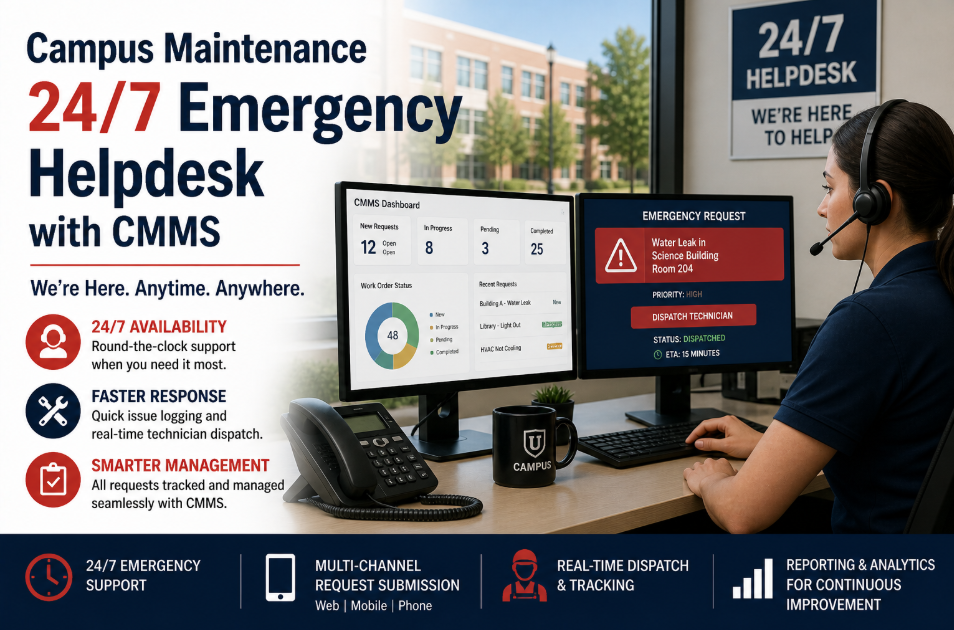
A CMMS emergency helpdesk is not just a phone number. It is a structured workflow that routes incoming emergency requests — from students, staff, BMS alerts, or sensor triggers — through a defined triage, dispatch, and escalation sequence without requiring a human dispatcher to be awake and reachable at all hours. The CMMS holds the on-call schedule, knows which technician is active for which building and trade, fires mobile alerts with work order context, and escalates automatically if the first responder does not acknowledge within a defined window. Every step is logged. Every response time is measured. Every emergency produces an audit record. Want to see how automated emergency dispatch can cut your campus response time by more than half? Start a free trial for 30 days and configure your first on-call tree, or book a demo to walk through a live emergency scenario from alert to resolved work order.
The Anatomy of a CMMS Emergency Response Workflow
Student submits via QR portal. BMS fires a fault webhook. Sensor threshold breaches. All three trigger the same emergency work order type in OxMaint — immediate priority, high visibility flag, timestamp locked at submission.
OxMaint classifies the emergency by type, building, system, and severity. Life-safety events (fire suppression, gas, flooding) automatically escalate to P1. HVAC faults in residence halls go P2. Cosmetic issues stay in standard queue even after hours.
The CMMS reads the live on-call schedule and fires a push notification — with full work order context, asset location, last service history, and required parts — to the assigned technician's mobile device. No dispatcher required.
Technician acknowledges within the defined SLA window (e.g., 10 minutes for P1). If they do not respond, OxMaint auto-escalates to the next technician in the escalation tree, then to the supervisor, with every step timestamped and logged.
Technician completes the work order on mobile — photos, parts used, labor time, resolution notes. Digital signature confirms completion. No paper. No re-entry. The record is compliance-ready the moment the technician submits.
Requester receives an automated closure notification with resolution summary. Management sees the incident in the emergency response dashboard. Response time, resolution time, and cost post automatically to the monthly KPI report.
Why Campus Emergency Response Fails Without Automation
Manual on-call lists become outdated the moment someone changes shift, takes vacation, or resigns. A 2 AM emergency routed to an unavailable technician wastes 20 to 30 minutes before the next person is tried — while the pipe is still running.
After-hours emergencies handled by phone call produce no CMMS record, no labor log, no parts cost, and no compliance documentation. When the regulator asks about a gas leak response time, "we think it was around 45 minutes" is not an acceptable answer.
Dispatching an electrician to a plumbing emergency — or a general maintenance tech to a chiller fault — wastes a response cycle and delays actual resolution. Without skill-based routing in the CMMS, dispatcher judgment is the only filter, and dispatchers are not always available.
Management learns about SLA breaches in the Monday morning meeting — three days after a P1 incident was responded to in 67 minutes instead of the required 15. Real-time escalation and alert systems surface SLA risk while there is still time to intervene.
How OxMaint Powers Campus 24/7 Emergency Operations
Build weekly or monthly on-call rosters by trade, building zone, and campus. The system always knows who is on-call right now. Swaps and substitutions update instantly without rebuilding the entire schedule.
Set SLA windows per priority level. If the first responder does not acknowledge in 10 minutes, escalate to the backup. Still no response in another 10 minutes, escalate to the supervisor. Every step is automatic and timestamped.
Emergency work orders fire push notifications to the iOS or Android app with full context: asset location, fault description, service history, required parts, and QR code for on-site access. No phone calls. No paper printouts.
Life-safety, operational, and cosmetic emergencies follow different routing paths. Skill-based dispatch ensures the right trade is always dispatched. Building-zone assignment ensures proximity. Both rules apply simultaneously without manual override.
Management sees every active emergency, its current status, and time-to-SLA-breach on a live dashboard. Historical response time, resolution time, and cost per incident type are available in one-click reports.
Every emergency produces a complete audit trail: report time, dispatch time, acknowledgment time, technician arrival, resolution, photos, parts, labor, and digital signature. Fully compliant with OSHA, NHS, and insurance documentation standards.
Ad Hoc Emergency Response vs CMMS-Automated Dispatch
| Emergency Scenario | Phone Tree Approach | OxMaint Automated Dispatch |
|---|---|---|
| 2 AM Pipe Burst | Call dispatcher, try 2–3 numbers, 20–40 min to reach someone | Push notification to on-call plumber in under 60 seconds, auto-escalates if no ack in 10 min |
| Chiller Fault on Weekend | Email from BMS, no one reads it until Monday, $12K+ in damage | BMS webhook fires work order, HVAC tech dispatched within 5 minutes, damage contained |
| Gas Leak in Lab | Caller contacts security, security tries maintenance, no log of who responded | P1 work order auto-created, timestamped, escalation tree fires, full audit trail on closure |
| SLA Compliance Report | Manual review of call logs, incomplete data, 3–4 hours to compile | One-click report: response time, resolution time, breach rate, cost by incident type |
Measured Impact: What 24/7 CMMS Dispatch Delivers
Frequently Asked Questions
How does OxMaint know which technician is on-call at 2 AM?
What happens if the on-call technician does not respond to the mobile alert?
Can students or building occupants submit emergency requests directly?
How does OxMaint document emergency response for OSHA and insurance audits?
Stop Hoping Someone Answers the Phone at 2 AM
OxMaint's 24/7 automated dispatch routes every campus emergency to the right technician in under 60 seconds — with escalation trees, mobile alerts, and full audit documentation built in. No phone trees. No gaps. No liability exposure from undocumented responses.