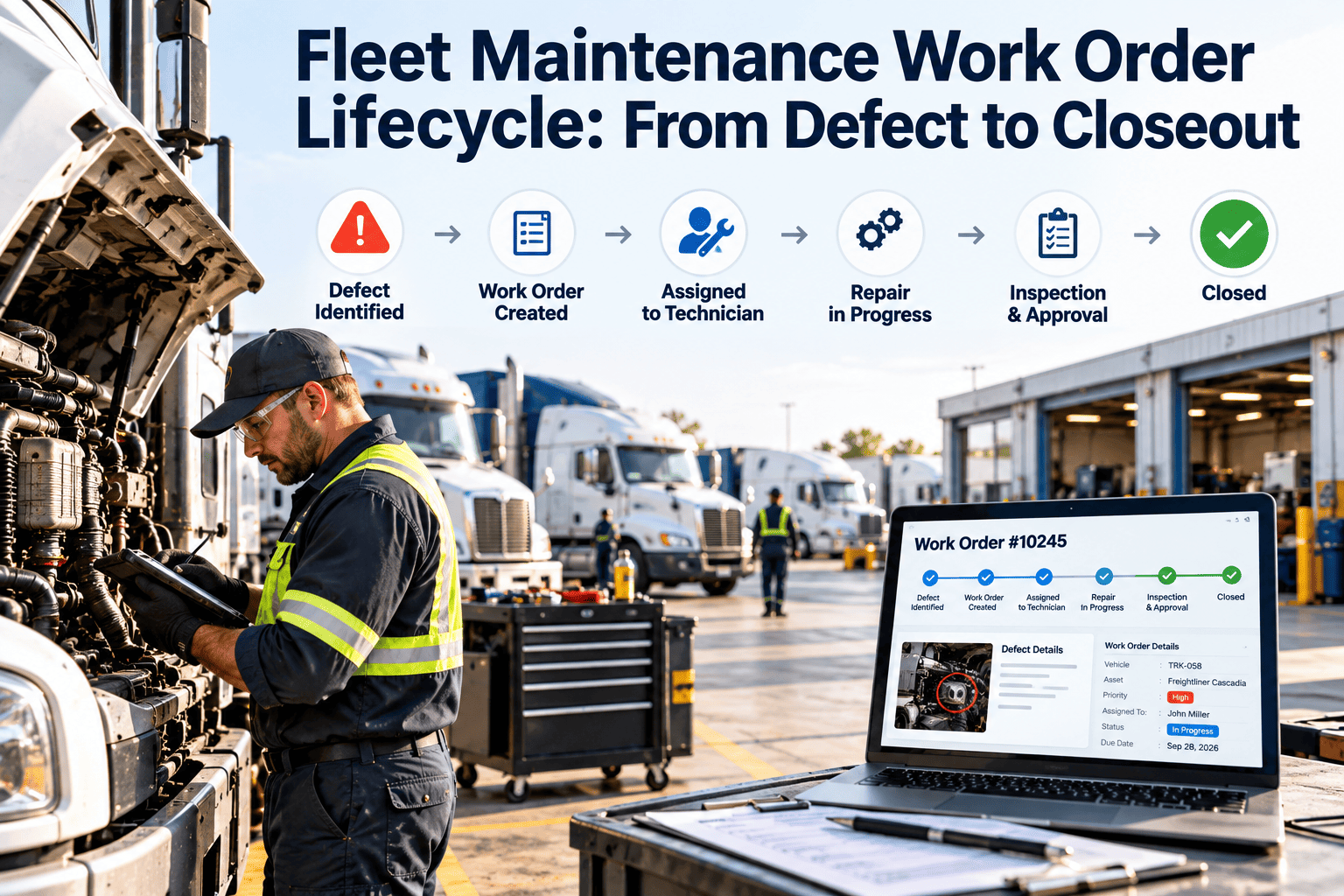
A fleet work order rarely fails at the repair itself. It fails in the handoffs: a driver notes a defect on paper, the note sits on a dashboard, the shop hears about it two days later, and the part is ordered after the truck is already on the lift. Each gap adds downtime, repeat repairs, and missing records. This guide walks through every stage of the fleet maintenance work order lifecycle, from the first reported defect to a verified closeout, and shows how a fleet maintenance software workflow keeps each stage visible, owned, and auditable.
Fleet Maintenance Work Order Lifecycle: From Defect to Closeout
Track every defect through triage, approval, parts, repair, quality check, and closeout so no vehicle returns to service without a documented fix.
Why Work Orders Stall Between Defect and Closeout
The repair is usually the shortest part of the timeline
- Waiting time before anyone reviews the reported defect
- Waiting time for approval on repairs above a cost threshold
- Waiting time for parts that were never checked against stock
- Waiting time for a bay, a technician with the right skills, or a vendor slot
- Waiting time after the repair while paperwork is finished
Common symptoms fleet managers recognize
- The same defect is reported by several drivers because nobody confirmed it was received
- Work orders stay open for weeks because closing them is treated as clerical work
- Technicians write vague notes such as "fixed" with no cause, part, or labor detail
- Vehicles are dispatched with an unverified repair because the status was unclear
- Repeat failures go unnoticed because asset history is spread across paper and spreadsheets
The Seven Stages of a Fleet Work Order
Defect capture
Triage and severity
Approval and scoping
Parts and resource planning
Repair execution
Quality check and return to service
Closeout and history
Work Order Status Definitions That Prevent Confusion
Every status needs an owner and an exit rule
| Status | Owner | Exit Condition | Common Failure |
|---|---|---|---|
| Reported | Fleet controller | Severity assigned | Defects sit unread |
| Awaiting approval | Fleet manager | Estimate approved or rejected | Approvals wait in email |
| Awaiting parts | Parts planner | All parts on hand or ordered with a date | Vehicle blocks a bay |
| Scheduled | Shop lead | Technician starts the job | Scheduled date slips silently |
| In progress | Technician | All tasks completed and logged | Labor logged in bulk at shift end |
| Pending verification | Lead technician | Check passed and signed off | Vehicle leaves before sign-off |
| Closed | Fleet controller | Costs posted and history updated | Orders left open for reporting |
See Where Your Work Orders Are Really Waiting
Set up your defect-to-closeout workflow in Oxmaint and give every open work order a clear status, owner, and next step.
Triage Matrix: Matching Severity to Response
Use a simple two-axis rule so dispatchers and technicians agree
Paper and Spreadsheets Versus a Connected Lifecycle
Disconnected process
- Inspection forms are collected in batches and re-typed
- Approvals travel through calls, texts, and email
- Parts availability is checked by walking to the storeroom
- Closeout depends on someone remembering to update a sheet
- Repeat defects are found only when a manager recalls them
Connected process
- Driver defects create work orders as they are submitted
- Approval rules route estimates to the right person
- Parts are reserved against the work order automatically
- Closeout requires verification and cost posting to the asset
- Asset history flags repeat failures at the moment of triage
Compliance Records Built Into the Lifecycle
Documentation is a byproduct, not a separate task
KPIs That Show Whether the Lifecycle Is Healthy
Measure the stages, not only the repair
Closeout Checklist for Every Work Order
Do not close until each line is true
- The original defect is linked and marked resolved or not required
- Failure cause and repair action are recorded in specific terms
- Actual labor and parts match what was consumed
- Additional findings are raised as their own work orders
- A verification check is complete and signed off by someone other than the repairing technician where practical
- Photos or attachments support the repair where they add value
- Warranty or vendor claims are flagged when the failed part qualifies
- The next preventive maintenance due date is confirmed or reset
- Downtime start and end are recorded for reporting
How Oxmaint Supports Each Stage
Capabilities mapped to the lifecycle
- Defect capture: mobile inspections create work orders from failed checklist items, with photos attached.
- Triage and scheduling: priorities, assignments, and due dates keep the queue ordered by risk.
- Parts control: inventory tracking shows availability and links consumption to each job.
- Execution: technicians log tasks, time, and notes from a phone in the bay or roadside.
- Asset history: every repair, cost, and inspection stays on the vehicle record for trend review.
- Reporting: dashboards show backlog, downtime, cost per asset, and preventive maintenance completion.
Frequently Asked Questions
What is a fleet maintenance work order lifecycle?
How many statuses should a work order have?
Should driver defects create work orders automatically?
Why track repair verification separately?
Can Oxmaint fit an existing shop process?
Close the Gap Between Defect and Closeout
Give your drivers, technicians, and managers one shared work order workflow with clear ownership, parts visibility, and audit-ready records.