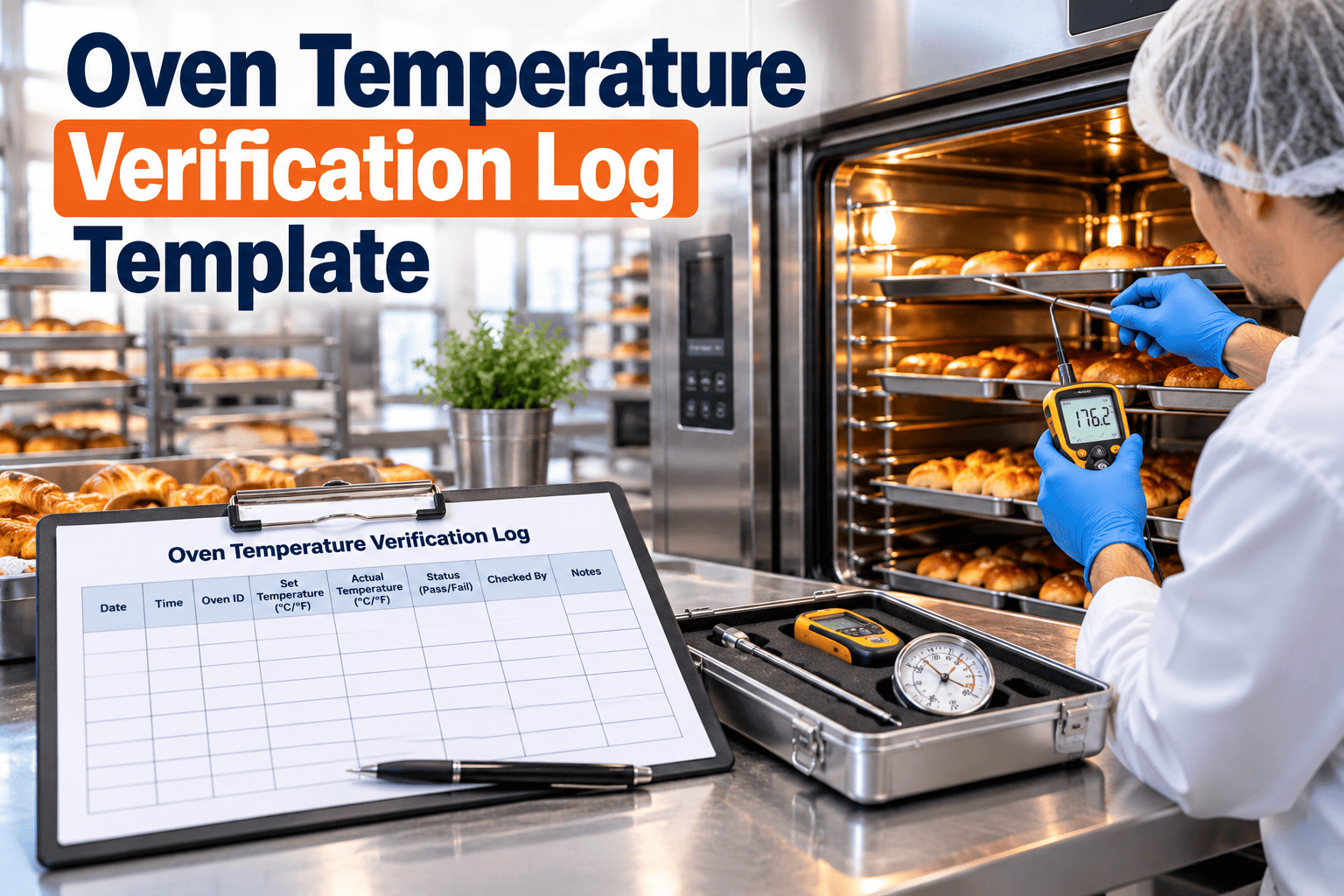
An oven that displays 180 degrees does not always bake at 180 degrees. Thermocouples age, burners drift, fans wear, and doors leak heat, so the number on the panel and the real bake temperature slowly separate. An oven temperature verification log records setpoint, measured reading, tolerance, and correction each time you check, which proves ovens bake as intended. This page gives you an editable log layout, completion rules, and a way to move it into a digital workflow with Oxmaint maintenance software.
Oven Temperature Verification Log Template: Editable Format for Bakery Records
Record setpoints, actual readings, and corrections so you can show every oven stayed within tolerance.
What an Oven Temperature Verification Log Proves
- The oven was checked with a reference instrument that has a calibration record
- The difference between displayed and actual temperature was measured, not assumed
- Out-of-tolerance results triggered a documented correction
- Product baked during a deviation can be identified and assessed
Verification vs Calibration
The Log Template
Copy the layout below into your spreadsheet or document system. Example values are illustrative only; set tolerances from your validated product and process requirements.
| Date and Time | Oven ID and Zone | Product or Program | Setpoint | Actual Reading | Tolerance | Variance | Within Tolerance | Reference Instrument ID | Corrective Action | Verified By |
|---|---|---|---|---|---|---|---|---|---|---|
| Example date, 06:00 | Oven 2, Zone A | Bread program | Enter value | Enter value | Per spec | Actual minus setpoint | Yes or No | Probe ID | None required | Initials |
| Example date, 06:00 | Oven 2, Zone B | Bread program | Enter value | Enter value | Per spec | Actual minus setpoint | No | Probe ID | Work order raised, line held | Initials |
Field-by-Field Completion Rules
How to Verify an Oven Step by Step
Mapping Oven Zones So Readings Are Comparable
Different locations inside an oven can run at different temperatures. Define positions and keep them fixed.
Replace Paper Oven Logs With Scheduled Digital Checks
Oxmaint can schedule verification tasks, capture readings on mobile devices, and open work orders when an oven fails its check.
How Often Should Ovens Be Verified?
There is no single correct interval. Set frequency from product risk, oven history, and customer or regulatory requirements.
| Situation | Reasonable Approach |
|---|---|
| Critical bake step with food safety impact | More frequent verification, tied to the HACCP plan |
| Oven with recent temperature complaints | Increase checks until the cause is found and fixed |
| After thermocouple, burner, or controller repair | Verify before returning the oven to production |
| Stable oven with strong history | Maintain the interval justified by recorded results |
Common Causes of Oven Temperature Variation
What to Do When an Oven Fails Verification
- Stop or hold affected product according to your deviation procedure
- Check the reference instrument calibration status first
- Repeat the measurement to confirm the result
- Raise a corrective work order and record the cause found
- Re-verify after the repair and document the return to service
- Have quality review product baked since the last good check
Before and After: Paper vs Digital Logs
Using Oxmaint for Oven Maintenance and Records
| Oxmaint Capability | Use in Oven Verification |
|---|---|
| Asset management | One record per oven with zones, sensors, and history |
| Preventive maintenance | Recurring verification and thermocouple checks |
| Mobile inspections | Enter readings on the floor with required fields |
| Work orders | Corrective repair when readings fall outside tolerance |
| Reporting | Trend drift by oven and prove completion to auditors |
Frequently Asked Questions
What tolerance should I use?
Can I use the oven display as the reference?
Who should sign the log?
How long should records be kept?
Can the template be digitized?
Choosing the Right Reference Instrument
The log is only as trustworthy as the instrument that produces the actual reading. Select and control it carefully.
| Instrument Type | Typical Use | Points to Control |
|---|---|---|
| Handheld probe thermometer | Spot checks of air or product temperature | Calibration status, probe damage, response time |
| Data logger with probes | Temperature profile over a full bake cycle | Battery, sampling interval, heat protection |
| Fixed oven thermocouple | Continuous control and recording | Drift, placement, wiring condition |
| Wireless thermal profiler | Tracking temperature travelling with product through tunnel ovens | Barrier performance, download and review |
Reference Instrument Rules
- Assign every reference instrument a unique ID and list it on the calibration schedule
- Do not use an instrument that is overdue or damaged
- Store probes safely so they are not dropped or exposed to heat damage
- Record the instrument ID on every log entry so readings can be traced
Spot Checks vs Full Temperature Profiles
Two verification styles give different information. Many bakeries use both.
When to Run a Full Profile
- After installation, relocation, or major rebuild of an oven
- After replacing burners, elements, fans, or control systems
- When product shows uneven colour, texture, or bake level
- When a customer or scheme requires periodic uniformity studies
Good Record-Keeping Rules for the Log
A log with gaps or corrections that cannot be explained weakens trust in all of your records.
Troubleshooting Guide: Reading Patterns in the Log
The log becomes a diagnostic tool once you look at patterns, not single readings.
| Pattern in the Log | Possible Cause | First Check |
|---|---|---|
| Actual always lower than setpoint | Sensor drift, heat loss, or element wear | Reference probe calibration, then door seals |
| Actual always higher than setpoint | Controller or sensor offset | Controller settings and sensor condition |
| One zone consistently different | Burner, fan, or damper problem in that zone | Zone burner, airflow, and ductwork |
| Large swings between readings | Poor control tuning or unstable fuel or power | Controller tuning and utility supply |
| Gradual drift over weeks | Ageing thermocouple | Replace or recalibrate the sensor |
| Sudden step change | Repair, setting change, or damage | Review work orders and recent changes |
Connecting the Log to Your Food Safety System
For products where baking is a kill step or a critical control, temperature verification supports your HACCP or preventive controls plan.
- Identify which ovens and programs are covered by critical limits
- Use the log to show the oven delivers the validated time and temperature
- Define the corrective action for a deviation in the same procedure that defines the limit
- Include oven verification in internal audits and management review
Quality Questions the Log Helps Answer
- Was the oven within tolerance when a customer complaint batch was baked
- Does temperature drift correlate with colour or texture complaints
- Which ovens need repair or replacement first
- Are verification checks being completed on time
Oven Maintenance Tasks to Pair With Verification
Verification finds problems. Preventive maintenance prevents many of them.
Example Weekly Review Routine
A log that nobody reviews only proves that someone wrote numbers. A short routine turns it into control.
Different Oven Types, Different Verification Considerations
| Oven Type | Common Concerns | Verification Notes |
|---|---|---|
| Deck oven | Variation between decks and top versus bottom heat | Check each deck separately and record deck position |
| Rack or rotating oven | Airflow, rotation speed, and door sealing | Measure with rack in place and check at several heights |
| Tunnel or travelling oven | Zone balance and belt speed | Verify each zone and use a profiler through the full length |
| Convection oven | Fan performance and load effects | Verify loaded and unloaded where relevant |
| Spiral oven | Humidity, belt tension, and airflow path | Check multiple tiers and record belt speed |
Practical Tips for Safe Verification
- Use heat-resistant gloves and follow lockout rules when entering or opening equipment
- Avoid contact between probes and metal surfaces unless the method requires it
- Allow instruments to stabilise before recording the value
- Keep the oven door open for as little time as possible during a check
Why Oven Records Matter Beyond Audits
Temperature records protect product quality and reduce waste, as well as satisfying auditors.
- Records support recipe and process changes with evidence
- Maintenance teams use the history to plan repairs before breakdowns
- New staff learn what normal looks like for each oven
Setting Up the Digital Version in a CMMS
Training Staff to Complete the Log Correctly
- Show new staff how to place probes, wait for stable readings, and record values honestly
- Explain that a failed check is useful information, not a personal failure
- Practise the deviation procedure so staff know whom to call and what to hold
- Test understanding by reviewing a sample of completed entries together
- Refresh training whenever the form, tolerance, or oven changes
Signs the Log Is Being Filled in Without Care
- Identical readings recorded over many days
- Entries made in bulk at the end of a shift or week
- No failed checks over a long period despite known oven problems
- Different handwriting for entries supposedly made by one person
Prove Every Oven Bakes Within Tolerance
Turn temperature checks, calibration, and repairs into one connected maintenance record that is ready for any audit.