A pre-op inspection that is performed but not signed is, in practice, an inspection that never happened. Missing sign-offs are among the most common record gaps in food plants, and they usually come from a form that is unclear about who signs, when and for what. This guide describes a pre-op inspection form layout that captures the inspector, time, findings and release decision for each line before production begins, and shows how to move it into work order management software without losing the structure.
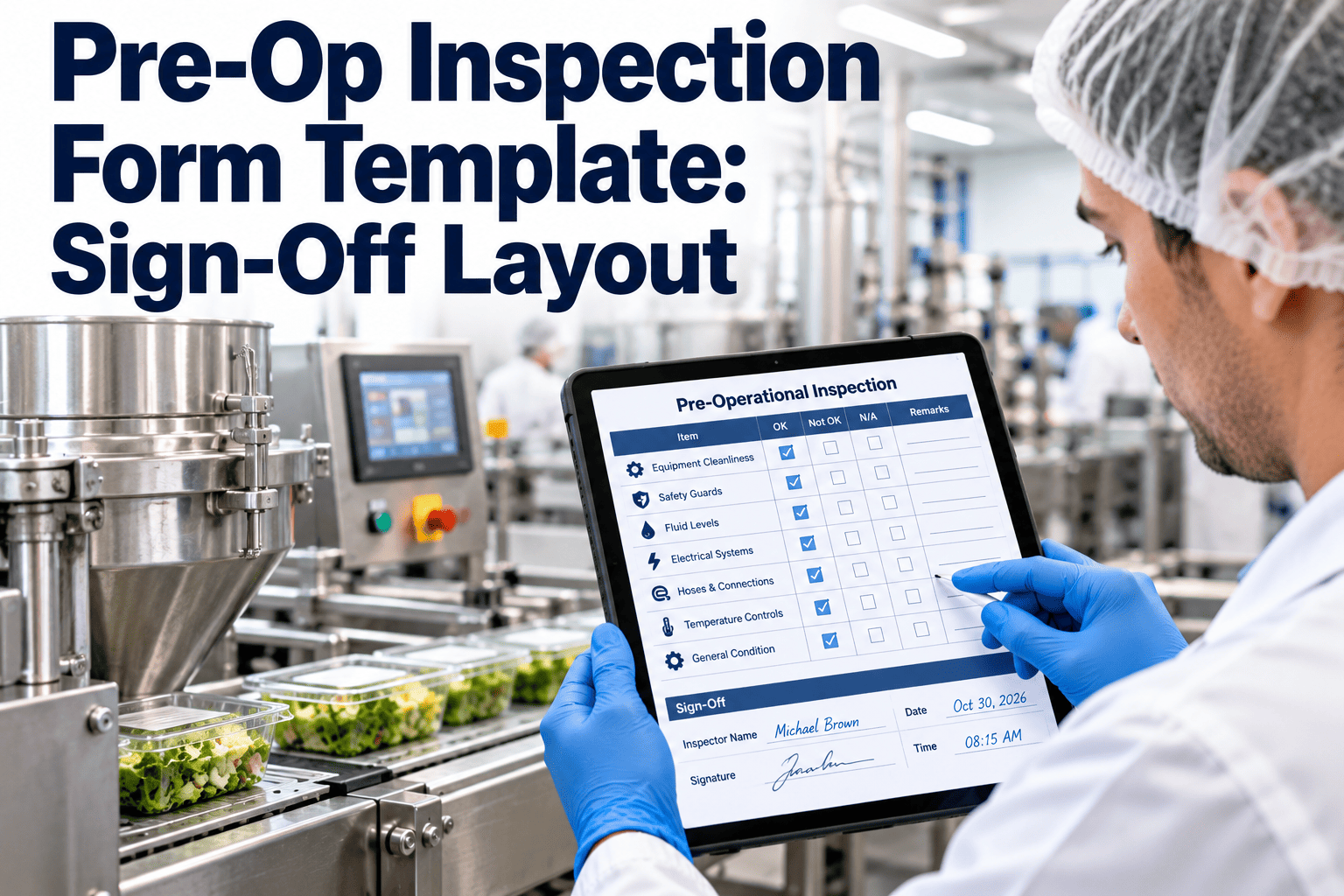
Pre-Op Inspection Form Template: Sign-Off Layout
Capture inspector, time, findings and release decision for each line before production begins, in a form designed so that a missing signature is obvious at a glance.
Design faults that cause blank signature lines
Blank lines are often blamed on careless staff, but form design deserves a share of the blame. A form can quietly encourage skipped steps.
Signature at the bottom of a long page
If the sign-off sits on page two, it is easy to forget when the line is waiting. Put the decision block where the inspector finishes the walk, and keep the form to one page per line.
One signature for everything
A single initial line cannot show who inspected, who corrected and who released. Separate roles make accountability visible.
No time field
Without a time, a form cannot show that inspection happened before startup. Time stamps prove sequence, which is the whole purpose of a pre-op check.
No place for failures
If the form only has tick boxes, inspectors tend to tick pass rather than describe a problem. A visible findings area makes honest recording easier.
Four blocks of the form, in order
A clear form moves the inspector from context to evidence to decision. Each block has one job.
Header: context
- Facility, line or equipment name and tag number.
- Date, shift and scheduled start time.
- Previous product, next product and allergen status.
- Related sanitation and maintenance work order numbers.
Inspection items: evidence
- Grouped by zone in walking order.
- Pass, fail or not applicable for each item.
- Critical items clearly marked and required.
- Space for sanitizer verification result if used.
Findings: action
- Item, location, severity and description.
- Corrective action taken and by whom.
- Re-inspection time and result.
- Link to a maintenance work order if repair is needed.
Sign-off: decision
- Inspector name, signature and time.
- Verifier or releaser name, signature and time.
- Decision: release, release with restriction or hold.
- Notes for the next shift if conditions apply.
Who signs what, and when
Spell out the signatures the form requires and the moment each is given. Ambiguity here produces the blanks you are trying to prevent.
| Signature | Who signs | When | What it confirms |
|---|---|---|---|
| Sanitation complete | Sanitation lead | End of cleaning, before inspection | The cleaning procedure was followed and recorded |
| Maintenance clear | Maintenance lead | After repairs, before inspection | Work is closed, tools counted and lockout removed |
| Inspection performed | Authorized inspector | At the end of the walk-through | Every item was checked and findings recorded |
| Corrections verified | Inspector or second person | After re-clean or repair | Failed items now pass |
| Release decision | Quality or designated releaser | Before first product | The line is approved to start |
Rule of independence
The person who cleaned or repaired the line should not be the one who approves the release.
Guidance for completing each field
Print this guidance on the back of the form or attach it as help text in the digital version so everyone fills the form in the same way.
| Field | How to complete | Common error |
|---|---|---|
| Time of inspection | Record the actual start and finish of the walk-through | Rounding to the scheduled start |
| Pass or fail | Mark every item, using not applicable only where the item truly does not exist | Leaving blanks for items that were skipped |
| Finding description | Name the item, exact location and what was seen | Writing not clean with no location |
| Corrective action | State what was done, by whom and with which method | Writing fixed with no detail |
| Re-inspection | Record a new time and name for the passing check | Reusing the original time and initials |
| Release decision | Select one outcome and add conditions if restricted | Signing without selecting an outcome |
Sample inspection items to build into the form
Adapt the list to each line. Keep critical items few and specific so that a fail is meaningful and a pass is trusted.
| Zone | Sample item | Critical | Evidence suggested |
|---|---|---|---|
| Infeed | Hopper, chute and feeder free of residue and foreign material | Yes | Note only for fails |
| Conveying | Belt surface, underside and return rollers clean | Yes | Photo for fails |
| Processing | Blades, nozzles and screens clean, sharp and undamaged | Yes | Photo for fails |
| Seals | Gaskets and shaft seals intact and seated | Yes | Note and work order for fails |
| Guarding | Guards fitted and interlocks working | Yes | Pass or fail |
| Controls | Operator panel and sensors clean and dry | No | Note for fails |
| Environment | Floor, drains and overhead structure near the line are clean | No | Note for fails |
| Chemicals | Sanitizer verified and no residue present | Yes | Reading value |
Three release outcomes and what each requires
A form that only offers pass or fail pushes inspectors toward the wrong choice when conditions are mixed. Three clear outcomes keep decisions honest.
Release
- All critical items pass.
- No open findings that affect product.
- Signed by the authorized releaser.
Release with restriction
- Minor findings remain, or a section is isolated.
- Restriction is described in plain words.
- Follow-up task has an owner and a due time.
Hold
- A critical item failed or evidence is missing.
- Line stays tagged and marked unavailable.
- Release requires a new inspection and signature.
Handling mistakes on a signed form
People make errors, and the way you handle them shows whether the record can be trusted. The rules should be simple and applied the same way each time.
On paper
- Draw a single line through the error so it remains readable.
- Write the correct entry beside it with initials, date and time.
- Never use correction fluid or erase entries.
- Late entries are marked as late, with the actual time written.
In software
- Edits keep a history of what changed, who changed it and when.
- Submitted forms are locked, with changes made as time-stamped amendments.
- Reasons for amendments are required.
- Reports can show amended records for review by quality.
What happens to the form after the line starts
A signed form is the start of a record, not the end. Review turns individual forms into improvements.
| Timing | Reviewer | What they check | Action |
|---|---|---|---|
| Same shift | Sanitation or quality supervisor | All signatures present and findings closed | Return incomplete forms immediately |
| Weekly | Quality manager | Repeat findings, long corrections and unusual patterns | Raise sanitation or maintenance tasks |
| Monthly | Cross-functional team | Fail rates by line, shift and item | Adjust criteria, training or equipment plans |
| Annually | Food safety team | Form design, criteria and retention rules | Update the template and training |
Retention
Keep records for the period your regulator, customers and certification scheme require, and make sure older records remain searchable by line and date.
Where failed items go next
Many pre-op findings point to equipment problems that cleaning will never fix. A good form routes them to the people who can.
Worn gasket
Corrective work order, part from inventory, verification on closure.
Recurring leak
Inspection of seals and lubrication added to preventive maintenance.
Damaged guard
Line hold until repair, then re-inspection and release.
Hard-to-clean area
Improvement request for design change at the next planned shutdown.
Getting every inspector to complete the form the same way
Consistency across shifts is what makes a form comparable and defensible. Short, repeated training works better than a long annual session.
Calibrate with photographs
Collect images of acceptable and unacceptable conditions for each critical item and review them together every quarter.
Walk the route together
New inspectors complete at least several inspections alongside an experienced person and compare findings before signing independently.
Review real records
Use anonymized completed forms in refresher sessions to discuss what a strong entry looks like and why a weak one fails an audit.
Questions an auditor may ask about your sign-offs
Run this list as an internal check before an audit. Any question you cannot answer quickly marks a gap in the form or the process.
- Who is authorized to sign as inspector and as releaser?
- How do you know the inspection happened before production?
- What stops a form being closed with a blank signature?
- How are amendments recorded and reviewed?
- How are failed items followed up and who confirms closure?
- Can you show records for a specific line on a specific date?
- How often are completed forms reviewed for trends?
- What training do inspectors receive and how is it recorded?
Moving to the new layout without disrupting startup
Changing a form that is used every morning needs care. A short, structured rollout avoids confusion and gives inspectors a chance to shape the final version.
| Step | Activity | Owner |
|---|---|---|
| Audit current forms | Collect a month of completed forms and mark blanks, vague entries and missing times | Quality |
| Draft the layout | Build the four blocks with required roles and decisions, and review with inspectors | Quality and sanitation |
| Trial on one line | Run in parallel with the old form for a week, then replace it | Line supervisor |
| Configure in Oxmaint | Set required fields, roles, photos and work order links | Maintenance planner |
| Review and extend | Compare blank-signature rates, then add further lines | Cross-functional team |
Indicators that the sign-off layout is working
Choose a handful of measures before rollout so improvement can be shown with data from your own plant.
Blank signature rate
Forms found incomplete at review, which should fall toward zero.
Inspection before start
Share of forms with a release time earlier than first product.
Closed findings
Failed items with a passing re-inspection recorded.
Retrieval time
Minutes needed to produce a requested record during an audit.
Make a missing signature impossible to miss
Use required fields, role-based sign-off and time stamps so no pre-op form closes without a decision.
Two versions of the same completed form
Compare how the same inspection reads when it is recorded loosely and when it is recorded well.
Weak record
- All items ticked with the same pen at the same moment.
- One set of initials with no role or time.
- Finding written as dirty, with no location.
- No re-inspection time recorded.
- Release decision implied by the end of the form.
Strong record
- Items marked in route order with realistic times.
- Inspector, verifier and releaser each signed with time.
- Finding names the item, place and severity.
- Corrective action and passing re-inspection both recorded.
- Explicit decision selected and conditions noted.
What changes when the form lives in Oxmaint
The layout stays familiar, and the system adds enforcement and traceability that paper cannot provide.
Required fields
The form cannot be submitted until critical items, time stamps and decision fields are completed.
Role-based sign-off
Only authorized users can sign as inspector or releaser, which prevents self-approval.
Linked actions
A failed item can open a corrective work order against the asset, and the form shows when it closes.
Photos and notes
Inspectors attach images of findings so the next person sees exactly what was found.
Scheduling
Recurring inspections generate by line and shift, so forms are ready before the walk-through.
Search and reports
Records can be found by line, date or finding, and trends can be reviewed across shifts.
A simple sign-off routine for every shift
Consistency matters more than complexity. Teach one routine and repeat it every day.
Pre-op inspection form FAQs
How many signatures should a pre-op form have?
At least the inspector and a releaser, with sanitation and maintenance clearance where relevant. Each role should be separate so responsibility is visible.
Should the form be one page per line?
Yes where possible. A single page keeps the sign-off in view, and complex lines can use sections that share one decision block.
What if the inspector finds a problem after signing?
Reopen the record, add a time-stamped note, correct the issue and re-inspect. Never overwrite the original entry.
Can this form be used on a tablet?
Yes. Oxmaint supports mobile inspections with required fields, photos and role-based sign-off.
How do I handle multiple lines in one room?
Use one form per line or one form with separate decision blocks per line. A demo can show common setups.
Every line released with a name, a time and a decision
Replace unsigned paper with a pre-op workflow that makes accountability visible and retrievable.