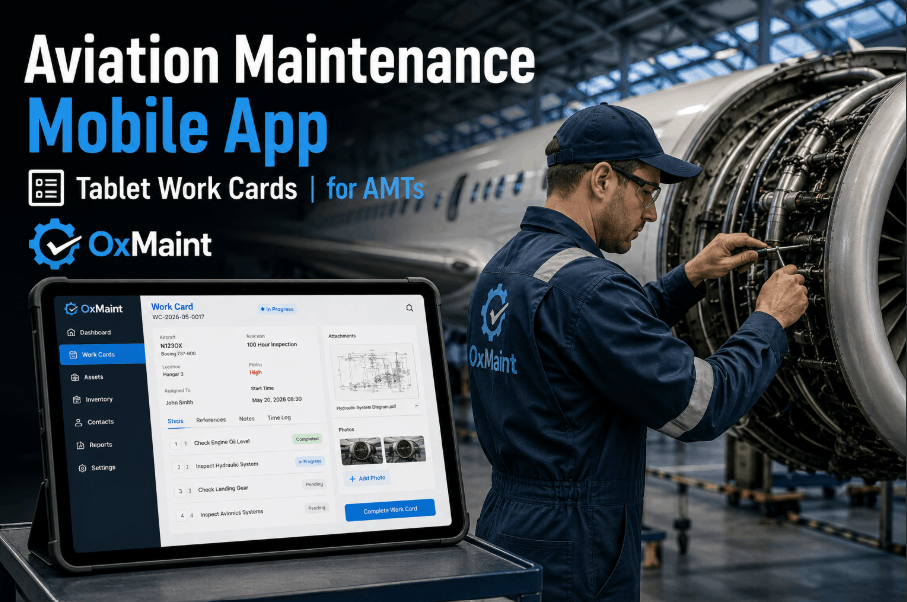
Aviation maintenance mobile apps are reshaping how line maintenance supervisors and AMT leads operate on the ramp, in the hangar, and across remote stations where Wi-Fi coverage is unreliable and paper work cards slow every job down. OxMaint delivers a mobile-first AMT platform built for iPad, Android, and rugged tablets — giving technicians offline-capable digital work cards, embedded AMM and IPC access, photo evidence capture, and electronic sign-off that syncs automatically the moment connectivity returns. Sign Up Free and eliminate paper-based task card workflows from your line maintenance operation today.
What Is an Aviation Maintenance Mobile App?
An aviation maintenance mobile app is a tablet or smartphone platform that replaces paper task cards, manual logbooks, and desktop-bound MRO systems with digital workflows that AMTs can execute entirely from the ramp or hangar floor. For line maintenance supervisors managing multi-aircraft turns across dispersed stations, a purpose-built AMT mobile app consolidates work card issuance, technician sign-off, inspection evidence, and parts request into a single connected workflow — without requiring a continuous internet connection to function. Book a Demo with OxMaint to see how the platform handles offline work card execution and automatic sync across your maintenance network.
AMTs complete task cards, capture photos, and submit sign-offs without live connectivity. All data queues locally and syncs automatically when Wi-Fi or cellular returns — no manual re-entry required.
Technicians access Aircraft Maintenance Manual procedures and Illustrated Parts Catalog references directly within the work card — eliminating the need to cross-reference physical manuals on the ramp.
AMTs photograph defects, completed tasks, and inspection findings directly within the work order — creating a structured visual audit trail linked to the specific task, aircraft, and technician.
Authorized technicians and supervisors apply digital signatures to completed task cards with timestamp, license number, and authorization scope — fully replacing manual pen-and-ink task card sign-off.
Core Capabilities Every Aviation Maintenance Mobile App Must Deliver
A line maintenance mobile app that serves AMT leads and supervisors across mixed-fleet operations requires capabilities that go well beyond a simple checklist. The following capability pillars define a production-ready aviation tablet app for hangar and ramp environments. Sign Up Free on OxMaint to access these capabilities across iPad, Android, and rugged tablet deployments from day one.
Work cards are issued digitally from the maintenance control system and pushed directly to assigned AMTs on their tablets. Technicians step through each task card item on-device, capturing completion status, measurement entries, and observations — without returning to a desktop workstation or handling paper task cards.
AMTs operating at remote outstations, in RF-shielded hangars, or on congested airport Wi-Fi networks need uninterrupted workflow continuity. OxMaint's offline mode stores the complete work package locally on the device — allowing full task card execution, photo capture, and sign-off without connectivity. Book a Demo to see how the sync engine handles conflict resolution when multiple AMTs work the same aircraft offline.
Technicians access real-time parts availability, part number cross-references, and bin locations directly from the work card view — submitting parts requests to the stores team without leaving the task. Eliminating physical trips to the parts counter or phone calls to maintenance control reduces average turn times on aircraft-on-ground events.
Line maintenance supervisors configure inspection forms with required fields, conditional logic, and mandatory photo attachments — ensuring every inspection generates a complete, structured digital record rather than a free-text notation. Inspection findings auto-generate corrective work orders within the same platform, with no manual handoff required.
OxMaint supports BYOD deployment on iOS and Android devices alongside dedicated rugged tablet deployments — providing consistent functionality whether the operation uses personal devices, airline-issued iPads, or MIL-SPEC handheld computers. Single app binary, one management portal, uniform AMT experience across hardware platforms.
Line maintenance supervisors monitor active work card status, technician location, overdue tasks, and aircraft readiness across all assigned tails from a single dashboard view — without calling individual AMTs for status updates. Real-time task completion feeds reduce radio traffic and give supervisors the situational awareness to re-prioritize resources during compressed turn windows. Book a Demo to walk through the supervisor dashboard in a live demo environment.
Every work card execution, sign-off, photo, and inspection record is stored with a complete timestamp, user identity, and device audit trail — structured for FAA, EASA, and CAAC records requirements. Digital records are searchable by tail number, task card reference, technician, and date — eliminating the hours spent locating paper records during unannounced audits. Sign Up Free to evaluate OxMaint's compliance record structure against your regulatory documentation requirements.
Aviation Maintenance Mobile App: Capability Reference
The table below maps each critical mobile MRO capability to its functional scope, primary user, and platform support within the OxMaint aviation maintenance app.
| Capability | Functional Scope | Primary User | Device Support |
|---|---|---|---|
| Digital Work Cards | Task card issuance, step-by-step execution, completion capture | AMT / Technician | iPad, Android, Rugged Tablet |
| Offline Mode | Full work package access without connectivity; auto-sync on reconnect | AMT / Line Maintenance Supervisor | All platforms |
| Photo Evidence | Defect capture, task completion photos linked to work order record | AMT / Inspector | iPad, Android, Rugged Tablet |
| Electronic Sign-Off | Digital certification with timestamp, license number, authorization scope | AMT / Certifying Staff | All platforms |
| AMM / IPC Access | Embedded manual reference within active work card view | AMT / Technician | iPad, Android, Rugged Tablet |
| Live Parts Lookup | Real-time parts availability, bin location, stores request submission | AMT / Planner | All platforms |
| Supervisor Dashboard | Real-time task status, technician activity, aircraft readiness view | Line Maintenance Supervisor | iPad, Tablet, Desktop |
| Audit Records | Searchable timestamped records for regulatory compliance documentation | Quality / Compliance | All platforms |
Deploying an Aviation Maintenance Mobile App: 6 Implementation Stages
Rolling out a mobile MRO app across a line maintenance operation requires a structured deployment approach that connects device strategy, workflow configuration, and regulatory compliance from the first pilot to full fleet coverage.
Define whether the deployment uses airline-issued iPads, BYOD Android devices, rugged tablets, or a mixed hardware environment. Confirm network coverage at each station to size offline mode requirements. Document device management policy (MDM) requirements before application rollout begins.
Translate existing paper task cards, job cards, and inspection check sheets into digital form templates within OxMaint. Configure mandatory fields, conditional task logic, required photo attachments, and sign-off authority levels for each work card type used in line maintenance operations.
Create user accounts for all AMTs, certifying staff, and supervisors with role-based permissions that reflect actual authorization levels. Configure electronic sign-off authority against each technician's license category, ratings, and authorization scope — ensuring digital sign-off records meet the same regulatory standard as manual endorsements.
Launch the mobile app at a single high-volume line station with a selected group of AMT leads and supervisors. Run parallel paper and digital workflows for two to four weeks to validate data completeness, offline sync reliability, and sign-off record integrity before decommissioning paper task cards at that station.
Before full rollout, conduct a records audit comparing digital work order outputs against existing paper record standards for FAA, EASA, or applicable authority requirements. Document the electronic records retention policy, backup procedure, and audit access process for the quality management system.
Expand the deployment to all stations in the maintenance network, with supervisor dashboards configured to reflect the full operational picture. Track task card cycle time, sign-off turnaround, defect capture rates, and audit finding frequency as KPIs demonstrating the mobile app's impact on line maintenance performance.
Aviation Mobile MRO: Performance Benchmarks
Use these operational benchmarks to evaluate the impact of a mobile-first AMT workflow against your current paper-based or desktop-dependent line maintenance process.