It is 2:43 AM when the kiln drive motor seizes. Raw meal backs up in the preheater tower, clinker cooling stops, and the cement mill sits idle within minutes. By the time the emergency crew arrives, diagnoses a failed bearing, and sources a replacement, fourteen hours of production are gone, costing the plant well over $280,000 in lost output alone. The difference between that outcome and a contained two-hour stop is rarely the severity of the failure — it is how fast the right people, parts, and instructions reach the right asset, something a structured breakdown workflow inside OxMaint is built to compress.
Emergency Breakdown Workflow: From Alarm to Restart in Minutes, Not Hours
Kilns, mills, crushers, and conveyors do not fail on a schedule. The plants that recover fastest are the ones whose breakdown response is a workflow, not a phone tree.
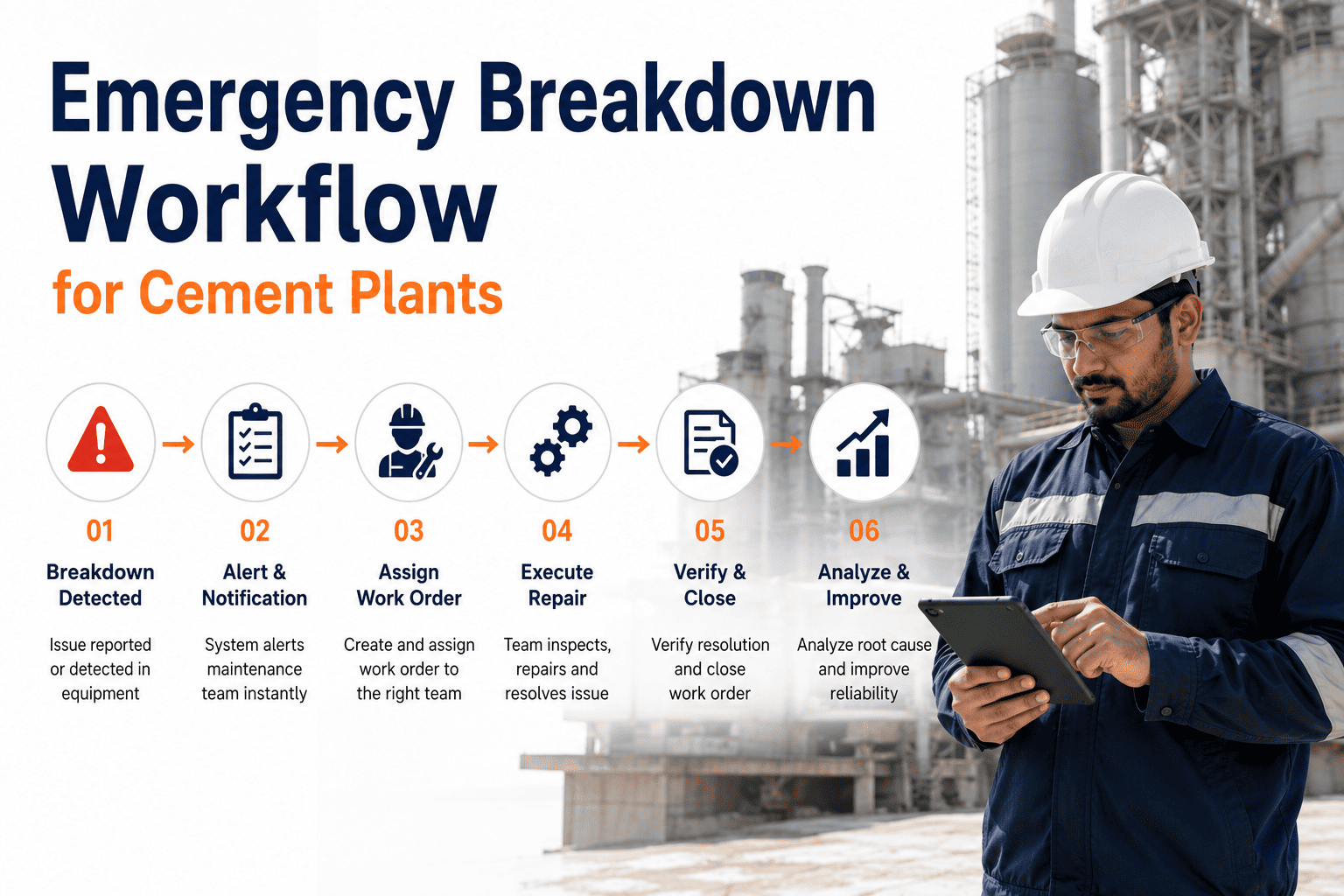
The Anatomy of a Cement Plant Breakdown Response
Failure Detected
An alarm trips, an operator notices an abnormal sound, or a sensor threshold is breached. Without a defined workflow, this moment often produces a phone call instead of a logged event.
Emergency Work Order Created
The event is logged as a priority-one work order with asset, location, and symptom attached, instead of a verbal description that loses detail with every handoff.
Right Technician Notified Automatically
The system routes the alert to the on-call technician qualified for that asset class, rather than whoever happens to answer the radio first.
Parts and History Checked Before Arrival
The technician sees the asset's failure history and current spare parts availability on the way to the equipment, cutting the diagnosis time spent guessing what already failed before.
Repair, Closure, and Root Cause Logged
The work order closes with parts used, downtime hours, and root cause noted — data that turns this breakdown into prevention for the next one instead of a forgotten incident.
Why Plants Lose Hours Before the Repair Even Starts
No Single Source of Truth
The failure is reported in three different places — a radio call, a logbook, and a text message — and none of them reach the planner who could escalate it fastest.
Wrong Technician Dispatched First
A generalist is sent to a specialist failure mode, loses thirty minutes diagnosing, then escalates anyway — time that a skill-matched routing rule would have saved.
Parts Location Unknown
The bearing needed for the repair exists in inventory, but nobody can confirm it without walking to the parts room, because the system tracking stock isn't connected to the work order.
No Record for the Next Shift
The incoming shift inherits a half-repaired asset with no written status, repeating diagnostic steps the outgoing shift already completed.
Cut Your Average Breakdown Response Time
OxMaint routes emergency work orders to the right technician with parts and history attached, from the first alarm.
What Changes With an Automated Breakdown Workflow
A cement plant with vibration sensors already installed on its kiln drives and critical fans was still losing an average of fourteen days between a detectable condition alert and an actual work order, because the alerting software wasn't connected to maintenance execution. After connecting alerts directly into an automated breakdown and work order workflow, the plant cut unplanned stops by 60% within twelve months, well past its original 50% target.
Frequently Asked Questions
Notifications route automatically based on asset class and on-call schedule, typically reaching the qualified technician within seconds of the work order being created. This replaces the manual phone-tree approach where finding the right person can take longer than the actual diagnosis. Book a demo to see routing configured for your shift structure.
Yes, condition alerts from existing sensor infrastructure can feed directly into OxMaint's work order system, so a threshold breach generates a prioritized work order automatically instead of sitting in a standalone monitoring dashboard. This is often the single biggest reduction in response lag for plants that already have sensors installed.
Escalation rules automatically reassign the work order to the next qualified technician or supervisor if there is no acknowledgment within a configured time window, preventing a breakdown from sitting unanswered. Escalation paths can be set per asset criticality, so kiln-level failures escalate faster than a minor conveyor issue. Sign up free to configure this for your team.
Every closed emergency work order logs failure mode, parts consumed, downtime duration, and root cause, feeding directly into recurring failure analytics. This turns each individual breakdown into a data point that helps reliability engineering target the next root-cause fix rather than just the next repair.
Yes, the work order remains live with technician notes, parts used, and current status visible to the incoming shift, eliminating the need to repeat diagnostic steps already completed. Any technician with access to the asset can see exactly where the repair stands without a verbal handoff.
The Next Breakdown Will Happen. Make Sure the Response Doesn't Lose Hours.
OxMaint turns the chaotic first minutes of an equipment failure into a structured workflow — logged, routed, and resourced before the technician even reaches the asset.