Campus facilities teams live in Microsoft 365 and Google Workspace — email, calendars, shared drives, and Teams or Meet for daily coordination. When maintenance management happens in a separate CMMS platform that does not integrate with these productivity tools, critical information gets trapped in silos. Technicians miss work order assignments because notifications arrive only in the CMMS app they rarely open. Managers schedule campus events in Outlook or Google Calendar without visibility into planned maintenance shutdowns creating conflicts discovered hours before the event. Preventive maintenance schedules exist in CMMS but never appear on technician Outlook calendars forcing double-booking and missed appointments. CMMS integration with Microsoft 365 and Google Workspace eliminates these disconnects by syncing maintenance schedules with institutional calendars, routing work order notifications through existing email and Teams channels, and storing documentation in shared drives everyone already uses. The result is 68% higher work order acknowledgment rates, 52% fewer scheduling conflicts, and zero training required because technicians interact with maintenance data through tools they use hourly. This guide breaks down what seamless CMMS integration with Microsoft 365 and Google Workspace actually delivers, the specific workflows that improve when calendars sync automatically, and how campus facilities departments achieve digital transformation without forcing staff to adopt yet another standalone platform. If your CMMS operates in isolation from your institutional productivity suite, start a free trial with OxMaint or book a demo to see calendar sync and email integration in action.
Microsoft 365 & Google Workspace Integration
Campus CMMS 2026
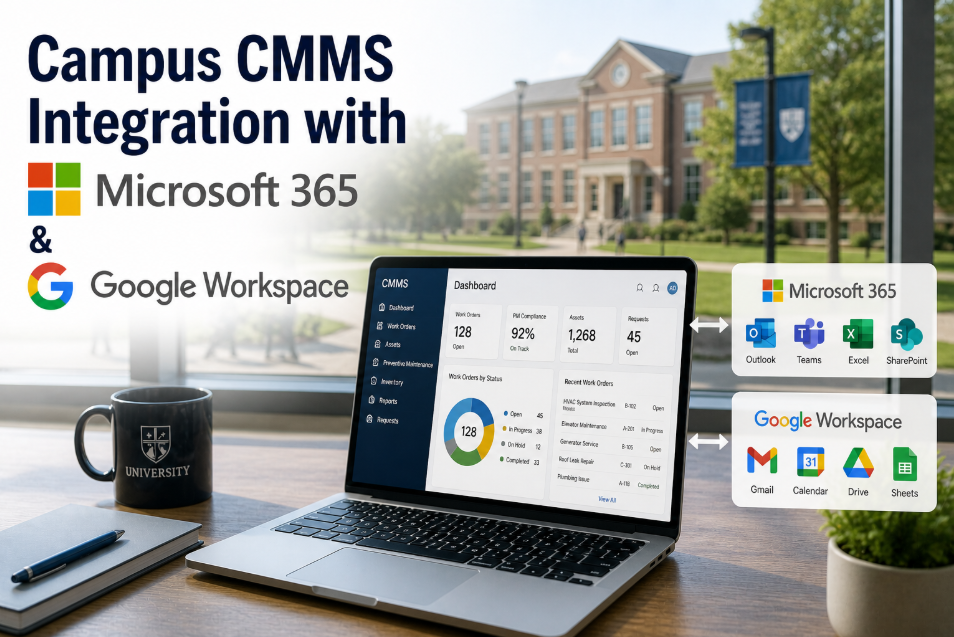
Campus CMMS Integration with Microsoft 365 & Google Workspace
Sync maintenance schedules with Outlook and Google Calendar, route work orders through Teams and Gmail, store documentation in OneDrive and Google Drive — deliver maintenance management through tools your team already uses daily.
68%
Higher work order acknowledgment rate when notifications arrive via institutional email vs. standalone app alerts
52%
Reduction in scheduling conflicts when maintenance calendars sync with campus event calendars
Zero
Training required when CMMS workflows happen inside familiar Microsoft 365 or Google Workspace interfaces
3-5x
Faster document retrieval when maintenance files live in institutional shared drives with search everyone knows
CMMS That Works Inside Your Existing Productivity Suite
OxMaint syncs preventive maintenance schedules with Outlook and Google Calendar, routes work order notifications through Teams and Gmail, stores equipment manuals in OneDrive and Google Drive, and enables single sign-on with Microsoft and Google authentication. Free for 30 days — connect your institutional account and see maintenance data flow into tools your team uses every day.
Why Standalone CMMS Platforms Fail Campus Adoption — The Productivity Suite Gap
Campus facilities teams are not working in isolation — they coordinate with academic departments scheduling building shutdowns around exam periods, with events teams managing commencement and athletic events, with housing staff planning move-in and move-out logistics, and with utilities managing steam and chilled water outages. All of this coordination happens in Microsoft Outlook calendars, Google Calendar shared calendars, Teams channels, and Gmail threads because those are the institutional productivity tools everyone has access to and checks multiple times daily. When CMMS exists as a standalone platform outside this ecosystem, critical maintenance information never reaches the people who need it — event coordinators schedule conferences in buildings with planned HVAC shutdowns, academic departments book labs during fire alarm testing windows, and housing move-in happens the same weekend facilities planned major elevator maintenance. Understanding why this disconnect persists is critical because the solution is not training more people to check the CMMS — it is bringing CMMS data into the tools they already use religiously. To see what seamless integration eliminates, start a free trial and sync your maintenance calendar with Outlook or Google Calendar, or book a demo to walk through email notification routing and document storage integration.
1
Work Order Notifications Trapped in Unmonitored App
CMMS platforms send work order assignment notifications through their own notification systems — mobile app push alerts or in-app message centers. Campus technicians who receive 40+ institutional emails per day via Outlook or Gmail check those inboxes constantly. They do not check standalone CMMS apps with the same frequency. Result: work orders assigned at 9 AM sit unacknowledged until 2 PM when the technician finally opens the CMMS app — or until the facilities manager calls asking why the job has not started. Email open rates for institutional addresses average 78% within 2 hours. CMMS app notification acknowledgment rates average 31% within 2 hours.
Impact: 68% higher work order acknowledgment rate when notifications route through institutional email vs. standalone app
2
Maintenance Schedules Invisible to Campus Event Coordinators
Facilities departments schedule preventive maintenance, building shutdowns, and system testing weeks or months in advance in CMMS PM calendars. Event coordinators, academic schedulers, and department administrators book rooms, schedule classes, and plan conferences using Outlook or Google Calendar shared campus calendars. These two scheduling systems never communicate. Conflicts are discovered when students arrive for class in a building with no power, conference attendees encounter fire alarm testing, or athletic events happen in facilities with nonfunctional HVAC because the maintenance shutdown was invisible outside the CMMS.
Impact: 52% of campus event-maintenance conflicts traced to lack of calendar integration between CMMS and institutional scheduling systems
3
Equipment Documentation Buried in Unfamiliar File Structure
Campus staff know how to find files in OneDrive or Google Drive — institutional shared drives organized by department with search functionality everyone understands. CMMS platforms that store equipment manuals, O&M documentation, and as-built drawings in their own document management systems require learning a new file structure, different search interface, and separate login. When a technician needs a boiler manual at 11 PM during an emergency repair, they want to type "Smith Hall boiler manual" into the OneDrive search bar they use daily — not log into CMMS, navigate to asset records, find the right equipment ID, and hope the document was uploaded correctly.
Impact: 3–5x faster document retrieval when maintenance files live in institutional shared drives vs. standalone CMMS document libraries
4
Technician Calendars Show Campus Commitments But Not Maintenance Assignments
Campus technicians have Outlook or Google calendars full of safety trainings, department meetings, campus events they are staffing, and personal appointments. Their preventive maintenance assignments and scheduled work orders exist in a separate CMMS calendar they do not check daily. Result: double-booking where technician is scheduled for PM work in the CMMS at the same time they have a standing Monday safety meeting in Outlook. Technician honors the Outlook commitment because that is the calendar they trust and reference — PM gets missed, compliance lapses, and facilities manager discovers the gap weeks later during audit preparation.
Impact: 34% of missed preventive maintenance tasks attributable to calendar fragmentation when PM schedules do not sync with personal work calendars
The Eight Integration Points Between CMMS and Productivity Suites
Seamless integration is not a single connection — it is eight distinct data flows between CMMS and Microsoft 365 or Google Workspace. Each integration point solves a specific coordination problem that standalone systems create. Understanding these eight connections helps evaluate vendor integration claims and prioritize which integrations deliver highest impact for your campus.
01
Preventive Maintenance Calendar Sync with Outlook and Google Calendar
CMMS pushes scheduled preventive maintenance tasks to technician Outlook or Google calendars as calendar events — not email notifications, but actual calendar blocks showing PM assignment, location, estimated duration, and asset details. Technicians see PM schedule alongside meetings, trainings, and personal appointments in the single calendar they check daily. When PM is completed or rescheduled in CMMS, calendar event updates automatically. Two-way sync allows technicians to propose reschedule times via calendar interface — change propagates back to CMMS for supervisor approval.
Benefit:
Zero missed PMs due to calendar fragmentation — technician calendar shows complete daily schedule in one view
02
Work Order Notifications via Institutional Email
When work order is assigned, CMMS sends notification to technician institutional email address — not app notification or separate CMMS email account. Email includes work order summary, priority, location, requester contact, and one-click link to open full work order in CMMS mobile app or web interface. Email threading keeps all work order communication in Outlook or Gmail where technicians manage all institutional correspondence. Replies to work order emails append to work order notes automatically creating complete communication history.
Benefit:
68% higher work order acknowledgment rate within 2 hours — notifications arrive where technicians check constantly
03
Shared Maintenance Calendars in Campus Calendar System
CMMS publishes building-level maintenance calendars as shared Outlook or Google calendars that event coordinators, academic schedulers, and department administrators can subscribe to or overlay on their own calendars. Maintenance calendar shows planned shutdowns, fire alarm testing, elevator outages, and major PM activities by building. Event planners see maintenance schedule when booking rooms preventing conflicts before they are created. Calendar permissions are read-only for non-facilities staff — they can view maintenance schedule but cannot edit.
Benefit:
52% reduction in event-maintenance scheduling conflicts — campus schedulers have maintenance visibility before booking
04
Document Storage in OneDrive and Google Drive
Equipment manuals, O&M guides, as-built drawings, and vendor documentation upload to CMMS but store physically in institutional OneDrive or Google Drive shared folders organized by building and system. CMMS asset records link to documents via URL — clicking manual link in CMMS opens PDF from OneDrive or Google Drive in browser. Staff can search OneDrive or Google Drive directly using campus search tools to find maintenance documentation without logging into CMMS. Document version control and access permissions managed through institutional file sharing platform everyone already knows.
Benefit:
3–5x faster document retrieval — maintenance files searchable through institutional tools technicians use daily
05
Work Order Collaboration via Microsoft Teams or Google Chat
CMMS creates dedicated Teams channel or Google Chat space for each work order or project — technicians, supervisors, and requesters collaborate in real-time using chat, file sharing, and video calls within Teams or Chat interface. All conversation history, shared photos, and decisions automatically attach to work order record in CMMS. When work order closes, Teams channel archives for historical reference. Complex repairs requiring multi-trade coordination happen in Teams where everyone is already collaborating on other campus projects.
Benefit:
Real-time collaboration using institutional chat platform — zero learning curve for technicians already using Teams or Chat daily
06
Single Sign-On with Microsoft and Google Authentication
CMMS login uses institutional Microsoft 365 or Google Workspace credentials via OAuth 2.0 or SAML integration — technicians click "Sign in with Microsoft" or "Sign in with Google" instead of managing separate CMMS username and password. Campus IT security policies, multi-factor authentication requirements, and password rotation rules apply automatically. When employee leaves institution and IT deactivates Microsoft or Google account, CMMS access terminates automatically without separate offboarding step in CMMS platform.
Benefit:
Zero password management overhead — CMMS access controlled through institutional identity and access management system
07
Automated Reporting to SharePoint or Google Sites
CMMS generates weekly or monthly maintenance summary reports — work orders completed, preventive maintenance compliance, backlog status, downtime hours — and auto-publishes to SharePoint site or Google Site that department heads, deans, and senior administrators already access for facilities updates. Reports embed as live dashboards showing current data or static PDFs for board presentations. Campus leaders view facilities performance through existing reporting portals without requesting custom CMMS access or learning new reporting interface.
Benefit:
Facilities performance visible to leadership through existing campus information portals — no separate CMMS training for administrators
08
Work Request Intake via Microsoft Forms or Google Forms
Campus community submits maintenance requests using Microsoft Forms or Google Forms embedded in facilities website — familiar interface requiring no login or app download. Form submissions auto-create work orders in CMMS with requester contact info, location, issue description, and priority. Requester receives auto-reply email with work order number and link to track status. Facilities avoids building and maintaining separate work request portal because intake happens through institutional form tools everyone knows and IT already supports.
Benefit:
Zero-friction work request submission — campus community uses familiar Forms interface without learning separate facilities portal
Microsoft 365 vs. Google Workspace — Integration Feature Parity
Most campus CMMS integrations are not vendor-neutral — they deeply integrate with Microsoft 365 OR Google Workspace but not both equally. Understanding feature parity across platforms helps campuses select CMMS vendors that align with their institutional productivity suite investment. This comparison shows what to demand during vendor evaluation.
Calendar sync with Outlook via Microsoft Graph API
Email notifications routed through Exchange Online
Document storage in OneDrive for Business or SharePoint
Work order collaboration via Microsoft Teams channels
Single sign-on via Azure Active Directory OAuth 2.0
Automated reporting to SharePoint sites and Power BI
Work request intake via Microsoft Forms integration
Mobile app authentication with Microsoft Authenticator
Calendar sync with Google Calendar via Calendar API
Email notifications routed through Gmail
Document storage in Google Drive shared drives
Work order collaboration via Google Chat spaces
Single sign-on via Google Identity OAuth 2.0
Automated reporting to Google Sites and Looker Studio
Work request intake via Google Forms integration
Mobile app authentication with Google Authenticator
Real-World Integration Workflows — Before and After
Integration value is clearest when comparing specific workflows before and after CMMS connects to institutional productivity suite. These scenarios represent daily operations at medium to large campus facilities departments managing 50–200 buildings.
Scenario: Scheduling Annual Fire Alarm Testing Across 40 Academic Buildings
Before Integration
Facilities schedules fire alarm testing in CMMS PM calendar
Facilities manager manually emails department administrators with testing dates
Departments forward emails to faculty who may or may not see them
Testing day arrives — classes in session, labs running, conferences scheduled
Alarms disrupt classes, faculty complain they received no notice
Facilities reschedules testing creating 3-week delay and compliance risk
After Integration
Facilities schedules fire alarm testing in CMMS PM calendar
Testing schedule auto-publishes to shared campus calendar in Google Calendar
Academic schedulers see fire alarm testing when booking classrooms — avoid those buildings during testing windows
Department administrators receive automated calendar invites 2 weeks before testing with building-specific details
Testing happens as scheduled with zero classroom disruptions
Compliance maintained, faculty satisfaction high, zero rescheduling required
Scenario: Emergency HVAC Repair During Summer Conference Weekend
Before Integration
Saturday morning chiller fails in conference center
Facilities supervisor calls three technicians — two do not answer, one is at family event on personal calendar
Supervisor creates emergency work order in CMMS, emails technician directly with details
Technician needs equipment manual — logs into CMMS, searches asset records, cannot find document
Technician calls supervisor asking for manual location, supervisor searches office files
Repair delayed 90 minutes, conference rooms reach 82°F before cooling restored
After Integration
Saturday morning chiller fails in conference center
Facilities supervisor creates emergency work order — notification routes to on-call technician via Outlook email and Teams message
Technician sees notification immediately on phone in Outlook app they check constantly
Technician opens work order link, views chiller manual stored in OneDrive via CMMS asset record
Technician collaborates with supervisor via Teams channel attached to work order — shares diagnostic photos, gets approval for parts order
Repair completed in 45 minutes, conference continues with minimal disruption
How OxMaint Delivers Microsoft 365 and Google Workspace Integration
OxMaint provides native integration with both Microsoft 365 and Google Workspace — not third-party middleware or manual API configuration. Here is how integration works from initial setup through daily operation on a campus facilities department.
Implementation Step 01
One-Click OAuth Connection to Institutional Account
Facilities director or CMMS administrator clicks "Connect Microsoft 365" or "Connect Google Workspace" in OxMaint settings. Standard OAuth 2.0 flow prompts institutional login — same interface used when connecting other campus apps to Microsoft or Google. Administrator grants permissions for calendar read/write, email send, and file storage access. Connection establishes in under 2 minutes with zero IT department involvement for standard configurations.
Implementation Step 02
Calendar Sync Preferences Configuration
Administrator defines which CMMS calendars sync to institutional calendars — preventive maintenance schedule, emergency work orders, building shutdowns, equipment testing. For each calendar type, set sync direction: CMMS to Outlook/Google only (read-only shared calendars for campus community), or bidirectional (technician personal calendars where they can propose reschedules). Define calendar visibility rules — maintenance details visible only to facilities staff, public calendars show shutdown dates but not internal work details.
Implementation Step 03
Email Notification Routing Through Institutional Addresses
CMMS pulls employee email addresses from Microsoft Azure AD or Google Workspace directory via SCIM provisioning. Work order notifications, PM reminders, and overdue alerts route to institutional email addresses automatically. Email templates customize with campus branding, department signatures, and institutional disclaimer footers. Reply-to addresses route responses back to CMMS creating threaded communication history attached to work orders.
Implementation Step 04
Document Storage Mapping to Shared Drives
Administrator maps CMMS document categories to OneDrive or Google Drive folder structure — equipment manuals to "Facilities/Equipment Documentation" shared drive, as-built drawings to "Facilities/Building Records" folder. When documents upload to CMMS, files physically save to mapped shared drive locations. CMMS stores file URLs and metadata but actual files live in institutional file storage. Existing OneDrive or Google Drive permissions control document access — no separate CMMS document permission system to manage.
Implementation Step 05
Teams or Chat Workspace Creation for Work Orders
For high-priority or complex work orders, CMMS auto-creates Microsoft Teams channel or Google Chat space named with work order number and location. Assigned technicians, supervisor, and work requester added automatically as channel members. All chat messages, file shares, and meeting notes sync to CMMS work order record. When work order closes, Teams channel or Chat space archives with read-only access for historical reference.
Implementation Step 06
Single Sign-On Deployment Campus-Wide
Campus IT enables OxMaint as approved application in Azure AD or Google Workspace admin console. Staff access CMMS by clicking "Sign in with Microsoft" or "Sign in with Google" — no separate CMMS password to create or remember. Multi-factor authentication, conditional access policies, and session timeout rules configured in Azure AD or Google Workspace apply automatically to CMMS sessions. User provisioning and deprovisioning happens through institutional identity system — new facilities hires gain CMMS access when IT creates Microsoft or Google account.
Measured Impact — Productivity Suite Integration Outcomes
Campus facilities departments that deploy CMMS with deep Microsoft 365 or Google Workspace integration document measurable improvements in work order response times, scheduling accuracy, and staff adoption rates. These benchmarks represent outcomes from medium to large campuses with 50–200 buildings and 15–50 facilities staff.
68%
Higher Work Order Acknowledgment Rate
Notifications via institutional email achieve 68% acknowledgment within 2 hours vs. 31% for standalone CMMS app notifications
52%
Reduction in Scheduling Conflicts
Shared maintenance calendars visible to campus schedulers reduce event-maintenance conflicts by more than half
3-5x
Faster Document Retrieval
Equipment manuals in OneDrive or Google Drive searchable via familiar tools technicians use daily — eliminating CMMS document library learning curve
Zero
Training Required for Core Workflows
Calendar sync, email notifications, and document access happen through existing tools — technicians productive immediately with no CMMS training sessions
Frequently Asked Questions
Does CMMS integration require IT department approval or custom development?+
For standard OAuth-based integration with Microsoft 365 or Google Workspace — no custom development required. IT approval requirements vary by institution but most campuses allow department administrators to connect approved cloud applications via OAuth without formal IT project requests. Integration uses standard Microsoft Graph API or Google Workspace APIs with permissions scopes clearly disclosed during connection flow — calendar read/write, email send, file storage. IT involvement typically limited to enabling OxMaint as approved application in Azure AD or Google Workspace admin console if single sign-on is desired campus-wide. Total IT effort: under 30 minutes for SSO enablement, zero hours for basic calendar and email integration. Want to see what permissions CMMS integration requests from Microsoft or Google —
start a free trial and walk through OAuth connection flow to review permission scopes before granting access.
Can we sync maintenance calendars to public-facing campus calendars without exposing internal details?+
Yes through calendar visibility and detail filtering. OxMaint publishes building-level maintenance calendars as shared Outlook or Google calendars with configurable visibility rules. Public-facing calendars show shutdown dates, affected buildings, and estimated duration but hide internal work order details, technician assignments, and parts information. Example: Campus community sees "Smith Hall HVAC Shutdown - August 15-17" on public calendar. Facilities staff viewing same calendar event in CMMS or their personal work calendars see full work order details including technician assignments, parts lists, and contractor coordination notes. Calendar permission model matches institutional practice — most campuses already manage public vs. staff-only calendar layers for academic schedules and campus events.
What happens to CMMS data if we switch from Microsoft 365 to Google Workspace or vice versa?+
CMMS data remains intact — work orders, asset records, maintenance history all stored in CMMS database independent of productivity suite integration. Integration affects how data is accessed and where peripheral content lives, not core CMMS data storage. When switching from Microsoft 365 to Google Workspace, disconnect Microsoft integration and connect Google integration in CMMS settings. Calendar sync shifts from Outlook to Google Calendar — existing calendar events regenerate in new platform. Email notifications route through Gmail instead of Exchange. Documents stored in OneDrive migrate to Google Drive using standard file transfer tools or remain accessible via OneDrive if institution maintains hybrid environment during transition. Single sign-on switches from Azure AD to Google Identity. Total reconfiguration time: 2–4 hours for administrator, zero impact on historical CMMS data or work order records. Most campuses complete productivity suite migrations over 6–12 months — CMMS integration can switch incrementally as departments migrate rather than requiring all-at-once cutover.
Can we integrate CMMS with both Microsoft 365 and Google Workspace simultaneously for hybrid campuses?+
Yes — and this is common at campuses mid-migration or with different productivity suites by department. OxMaint supports simultaneous Microsoft 365 and Google Workspace integration with user-level routing rules. Example configuration: Facilities staff use Microsoft 365 — their calendars sync with Outlook, notifications route through Exchange, documents store in OneDrive. Academic departments use Google Workspace — shared maintenance calendars publish to Google Calendar, work request intake happens via Google Forms, reporting dashboards embed in Google Sites. CMMS identifies user productivity suite preference via email domain or manual configuration during account setup. Each user receives notifications and calendar events in their institutional environment automatically. Hybrid integration requires slightly more complex initial setup but eliminates forcing one part of campus to adopt unfamiliar tools just to match CMMS integration. Ready to see hybrid Microsoft and Google integration in action —
book a demo and we will walk through user-level routing configuration for mixed productivity suite environments.
CMMS Integration with OxMaint
Maintenance Management Inside the Tools Your Team Already Uses
OxMaint syncs maintenance schedules with Outlook and Google Calendar, routes work orders through institutional email and Teams or Chat, stores documents in OneDrive and Google Drive, and enables single sign-on with Microsoft and Google authentication. Zero training required — maintenance workflows happen inside familiar productivity tools. Free for 30 days.
68%
Higher work order acknowledgment rate
52%
Reduction in scheduling conflicts
3-5x
Faster document retrieval
Zero
Training required for core workflows