Geofencing has evolved from a novelty GPS feature into a core fleet management capability. In 2026, 67% of commercial fleets with 50+ vehicles use geofencing for at least one operational function — from automated arrival notifications to unauthorized use detection. The technology draws virtual boundaries around specific locations and triggers actions when vehicles enter, exit, or dwell within those zones. For fleet managers dealing with route compliance, yard security, customer SLA tracking, and driver accountability, geofencing replaces manual oversight with automated intelligence. Fleets pairing geofencing with digital maintenance platforms like OxMaint are going further — triggering location-based inspections, automating mileage-based PM schedules when vehicles reach specific service zones, and generating compliance documentation tied to where work actually happens. The gap between fleets using geofencing strategically and those who have never configured a single zone is widening fast, and it shows up directly in operational costs, customer satisfaction scores, and regulatory compliance rates.
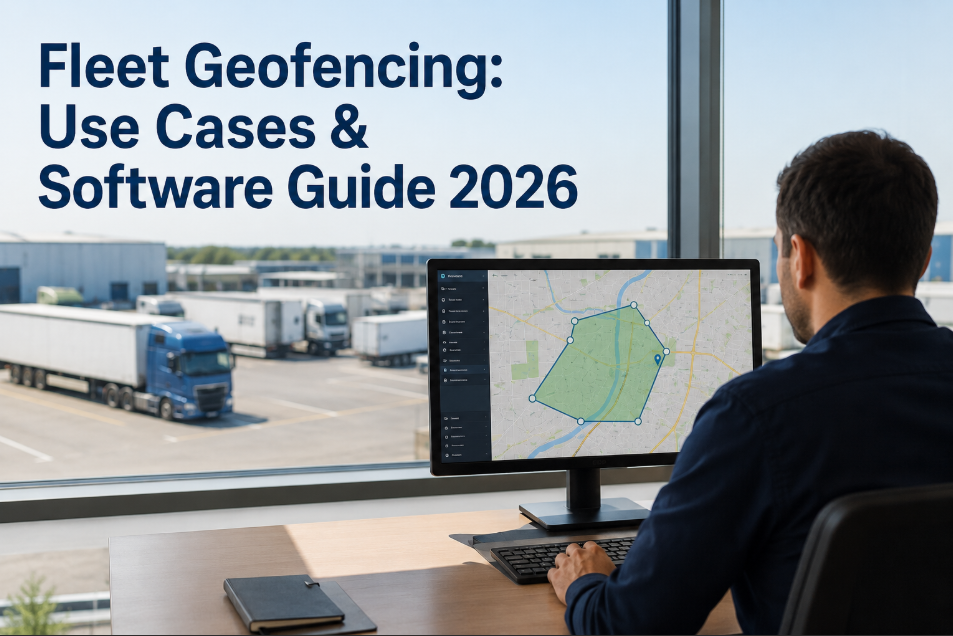
Fleet Geofencing: Use Cases and Software Guide 2026
How commercial fleets use geofencing to automate alerts, restrict vehicle use, enforce route compliance, and strengthen security — with a review of how to connect geofence data to your maintenance operations.
What Is Fleet Geofencing?
Fleet geofencing is the use of GPS coordinates to create virtual boundaries — called geofences — around specific geographic areas. When a vehicle crosses a geofence boundary, the system triggers a predefined action: an alert, a report entry, a work order, or a restriction command. Geofences can be circular (radius around a point), polygonal (custom shapes around complex areas like yards or customer sites), or corridor-based (along a specific route path).
The technology relies on cellular GPS, satellite positioning, or a combination of both. Modern fleet telematics systems support unlimited geofences with configurable dwell-time thresholds — meaning you can distinguish between a vehicle passing through a zone versus stopping at a delivery point for 15 minutes. This granularity is what separates basic GPS tracking from actionable geofencing. Fleets integrating geofence events with maintenance platforms can automate location-triggered inspections. Curious how that works? Start a free trial or book a demo to see it configured live.
8 High-Impact Geofencing Use Cases for Commercial Fleets
Geofencing value depends entirely on how you configure and use it. Below are the eight use cases generating the highest ROI for fleet operators in 2026.
Automated notifications sent to dispatchers and customers when vehicles enter a 5-mile radius of the delivery point. Reduces "where is my driver" calls by 42% and improves customer satisfaction scores.
Alerts triggered when vehicles leave designated operating zones during off-hours. Fleets using this feature detect and stop unauthorized personal use within the first month — reducing liability exposure and fuel waste.
Corridor geofences along planned routes flag deviations in real time. Critical for hazmat, oversize loads, and contract routes where deviation means regulatory violations or customer SLA breaches.
Track how long vehicles spend in loading yards, distribution centers, and customer docks. Average dwell times above 2 hours cost $120+ per event in driver wages and equipment opportunity cost — geofencing makes this visible.
Immediate alerts when vehicles or trailers move outside authorized zones during non-operating hours. Combined with engine immobilization, geofencing has recovered stolen assets within 2 hours in 78% of reported cases.
For service fleets, geofencing proves vehicles were on-site for the documented service window. This eliminates billing disputes and supports contractor compliance verification — especially for government contracts.
When a vehicle enters a service center geofence, OxMaint can auto-generate pending inspection checklists and pre-stage parts based on the vehicle's maintenance schedule — saving 30+ minutes per service visit.
Auto-log entry and exit from emission zones (London ULEZ, California CARB zones), port authority areas, and weight-restricted routes. Generates compliance documentation automatically — no driver paperwork needed.
Fleet Without vs With Geofencing
How OxMaint Integrates Geofencing Into Maintenance Operations
Most geofencing tools stop at alerts and reports. OxMaint connects geofence data to your maintenance workflows — creating operational intelligence that reduces service delays and prevents breakdowns before they happen.
When a vehicle with pending maintenance enters a service center geofence, OxMaint flags the opportunity and pre-stages the work order with parts, labor estimates, and technician assignment ready.
Geofence exit events trigger mandatory digital inspection checklists on the driver's mobile device. No vehicle leaves the yard without a completed and timestamped pre-trip record.
Geofence data cross-references reported mileage against GPS distance traveled. OxMaint flags discrepancies above 5% — catching odometer fraud and ensuring mileage-based PMs fire at the correct interval.
For fleets operating across multiple depots and regions, OxMaint provides a single dashboard showing which vehicles are at which site — with maintenance status overlaid on location data.
Seeing your fleet's location data connected to live maintenance schedules changes how you prioritize service. Start a free trial and book a demo to see the integration in your fleet context.
Frequently Asked Questions
How many geofences can a typical fleet telematics system support?
Does geofencing work in areas with poor cellular coverage?
Can geofencing data be used for driver disputes or legal cases?
How does OxMaint connect geofence data to preventive maintenance?
Turn Location Data Into Maintenance Intelligence
OxMaint connects your geofencing data to preventive maintenance schedules, digital inspections, and asset condition tracking — giving you a fleet platform where location and maintenance work together instead of in separate silos.