Most maintenance teams collect data — but few turn it into a dashboard that plant managers actually open. The gap between raw CMMS data and actionable insight costs operations leaders time, credibility, and missed opportunities to prevent failures. A well-structured maintenance KPI dashboard gives plant managers a real-time view of equipment health, work order status, and team productivity — without requiring them to dig through spreadsheets or chase down technicians. With Sign Up Free on Oxmaint, you get a purpose-built reporting layer that surfaces the metrics that drive maintenance decisions: MTTR, PM compliance, backlog age, and asset downtime — all in one place. Research shows plants using structured maintenance dashboards reduce unplanned downtime by up to 30% and improve work order closure rates significantly. This guide covers exactly which KPIs to display, what visualization types work best for each metric, how often to refresh data, and how Book a Demo with Oxmaint shows you how CMMS integration automates the entire reporting workflow so your dashboard is always current without manual effort.
30%
reduction in unplanned downtime with structured maintenance dashboards
42%
faster work order resolution when KPIs are visible in real time
3×
more PM compliance improvement reported with live dashboard tracking
68%
of plant managers say poor reporting visibility delays maintenance decisions
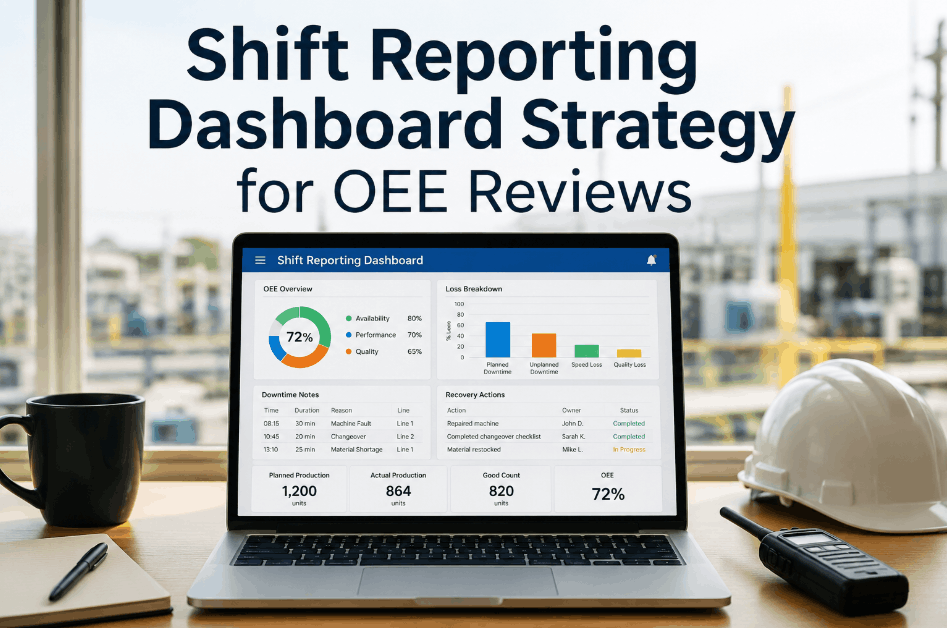
Oxmaint Maintenance Dashboard
See Every Maintenance KPI in Real Time — From Work Orders to Asset Health
Oxmaint's built-in reporting dashboard gives plant managers live visibility into MTTR, PM compliance, backlog, and downtime — without spreadsheets or manual data pulls. Connect your CMMS data to a dashboard your entire leadership team will rely on.
The 8 Maintenance KPIs Every Plant Manager Dashboard Must Include
Not every metric belongs on a plant manager's view. These eight KPIs are the ones that directly influence production decisions, budget justification, and safety compliance — and all of them are trackable inside Oxmaint without custom reporting setup.
01
Mean Time to Repair (MTTR)
Shows how quickly your team resolves failures. High MTTR means extended production stoppages. Target varies by equipment class but lower is always better.
Visualization: Single number with trend line vs. prior 30 days
02
PM Compliance Rate
Percentage of scheduled preventive tasks completed on time. Below 85% signals a backlog problem or resource gap that leads to reactive maintenance spikes.
Visualization: Gauge chart or % bar with color thresholds
03
Work Order Backlog Age
Count of open work orders grouped by age — 1–7 days, 8–30 days, 30+ days. Aged backlog predicts future failures and drives prioritization conversations.
Visualization: Stacked bar chart by age bucket
04
Equipment Downtime Hours
Total unplanned downtime by asset and production line. This is the metric plant managers care most about — it directly translates to lost output and cost.
Visualization: Ranked bar chart by asset, with cost overlay
05
Mean Time Between Failures (MTBF)
Average operating time between unplanned failures per asset. Declining MTBF on a specific machine is an early warning signal for replacement or overhaul planning.
Visualization: Trend line per critical asset over 90 days
06
Reactive vs. Planned Work Ratio
Percentage split between emergency/reactive work orders and planned maintenance. Industry benchmark: 80% planned, 20% reactive. Inversion signals systemic breakdown.
Visualization: Donut chart with benchmark comparison line
07
Technician Utilization Rate
Hours spent on productive maintenance tasks vs. total available hours. Low utilization reveals scheduling inefficiency; high rates without completion signal resourcing gaps.
Visualization: Team heatmap or per-tech bar chart
08
Inspection Completion Rate
Percentage of scheduled safety and condition-based inspections completed on time. Critical for regulatory compliance and catching degradation before failure.
Visualization: Weekly compliance % with missed inspection count
Visualization Types That Work for Maintenance Data
The wrong chart type makes good data unreadable. Match the visualization to what the metric communicates — status, trend, comparison, or distribution.
Dashboard Layers: What Each Role Needs to See
A single dashboard view rarely serves everyone. Structure your maintenance reporting in three layers — and Book a Demo to see how Oxmaint lets you configure each view without custom development.
Layer 1
Plant Manager / Leadership
High-level production impact metrics updated daily. Focus: downtime cost, PM compliance %, reactive ratio, and asset health score. One-screen view with no drill-down required for the morning review.
Total downtime hours (current month)
PM compliance % vs. target
Open critical work orders
Reactive vs. planned split
Layer 2
Maintenance Supervisor
Operational view updated every shift. Focus: work order queue, technician assignments, backlog age, and today's scheduled PMs. Used for morning standup and shift handover decisions.
Work orders due today / overdue
Technician utilization by person
Parts pending / on order
Inspections scheduled this shift
Layer 3
Maintenance Technician
Task-level view updated in real time. Focus: assigned work orders, asset history, checklists, and parts availability. Accessed via mobile app — not a wall display. Drives execution, not reporting.
My assigned work orders
Asset repair history for current job
Inspection checklist for this task
Parts bin location and availability
Update Frequency: How Often Each KPI Should Refresh
Dashboard credibility depends on data freshness. Stale metrics destroy trust faster than no dashboard at all. Match refresh rates to how fast the underlying situation changes — and use Sign Up Free on Oxmaint to automate data sync from your work order and asset records.
Real-Time
Every 5–15 minutes
Active work order status
Equipment in downtime now
Open critical alerts
Shift-Based
Every 8–12 hours
Work order completions
Inspection compliance today
Technician utilization (current shift)
Daily
Every 24 hours
MTTR rolling average
PM compliance % (month-to-date)
Backlog age distribution
Weekly / Monthly
Management cadence
MTBF trend by asset
Reactive vs. planned ratio
Maintenance cost per asset
5 Maintenance Dashboard Mistakes That Make Plant Managers Stop Using Them
The most common reason maintenance dashboards get abandoned is not bad data — it is poor design decisions that make the dashboard harder to use than the spreadsheet it replaced. Avoid these five patterns.
01
Too Many Metrics on One Screen
A dashboard with 20+ KPIs forces the viewer to search instead of decide. Limit the executive view to 6–8 metrics maximum. More metrics means no metric gets attention.
02
Metrics With No Benchmark or Target
MTTR of 4.2 hours means nothing without context. Every KPI needs a target line, industry benchmark, or comparison to the prior period. Numbers without reference points are just data noise.
03
Manual Data Entry as the Update Mechanism
Any dashboard that requires a person to update it will be stale by Monday morning. Connect directly to your CMMS work order and asset records. Automation is not optional — it is the only way dashboards stay credible.
04
No Mobile Access for Supervisors
Plant managers and supervisors spend most of their shift on the floor, not at a desk. A dashboard only accessible on a desktop gets checked once a day at best. Mobile-first design is essential for operational KPIs.
05
Activity Metrics Disguised as Outcome Metrics
"Work orders created this week" is an activity metric. "MTTR this week vs. target" is an outcome metric. Plant managers care about outcomes. Dashboards full of activity counts look busy but drive no decisions.
Oxmaint Analytics and Reporting
Build a Maintenance Dashboard That Updates Automatically From Your CMMS
Oxmaint connects your work orders, assets, inspections, and PM schedules to a reporting layer that plant managers can actually use. No manual exports, no spreadsheet maintenance, no stale data. Sign Up Free and see your maintenance KPIs live in minutes.
How CMMS Integration Powers an Always-Current Maintenance Dashboard
A dashboard is only as good as the data feeding it. CMMS integration removes the human update step entirely — so when a technician closes a work order in Oxmaint, every connected KPI updates automatically. Book a Demo to see exactly how the data flows from the floor to the dashboard in real time.
1
Work Order Created or Updated
Technician logs a failure, completes a PM, or closes a work order in the Oxmaint mobile app. Timestamp, asset ID, and labor hours are captured automatically.
2
CMMS Records Update Instantly
Asset maintenance history, work order backlog, technician time logs, and parts consumption update in the central Oxmaint database without any manual sync required.
3
Dashboard KPIs Recalculate
MTTR, PM compliance, backlog age, and technician utilization recalculate from live CMMS data. The plant manager's dashboard reflects current reality — not yesterday's numbers.
4
Alerts Trigger When Thresholds Breach
When PM compliance drops below target or a critical asset exceeds downtime thresholds, Oxmaint sends automated alerts to the right person — before the morning review, not during it.
4-Week Roadmap to Launch Your Maintenance Dashboard
Most maintenance dashboard projects fail because they try to display everything before displaying anything useful. This four-week roadmap gets you from zero to a dashboard your plant manager checks every morning — using Oxmaint as the data backbone. Sign Up Free to begin Week 1 today.
Week 1
Define the Audience and the 6 Core KPIs
Days 1–7
Interview your plant manager and maintenance supervisor. Ask: what decisions do you make daily that need better data? Choose 6 KPIs maximum for the first version. Resist adding more until version one is used consistently.
Confirm the plant manager's top 3 daily decisions
Select 6 KPIs directly tied to those decisions
Define target values and threshold colors for each KPI
Identify data source for each metric in Oxmaint
Week 2
Connect Data Sources and Validate Accuracy
Days 8–14
Map each KPI to its CMMS data source in Oxmaint. Validate calculated values against known ground truth — cross-check MTTR against manually tracked downtime logs. Fix data gaps before showing the dashboard to leadership.
Map all 6 KPIs to Oxmaint data fields
Cross-validate 2 weeks of historical data
Identify and resolve any missing asset or work order records
Confirm update frequency and automation triggers
Week 3
Build the Layout and Get Plant Manager Feedback
Days 15–21
Build the first version of the dashboard in Oxmaint's reporting module. Show it to the plant manager and supervisor — not to impress, but to get honest feedback on what is missing, confusing, or irrelevant. Expect to change 30% of it.
Build executive view with 6 KPIs and correct viz types
Review with plant manager in a 30-minute working session
Adjust KPI selection and layout based on feedback
Verify mobile access works correctly on floor devices
Week 4
Launch, Socialize, and Set a 30-Day Review Cadence
Days 22–28
Introduce the dashboard in the weekly operations meeting. Walk through each KPI and the decision it drives. Schedule a 30-day review to assess whether the dashboard is influencing actual maintenance decisions — if not, change what is displayed.
Present dashboard in operations meeting with decision context
Enable automated daily email summary for plant manager
Set 30-day review meeting in calendar
Document which decisions have changed since launch
Frequently Asked Questions
What maintenance KPIs should a plant manager dashboard show first?
Start with MTTR, PM compliance rate, and equipment downtime hours. These three metrics directly connect to production output and maintenance cost — and are the ones plant managers are most likely to act on daily.
How often should a maintenance dashboard update?
Real-time for active work orders and live downtime. Daily for MTTR and PM compliance. Weekly or monthly for MTBF trends and cost analysis. Match refresh rate to decision frequency — not to what is technically possible.
Can Oxmaint generate maintenance reports automatically for plant managers?
Yes. Oxmaint supports automated daily and weekly report delivery by email, with configurable KPI summaries. Plant managers receive a current-state snapshot without logging into the platform or requesting a manual report.
What is the difference between a maintenance dashboard and a CMMS report?
A CMMS report is a static output generated on request — useful for detailed analysis. A maintenance dashboard is a live, always-on view of current performance. Dashboards drive daily decisions; reports support investigations and planning reviews.
How many KPIs should be on a maintenance dashboard for plant managers?
Six to eight for the executive layer. More than eight overwhelms the viewer and reduces the chance any single metric drives action. Supervisor and technician layers can show more because they are task-driven, not decision-driven.
Does Oxmaint support mobile maintenance dashboards for plant floor use?
Yes. Oxmaint's reporting and dashboard views are fully mobile-responsive and accessible via the Oxmaint mobile app. Supervisors and managers can review live KPIs, open work orders, and asset status from the production floor without returning to a desktop.
Ready to Build a Dashboard Your Plant Manager Will Actually Use?
Oxmaint Turns Your CMMS Data Into a Live Maintenance Dashboard — No Setup Fee, No Manual Updates
Every work order, PM completion, inspection record, and asset failure in Oxmaint feeds your maintenance dashboard automatically. Sign Up Free and launch your first plant manager dashboard this week. Or Book a Demo and see a live example built for your industry in 30 minutes.



![maintenance-cost-tracking-template-for-plant-managers-[free-excel-2026]](./manage-post-2k26/uploads/maintenance-cost-tracking-template-for-plant-managers-[free-excel-2026].png)
.png)