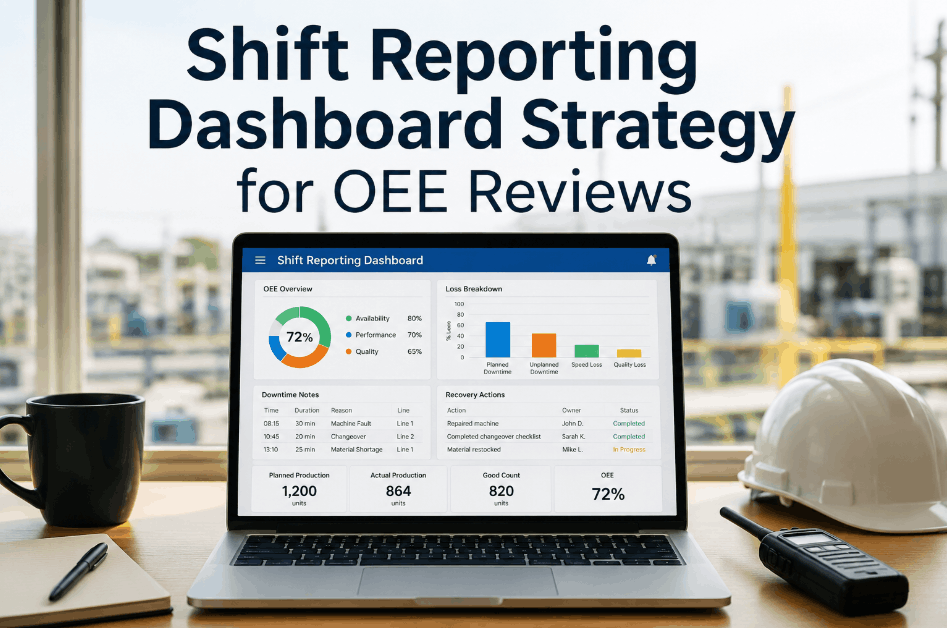
A shift reporting dashboard only earns its place in an OEE review when it connects production losses, downtime notes, and recovery actions in a single view — not when it displays throughput numbers that leave the review team asking why the shift fell short and what was actually done about it. Sign Up Free to configure your shift reporting structure inside Oxmaint and tie OEE losses to work order outcomes from the same shift. Book a Demo to see how operations teams use Oxmaint's OEE analytics and shift logbook to make every review specific, actionable, and short.
OEE Analytics · Shift Operations · 2026
Shift Reporting Dashboard Strategy for OEE Reviews
Connect OEE losses, downtime notes, and recovery actions in one shift reporting dashboard so reviews stay specific, fast, and useful instead of becoming a data explanation session.
45%Reduction in OEE review meeting time when shift data arrives pre-structured and linked
3xMore corrective actions closed per week when reviews connect loss events to work orders
60%Of recurring downtime causes identified faster through cross-shift OEE pattern analysis
82%Of manual shift reporting steps eliminated when OEE and logbook data auto-populate dashboards
Where Shift Reporting Dashboards Break Down for OEE Reviews
Most OEE review problems are not data problems — they are structure problems. Numbers are present but not connected to what caused the loss, who responded, and what changed. Sign Up Free to map your shift reporting workflow into Oxmaint and link production losses to maintenance outcomes automatically.
01
OEE Numbers Disconnected from Downtime Context
Risk Window: Every shift OEE review
Structural GapWhen OEE metrics land in the review without linked downtime notes, the team spends the first half of the meeting reconstructing what happened rather than deciding what to do about it.
02
Recovery Actions Not Recorded at Point of Event
Risk Window: Shift handover and post-shift review
Largest VariableWhen technicians resolve a downtime event without logging the recovery action in the system, the OEE review has no record of what was done — only that the line came back up at a certain time.
03
Cross-Shift Patterns Invisible in Shift-Level Reports
Risk Window: Recurring production losses across shifts
Pattern LossA quality loss appearing on the night shift and a speed loss appearing on the day shift on the same line can share the same root cause — but shift-level reporting frames them as two unrelated events.
04
Manual Data Entry Between Systems
Risk Window: Shift end and report consolidation
Data Quality RiskWhen production, maintenance, and quality data live in separate systems, someone must reconcile them manually before each review — a step that introduces delay, errors, and selective data inclusion.
05
Review Actions Not Tracked to Closure
Risk Window: Week-over-week OEE improvement cycles
Improvement GapActions assigned at the OEE review are tracked in a separate list that no one checks before the next review — so the same losses recur without accountability for whether the prior action was ever completed.
06
Dashboard Metrics Not Aligned to Line Criticality
Risk Window: Multi-line production environments
Priority GapA dashboard that displays OEE equally across all lines makes a bottleneck-line loss look equivalent to a redundant-line loss — misaligning review attention and corrective action priority.
Shift Reporting for OEE Reviews — Without vs. With Oxmaint
A connected shift reporting dashboard changes what the OEE review can accomplish in the time available. Book a Demo to see how Oxmaint links OEE analytics, shift logbook data, and work order outcomes into a single review-ready dashboard.
Shift Reporting Dashboard Maturity — Where Does Your Operation Score?
OEE review effectiveness depends directly on how well the shift reporting dashboard connects loss data to recovery context. Book a Demo to assess your current shift reporting maturity and identify the highest-value connections to close first.
Shift Reporting Dashboard Maturity for OEE Reviews
Score 5 = fully connected · Score 1 = manual and disconnected
5
Fully Connected · Auto-Populated Review Dashboard
OEE losses, downtime notes, recovery actions, and work order closures all populate a single dashboard automatically — reviews begin with context, not data reconstruction.
Profile: OEE review time is spent on decisions and corrective actions, not on assembling the data to understand what happened during the shift.
4
Connected · Partial Manual Steps Remain
Most OEE and maintenance data flows automatically but some logbook entries or quality data still require manual consolidation before each review.
Action: Close the remaining manual steps by connecting logbook and quality data sources to the OEE dashboard directly.
3
Structured OEE Data · Disconnected from Maintenance
OEE metrics are structured and accessible but sit in a separate system from maintenance work orders and shift logbook entries.
Gap: Reviewing OEE without linked maintenance context means every loss explanation requires a separate lookup — slowing the review and reducing decision quality.
2
Manual Reporting · No Cross-Shift Visibility
Shift reports are assembled manually from multiple sources with no cross-shift loss correlation and no link between reported losses and corrective action outcomes.
Risk: Manual consolidation introduces data gaps and delays that make the OEE review a backward-looking exercise rather than a forward-looking one.
1
No Structured Shift Reporting
OEE reviews rely on verbal shift handovers and informal notes with no structured reporting system connecting production losses to maintenance or quality outcomes.
Risk: Without structured shift data, OEE reviews produce the same discussion every week because no consistent record exists to hold improvement actions accountable.
Stop Spending OEE Reviews Explaining the Data.
Oxmaint connects OEE losses, shift logbook entries, and work order outcomes into one dashboard so every review starts with context and ends with accountable actions.
How Oxmaint Structures Shift Reporting Dashboards for OEE Reviews
Oxmaint's OEE Analytics and Shift Logbook modules connect production loss events, maintenance work orders, and shift notes into a single data layer — so the dashboard that reaches the OEE review already contains the context the team needs to act, not just the numbers they need to explain. Sign Up Free to configure your OEE dashboard and shift reporting workflow. Book a Demo to walk through a live OEE review dashboard built on your line structure and shift schedule.
OEE Analytics Module
Real-Time Loss Tracking
Availability, performance, and quality losses tracked per shift and line
Oxmaint OEE Analytics captures availability, performance, and quality losses at the shift level, weighted by line criticality, so the review dashboard surfaces the highest-impact events at the top rather than listing losses by time alone.
Shift Logbook Integration
Linked to OEE Events
Shift notes attach directly to the loss events they describe
Oxmaint's Shift Logbook ties technician and supervisor notes to the OEE event they reference, so the review team reads the downtime cause and recovery action alongside the loss metric — not in a separate file opened during the meeting.
Work Order-to-Loss Linkage
Action Traceability
Every review action converts to a tracked work order
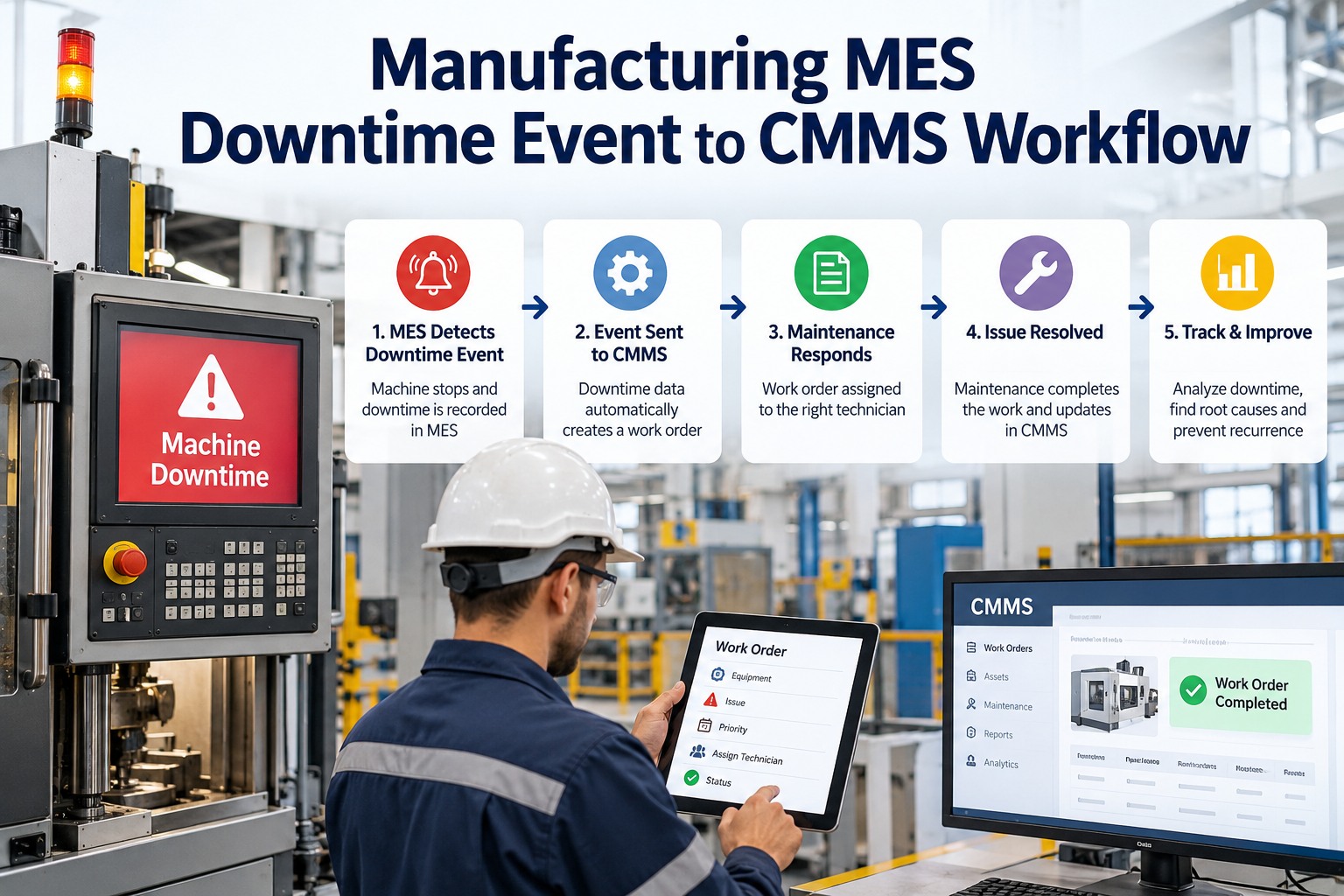
Actions assigned during the OEE review convert directly to Oxmaint work orders with assigned technician, due date, and priority — so closure status is visible in the dashboard before the next review begins.
Cross-Shift Pattern Detection
Recurring Loss Surfacing
Identify repeat loss causes across shifts before they compound
Oxmaint OEE Analytics tracks recurring loss events across shifts and lines, automatically flagging patterns that span multiple shifts so the review team addresses the cause rather than the symptom each week.
"
Our OEE reviews used to open with 20 minutes of everyone pulling numbers from different spreadsheets to agree on what actually happened during the shift. Once we connected the shift logbook and work order data to the OEE dashboard in Oxmaint, we show up to the review with the context already there. Now the whole meeting runs in 30 minutes and we leave with actual actions instead of more questions.
Production Manager — Consumer Goods Manufacturing, 4-Line Plant, Tennessee
Frequently Asked Questions
What should a shift reporting dashboard include for OEE reviews?
A shift reporting dashboard for OEE reviews should connect availability, performance, and quality losses with the linked downtime cause, recovery action, and work order outcome — so the review can begin with context rather than data reconciliation.
How does Oxmaint link shift logbook data to OEE metrics?
Oxmaint's Shift Logbook module attaches technician and supervisor notes directly to the OEE loss event they describe, making downtime cause and recovery context available in the same dashboard view as the loss metrics.
Can Oxmaint track OEE review actions to closure?
Yes. Actions assigned during an OEE review convert to Oxmaint work orders with assigned ownership and due dates, with closure status visible in the dashboard before the next review begins.
How does Oxmaint surface cross-shift OEE loss patterns?
Oxmaint OEE Analytics tracks recurring loss events across shifts and lines, automatically flagging patterns that span multiple shifts so the review team addresses root cause rather than treating each event as isolated.
Does Oxmaint require replacing existing production monitoring systems?
No. Oxmaint integrates with existing PLC, SCADA, and sensor infrastructure, adding the OEE analytics, shift logbook, and work order linkage layer on top of data sources already in place.
Make Every OEE Review Specific, Fast, and Worth Attending.
Oxmaint connects OEE losses, shift logbook entries, and work order outcomes into one dashboard — so reviews start with context and end with accountable actions instead of open questions.

![machine-downtime-tracking-template-for-manufacturing-[excel-dashboard]](./manage-post-2k26/uploads/machine-downtime-tracking-template-for-manufacturing-[excel-dashboard].png)


