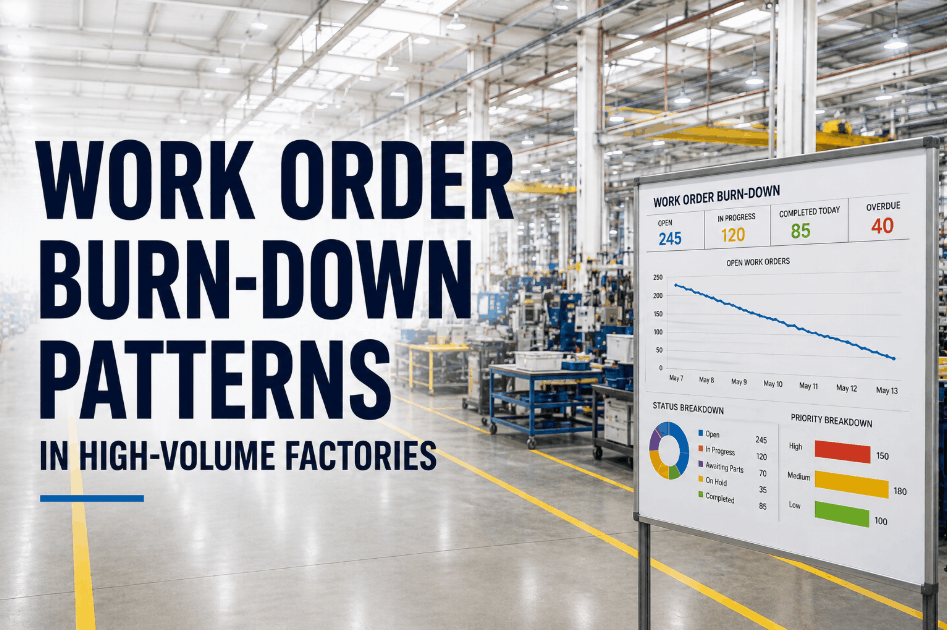
Maintenance backlog burn-down forecasting is the discipline of projecting how quickly an existing work order queue will clear by analyzing intake rate, closure speed, and blocked task volume — so planners can identify whether the backlog is shrinking, stable, or silently growing before it becomes a reliability crisis. Sign Up Free to see how OxMaint gives maintenance planners real-time backlog forecasting across intake velocity, closure throughput, and blocked work visibility.
Forecast Your Maintenance Backlog Before It Grows Unmanageable
OxMaint tracks intake rate, closure speed, and blocked work orders in one planning view — so schedulers can steady the queue instead of reacting to it.
Why Maintenance Backlogs Grow Out of Control
A backlog that exceeds four to six weeks of maintenance capacity is not a resourcing problem — it is a forecasting problem. Without visibility into intake versus closure rate, planners cannot distinguish a queue that will naturally clear from one that is compounding. Book a Demo to see how OxMaint's planning module surfaces backlog trajectory in real time.
Intake Rate Not Tracked Separately
When new work orders enter the queue faster than they close, planners see total backlog growing but cannot isolate whether the cause is high intake or slow closure speed.
Blocked Work Buried in the Queue
Work orders waiting on parts, permits, or contractor availability stay in the active queue and inflate apparent backlog without contributing to any realistic burn-down projection.
No Forecast Horizon for Queue Clearance
Without a projected clearance date based on current closure speed, planners cannot tell leadership when the backlog will reach a healthy level or how much additional capacity is needed.
Priority Drift Across Aging Tickets
High-priority work orders added weeks ago lose visibility as newer tickets are created, allowing aging safety or reliability tasks to remain unaddressed in a growing queue.
Planner Workload Not Matched to Throughput
Scheduling without throughput data means assigning work volume that technicians cannot realistically close — creating planned closure rates that never match actual performance.
Seasonal and Shutdown Spikes Not Anticipated
Backlogs that spike before planned shutdowns or seasonal production increases are predictable from historical intake patterns but are rarely modeled in advance.
Burn-Down Forecasting Model — Core Components
An accurate backlog burn-down forecast requires four independently tracked variables that OxMaint surfaces in a single planning dashboard. Sign Up Free to configure your backlog forecast inside OxMaint.
| Forecast Variable | What It Measures | OxMaint Capability | Planner Output |
|---|---|---|---|
| Intake Rate | New work orders entering the queue per week | WO Intake Velocity Tracker | Weekly intake trend by asset class or line |
| Closure Speed | Work orders completed per technician per week | Technician Throughput Reporting | Actual vs planned closure rate by crew |
| Blocked Work Volume | Open tasks with documented hold reason | Blocked WO Identification Flag | True actionable queue vs blocked portion |
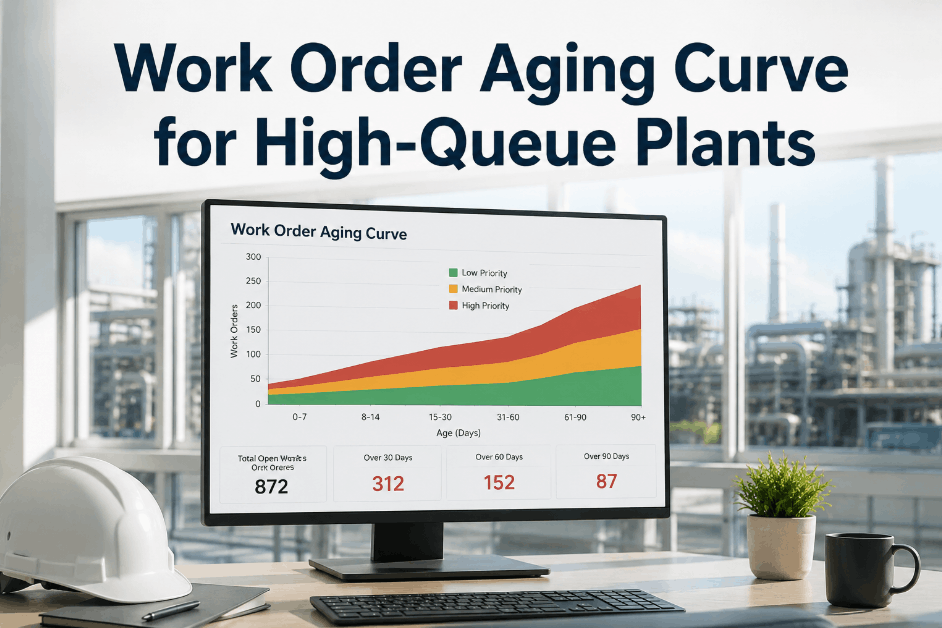
| Queue Age Distribution | Breakdown of backlog by days open | Aging Backlog Dashboard | Priority aging alerts for overdue safety tasks |
How OxMaint Supports Backlog Burn-Down Forecasting
Real-Time Intake and Closure Tracking
OxMaint tracks new work orders entering the queue and work orders closing in real time, giving planners a live net backlog number rather than a static count that is only accurate at report generation time.
Blocked Work Order Flagging
When a work order is held for parts, permits, or contractor scheduling, OxMaint flags it as blocked and removes it from the actionable queue — showing planners the true volume available for scheduling. Book a Demo to see blocked-work separation in the planning view.
Technician Throughput Reporting
OxMaint measures actual closure rate per technician and crew against planned throughput, identifying whether a growing backlog is a capacity problem, a scheduling problem, or a blocked-work problem requiring a different resolution path.
Aging Backlog Priority Alerts
Work orders that exceed configurable age thresholds trigger escalation alerts in OxMaint, ensuring safety-critical and high-priority tasks do not age past acceptable limits inside a large queue. Sign Up Free to configure aging alerts for your backlog.
Backlog Burn-Down Forecasting in Practice
Intake Rate Analysis Prevented Pre-Shutdown Spike
Blocked Work Separation Revealed True Queue Depth
Throughput Gap Identified by Crew
Aging Alert Recovered a Safety-Critical Task
Step-by-Step: Running Backlog Burn-Down Forecasting in OxMaint
Establish Baseline Intake and Closure Rates
Pull a 13-week rolling average of new work orders created and completed per week in OxMaint — this becomes the baseline for burn-down projection. Book a Demo to configure your baseline reporting window.
Flag and Separate Blocked Work Orders
Use OxMaint's hold reason field to tag every work order waiting on parts, permits, or third-party resources — removing them from the actionable queue and tracking them separately until the block is resolved.
Calculate Net Burn-Down Rate
Subtract weekly intake from weekly closure rate to get the net burn-down rate. A negative number means the queue is growing. OxMaint displays this calculation live in the planning dashboard.
Set Aging Alerts for Priority Task Categories
Configure OxMaint aging thresholds by work order priority — safety-critical tasks might escalate at 14 days, routine PMs at 45 days — so high-risk tickets cannot disappear into a large queue undetected.
Use Throughput Data to Model Clearance Timeline
Divide actionable queue size by current net burn-down rate to project clearance weeks. Share this projection with operations and reliability leadership to justify capacity decisions before the backlog becomes a reliability threat.
Key Metrics for Backlog Burn-Down Forecasting
Net Burn-Down Rate
Work orders closed minus work orders created per week — the single most important indicator of whether the queue is improving or compounding.
Blocked Work Percentage
Share of total backlog that cannot be executed due to parts, permits, or dependency holds — reveals how much of the queue is genuinely actionable.
Queue Clearance Weeks
Projected weeks until actionable backlog reaches target level at current burn-down rate — the key planning horizon metric for resource decisions.
Technician Closure Rate vs Plan
Actual work orders closed per technician compared to planned throughput — identifies crews or individuals where scheduled capacity does not match real output.
Average Task Age in Backlog
Mean days a work order has been open in the queue — rising average age signals that intake is exceeding closure and older tasks are being displaced by newer ones.
Aging Alerts Triggered Per Week
Count of work orders that exceed priority age thresholds each week — a rising count indicates that the queue is too large for current closure speed to protect critical tasks.
Steady Your Queue Before It Becomes a Reliability Risk
OxMaint's backlog forecasting tools give planners the intake, closure, and blocked-work data they need to project clearance timelines and act before the queue compounds.
Frequently Asked Questions
What is maintenance backlog burn-down forecasting?
It is the process of projecting how quickly an open work order queue will clear by tracking intake rate, closure speed, and blocked task volume — so planners can determine whether intervention is needed before the backlog reaches a critical level.
How does OxMaint calculate backlog burn-down rate?
OxMaint measures weekly work order creation and completion in real time, calculates the net difference, and displays the resulting burn-down rate and projected clearance timeline in the planning dashboard.
What counts as blocked work in backlog forecasting?
Any work order with a documented hold reason — parts on order, permit pending, contractor scheduled, or approval awaited — qualifies as blocked and should be separated from the actionable queue in burn-down calculations.
How large should a healthy maintenance backlog be?
Most reliability programs target a four- to six-week actionable backlog. Below four weeks suggests insufficient planned work; above six weeks typically signals intake or throughput imbalance requiring intervention.
Can OxMaint alert planners when a backlog is growing too fast?
Yes. OxMaint can be configured to trigger planner notifications when weekly intake consistently exceeds closure rate, and when total actionable backlog crosses a defined threshold.
What is the difference between total backlog and actionable backlog?
Total backlog includes all open work orders. Actionable backlog excludes tasks that are blocked by parts, permits, or dependencies. Burn-down forecasting should use actionable backlog to produce a realistic clearance projection.
Give Planners the Forecasting Tools They Need
Intake tracking, blocked-work separation, technician throughput reporting, and aging alerts — OxMaint gives every maintenance team the data to manage backlog before it manages them.