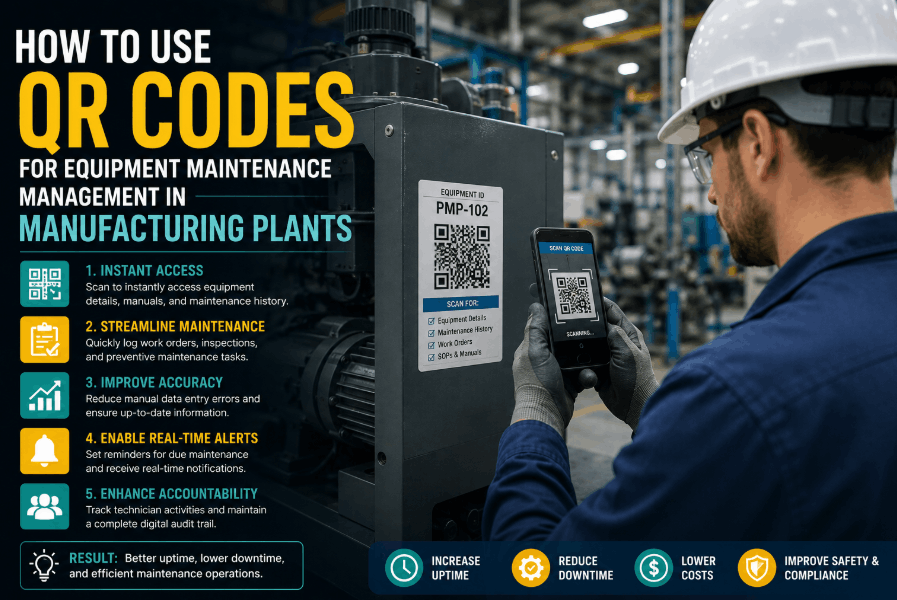
QR code equipment maintenance is transforming how manufacturing plants manage assets, execute inspections, and close work orders. When a technician scans a tag on a conveyor motor, presses, or HVAC unit, they get instant access to service history, open work orders, and step-by-step procedures — without a clipboard, a radio call, or a trip to the office. This guide covers exactly how to implement QR code asset management in manufacturing, from physical tagging strategy to Sign Up Free and connecting your asset library to a live CMMS. Whether you are building a new maintenance program or digitizing an existing one, QR codes are the fastest path from paper-based chaos to structured, mobile-first operations.
QR Code Maintenance · CMMS · Asset Tagging
Tag Every Asset. Scan to Act. Track Everything in Oxmaint.
Generate QR codes for every piece of equipment, link them to work orders and inspection checklists, and manage your entire plant from a mobile device.
Why QR Codes
Why QR Code Asset Tagging Is the Fastest Win in Plant Maintenance Digitization
Most maintenance digitization projects stall because they require major change management or expensive sensor infrastructure before delivering any value. QR code plant maintenance is different — it delivers immediate, tangible value to every technician on the floor from day one. Book a Demo to see how Oxmaint's QR code generation and mobile work order system get a facility operational in days, not months.
< 30s
Time to open a work order by scanning an asset QR code
100%
Asset history accessible from the scan point — no desktop needed
Zero
Paper forms, clipboards, or manual data re-entry required
1 Day
Typical time to tag and activate assets in Oxmaint's mobile platform
Core Use Cases
5 Ways Manufacturing Plants Use QR Codes for Equipment Maintenance
QR code maintenance goes beyond simple asset identification. In a structured CMMS like Oxmaint, every scan is a gateway to action — creating work orders, completing inspection checklists, accessing manuals, or logging readings. Sign Up Free and explore each use case with your own equipment data inside the platform.
01
Instant Work Order Creation
A technician scans the QR tag on a packaging line motor and raises a corrective work order directly from their phone. Asset ID, location, and equipment data populate automatically — no manual entry, no miscommunication.
Eliminates: Manual WO Entry Errors
02
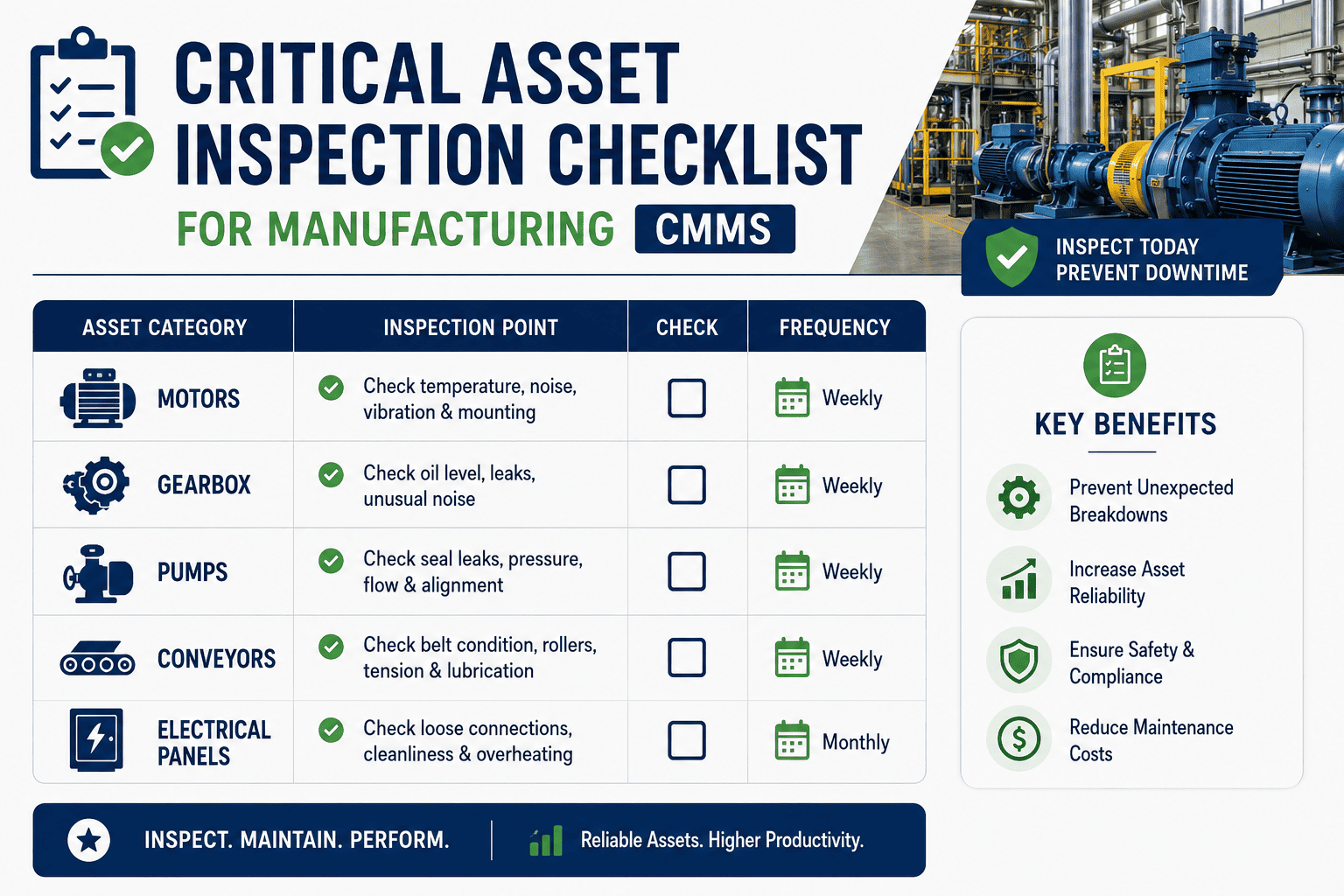
Mobile Inspection Checklists
Scan-triggered inspection forms ensure the right checklist loads for the right asset at the right frequency. Readings, pass/fail results, and photos are captured at the point of work and synced to the asset record in real time.
Eliminates: Paper Inspection Logs
03
Full Service History Access
Every scan surfaces the complete maintenance history of that specific asset — all past work orders, failure events, parts replaced, and technician notes. New technicians get full context without asking anyone.
Eliminates: Knowledge Loss on Turnover
04
Procedure and Manual Access
Link OEM manuals, lubrication specs, torque tables, and SOP documents directly to each asset's QR code. Technicians follow the correct procedure every time without searching shared drives or flagging supervisors.
Eliminates: Procedure Gaps
05
Parts and Inventory Lookup
Scan an asset to view its critical spare parts list, current storeroom inventory levels, and last reorder date. Technicians confirm parts availability before starting a job — reducing mid-repair stoppages and MTTR.
Eliminates: Mid-Job Parts Delays
06
Compliance and Audit Trails
Scan-triggered task completion creates a timestamped, technician-attributed digital record for every maintenance activity. Regulatory audits and ISO compliance reviews are supported with zero additional documentation effort.
Eliminates: Manual Compliance Records
Implementation Guide
How to Implement QR Code Equipment Tagging in a Manufacturing Plant: Step-by-Step
A successful QR code maintenance rollout is 20% technology and 80% process design. The steps below reflect what Oxmaint's implementation team consistently sees working across discrete manufacturing, food and beverage, and process industries. Book a Demo and walk through this implementation framework with your own facility data.
Step 01
Build Your Asset Hierarchy in the CMMS
Before printing a single label, define your asset structure in Oxmaint: sites, areas, systems, and individual equipment items. Each node in the hierarchy receives its own QR code, enabling scan-based navigation from plant level down to a specific pump or gearbox.
Step 02
Generate and Print QR Labels
Oxmaint auto-generates a unique QR code for every asset in your database. Print durable polyester or metal-plate labels rated for your operating environment — high-temperature, chemical-wash, or outdoor exposure as required. Tag placement should be ergonomic: scan-height, unobstructed, and away from heat sources.
Step 03
Link PM Schedules and Inspection Forms
Attach preventive maintenance schedules and inspection checklists to each asset record. When a technician scans the QR code, the correct active tasks appear automatically — no search required. This is where scan-to-inspect and mobile QR maintenance value is realized immediately.
Step 04
Train Technicians on Scan-First Workflow
The shift from paper to QR requires one workflow change: scan before you touch. A 30-minute onboarding session with the Oxmaint mobile app is sufficient for most technicians. Scan to find, scan to log, scan to close — three actions that replace an entire paper-based maintenance system.
Step 05
Monitor Scan Activity and Compliance
Use Oxmaint's dashboard to track which assets are being scanned, which PMs are completed on time, and where scan gaps indicate missed inspections or untagged equipment. Scan data becomes a proxy for PM compliance and technician coverage.
Step 06
Expand to Predictive Triggers
Once QR-driven work order and inspection data matures, layer in condition-based triggers. Meter readings captured at each scan — vibration, temperature, runtime hours — feed Oxmaint's predictive maintenance rules and fire work orders before failure occurs.
CMMS Integration
QR Code CMMS Integration: How Oxmaint Connects Asset Tags to Live Maintenance Data
A QR code without a CMMS behind it is just a sticker. The maintenance value is entirely in what the scan triggers. Sign Up Free and see how Oxmaint's QR infrastructure connects every physical tag to a live data layer covering work orders, parts, compliance, and performance KPIs.
| Scan Action |
What Oxmaint Triggers |
Data Captured |
Business Outcome |
| Technician scans asset tag |
Asset profile opens with active WOs, history, and pending PMs |
Scan timestamp, technician ID, location |
Zero search time; full context at point of work |
| Scan during scheduled PM |
Inspection checklist auto-loads for that asset and frequency |
Checklist responses, meter readings, photos |
100% structured PM records; PM compliance tracking |
| Scan to report breakdown |
Corrective work order created with asset pre-populated |
Failure description, priority, reported time |
Faster WO creation; accurate MTTR measurement |
| Scan to close work order |
Completion prompt with labor hours, parts used, notes |
Labor time, parts consumed, technician sign-off |
Accurate cost-per-asset data; inventory auto-deduction |
| Scan for parts lookup |
Critical spares list with live storeroom inventory levels |
Parts viewed, stock confirmation |
Eliminates mid-repair delays from parts unavailability |
ROI and Value
The Business Case for QR Code Equipment Maintenance in 2026
QR code maintenance is not a technology project — it is a productivity and reliability investment. The ROI arguments below are drawn from Oxmaint customer outcomes across manufacturing, facilities, and utilities. Book a Demo to model these numbers against your own facility baseline.
Wrench Time Recovery
Minutes Saved per WO × Daily WO Volume × Technician Cost Rate
Technicians typically spend 15–25 minutes per job locating paperwork, finding procedures, and manually entering data. Scan-triggered workflows eliminate this entirely — recovering 1–2 productive hours per technician per shift.
Inspection Compliance Improvement
Missed PMs Prevented × Avg Failure Cost × Failure Probability
Plants using scan-triggered checklists consistently report PM compliance improvements from below 70% to above 90%. Each percentage point of PM compliance represents measurable reduction in unplanned failures and emergency repair costs.
MTTR Reduction
Hours Saved per Repair × Repairs per Month × Hourly Downtime Cost
Access to full asset history at the scan point means technicians diagnose faster, order the right parts the first time, and follow the correct procedure. Average MTTR reduction of 20–35% is documented across Oxmaint deployments.
Audit and Compliance Cost Avoidance
Hours Saved on Audit Prep × Compliance Team Rate + Risk of Non-Compliance
Timestamped, scan-attributed maintenance records eliminate manual audit preparation. Plants facing regulatory inspections or ISO recertification recover weeks of administrative time annually — and reduce the risk of compliance gaps.
Mobile Maintenance · QR Asset Tags · Work Order Automation
Turn Every QR Scan Into a Maintenance Action in Oxmaint
Generate asset QR codes, link PM schedules and inspection forms, and track compliance in real time — from a platform built for plant floors.
Common Questions
QR Code Equipment Maintenance — Questions from Plant Managers and Maintenance Leaders
What type of QR code labels work best for manufacturing environments?
Use polyester or anodized aluminum labels rated for your specific conditions — high temperature, chemical wash-down, UV exposure, or outdoor use. Avoid paper labels in any industrial setting. Oxmaint's QR codes are format-agnostic and work with any durable label supplier.
Do technicians need a special app to scan QR codes for maintenance?
Oxmaint's mobile app is available on iOS and Android and handles all QR scanning natively. Standard smartphone cameras work without any additional hardware. Technicians log in once and scan from any device.
Can QR code maintenance work without internet connectivity on the plant floor?
Oxmaint supports offline mode — technicians can scan, complete checklists, and close work orders without a live connection. Data syncs automatically when connectivity is restored, ensuring no records are lost in low-signal environments.
How long does it take to tag all assets and go live with QR code maintenance?
Most plants complete asset upload, QR generation, and label printing within one to two days. Live scanning on the floor typically begins within the first week of Oxmaint deployment — no lengthy implementation cycle required.
How does QR code maintenance improve PM compliance tracking?
Every scan creates a timestamped record tied to a specific asset and technician. Oxmaint's dashboard shows real-time PM compliance rates, overdue tasks, and scan gaps — replacing manual tracking spreadsheets entirely.
Is QR code asset management suitable for multi-site manufacturing operations?
Yes. Oxmaint's multi-site architecture allows centralized asset libraries with site-level QR code management. Maintenance managers can view compliance and work order data across all locations from a single dashboard while technicians work locally.
QR Maintenance · CMMS · Mobile Plant Operations
Start Tagging Your Equipment and Go Live in Days
Oxmaint gives every technician instant access to asset history, work orders, and inspection checklists — from a single QR scan on any mobile device.


.png)