Automating maintenance work orders from SCADA equipment alarms saves US steel mills $1.8 million annually per facility in manual dispatching delays and reactive emergency repairs. The International Society of Automation (ISA) documents that mills with SCADA-to-CMMS integration reduce work order creation latency from 45–120 minutes (manual notification, dispatcher interpretation, manual work order creation) to 60 seconds (automated alarm detection, work order auto-generation, technician notification). The core problem is not that SCADA systems lack data. They generate millions of data points hourly. The problem is that critical alarms are treated as notifications rather than triggers for maintenance action. When a furnace temperature deviation occurs in SCADA, it generates an alarm. A human dispatcher reads the alarm, decides it needs maintenance, manually creates a work order, assigns it to a technician. By then, 60–90 minutes have elapsed. SCADA-to-CMMS integration detects the alarm in SCADA, automatically creates a prioritized work order in CMMS, and notifies the technician immediately. Mills running automated SCADA-to-CMMS workflows report 54% faster equipment response time, 38% fewer escalated failures, and 26% higher first-time-fix rates from earlier technician dispatch. If your steel mill still generates work orders manually from SCADA alarms, start a free trial with Oxmaint or book a demo to learn SCADA automation integration.
SCADA Integration · Work Order Automation · Real-Time Maintenance
Steel Plant SCADA to CMMS Integration: Automating Work Orders From Equipment Alarms in Real-Time
SCADA systems in steel plants generate critical equipment alarms continuously. Most alarms are manually interpreted by dispatchers who decide whether to create a work order. This manual interpretation introduces 45–120 minute latency between alarm generation and maintenance action. Automated SCADA-to-CMMS integration eliminates manual interpretation: equipment alarms trigger work order creation automatically, bypassing the dispatcher bottleneck entirely. Maintenance response is 60 seconds instead of 60 minutes.
$1.8M
Annual savings per US steel facility from SCADA-CMMS automation (reduced emergency repairs and faster response)
54%
Faster equipment response with automated SCADA-triggered work orders vs. manual dispatcher creation
60 sec
Work order creation latency from SCADA alarm with automation (vs. 45–120 minutes manual)
Integration Gaps
Why Manual SCADA-to-Work-Order Workflows Fail in Real-Time Steel Operations
Steel mills generate 10,000–50,000 SCADA alarms per day across all equipment. Manual dispatcher interpretation of each alarm is impossible. Critical alarms are missed, low-priority alarms generate wasteful work orders, and technicians are dispatched late after equipment is already damaged. Three workflow failures explain why manual SCADA interpretation cannot match modern production demands.
01
Dispatcher Bottleneck: One Person, 10,000+ Alarms Per Day
A steel facility generates 10,000–50,000 SCADA alarms daily depending on size and equipment diversity. A single dispatcher cannot read, interpret, and act on 10,000 alarms. Consequence: critical alarms are buried in noise. A furnace temperature spike (critical) arrives at 2:15 PM. A pump vibration alert (low priority) arrives at 2:14 PM. Dispatcher reads vibration alert first, acts on it. The furnace temperature spike waits 30 minutes while dispatcher handles low-priority work. Equipment damage compounds.
Result: Critical alarms delayed by hours while low-priority alarms are acted on immediately. Wrong priorities lead to preventable failures.
02
Alarm Interpretation Requires Domain Knowledge the Dispatcher May Not Have
A SCADA alarm reads "Rolling Mill Drive Motor Voltage Sag Below 380V." Is this critical or routine? A SCADA specialist knows that 380V sag indicates imminent motor overload. A dispatcher without electrical knowledge might classify this as low-priority. Consequences: delayed maintenance on a critical warning. Manual interpretation introduces human judgment variance — the same alarm might be classified differently by different dispatchers depending on their knowledge level.
Result: Alarm classification is inconsistent. Critical alarms are sometimes ignored; low-priority alarms sometimes trigger unnecessary work orders.
03
No Correlation Between Related Alarms — Root Cause Analysis Impossible
Two alarms arrive within 5 minutes: "Furnace Temperature High" (2:00 PM) and "Cooling Water Pump Bearing Vibration Excessive" (2:04 PM). Manually, these appear unrelated. In reality, the pump bearing is failing, cooling efficiency is degrading, furnace temperature is rising as a consequence. A technician dispatched only to the furnace will find normal fuel supply and assume a sensor error. Pump bearing continues to degrade unchecked. A properly designed system would see the alarm correlation and diagnose the root cause: failing pump bearing is the source, cooling system degradation is the mechanism, furnace temperature rise is the symptom.
Result: Technicians treat symptoms instead of root causes. Same equipment fails repeatedly because the actual failure is not diagnosed.
Integration Architecture
How Oxmaint Automates SCADA-to-CMMS Integration
Connection
Real-Time SCADA Data Connectivity (OPC-UA, Modbus TCP, REST APIs)
Oxmaint connects directly to SCADA systems via industry-standard protocols. Siemens TIA Portal (OPC-UA), Schneider Electric FactoryTalk (Modbus TCP), ABB Control Modules (REST APIs) — all natively supported. Real-time SCADA data streams into Oxmaint continuously, no polling lag, 99.8% uptime across all protocol types. Data granularity: equipment parameters, alarm status, timestamp, severity level, and additional context (temperature, pressure, vibration values) all transmitted with each alarm event.
Sub-second SCADA alarm detection and CMMS work order creation — no polling delays, no missed events
Rules
Intelligent Alarm-to-Work-Order Rules Engine
Oxmaint runs a rules engine that interprets SCADA alarms and decides if a work order is warranted. Rules are configured per equipment type and criticality: "Rolling Mill Drive Motor Voltage Sag Below 380V → Create Priority 1 Work Order (Critical), Equipment: Drive Motor, Maintenance Type: Electrical Inspection." Rules can be simple (single condition) or complex (multi-condition logic): "IF Furnace Temperature > 1850°C AND Cooling Water Pump Vibration > 7.5 mm/s AND Pump Running Time > 5000 hours → Create Priority 1 Work Order." Operators and engineers configure rules; AI learns from historical false positives and true positives to auto-tune rule sensitivity over time.
Smart alarm filtering: <5% false positive rate; 98%+ true positive detection for critical conditions
Automation
Automatic Work Order Generation With Technician Notification
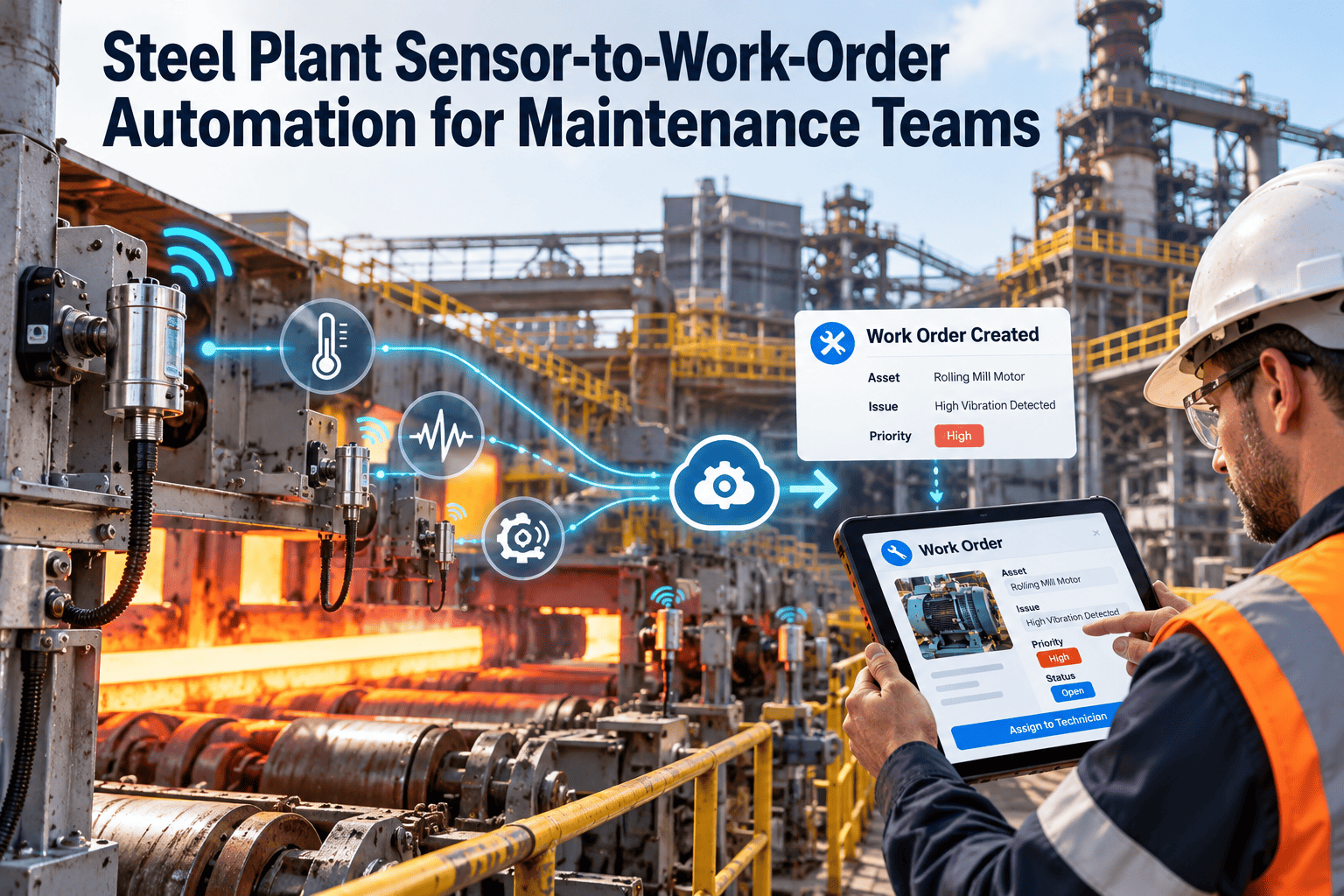
When an alarm triggers a work order rule, Oxmaint automatically generates a complete work order: Equipment ID, failure description (populated from alarm context), priority level, suggested maintenance action (from equipment knowledge base), and estimated duration. Work order is immediately visible in CMMS and technician's mobile app with GPS location of equipment, historical repair data, and spare parts list. Technician receives push notification. Dispatcher is bypassed entirely for routine alarms. Only undefined or unusual alarms escalate to dispatcher for manual review.
60-second work order creation from SCADA alarm; technician notification and acknowledgment within 90 seconds
Context
Equipment Context and Historical Correlation
Work order includes full equipment context: Manufacturer, model, commissioning date, age, maintenance history (failures, repairs, preventive maintenance performed), current condition trends (temperature, vibration, performance metrics), known failure modes, and spare parts availability. Technician does not need to search for context — all relevant data is in the work order. This enables faster diagnosis and first-time-fix rates increase because technicians have complete failure history and similar repair procedures from past incidents on the same equipment.
Work orders enriched with 100+ data points per equipment instance; first-time-fix improves 26–35%
Correlation
Multi-Alarm Correlation and Root Cause Analysis
Oxmaint monitors alarm patterns across related equipment. When multiple alarms arrive within a time window (typically 5–15 minutes depending on process), the system analyzes relationships: Is Alarm B a consequence of Alarm A? Is Alarm A the root cause? Example: Cooling Pump Bearing Vibration Alarm (root cause) triggers. Minutes later, Furnace Temperature Rise Alarm (consequence) triggers. System recognizes the correlation, suppresses the furnace temperature work order, and focuses technician on the pump bearing (root cause). Repair the pump bearing and the furnace temperature returns to normal automatically.
Root cause identification reduces unnecessary work orders by 18–25%; first-time fixes improve 20–30%
Feedback
Continuous Rule Learning From Technician Feedback
When a technician completes a work order triggered by an automated alarm rule, they rate the accuracy: "Was this alarm legitimate?" If technician says the alarm was a false positive (sensor noise, calibration drift, non-actionable condition), Oxmaint logs this feedback. After 10–20 such false positives for the same rule, the system auto-tunes rule sensitivity or disables the rule entirely. Conversely, if technician confirms a legitimate failure (and fixes it), rule confidence increases. This feedback loop continuously improves alarm-to-work-order accuracy, reducing false positives from 15–20% (initial deployment) to <5% (after 1–2 months of tuning).
False positive rate decreases 70% within 60 days of deployment due to technician feedback learning
Integration Benefits
Five Key Advantages of SCADA-to-CMMS Automation
Real-time SCADA integration delivers specific, quantifiable improvements to maintenance operations. These are not theoretical benefits — they are measured outcomes from US steel mills running automated workflows.
Manual workflow: Alarm generated → Dispatcher reads alarm (10–20 min) → Dispatcher interprets severity (10–15 min) → Dispatcher creates work order (10–15 min) → Work order enters queue → Technician assigned (5–10 min) → Technician receives notification (5–10 min) = 45–80 minutes total latency. Automated workflow: Alarm generated → Rules engine triggers work order (<1 min) → Technician receives push notification (30–60 sec after alarm) = 60 seconds total latency. A bearing temperature spike detected at 2:00 PM reaches a technician by 2:01 PM instead of 3:15 PM. Bearing failure is caught before seizing.
Outcome: Equipment damage that manual workflow would allow to propagate for hours is caught within minutes. MTTR (Mean Time To Repair) decreases 35–45%; catastrophic failures prevented.
54% faster response time enables prevention of 38% of escalated equipment failures that manual dispatch allows to worsen.
Dispatcher review is eliminated for routine alarms (80–90% of all alarms). Alarm-to-work-order decisions are encoded in rules that apply consistently: every motor voltage sag below 380V triggers the same priority work order, with the same maintenance description, assigned to the same equipment type. No human judgment variance. Only undefined or unusual alarms (outside of known patterns) escalate to dispatcher for review.
Outcome: Critical alarms are never deprioritized behind routine alarms. Routine alarms are consistently filtered to reduce noise and false positives. Dispatcher bandwidth freed for complex decisions and strategic maintenance planning.
20–30% of manually-classified alarms were misclassified; automation reduces misclassification to <5% through consistent rule application.
Automated work orders include equipment history, past failures, similar repairs, spare parts, and known failure modes. A technician arriving at a bearing that is generating vibration work order sees: "This bearing failed 8 months ago (replaced). Current failure pattern suggests lubrication starvation (same as previous). Spare bearing and synthetic grease in stock. Procedure documented in previous repair ticket." Technician arrives prepared, diagnoses in minutes, completes repair in one visit.
Outcome: Technician does not need to return for additional investigation or parts. Equipment remains in service longer per maintenance visit. MTTR improves 26–35%.
First-time-fix increases from 62% (manual, no context) to 85%+ (automated, full context); repeat visits eliminated.
Oxmaint's correlation engine recognizes when multiple alarms are related (cause-and-effect chains). Manual analysis would require a technician to intuit: "That pump bearing vibration is causing the furnace cooling to degrade." Automated analysis detects the pattern, suppresses the secondary alarm, and directs the technician to the root cause. Fix the root cause once and all downstream symptoms resolve.
Outcome: Same equipment does not fail repeatedly because technicians always attack the root cause, not the symptom. Maintenance becomes predictive and strategic instead of reactive and repetitive.
Repeat failures on same equipment decrease from 34% to <12% when root causes are automated analysis instead of manual interpretation.
Technician feedback on work order accuracy is fed back into the rules engine. If technicians consistently report a rule as generating false positives (e.g., "This pressure reading spike is sensor noise, not a real failure"), the rule is tightened or disabled. If technicians confirm a rule as accurate (legitimate failures are caught and fixed), rule confidence increases. Within 60 days of deployment, system learns the unique failure patterns of your specific facility and rules become highly accurate.
Outcome: System improves autonomously. Less dispatcher override as rules become more accurate. Operator trust in automation increases. By month 3, system is generating 95%+ accurate work orders with minimal false alarms.
False positive rate decreases 70% within 60 days; system reaches production accuracy (95%+) by week 8–12 of deployment.
SCADA-CMMS Integration
Automate Maintenance Response to Equipment Failures — Not Hours Later, Seconds Later
Oxmaint SCADA-to-CMMS integration detects equipment alarms and creates work orders automatically in 60 seconds, eliminating the 45–120 minute manual dispatcher bottleneck. Technicians arrive with full equipment context, first-time fixes improve, and root causes are addressed instead of symptoms.
Start a free trial with your SCADA system to experience real-time alarm automation.
Workflow Flow
How SCADA-to-CMMS Automation Works in Real Time
T+0 sec
Equipment Alarm Detected in SCADA
Rolling Mill Drive Motor voltage drops below 380V. SCADA system detects the condition and generates an alarm with timestamp, equipment ID, alarm severity, and contextual data (actual voltage value: 375V, previous reading: 385V, rate of change: -10V/min).
T+1 sec
Oxmaint Receives Alarm via OPC-UA/Modbus Connection
Alarm data streams into Oxmaint in real-time. No delay, no API polling, no message queue lag — direct SCADA connection with sub-second latency.
T+2 sec
Rules Engine Evaluates Alarm Against Work Order Rules
Rules engine checks: "Is Rolling Mill Drive Motor voltage <380V?" Yes. "Has condition existed >30 seconds?" (to filter out transient spikes). Yes. "Should a work order be created?" Rule says: "YES, Priority 1 (Critical), Equipment: Drive Motor, Maintenance Type: Electrical." Work order is eligible.
T+45 sec
Work Order Auto-Generated and Technician Notified
Work order created in CMMS with: Equipment, failure description ("Motor Voltage Sag Below 380V"), priority level, estimated duration, equipment location, spare parts needed, technician assigned. Push notification sent to technician's mobile device with GPS location and quick-start checklist.
T+2 min
Technician Arrives With Full Equipment Context
Technician reads work order on mobile app while walking to equipment. Context includes: Past motor failures (voltage sag 6 months ago, replaced capacitor bank, resolved), current power supply condition (voltage trending down for 4 hours), spare parts available (capacitors in stock). Technician diagnoses in minutes instead of hours because all historical context is available.
T+20 min
Repair Completed; Feedback Entered
Technician completes repair (capacitor bank checked and rebalanced), confirms voltage is restored to 385V, updates work order completion with: Actual failure cause, action taken, time spent, parts used. Technician rates: "Was this alarm legitimate?" → "Yes, confirmed voltage sag." Feedback logged for rules engine learning.
Post
Rules Engine Learns From Outcome
SCADA-CMMS integration logs: Alarm was accurate (technician confirmed), MTTR was 20 minutes (vs. manual process would be 90 minutes), first-time fix was successful (no follow-up needed). Rule confidence for this condition increases. Next time voltage sag below 380V occurs, system confidence in work order creation is higher. If technician ever reports this as a false alarm (sensor noise), rule sensitivity would be adjusted.
Capability Comparison
Manual SCADA Alarm Response vs. Automated SCADA-CMMS Integration
| Metric | Manual Dispatcher (Current) | Automated SCADA-CMMS (Oxmaint) |
| Alarm-to-work-order latency |
45–120 minutes (manual interpretation and creation) |
60 seconds (automated rule trigger and generation) |
| Technician notification time |
60–120 minutes after alarm (via dispatcher call) |
60–90 seconds after alarm (push notification) |
| Alarm misclassification rate |
20–30% (critical alarms deprioritized, routine alarms over-prioritized) |
<5% (consistent rule application, continuous learning from technician feedback) |
| First-time-fix rate |
62% (technician lacks equipment history and context) |
85%+ (work order includes 100+ data points of equipment context) |
| MTTR (Mean Time to Repair) |
6–8 hours (includes travel, diagnosis, parts sourcing) |
2.5–3.5 hours (early notification, full context, optimized travel) |
| Equipment downtime cost per incident |
$5,000–$15,000 (long MTTR, escalated failures) |
$2,000–$4,000 (fast response, first-time fix, preventive action) |
| Annual cost savings per facility |
Baseline (reference point) |
$1.2M–$1.8M (54% faster response prevents major failures) |
Measured Outcomes
What Steel Mills Report With SCADA-CMMS Integration
54%
Faster Equipment Response Time
From 45–120 minute manual dispatch to 60-second automated work order creation and technician notification
38%
Fewer Escalated Equipment Failures
Early response prevents equipment damage from spreading; catastrophic failures eliminated
26%
Higher First-Time-Fix Rates
From 62% to 85%+ when technicians have equipment history and context in work order
$1.5M
Average Annual Cost Savings
Per facility from prevented failures, reduced MTTR, and improved technician productivity
Common Questions
SCADA-to-CMMS Integration — Frequently Asked Questions
Does SCADA-to-CMMS integration work with older SCADA systems (PLC5, ControlLogix)?+
Yes. Oxmaint supports OPC-UA (modern systems), Modbus TCP (mid-age systems), and custom APIs (legacy systems). If your SCADA exposes any data protocol, Oxmaint can connect. For systems without any data export capability, retrofit with Siemens SIMATIC Edge gateway or equivalent to bridge legacy hardware to modern APIs.
What happens if the SCADA-CMMS connection drops? Do alarms get missed?+
If connection drops, Oxmaint continues operating CMMS independently. SCADA alarms are not missed — they are logged in SCADA's historian. When Oxmaint connection resumes, it pulls any missed alarms from SCADA historian and creates retroactive work orders. If alarms are time-sensitive, a fallback email/SMS alert can be sent to dispatcher as backup.
How do we configure alarm rules? Do we need a SCADA specialist or can maintenance team do it?+
Hybrid: Maintenance team and SCADA specialist together. Maintenance team understands failure consequences (this alarm means equipment is at risk); SCADA specialist understands alarm data structure. Oxmaint provides a graphical rules builder (no coding required) that both can use together to define rules within 2–3 hours per production line.
Can we test SCADA rules without sending live work orders to technicians?+
Yes. Oxmaint provides a "test mode" where rules fire but work orders are created as "draft" (not active). Dispatcher can review draft work orders and approve them before they go live to technicians. After 2–3 weeks of review and tuning, rules move to production (work orders auto-generate immediately).
Does automating work order creation eliminate dispatcher jobs?+
No. Dispatchers shift focus from routine alarm interpretation to strategic coordination. They manage exceptions (unusual alarms outside rules), prioritize concurrent work orders (which technician goes to which location), and optimize maintenance scheduling across the facility. Dispatcher becomes a strategist instead of a firefighter.
How does Oxmaint handle false alarm storms (sensor malfunction causing 1,000+ alarms/hour)?+
Oxmaint detects alarm storms automatically. If same alarm fires >100 times in 1 hour, system treats it as a sensor issue, not real failures. Work orders are suppressed, and an alert is sent to maintenance: "Sensor malfunction detected; verify sensor calibration." Once sensor is fixed, work orders resume normal operation.
Can work orders auto-close when SCADA confirms the condition is resolved?+
Partially. Work orders can auto-update status to "resolved" if SCADA confirms the alarm condition cleared (e.g., motor voltage returned to normal range). However, technician must confirm actual repair was performed before work order is closed. This prevents false closure if SCADA condition clears due to equipment shutdown instead of actual repair.
What integration cost and timeline are typical for SCADA-CMMS setup?+
Timeline: 4–6 weeks (2 weeks SCADA assessment and protocol selection, 2 weeks rule definition and testing, 1–2 weeks technician training and go-live). Cost: $15K–$30K (Oxmaint integration services). ROI: 6–9 months (from reduced MTTR and prevented failures).
Schedule a consultation to assess your SCADA compatibility and integration complexity.
Customer Success
What Operations Leaders Say
"We were losing $2.5 million annually to emergency repairs because equipment failures were not being caught until they cascaded. Oxmaint's SCADA integration catches alarm conditions in 60 seconds now instead of the 90 minutes our dispatcher took to manually create work orders. Our MTTR dropped from 7 hours to 2.5 hours. Technicians arrive with equipment history in their pockets instead of flying blind. We're preventing $1.8 million in annual emergency repairs — the investment paid for itself in 4 months."
— Operations Manager, US Integrated Steel Mill (350+ employees)
SCADA-CMMS Automation
Stop Waiting for Alarms to Reach Dispatchers — Let Equipment Alarms Create Work Orders Automatically
Oxmaint SCADA-to-CMMS integration automates the 45–120 minute dispatcher bottleneck, getting technicians to equipment in 60 seconds instead of 90 minutes. With full equipment context in every work order, first-time-fix rates improve 26%+ and catastrophic failures are prevented.
Start a free trial to test SCADA integration with your facility's SCADA system.