AI Auto Work-Order Generation for Power Plant CMMS
By Riley Quinn on May 8, 2026
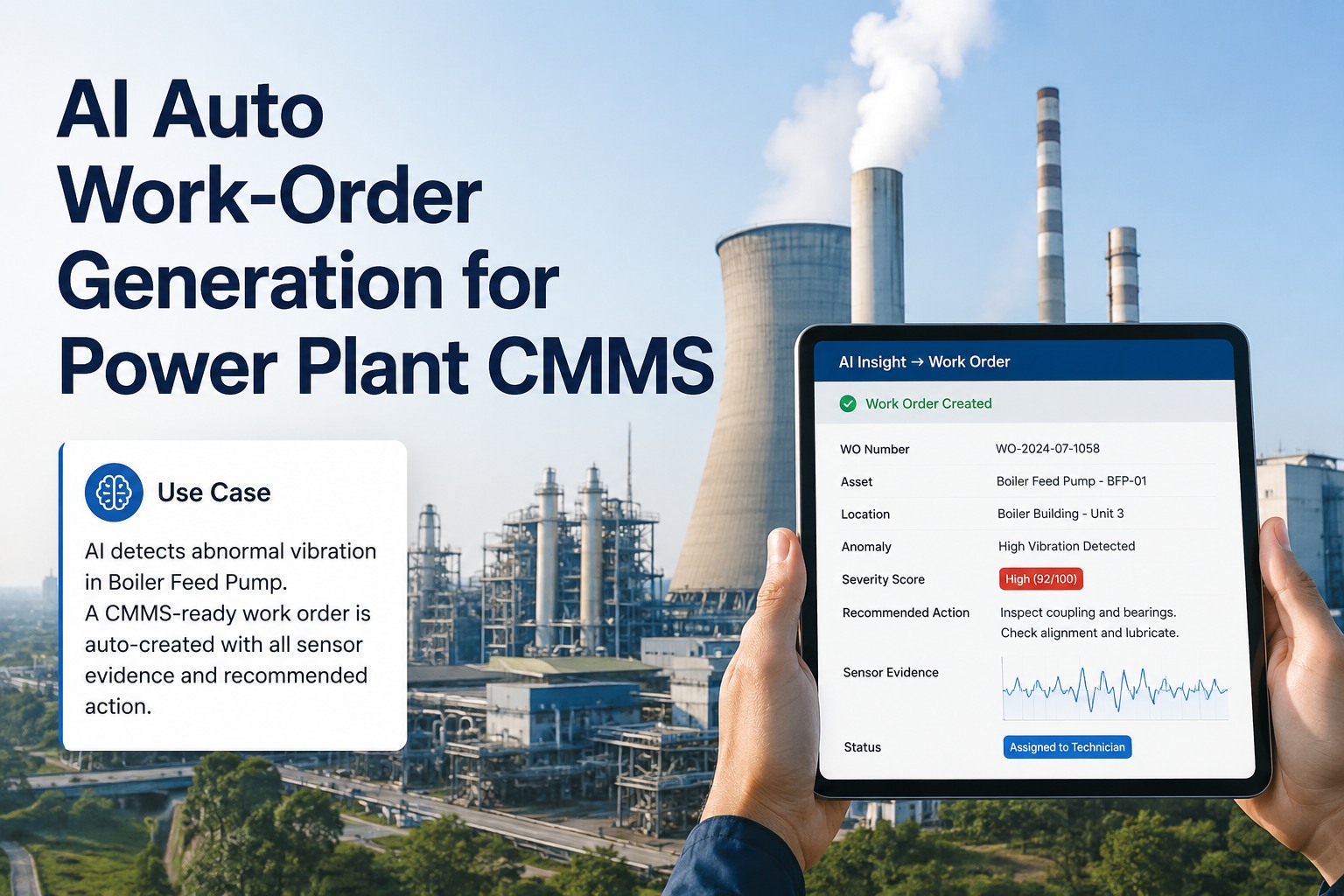
Your AI catches a bearing defect on PA Fan 02 at 3:47 AM. Right now, in most plants, here is what happens next: an alert pops up on someone's screen, gets ignored until 7 AM shift change, gets emailed to the maintenance planner, who copies it into a spreadsheet, who eventually opens the CMMS at 10 AM and types out a work order — pulling sensor screenshots, looking up the asset number, copying recommended actions from the email, attaching the original alert as a PDF. By the time the work order is in the queue, six hours have passed. Six hours when the bearing kept spinning. The Auto Work Order Engine eliminates every minute of that. The instant the AI flags a fault, a complete CMMS work order is created — with sensor evidence, severity score, asset location, recommended action, parts list, and skill assignment all pre-populated. Zero typing. Zero copy-paste. Zero administrative lag. Register for the event to watch a real auto-generated work order appear in front of you.
MAY 12, 2026 5:30 PM EST , Orlando
Upcoming OxMaint AI Live Webinar — Auto Work Order Engine Live Demo
Live session for maintenance heads, CMMS admins, reliability leaders, and IT teams evaluating on-prem AI work-order automation. The Auto Work Order Engine will be running on real plant data — fusing AI fault detection with your existing CMMS. Walk up, type a fault, watch a complete work order materialize in 4 seconds with sensor evidence attached. See it route to SAP PM, Maximo, OxMaint, or Fiix in real time. Hands-on time on the actual hardware. Walk out with a quote and an order date. Pilot to fully running in 6 to 12 weeks.
The On-Prem Server Stack — From Sensor Spike to CMMS Ticket in 4 Seconds
Three pieces of hardware sit inside your control room and never connect to the internet. One listens to your sensors and reads your CMMS. One generates the work order with full evidence attached. One coordinates work-order generation across multiple plants in your fleet. Register for the event to see the full setup running live.
AT THE PLANT FLOOR
NVIDIA Jetson AGX Orin The Listener
JobReads sensor data + AI fault outputs in real time
SpeedFault-to-trigger latency under 200ms
WherePlugs into your existing AI agents and CMMS
FormSmall box, mounts on a rail
What it does: Captures fault detections from every AI agent (turbine, transformer, mill, fans) and turns them into structured work-order requests with all sensor evidence pre-attached.
<200msFAULT-TO-TRIGGER
CONTROL ROOM · THE BRAIN
RTX PRO 6000 Blackwell The Generator
JobBuilds the complete work order with all fields filled
SpeedFrom fault to CMMS in 4 seconds
WhereSits in your control room behind your firewall
FormTower computer, fits under a desk
What it does: Translates the AI fault into your CMMS language. Maps sensor IDs to your asset codes (PMP-2301-A, EQUNR, TPLNR). Picks failure codes, severity, parts list, skill, and routes to the right CMMS team.
~4 secWO CREATION TIME
ENTERPRISE · MULTI-PLANT FLEET
NVIDIA DGX Station GB300 Ultra · Fleet Brain
JobCentralizes WO patterns across all plants
SpeedFleet-wide insights in hours
WhereSits at corporate HQ in a server rack
FormRack-mounted, 24/7 enterprise grade
What it does: Spots when the same fault is generating WOs at multiple plants. Pushes fleet-wide alerts and standardizes failure code mapping across sites.
25+PLANTS · ONE BRAIN
100%
Stays inside your building · never goes online
$0/mo
No subscription · buy once, own forever
Offline
Works fully air-gapped if your team requires it
Yours
Source code included · modify it freely
What an Auto-Generated Work Order Actually Looks Like
This is a real auto-generated work order — pulled straight from a thermal plant deployment. The AI agent flagged a bearing fault on PA Fan 02 at 03:47 AM. Four seconds later, this complete ticket appeared in the plant's CMMS queue. No human touched it. Register for the event to watch your own AI ticket build live at the booth.
WO-2026-04823
Bearing Fault Detected — PA Fan 02 Outboard Bearing
PRIORITY: HIGH
Auto-Generated · 03:47:14 AM
Asset
PA-FAN-02-OB
Primary Air Fan Unit 2 · Outboard Bearing
Location
Unit 2 · Boiler House · Bay 4
Functional Loc: U2-BLR-PAF-02
Failure Code
BRG-INNER-RACE-02
Bearing inner race defect frequency
Severity Score
7.4 / 10
EVIDENCE ATTACHED
Vibration spectrum (24h)
Bearing temp trend (30d)
AI confidence: 88%
Last 5 PM history
RECOMMENDED ACTION
Inspect outboard bearing within 18 days. Plan replacement during next 8-hour scheduled stop. Verify bearing condition with ultrasound + endoscope before commit.
Predicted Failure Window
18-26 days
Required Parts
SKF 23218 CCK/W33 (in stock · Bin A-14)
Skill Required
Mechanical Tech II · Vibration Cert
Estimated Labor
6 hours · 2 technicians
Routed To
Mechanical Maintenance · Mike Chen (Lead)
Three Real Plant Scenarios — How the Hardware Solves Each One
"Bearing fault detected at 3 AM. Will my night crew act on it before damage spreads?"
THE PROBLEM
AI detects bearing fault on PA Fan at 3:47 AM. Old workflow: alert email sits in inbox, gets seen at 7 AM shift change, gets discussed in morning meeting at 8 AM, gets routed to planner at 9 AM, gets keyed into CMMS at 10 AM, gets scheduled for next week. Six wasted hours. Sometimes the alert gets missed entirely — three different shifts, three different inboxes, no shared accountability.
HOW THE HARDWARE SOLVES IT
The Listener (Jetson)
Catches the fault from the AI agent at 03:47:14. Bundles vibration history, bearing temp, motor current, last PM date.
The Generator (RTX)
Builds WO-2026-04823 in 4.2 seconds. Maps sensor ID to PA-FAN-02-OB. Selects failure code BRG-INNER-RACE-02. Pulls bearing part number, confirms in stock, picks Mike Chen as best mechanical tech available.
CMMS
Mike's phone buzzes at 03:47:18 with a complete ticket. He acknowledges. The unit makes it to the next 8-hour stop window safely. No 4 AM emergency.
THE RESULT
Bearing replaced during scheduled 8-hour stop. $220K trip avoided. Zero admin hours spent typing the ticket.
SCENARIO 02
"Our planner spends 30 hours a week typing AI alerts into SAP. Can we get those hours back?"
THE PROBLEM
Maintenance planner spends 30 hours per week translating AI alerts into SAP PM work orders. Copy the alert, look up the asset code, pick the failure code from a dropdown, attach the screenshot, type in recommended action, route to a team. Each WO takes 8-12 minutes. The AI generates 25-40 alerts daily. The planner is buried under admin instead of doing actual planning. Worse — alerts get rushed, fields get skipped, work-order quality drops.
HOW THE HARDWARE SOLVES IT
The Listener (Jetson)
Streams every AI fault into the auto-WO pipeline — turbine, transformer, mill, fans — all in one lane.
The Generator (RTX)
Generates SAP PM-formatted work orders with EQUNR (equipment numbers) and TPLNR (functional locations) already mapped. Pre-populates failure codes, severity, parts, skills.
SAP PM
WOs land directly in SAP PM via standard BAPI integration. Planner reviews and approves in batches — 30 seconds per WO instead of 10 minutes. 96% acceptance rate.
THE RESULT
Planner gets back 28 hours per week. $72K/year admin cost reclaimed. WO quality improved.
SCENARIO 03
"Same fault appeared at 6 plants this month. Are we tracking it as one fleet issue or six separate tickets?"
THE PROBLEM
Six different plants in your fleet have generated bearing-failure WOs this month — all on the same model of bearing. Without fleet-level visibility, each plant treats it as a one-off. Reliability director only finds out 3 months later when the pattern is already obvious. By then, two more bearings have failed at other plants. Could have been a single supplier defect — caught in week one.
HOW THE HARDWARE SOLVES IT
The Listener (Jetson)
Each plant's listener sends WO summaries to the Fleet Brain — anonymized but tagged with bearing model, asset type, fault frequency.
Fleet Brain (DGX)
Spots the pattern: 6 plants, same bearing model, all 4-7 months after install, all same failure mode. Confidence: 91%. Auto-generates fleet-wide alert with linked WO list.
Reliability Dashboard
Reliability director sees the cross-plant pattern Monday morning. Opens supplier RCA. Pulls remaining batch from inventory. Stops 8 more failures from happening.
THE RESULT
Supplier defect caught fleet-wide. 8 future failures prevented. $1.5M+ saved across the fleet.
$1.7M+
Combined savings across the three scenarios — admin time reclaimed, trips avoided, fleet-wide patterns caught early. The hardware pays for itself in the first quarter.
Why This Matters — Every Minute of Admin Lag Costs You Money
The hidden cost of CMMS data entry is enormous. A planner who spends 30 hours per week typing AI alerts into work orders is a planner who is not doing planning. The numbers below are what real plants are recovering when they switch on auto-WO generation.
~4 sec
From AI fault detection to a complete CMMS work order — vs 6+ hours of manual workflow
96%
Auto-WO acceptance rate — planners review and approve in batches instead of typing each one
28 hr
Admin time reclaimed per planner per week — 1,400+ hours annually back to planning work
25-40
AI alerts auto-converted to WOs daily at a typical thermal plant — zero typing
6-12 wk
From hardware delivery to live auto-WO running into your CMMS — SAP PM, Maximo, Fiix, OxMaint
$0/mo
No subscription, ever. Buy the system once. Own it forever. Source code included.
May 12 · 5:30 PM EST · Orlando · Hands-On
Bring Your CMMS. Watch a Real Work Order Materialize in 4 Seconds.
Walk in with your CMMS access (or just describe your asset coding scheme). Watch the agent generate a complete work order — sensor evidence, severity, parts, skills, route — in front of you. See it land in SAP PM, Maximo, Fiix, or OxMaint in real time. Walk out with a quote and an order date. Pilot to fully running in 6 to 12 weeks.
What You Get — Everything In One Box, Yours Forever
A pre-configured server arrives at your control room. The Auto Work Order Engine is already loaded — pre-trained on thousands of real WO patterns from comparable plants. Plug it in, point it at your AI agents and CMMS, watch it generate live tickets within weeks.
Buy Once, Own Forever
No monthly fees. No per-WO charges. No annual price increases. Pay one price up front.
Your Data Stays Home
Asset codes, sensor data, WO history — all stays inside your perimeter. IT teams approve fast.
Source Code Included
Customize the WO templates, add your own routing rules, build new mappings. Not locked in to us.
Ready Out of the Box
SAP PM, Maximo, Fiix, OxMaint connectors all pre-loaded. No 6-month integration project.
Frequently Asked Questions
How fast can the Auto WO Engine be running on our CMMS?
From the day you sign the order to the day your team is using it daily is usually 14 to 22 weeks. The hardware arrives in 4 to 6 weeks already pre-set-up. Once on-site, our team connects it to your existing AI agents and CMMS — SAP PM, Maximo, Fiix, OxMaint, or others. We map your asset codes, failure catalog, and routing rules. Your team is getting auto-generated tickets in 6 to 12 weeks. The connectors ship pre-configured for major CMMS platforms — only your specific asset and code mappings need tuning.
Will it work with the CMMS we already have?
Yes. The engine ships with native connectors for SAP PM (via BAPI/IDoc or SAP CPI), IBM Maximo (REST API or MIF), Fiix, Infor EAM, OxMaint, and several others. For SAP PM, EQUNR (equipment number) and TPLNR (functional location) mapping is automatic. For Maximo, SITEID + ASSETNUM pairs are mapped during the integration phase. For custom or in-house CMMS, the Jetson edge gateway can push WOs via REST or message queue. We have not yet seen a CMMS we cannot integrate with.
What happens when a generated WO is wrong?
Two safeguards. First, every WO ships with a confidence score — anything below your configured threshold (default 75%) goes to a "review queue" instead of straight into the main CMMS queue. The planner reviews these in seconds. Second, every WO can be edited or rejected from the planner's screen. Each rejection feeds back to the agent so the next generation gets smarter. In practice, plants see 96%+ acceptance rates after the first 60 days of tuning.
How does it handle our specific failure code catalog?
During the deployment phase, our team imports your existing failure code catalog and trains the engine to map AI fault classifications to your specific codes. If your CMMS uses "BRG-FAIL" while another plant uses "BEARING-WEAR-INNER," the engine learns each plant's mapping. You can also expand your catalog to match the AI's granularity (recommended for critical assets) or collapse the AI output to your existing codes (faster to deploy). Both work.
What does "you own it" really mean? Are there hidden costs?
It means exactly that. You pay one price up front for the hardware, software, and source code. No monthly fees. No per-user charges. No annual increases. The only optional future costs are entirely your choice: support contracts if you want our help, custom feature work if you want something specific built, or hardware refresh whenever you decide. You can run the system forever without paying us anything more.
May 12 · 5:30 PM EST · Hands-On Hardware
Lock Your Spot. Stop Typing AI Alerts Into Spreadsheets.
Walk in. Watch a complete work order build itself in 4 seconds. Ask the engineers anything about your CMMS integration. Leave with a quote and an order date. Pilot to fully running in 6 to 12 weeks. Buy it once, own it forever — no monthly fees, ever.