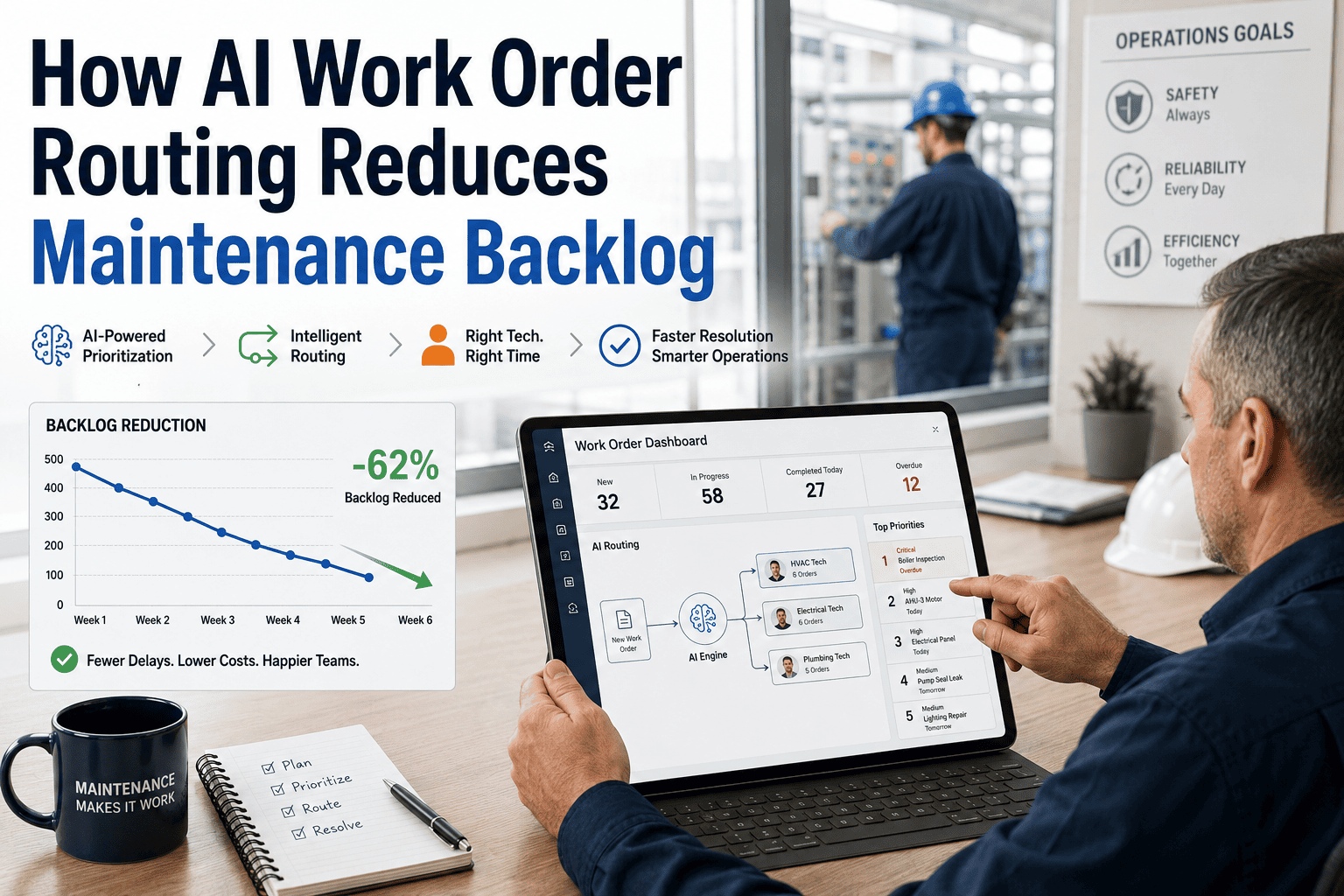
Maintenance backlog is rarely a technician problem — it's an assignment problem. Work orders sit in queues waiting for the right person, the right parts, or someone to notice they've been sitting there for three weeks. OxMaint's AI-based work order routing automatically matches every request to the right technician based on skill, location, shift, and parts availability — cutting response time and clearing backlog without adding headcount. This article explains exactly how it works and what you can expect in the first 90 days.
WORK ORDER AUTOMATION
AI Work Order Routing — How Smart Assignment Kills Maintenance Backlog
Stop manually dispatching work orders. OxMaint routes every request to the right technician — automatically — based on skill match, location, shift coverage, and parts on hand.
48%
average backlog reduction in first 90 days with AI routing
2.3×
faster average work order response time vs manual dispatch
91%
first-time fix rate when skill matching is part of the routing logic
Why Backlogs Build — The 4 Root Causes
01
Wrong Technician Assigned
Work order sent to whoever is available, not whoever has the right skill. Result: partial repair, return visit, double labor cost.
02
Parts Not Pre-Checked
Technician arrives on-site, part isn't in stock. Work order sits open while procurement catches up — often for days.
03
No Priority Differentiation
All work orders look the same in a flat queue. A critical pump failure sits behind a light bulb replacement for hours.
04
Supervisors Bottleneck Dispatch
Every assignment requires a supervisor decision. When supervisors are in meetings or off-shift, the queue freezes completely.
How OxMaint AI Routing Solves Each One
Wrong technician assigned
→
OxMaint matches work order asset type and failure code to technician skill profiles. The most qualified available tech on the right shift gets the assignment automatically.
Parts not pre-checked
→
At work order creation, OxMaint checks inventory for required parts. If stock is low, a procurement request is generated before the tech is dispatched.
No priority differentiation
→
AI scoring engine weighs asset criticality, production impact, safety risk, and SLA deadline. Critical work orders surface immediately — not after someone notices.
Supervisor bottleneck
→
Routine work orders route and assign automatically within defined rules. Supervisors only review exceptions — reducing their dispatch workload by up to 70%.
TYPICAL BACKLOG REDUCTION CURVE — AI ROUTING DEPLOYED AT DAY 0
Based on aggregate data from OxMaint customers using AI routing across discrete manufacturing, food processing, and utilities sectors.
Work Order Routing Comparison
| Routing Factor |
Manual Dispatch |
Basic CMMS Rules |
OxMaint AI Routing |
| Skill Matching |
Supervisor judgment |
Not available |
Automatic — skill profile match |
| Parts Availability |
Checked on arrival |
Not checked |
Checked at WO creation |
| Priority Scoring |
Manual triage |
Static priority field |
Dynamic — criticality + SLA + safety |
| Off-Shift Coverage |
Queue freezes |
Queue freezes |
Rules-based auto-escalation |
| First-Time Fix Rate |
55–65% |
65–75% |
85–91% |
How Much Backlog Are You Carrying Right Now?
OxMaint can show you your current backlog volume, age, and priority breakdown in your first session. Book a demo and come with your current queue — we'll show you what AI routing changes.
EXPERT REVIEW
Marcus Bell, CMRP, CRL
Reliability Engineer — 21 Years in Heavy Industry and Consumer Goods Manufacturing
Backlog is not just a scheduling problem — it's a risk accumulation problem. Every week a work order sits unassigned, the underlying asset degrades a little more. I've worked with plants where the backlog was so large that supervisors stopped looking at it — they just reacted to whatever broke that day. AI routing doesn't just speed up assignment; it makes the invisible visible. When a plant manager can see that 40 overdue work orders are on assets flagged as Tier-1 critical, that changes decisions immediately. The technology is the easy part — the hard part is being willing to see the real number.
Frequently Asked Questions
How does OxMaint's AI routing handle emergency work orders that need immediate dispatch?
Emergency work orders bypass the standard routing queue entirely. When a work order is flagged as emergency — by a technician, supervisor, or automated sensor trigger — OxMaint identifies the nearest qualified available technician, sends an immediate push notification to their mobile device, and notifies the supervisor. Response time tracking begins the moment the emergency flag is set, providing accountability data for every critical response.
Sign up free to configure your emergency dispatch thresholds.
What data does OxMaint need to build technician skill profiles for routing?
Skill profiles are built from three data sources: structured skill tags you assign during onboarding (equipment type certifications, trade licenses, system specialties), work order completion history — which skills each tech has demonstrated in the field — and supervisor-defined competency ratings. Most teams complete initial skill profiling in 1–2 hours during setup. The AI improves routing accuracy over time as more work order history accumulates.
Can supervisors override AI routing decisions?
Yes, always. AI routing in OxMaint is decision-support, not decision-replacement. Supervisors can reassign any work order at any time with a single tap, and the system logs the reassignment reason for reporting. Override patterns are analyzed automatically — if supervisors are regularly overriding routing for a specific asset type, OxMaint flags the skill profile or routing rule that likely needs adjustment.
Book a demo to see the supervisor dashboard in action.
Does AI routing work for multi-site and multi-shift operations?
Yes. OxMaint's routing engine is multi-site aware — it knows which technicians are assigned to which sites, which shift windows apply, and which skills are available across locations. For multi-site operations, routing can be set to site-local first with cross-site escalation rules for skills that only exist at certain locations. Shift handover summaries are generated automatically, ensuring open work orders transfer cleanly between shifts without being lost.