Airport CMMS Integration Guide: Best BMS, SCADA, ERP & Access Control
By William Jerry on September 18, 2026
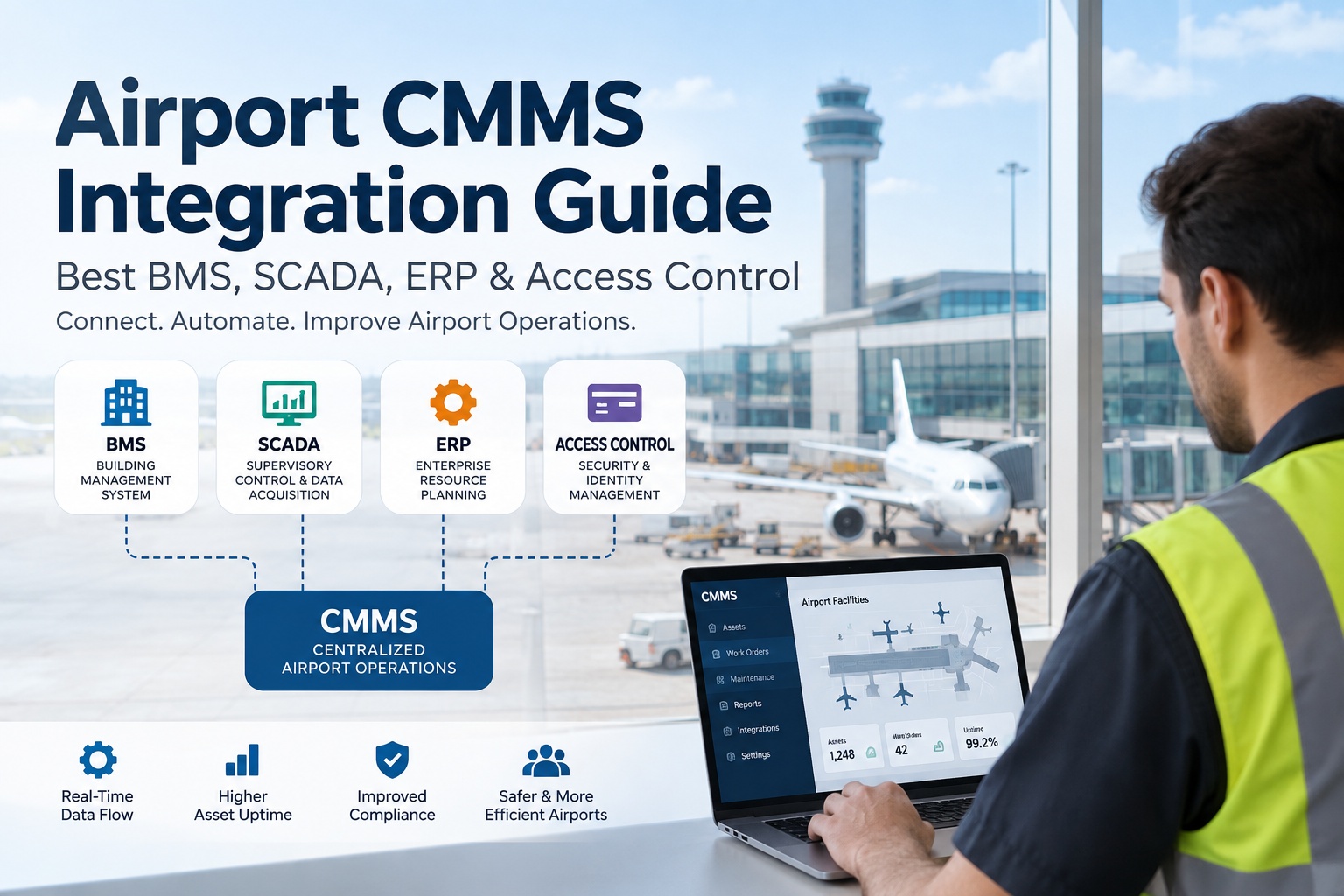
Every airport maintenance team eventually hits the same wall: the BMS knows a chiller tripped, the SCADA system knows a baggage belt jammed, the ERP knows whether the replacement part is even in stock, and the access control system knows which contractor badge is standing next to the asset right now — but none of these four systems talk to each other, or to the CMMS, without someone manually bridging the gap. Bolt on a point-to-point connection for every pair of systems and you get what integration engineers call a spaghetti stack: fast to build, brutal to maintain, and the first thing that breaks during an audit. This guide covers how to integrate an airport CMMS with BMS, SCADA, ERP and access control the way that scales — event triggers, work orders, inventory sync and role mapping through one integration layer, not seventeen.
Airport Systems Integration · BMS · SCADA · ERP · Access Control · 2026
Stop Chasing Alarms Across Four Different Screens
A chiller fault in the BMS, a conveyor jam on SCADA, a low-stock part in the ERP, a badge swipe at a restricted door — right now, each one lives in its own system, and someone has to notice, translate and re-key it before a technician ever gets dispatched. OXMAINT AI is the CMMS that sits underneath all four: it turns their events into work orders automatically, keeps parts inventory synced with the ERP, and maps access-control roles to who's actually allowed to close out the job.
connections a point-to-point stack needs — 5 systems = 10 links to maintain
4 systems
BMS, SCADA, ERP and access control — the core set most airports run
1 layer
a middleware/API hub replaces the tangle with one connection per system
Bi-directional
sync needed both ways — CMMS reads events, ERP reads cost & parts data back
Why the "Just Connect Everything" Approach Falls Apart
The instinct is understandable: BMS is down for a chiller fault, so wire it straight into the CMMS. Next month SCADA needs the same treatment for baggage belts. Then the ERP needs a direct feed for parts stock. Each connection is quick on its own — but the math catches up fast. Five systems connected point-to-point means ten separate integrations, each with its own auth, its own failure mode, and its own person who "knows how that one works." Change one system's API and two or three connections silently break. Book a demo and see the hub-and-spoke alternative mapped to your stack.
Point-to-Point
Every new system means new connections to all the others — the tangle grows faster than the estate.
Hub & Spoke (OXMAINT AI)
Every system connects once, to the CMMS hub — new systems add one link, not four.
Four Systems, Four Jobs — What Each One Actually Brings
HVAC, lighting, energy metering. A fault or setpoint breach should open a work order the moment it fires — not after someone checks the BMS dashboard.
SCADA
"Is the operational equipment running?"
Baggage belts, fuel distribution, airfield lighting circuits. High-frequency, safety-relevant signals that need fast, reliable event mapping to the right asset.
ERP
"Do we have the part, and who pays for it?"
Financial and procurement system of record. The CMMS needs to check stock before dispatch and post labour/parts cost back — both directions, in sync.
Access Control
"Who's allowed near this asset, and are they there?"
Badge and credential system. Maps to work-order permissions — a contractor shouldn't be able to close out a job in a zone their badge never entered.
From Event to Closed Work Order — What Flows Through the Hub
This is the pattern behind every one of those four integrations: a source system fires an event, the CMMS decides what it means for a specific asset, and the result is a tracked, owned action — not a message someone has to interpret. Book a demo to see this mapped to your actual asset list.
Source System
Event
CMMS Action
BMS
Chiller high-discharge-temp alarm
Work order auto-created, routed to HVAC tech, asset history attached
SCADA
Baggage belt motor overcurrent trip
Defect logged against the belt segment, spare motor checked against ERP stock
ERP
Purchase order for a spare part received
Parts inventory count updated, any parts-blocked work order released
Access Control
Contractor badge scanned into restricted zone
Linked work order permissions checked, entry logged against the job record
One Connection Per System. Every Event Mapped to an Asset.
OXMAINT AI is the hub that sits between your airport's physical systems and the people who fix things — reading events from BMS, SCADA, ERP and access control, and writing work orders, defects and cost data back, so nobody's manually bridging four screens at 3am.
Access Control Isn't Just a Door — It's a Permission Layer
Of the four integrations, access control is the one most airports treat as an afterthought — and the one auditors ask about first. When it's wired into the CMMS properly, a badge system does more than open doors: it confirms that whoever closed out a work order was actually cleared to be in that zone, and it flags a closed job with no matching badge entry as something worth a second look.
🛂
Zone-to-role mapping — a technician's badge clearance determines which work orders they can even be assigned.
📝
Entry-to-job matching — a badge scan near an asset within the work-order window gets logged against that job automatically.
⚠️
Closure without entry flags for review — a work order closed with no badge record in the zone is a data-quality or process gap worth checking.
List every system that currently generates an alarm, event or transaction relevant to maintenance.
✓
Confirm each system's API or export method — REST, OPC-UA, BACnet, flat-file — before assuming real-time is possible.
✓
Decide direction per system — does the CMMS only read events, or does it need to write data back (ERP cost postings, for example)?
✓
Map events to assets — an alarm is only useful if it's tied to the exact asset record it belongs to, not a generic zone.
✓
Assign an owner per integration — someone accountable when a connection breaks, not a shared "IT will fix it" assumption.
✓
Plan for one new system at a time — connect and stabilize BMS before adding SCADA, rather than wiring all four at once.
Frequently Asked Questions
What's the difference between a point-to-point and middleware integration approach?
Point-to-point connects each system directly to every other system it needs to talk to — fast to set up, but the number of connections grows sharply as systems are added. A middleware or hub approach has every system connect once to a central layer, so adding a new system means one new connection, not several.
Do we need to replace our BMS or SCADA system to integrate with a CMMS?
No. Integration works alongside existing BMS and SCADA platforms through their existing APIs or protocols — the CMMS reads their events and asset data rather than replacing the underlying control systems.
Does ERP integration need to be bi-directional?
Generally yes. The CMMS typically needs to check parts stock and cost centres from the ERP before dispatching work, and post labour and parts costs back once a job closes — a one-way feed leaves the financial side unreconciled.
How does access control integration actually help maintenance, not just security?
It ties physical presence to a work order — confirming the person who closed out a job was actually badged into that zone during the work window, which is useful both for accountability and for catching work orders closed without anyone on site.
Which system should we integrate first?
Whichever one is currently costing the most manual re-keying or causing the most missed events — for most airports that's either BMS (frequent, low-urgency alarms piling up) or ERP (parts and cost data re-entered by hand). Start there, stabilize it, then add the next system.
One Hub. Four Systems. No Spaghetti.
Connect BMS, SCADA, ERP and access control to OXMAINT AI once each — and let events become work orders, inventory stay in sync, and access roles map to who's actually allowed to close a job.