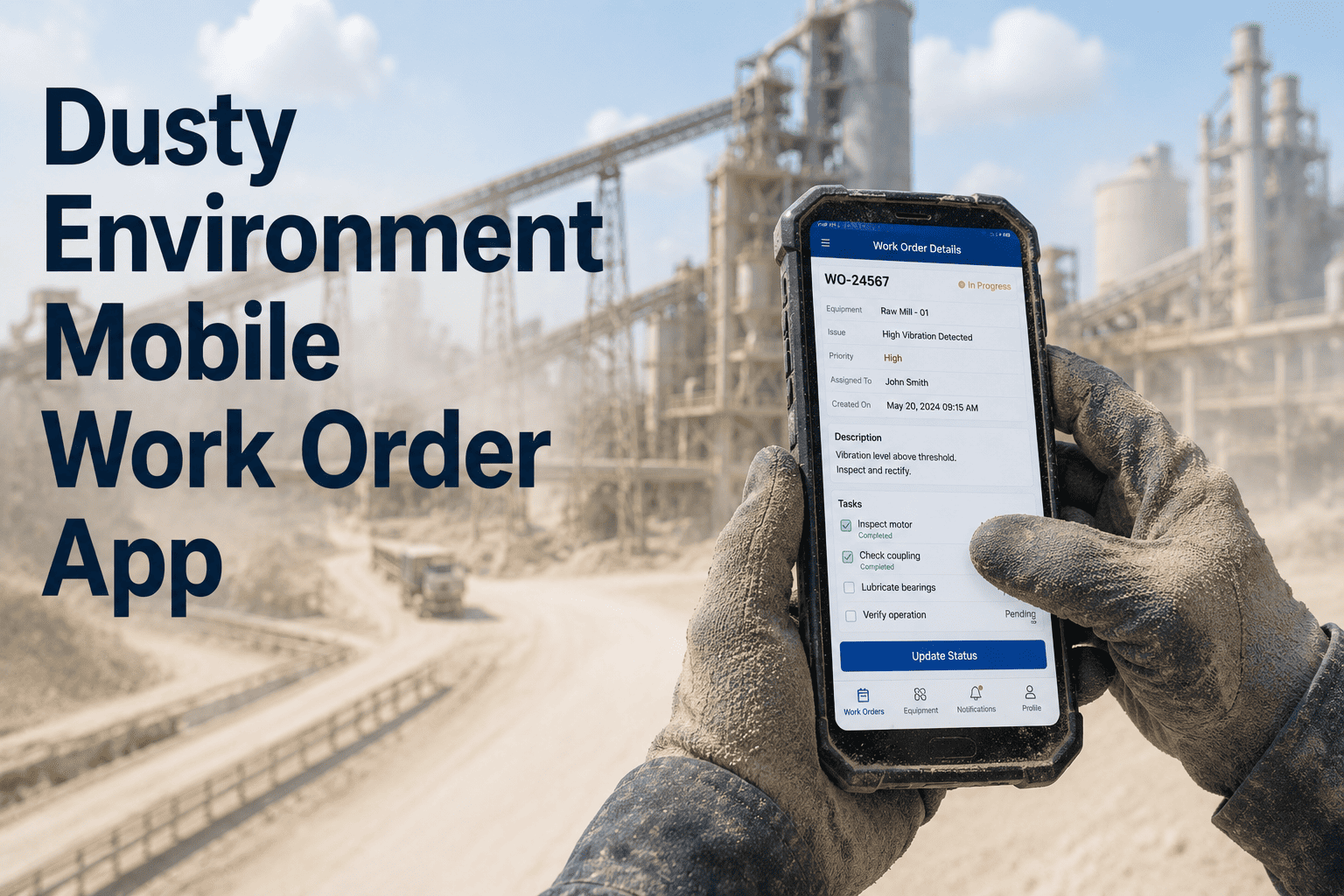
Cement plant technicians work in some of the most signal-hostile environments in industrial maintenance — 200 feet up a preheater tower, deep inside a clinker tunnel, or inside a kiln gallery thick with fly ash and steel — and when connectivity drops, a standard CMMS app goes completely dark. Every work order left unlogged, every inspection reading written on paper and transcribed hours later, every missed lube record is a gap in your asset history that eventually becomes an unplanned stoppage. OxMaint's offline-first mobile CMMS keeps every technician fully operational across every dead zone in your plant — syncing automatically the moment connectivity returns, with zero data loss.
Cement Plant Maintenance · Mobile CMMS · Offline Sync
Offline Mobile CMMS for Cement Plants: Full Functionality in Every Dead Zone
Kiln galleries, preheater towers, and underground conveyor tunnels defeat standard Wi-Fi — but your technicians still need every work order, every asset record, and every inspection checklist. OxMaint's offline-first architecture delivers complete CMMS capability anywhere in your plant, syncing automatically when connectivity returns.
47 min
Lost per technician per shift walking to control rooms without mobile CMMS
40%
Faster inspection completion reported by cement plants on mobile-first CMMS
30%
Of paper maintenance records never make it into the CMMS — permanently lost
Where Connectivity Dies in a Cement Plant
5 Dead Zones Where Standard CMMS Apps Stop Working — and OxMaint Keeps Going
Cement plants are built for tonnes per hour, not Wi-Fi signal. The same reinforced concrete, massive steel structures, and underground networks that make them productive are exactly what destroys connectivity for maintenance teams.
Preheater Tower
Zero Signal
Up to 120m height. Thick concrete walls at every level block all cellular and Wi-Fi signal. Technicians perform critical cyclone and riser duct inspections here daily.
Without offline CMMS: Technicians carry clipboards and transcribe 2–3 hours after returning to grade level. Data accuracy degrades with every step back to the office.
Kiln Gallery
Intermittent
Rotating steel shell 60–80m long creates RF interference and signal shadow zones. Tyre and roller inspections, drive gearbox checks, and shell temperature readings happen here every shift.
Without offline CMMS: Connectivity drops mid-form. Data entry interrupted. Partially completed records create compliance gaps and unreliable maintenance histories.
Underground Conveyor Tunnels
Zero Signal
Below-grade with dense concrete walls. Belt conveyor systems running limestone and clinker require regular inspection — idler checks, belt tracking, and drive motor condition monitoring happen underground.
Without offline CMMS: No data capture possible. Technicians use paper, lose readings, and asset history for underground conveyors is perpetually incomplete.
VRM and Ball Mill Interior
Zero Signal
Massive steel mill shells act as Faraday cages. Liner inspections during outages and gearbox lube checks require technicians to enter or work adjacent to steel structures that block all signals.
Without offline CMMS: Liner wear records, torque readings, and oil check data get written on scraps, transferred to paper forms, and entered 4–8 hours later with inevitable transcription errors.
ESP and Baghouse Areas
Poor Signal
Dense dust concentrations and high-voltage electrical equipment create EMI and signal attenuation. Filter cleaning cycles, electrode condition checks, and fan bearing inspections must continue regardless of signal quality.
Without offline CMMS: Maintenance data for baghouse and ESP systems — critical for emissions compliance — has persistent gaps that create audit risk and repeated diagnostic failures.
OxMaint Offline CMMS · Cement Plants
Your Technicians Work in Dead Zones Every Day. Their CMMS Should Too.
OxMaint pre-loads every assigned work order, asset record, inspection checklist, and spare parts list to the device at shift start. In any dead zone — preheater tower, kiln gallery, underground tunnel — technicians work exactly as normal. Everything syncs automatically when connectivity returns.
How Offline-First Architecture Works
Offline-First vs. Offline-Capable: Why the Difference Costs You Maintenance Hours
Most CMMS apps add offline mode as an afterthought — a limited fallback that breaks workflows and loses data. OxMaint is built offline-first: the mobile experience is designed for dead zones as the primary environment, not the exception.
| Capability |
Standard "Offline-Capable" App |
OxMaint Offline-First |
| Work order access in dead zone |
Cached WOs only — new assignments unavailable |
Full shift's WOs pre-loaded at shift start |
| Asset history lookup |
Online only — no history access without signal |
24-month history stored locally on device |
| Photo capture and attachment |
Photos saved to camera roll — manual upload later |
Photos attached to work order offline, auto-sync on reconnect |
| Inspection checklist completion |
Partial functionality — some fields locked offline |
100% checklist functionality in any connectivity state |
| Spare parts lookup |
Not available offline — technician guesses or returns to office |
Full parts catalogue and stock levels cached locally |
| Data sync on reconnect |
Manual reconciliation required — conflict resolution loses data |
Automatic sync — timestamps preserved, zero data loss |
| App behaviour if closed offline |
Data lost — app requires restart and re-entry |
Data preserved — picks up exactly where technician left off |
A Shift Without vs. With Offline CMMS
What a Maintenance Shift Looks Like Across a 1.5 MTPA Cement Plant
6:00 AM
Receives paper task list from outgoing crew. 3 items illegible. Calls previous technician to clarify. 18-minute delay.
7:30 AM
Finds abnormal vibration on kiln tyre #3. Must walk 600m to control room to generate a work order. 22-minute roundtrip.
9:15 AM
Climbs preheater tower — CMMS app shows blank screen. No signal. Carries clipboard and writes readings by hand.
11:45 AM
Paper lube form missing from clipboard. Lube check skipped — no record created. Missed interval not flagged.
End of Shift
Spends 40 minutes transcribing paper notes into desktop CMMS. 3 readings mis-entered. Asset history permanently incorrect.
6:00 AM
Opens OxMaint. All 8 work orders loaded with priority ranking, asset details, and access to 24-month equipment history. Shift planning done before coffee is finished.
7:30 AM
Scans QR code on kiln tyre #3. Logs abnormal vibration with photo. Work order created and dispatched — all offline. No walk to control room.
9:15 AM
Climbs preheater tower — no signal, no problem. Opens checklist offline. Logs all readings at the equipment, attaches photos of suspect cyclone seal.
11:45 AM
Lube interval prompted by OxMaint automatically. Logs lube point, quantity, grade, and condition note. Record created at the equipment, timestamped to the moment.
End of Shift
Zero transcription. All data synced automatically when returning to connected area. Supervisor sees completed work in real time on dashboard.
Core Offline Capabilities
What OxMaint Puts in Every Cement Technician's Pocket — With or Without Signal
01
QR Code Asset Scanning
Scan any asset tag in the plant — offline — to instantly access full maintenance history, current open work orders, OEM specs, and lubrication requirements. No typing. No searching. The asset record opens in one scan.
02
Full Work Order Lifecycle
Open, update, document, and close work orders completely offline. Add labour hours, parts consumed, failure codes, and completion notes — all timestamped to the moment of entry, not the moment of sync.
03
Guided Inspection Checklists
Step-by-step inspection checklists for every cement plant asset type — from kiln tyres to baghouse pulse-jet valves — stored locally with pass/fail indicators and mandatory measurement fields that enforce data quality at the equipment.
04
Photo Documentation
Capture and attach photos directly to work orders offline. Before and after fault evidence, crack documentation, oil condition images — all linked to the asset record and synced automatically when signal returns.
05
Spare Parts Lookup
The full spare parts catalogue and current stock levels are cached on the device. Technicians confirm part availability, reserve stock, and notify stores — all from the equipment location, with no trip to the maintenance office.
06
Automatic Conflict-Free Sync
When the technician re-enters a connected area, OxMaint syncs all offline data automatically — no manual reconciliation, no data conflicts, no lost records. Supervisor dashboards update in real time.
Common Questions
Offline CMMS for Cement Plants — FAQs
How does OxMaint handle data sync conflicts when multiple technicians work on the same asset offline?
OxMaint's sync engine timestamps every action at the moment of entry — not the moment of sync. When multiple technicians log data on the same asset in different dead zones simultaneously, the system merges all records chronologically with no data loss and no manual conflict resolution required.
Book a demo to see the sync engine in action.
How much storage does OxMaint require on a technician's device?
Typical cement plant deployments use 200–500 MB of device storage for a full shift's pre-loaded data including work orders, asset histories, checklists, and parts catalogue. OxMaint optimises data compression specifically for industrial asset records, and pre-loading refreshes automatically at each shift start.
Does OxMaint work on standard smartphones or only on rugged industrial devices?
OxMaint runs on standard iOS and Android devices. Most cement plants use consumer-grade smartphones in protective cases. Rugged industrial tablets and devices are fully supported for environments with extreme dust or drop risk, but they are not required for the offline functionality to work.
Start your free trial on any device.
What happens to offline data if a technician's device runs out of battery before syncing?
All offline data is written to encrypted local storage immediately upon entry. If the device shuts down, the data is preserved and will sync automatically the next time the device powers on and enters a connected area. No data entry is lost due to battery failure.
Can OxMaint's offline mode support compliance inspection records for emissions equipment like baghouses and ESPs?
Yes. Compliance-critical inspection checklists for baghouses, ESPs, and other emissions equipment are stored locally with mandatory field enforcement. The system captures the exact timestamp of every reading at the equipment — not the office — providing the audit trail that regulatory inspectors require.
Discuss compliance inspection workflows with our team.
OxMaint Mobile CMMS · Offline-First · Cement Plants
Every Dead Zone in Your Cement Plant Is a Gap in Your Asset History. Close It.
OxMaint's offline-first mobile CMMS gives every cement plant technician full work order, inspection, and asset record access in every preheater tower, kiln gallery, and underground tunnel — syncing automatically when connectivity returns. No paper. No transcription. No lost data. Deploy in under one week with pre-built cement plant templates.