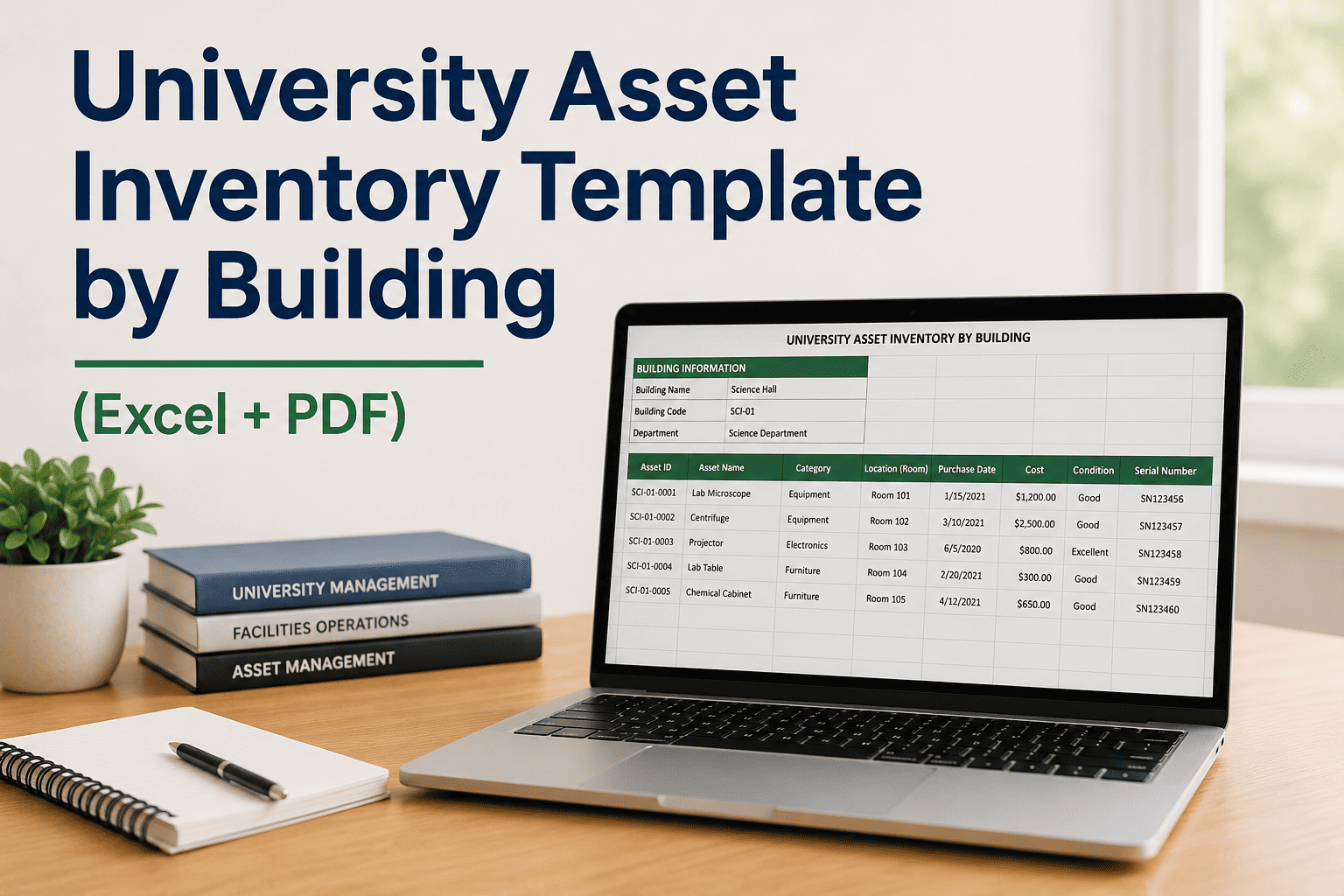
University facilities teams manage thousands of assets across dozens of buildings — but most still rely on spreadsheets without consistent field structures, inconsistent asset IDs, and no clear link between physical location and maintenance history. A structured university asset inventory template by building closes that gap: it standardizes asset identification, captures condition and PM frequency data, supports GIS pairing, and feeds directly into a CMMS for scheduled preventive maintenance. If your institution is ready to move from static spreadsheets to live, actionable asset data, Sign Up Free or Book a Demo to see how Oxmaint structures university asset hierarchies from day one.
Start Building Your University Asset Register Today
Oxmaint gives facilities teams a ready-to-use asset hierarchy, building-level grouping, and PM scheduling — no spreadsheet configuration required.
What a University Asset Inventory Template Must Include by Building
Every asset requires a unique alphanumeric ID tied to building code, floor, and asset category — enabling cross-building deduplication and CMMS import without reformatting.
Asset location must be captured in a four-level hierarchy to support GIS pairing, work order routing, and building-level reporting without ambiguous room references.
Consistent categories (HVAC, Electrical, Plumbing, Lab Equipment, Safety, IT Infrastructure) enable portfolio-level analytics and category-specific PM templates across all buildings.
A standardized condition field (1 = Critical, 5 = Like New) tied to the last inspection date gives capital planning teams the data needed for deferred maintenance prioritization and FCI calculations.
Each asset row should include a PM frequency field (Monthly / Quarterly / Semi-Annual / Annual) that maps directly to CMMS work order trigger logic — not left blank for later resolution.
A GIS coordinate field or QR code reference column allows the inventory to integrate with campus GIS layers and enables mobile technicians to scan assets during rounds for real-time work order creation.
University Asset Inventory Template — Field Reference by Column
| Field Name | Format | Required | CMMS Import |
|---|---|---|---|
| Asset ID | Alphanumeric — BLDG-FL-CAT-#### | Yes | Yes |
| Asset Name | Plain text — manufacturer + model | Yes | Yes |
| Building | Standardized building code | Yes | Yes |
| Floor / Room | Floor number + room ID | Yes | Yes |
| Asset Category | Controlled vocabulary list | Yes | Yes |
| Install Date | YYYY-MM-DD | Recommended | Yes |
| Condition Rating | 1–5 integer + inspection date | Recommended | Yes |
| PM Frequency | Monthly / Quarterly / Semi-Annual / Annual | Recommended | Yes |
| Replacement Cost | USD value | Optional | Optional |
| GIS / QR Reference | Coordinate pair or QR tag ID | Optional | Yes |
Six Asset Categories University Inventories Must Separate by Building
Air handlers, chillers, cooling towers, VAV boxes, and exhaust fans. Inventory by building requires unit capacity, served zones, and filter PM interval to prevent comfort complaints and energy waste.
Switchgear, transformers, panel boards, emergency generators, and UPS systems. Asset IDs must link to single-line diagrams for maintenance traceability and NFPA 70E compliance documentation.
Fume hoods, biosafety cabinets, autoclaves, NMR systems, and cryogenic equipment. Requires manufacturer, model, and calibration interval fields that feed directly into compliance PM scheduling.
Domestic water booster pumps, backflow preventers, water heaters, and eyewash stations. Monthly eyewash flushing and annual backflow testing require asset-level PM triggers, not building-level reminders.
Fire suppression risers, sprinkler zones, fire alarm panels, emergency lighting, and exit signs. Asset-level inventory with test dates is required for NFPA 25 and NFPA 72 inspection documentation.
Hydraulic and traction elevators, platform lifts, and escalators. State inspection certificate fields, load capacity, and annual inspection due dates must be captured per asset — not per building.
Why a Static Template Is Only the Starting Point
An Excel or PDF asset inventory template gives facilities teams a structured starting point — but the moment an asset is repaired, replaced, or inspected, the static file becomes inaccurate. Universities that Sign Up Free with Oxmaint import their template data directly into a live CMMS asset register where every PM work order, inspection result, and repair record is automatically attached to the asset. Teams that prefer to evaluate the workflow first can Book a Demo to see how building-level asset hierarchies are structured in Oxmaint before committing any data.
Import Your Asset Inventory into Oxmaint in One Step
Oxmaint accepts CSV and Excel asset imports. Map your existing columns to the asset register fields and your entire building inventory is live — with PM schedules auto-generated from your PM frequency field.
Frequently Asked Questions
What is the correct format for university asset IDs in a building-level inventory?+
Can I use the same asset inventory template for Excel and PDF output?+
How does GIS pairing work in a university asset inventory template?+
What condition rating scale should universities use in an asset inventory?+
How does Oxmaint use the PM frequency field from an imported asset inventory?+
Is a university asset inventory template enough for OSHA and NFPA compliance?+
Turn Your Asset Inventory Template into a Live Maintenance System
Import your building asset data into Oxmaint and activate PM schedules, inspection tracking, and compliance documentation in the same week — no IT project required.