Spreadsheets got facility teams through the first decade of digital maintenance tracking — and they are still in use today in a majority of small and mid-size facilities, often alongside expensive CMMS tools that were never fully adopted. The honest comparison is not about features; it is about what breaks, what gets missed, and what it costs when the maintenance log lives in a file only one person can edit at a time. OxMaint is built for teams ready to move beyond the spreadsheet — with a setup time measured in days, not months.
Comparison · Software · Facility Maintenance · BOFU
CMMS vs Spreadsheet Tracking for Facility Maintenance
Work Orders · Asset Records · Inspections · Compliance · Reporting · Team Accountability · Real Cost Comparison
At a Glance
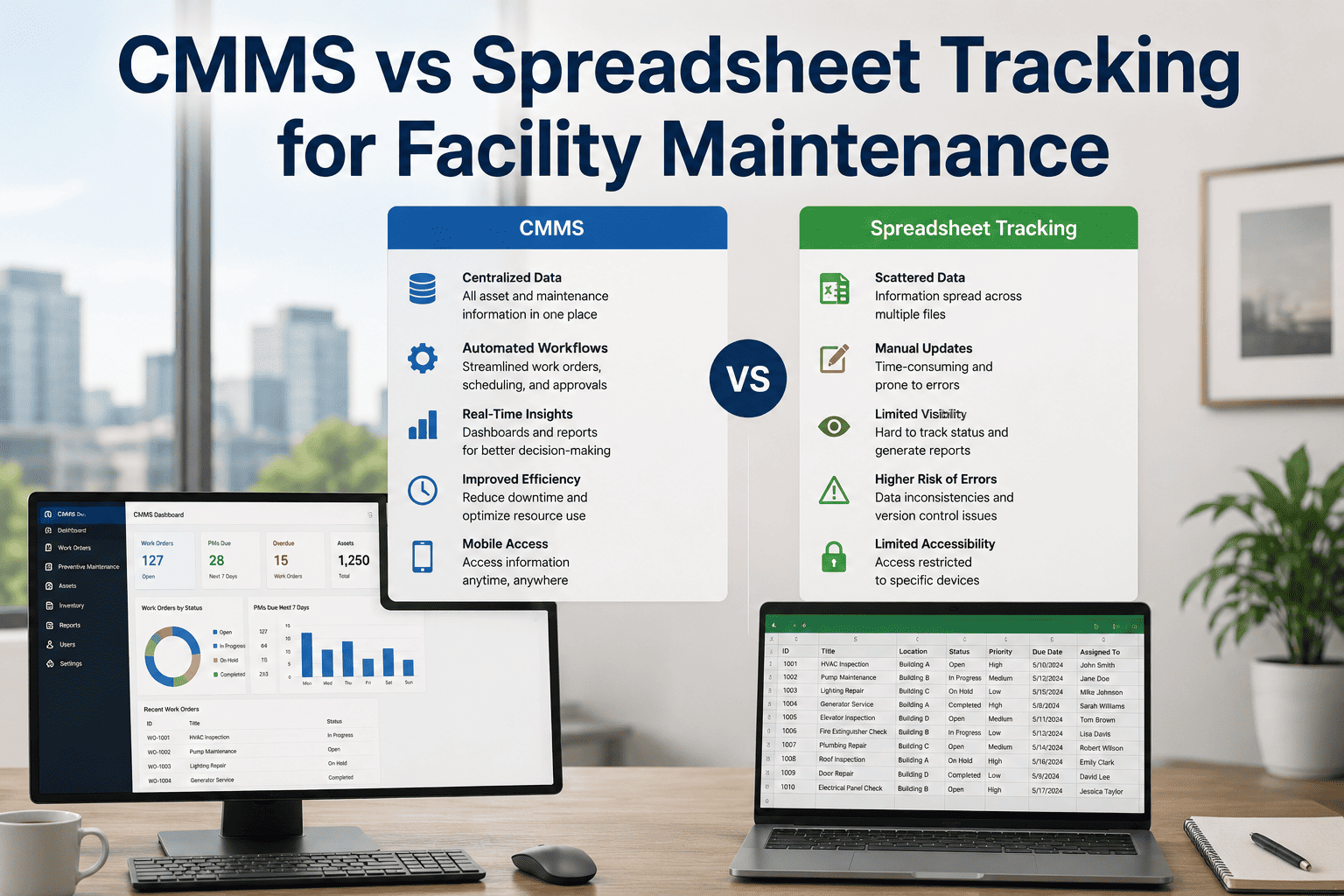
Spreadsheet
CMMS
Most facilities break even on CMMS investment within 6–9 months through reduced reactive maintenance costs alone.
The Real Costs of Spreadsheet-Based Maintenance Tracking
01
Labour Hours Lost to Manual Reporting
A facility team of 5 spends an average of 3.5 hours per week manually updating, formatting, and distributing maintenance spreadsheets. That is 182 hours per year — at a fully-loaded labour cost of over $7,000 — producing a report that is already outdated by the time it is read.
02
Missed PM Leading to Reactive Repairs
Reactive maintenance costs 3–5x more per incident than preventive maintenance. When PM schedules live in a spreadsheet without automated reminders, tasks are routinely missed — especially when the person who manages the file is on leave, transitions roles, or forgets to update it after a schedule change.
03
Compliance Gaps at Audit Time
Health authority, ISO, and fire safety auditors require documented proof of maintenance completion with dates and signatures. Paper checklists and spreadsheets are routinely challenged or rejected during audits — resulting in corrective action notices, repeat audits, and in regulated industries, potential licence risk.
04
No Accountability Without Timestamps
A spreadsheet cell says "Done" — but by whom, at what time, and with what result? Without timestamped, assigned work order records, there is no way to verify whether a task was completed to standard or simply marked off. That gap is invisible until an incident investigation or insurance claim makes it expensive.
Head-to-Head Comparison — 10 Maintenance Functions
| Maintenance Function | Spreadsheet | CMMS (OxMaint) | Impact of the Gap |
|---|---|---|---|
| PM auto-scheduling | Manual · Calendar reminder | Automated · Rule-based triggers | Tasks missed when schedule owner is absent |
| Work order assignment | Email or verbal · No tracking | Assigned in-app · Push notification | No record of who received the task |
| Mobile field completion | Laptop or paper required | Native app · Offline capable | Field team can't update in real time |
| Photo documentation | Emailed separately · Not linked | Attached to work order record | Evidence lost or disconnected from task |
| Inspection checklists | Printed forms or separate doc | Digital · In-app · Timestamped | Paper forms lost · Audit gaps |
| Compliance reporting | Manual compile · Hours to prepare | One-click export · PDF or CSV | Delayed or incomplete audit response |
| Asset service history | Scroll through rows · No filter | Per-asset record · Instant lookup | Technician repeats work or misses context |
| MTTR tracking | Calculated manually · Inaccurate | Automatic · Real-time KPI | No baseline for performance improvement |
| Vendor work order management | Email chains · No SLA tracking | Portal access · SLA monitored | Vendor delays invisible until escalation |
| Multi-site visibility | Separate files · Manual merge | Unified dashboard · All sites | Leadership lacks real portfolio view |
Typical CMMS ROI — Mid-Size Facility Team (10–30 Staff)
35%
Reduction in reactive maintenance spend in Year 1
4 hrs
Per week saved per team member on admin and reporting tasks
6–9 mo
Typical payback period for CMMS investment vs spreadsheet status quo
Zero
Compliance audit preparation hours when records are digital and auto-timestamped
ROI estimates based on IFMA benchmarking data and OxMaint customer outcomes. Actual results vary by team size, facility type, and prior maintenance maturity.
Ready to Move Beyond the Spreadsheet?
OxMaint can be configured and running for your team in days — not months. No IT project. No implementation consultant. Just a CMMS that works the way your team does.
"
I have reviewed maintenance records for facilities in dozens of health and safety investigations over my career, and the single most consistent finding in cases where preventable failures occurred is the absence of verifiable, timestamped maintenance records. Spreadsheets create an illusion of documentation — the cell says it was done, but there is no proof of when, by whom, or to what standard. From a legal and regulatory standpoint, that is not documentation; it is a liability. A properly configured CMMS like OxMaint creates records that withstand legal scrutiny, survive staff turnover, and give facilities directors genuine protection when things go wrong. The transition from spreadsheets to a CMMS is not an IT project — it is a risk management decision.
Alistair Brennan, NEBOSH Dip, CMIOSH
Independent Health, Safety and Facilities Consultant · 28 Years Regulatory Compliance Advisory · Chartered Member of IOSH · Specialist in maintenance record compliance, FM audit readiness, and regulatory risk reduction for commercial and industrial facilities
Frequently Asked Questions
How long does it realistically take to migrate from spreadsheets to OxMaint?
Most small to mid-size facility teams are fully operational on OxMaint within 3–7 business days of starting setup. The process involves importing your existing asset list via CSV, configuring PM schedules for each asset category, adding your team members with their assigned roles, and completing a short onboarding walkthrough with the OxMaint team. Start your free trial to begin the import process today. You do not need to have perfect data before migrating — OxMaint's onboarding team commonly helps facilities structure and clean asset data during the import process, and incomplete historical data does not prevent the system from generating PM schedules from the point of go-live forward.
What happens to our maintenance history if we switch from spreadsheets to OxMaint?
Historical maintenance records from spreadsheets can be imported into OxMaint as completed work order records, preserving service dates, task descriptions, and technician information. This maintains continuity of asset service history — which matters for warranty claims, regulatory compliance, and insurance purposes. Book a demo to discuss your specific data history requirements. For teams that have years of maintenance data in spreadsheets, OxMaint supports phased import so the most critical assets — high-value equipment, compliance-critical systems — are migrated first, and historical data for lower-priority assets follows without disrupting day-to-day operations during the transition period.
Our team is not technical — will they actually use a CMMS over a spreadsheet they already know?
Adoption is the real variable in any CMMS transition, and OxMaint is specifically designed with field technicians and non-technical facility staff as the primary users — not the FM director sitting at a desk. The mobile app is built around three core actions: receive a work order, complete the checklist, and close the task with a photo. Training for field staff typically takes under two hours. Start a free trial and let your team test the mobile app before committing. The most effective way to evaluate adoption risk is to put the tool in front of the three or four technicians who are most resistant to change — if they find it usable, the rest of the team will follow. OxMaint consistently passes that test because it was designed to reduce the friction of daily task management, not add to it.
OxMaint · CMMS for Facility Maintenance
The Spreadsheet Will Let You Down. OxMaint Won't.
Start with a free trial — no credit card, no IT project, no implementation consultant. Just a CMMS your team will actually use, set up in days.