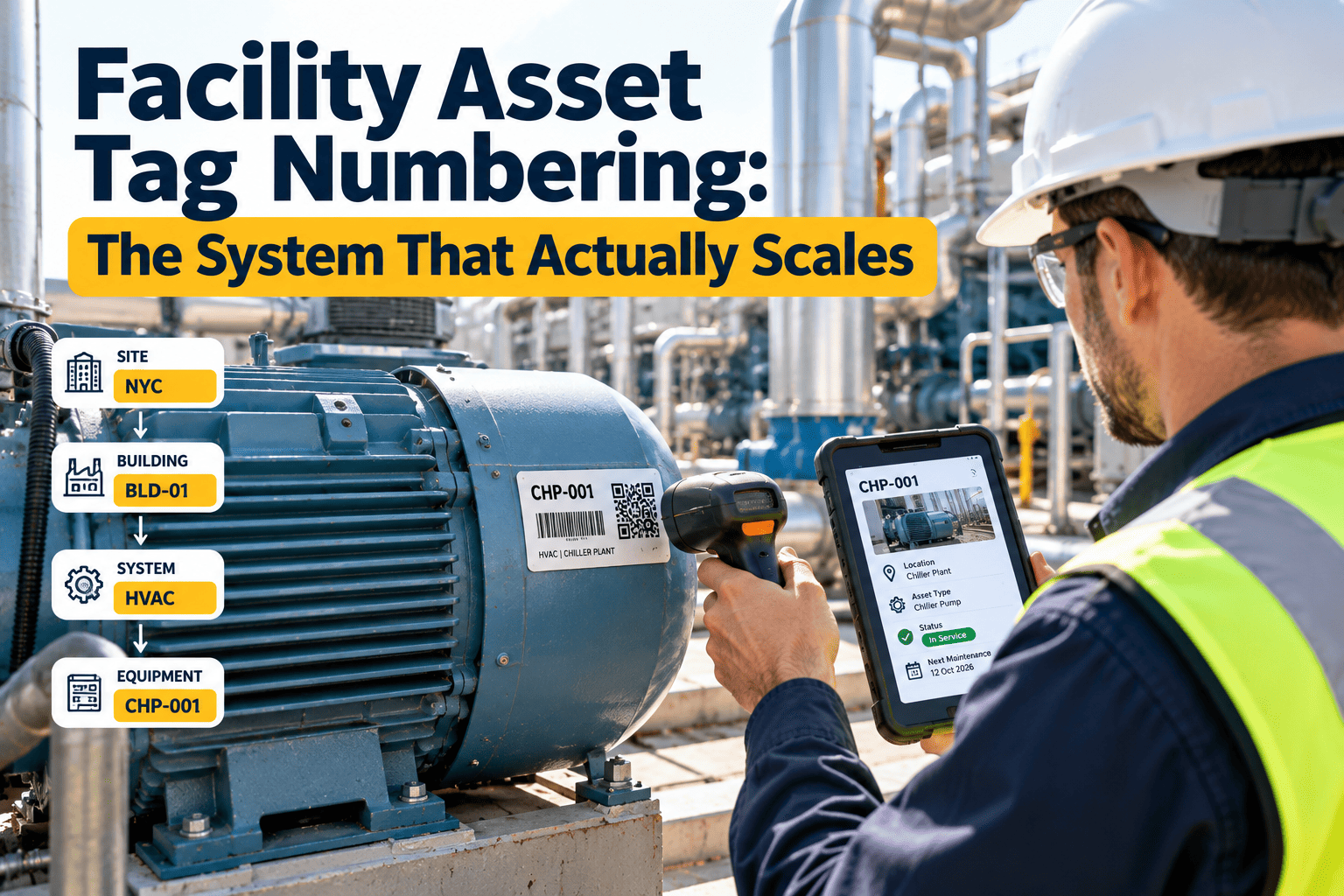
An asset tag scheme that feels clever at 100 assets often collapses at 10,000. Meaning-packed codes run out of digits, site prefixes collide after a merger, and a single typo sends a technician to the wrong chiller. This guide explains how to design a facility asset numbering system that scales, using hierarchy, site codes, and a check digit, with reference to GS1 asset identification. The result is a tag that scans cleanly into asset management software and stays valid for the full life of the equipment.
Asset tracking and identification
Facility Asset Tag Numbering: The System That Actually Scales
The best asset number is short, unique, and dull. Put meaning in the record, not in the tag, and the scheme survives growth, renames, and relocations.
Example tag structure
NY02
AHU
004217
7
SiteClassSequenceCheck digit
Why clever numbering breaks as the portfolio grows
Schemes fail in predictable ways. Spotting these patterns early saves a painful relabeling project later.
1
Meaning baked into the number
A tag that encodes floor, room, and system goes wrong the day equipment moves or a room is renumbered.
2
Too few digits
A three-digit sequence per class looks fine until the portfolio crosses a thousand units.
3
Collisions after mergers
Two organizations that both used AHU-001 now share a duplicate and a tangled history.
4
Hand-entered typos
With no check digit, a transposed pair silently points to a different, valid asset.
5
Reused numbers
Recycling the tag of retired equipment corrupts every report that includes its history.
Design rules for a numbering system that lasts
Keep the tag opaque
Store location, system, and manufacturer as fields in the record. The tag only needs to be unique.
Never reuse a number
Retire the number with the asset. History stays intact and audits stay clean.
Reserve room to grow
Use six or more sequence digits even if you own two hundred assets today.
Add a site code
A short site prefix prevents collisions and speeds up filtering by building.
Add a check digit
A calculated final character catches most single-character errors and many transpositions.
Make it scannable
Avoid characters that look alike, such as the letter O and the digit zero.
Where hierarchy belongs: in the record, not the tag
Hierarchy still matters. It simply lives in parent and child relationships inside the asset register, so a move never forces a retag.
Portfolio
Site NY02 · Main Campus
Building · Tower A
System · Air handling
Asset · AHU NY02AHU0042177
Component · Supply fan motor
Move the AHU to another building and only its parent link changes. The tag on the unit stays valid.
Opaque tag versus meaning-packed tag
| Question | Meaning-packed tag | Opaque tag with fields |
|---|---|---|
| Equipment moves rooms | Tag becomes wrong or needs relabeling | Update the location field only |
| Site is renamed or sold | Prefix loses meaning, reports break | Update the site record |
| Two portfolios merge | Duplicate numbers likely | Site code keeps numbers distinct |
| Technician reads tag aloud | Long, error-prone strings | Short code with a check digit |
| Barcode or QR size | Longer data needs a larger label | Compact data fits small labels |
| Reporting by system or floor | Parsed from text, often inconsistent | Filter on structured fields |
Start your asset register with a numbering scheme built to last
Create assets, attach scannable tags, and keep hierarchy in the record where it can change without relabeling a single unit.
Anatomy of a scalable tag, segment by segment
Site code
Two to four characters. A city or campus abbreviation plus a number, such as NY02. Assigned once per site and never reused.
Class code
Optional three letters for broad equipment class. Keep the list short, around two dozen classes, and treat it as a convenience for reading, not for logic.
Sequence
A six to eight digit number issued in order by the system. Do not hand out numbers by hand and do not skip based on meaning.
Check digit
One calculated character at the end, using a standard algorithm. The system validates it on every scan or manual entry.
If you prefer pure numbers, drop the class code and let the record carry the equipment type. Shorter tags print and scan more reliably.
What GS1 asset identification adds
GS1 publishes a global standard for identifying individual assets, which many organizations adopt when assets cross company boundaries or need RFID.
GIAI
The Global Individual Asset Identifier is an alphanumeric code of up to 30 characters, made of a GS1 Company Prefix and an individual asset reference.
Application Identifier 8004
When a GIAI is encoded in a barcode, the Application Identifier 8004 tells scanners that the data that follows is a GIAI.
Owner-defined reference
GS1 leaves the structure of the asset reference to the owner, so you can still apply your own site, sequence, and check digit pattern within it.
Lifecycle identity
A GIAI can identify an asset for its whole life, from procurement through maintenance, upgrade, and decommissioning.
Adopting GS1 is optional for most facilities. It makes the most sense when you lease or share assets, plan RFID, or need identifiers that outsiders can recognize.
Check digits: a small character that prevents big mistakes
A check digit is calculated from the other characters. If someone mistypes the tag, the calculation no longer matches and the system rejects it.
A
System issues the next sequence number
B
Algorithm computes the check digit
C
Tag is printed with the full code
D
Scan or entry recomputes the check
E
Mismatch is rejected before work is logged
Pick a published algorithm rather than inventing one. Standard methods are easy to implement in any system and well understood by auditors.
Capacity planning: how many digits is enough
The maths is simple, which is why undersizing is so avoidable. A sequence of n digits gives ten to the power of n unique numbers per site or per portfolio, depending on how you issue them.
| Sequence digits | Unique numbers available | Suits |
|---|---|---|
| 3 | 1,000 | A single small building, and even then it fills quickly once components are tagged |
| 4 | 10,000 | One campus, if only major equipment is tagged |
| 5 | 100,000 | Several campuses with components |
| 6 | 1,000,000 | A large portfolio with room for growth and acquisitions |
| 8 | 100,000,000 | Enterprise portfolios and shared registers |
Count components, not just major equipment. A single air handler can carry a fan, motor, coil, filter bank, and damper actuators that each deserve a record.
Choosing the data carrier for the tag
The number is only half the system. The label that carries it must survive the environment and scan reliably.
| Carrier | Strengths | Watch for |
|---|---|---|
| Linear barcode such as Code 128 | Simple, cheap, widely supported by scanners | Needs a line of sight and clean print, and carries limited data |
| QR code | Reads from a phone camera, holds more data, tolerates some damage | Needs adequate size and print quality for the scan distance |
| GS1-128 barcode | Carries a GIAI using Application Identifier 8004 | Only useful if your systems parse the identifiers |
| RFID tag | Reads without line of sight, supports bulk inventory | Metal, liquid, and tag placement can affect performance |
Most facility teams start with QR or barcode labels, since technicians already carry a phone. RFID tends to pay off for large moving inventories more than for fixed building equipment.
Tag placement and label durability
Pick a visible spot
Place the tag where a technician can scan it without removing guards or panels, and away from heat sources.
Match the material
Use metal or polyester labels for heat, moisture, or chemical exposure, and paper only for dry indoor spaces.
Tag twice if needed
For equipment in ceilings or shafts, add a second tag at the access point so it can be found without a ladder.
Print the number in text
Always include a human-readable version beside the code for when the scan fails.
Test before bulk printing
Print a small batch, scan from realistic distances, and adjust size and contrast before ordering thousands.
Plan for replacement
Keep a reprint process that reissues the same number so a damaged label never creates a new asset.
Edge cases every numbering scheme must handle
Real portfolios are messy. Decide the rule for each of these before the first tag is printed.
| Situation | Recommended rule |
|---|---|
| Component replaced inside an asset | Keep the parent tag and record the component change in history |
| Whole asset replaced | Issue a new tag, retire the old one, and link the two records |
| Asset moves to another site | Keep the number and update the site field, since the tag is opaque |
| Rented or leased equipment | Tag it with your own number and store the owner's serial as a field |
| Spare parts held in stock | Track in inventory by part number, and assign an asset tag on installation |
| Shared building systems | Tag once under the owning site and link dependent assets |
| Decommissioned equipment | Mark inactive and retain the record and history permanently |
How three common schemes behave as the register grows
The same portfolio looks very different depending on the scheme. This comparison shows where each approach starts to strain.
| Scheme | At about 100 assets | At about 1,000 assets | At about 10,000 assets |
|---|---|---|---|
| Meaning-packed code with floor, room, and system | Readable and feels logical | Renumbering starts as rooms change | Inconsistent, with many wrong or duplicate tags |
| Short sequence with no site code | Clean and simple | Collisions appear after acquisitions | Cannot merge registers without relabeling |
| Site code, class code, long sequence, check digit | Slightly longer than needed | Works without change | Still valid, with room to spare |
The scheme that looks slightly excessive at the start is the one that never needs a migration project.
Cleaning up a legacy register before you renumber
Most portfolios already have tags, spreadsheets, and half-finished registers. Do not paste the mess into a new scheme.
Find
Duplicates and ghosts
Identify equipment listed twice, assets that no longer exist, and equipment that exists but has no record.
Merge
One record per asset
Combine duplicates and keep the richest history in the surviving record.
Standardize
Names and classes
Agree on a short list of equipment classes and a naming pattern so reports group correctly.
Verify
Walk the floor
Confirm location, nameplate data, and condition while applying the new tag, so each label doubles as an audit.
Fields to store so the tag can stay simple
Because the tag carries no meaning, the record must. Decide these fields before data entry begins.
Identity
Tag number, legacy number, description, equipment class, manufacturer, model, and serial number.
Location
Site, building, floor, and room, plus the parent asset for components.
Lifecycle
Install date, warranty end, expected life, status, and retirement date and reason.
Risk and service
Criticality rating, regulatory flags, assigned crew, and linked preventive maintenance plans.
Governance: who is allowed to issue numbers
A good scheme collapses when everyone creates assets their own way. Assign ownership early.
- Name one owner of the numbering standard, usually the reliability or asset data lead
- Let the system, not people, issue sequence numbers and compute the check digit
- Restrict who can create new site codes and class codes
- Require a set of mandatory fields before an asset can be saved
- Review duplicates and orphan records each quarter
- Document the standard in one page and give it to every vendor who tags equipment
Rolling out the scheme across an existing portfolio
Step 1
Freeze the rules
Agree on site codes, sequence length, and check digit method before printing anything.
Step 2
Map old numbers
Keep the legacy number as a field so past work orders stay linked.
Step 3
Tag critical assets first
Start with the equipment whose failure hurts most, then expand by system.
Step 4
Choose durable labels
Match label material to heat, moisture, and cleaning agents at each location.
Step 5
Audit and correct
Walk a sample, scan every tag, and fix duplicates or unreadable labels.
How Oxmaint supports numbering and tagging
- Asset management with parent and child relationships, so hierarchy changes without retagging
- Barcode and QR scanning from a phone to open the asset record instantly
- Work orders, inspections, and preventive maintenance linked to the tag
- Custom fields for legacy numbers, manufacturer, and location
- Reports that filter by site, system, or class using structured fields
- Audit trails showing who created, moved, or retired each asset
Numbering mistakes to avoid
| Mistake | Why it hurts | Better practice |
|---|---|---|
| Encoding room numbers | Breaks when spaces are renamed | Store location as a field |
| Hand-assigned sequences | Gaps, duplicates, and arguments | System-issued numbers |
| Reusing retired tags | Mixes histories | Retire numbers permanently |
| Look-alike characters | Scan and entry errors | Drop O, I, and similar characters |
| No legacy mapping | History becomes unreachable | Keep old numbers as a field |
Facility asset tag numbering: frequently asked questions
What is the best asset tag format?
A short, opaque, system-issued code with a site prefix and a check digit. Keep descriptive details in record fields.
How many digits should the sequence have?
Use six or more, even for a small portfolio. Extra digits cost nothing and prevent a painful migration later.
Do I need GS1 identifiers?
Not for most facilities. GIAI helps when assets cross organizations or need RFID. Otherwise a well-designed internal scheme works.
Can I keep my old numbers?
Yes. Store them as a legacy field in your asset tracking software so past history stays searchable.
Can someone review my scheme?
A short demo call is a good place to walk through your asset structure and tagging plan.
Tag once, scale for the life of the asset
Set up a numbering scheme that survives growth, mergers, and moves, and let technicians scan straight into the work.