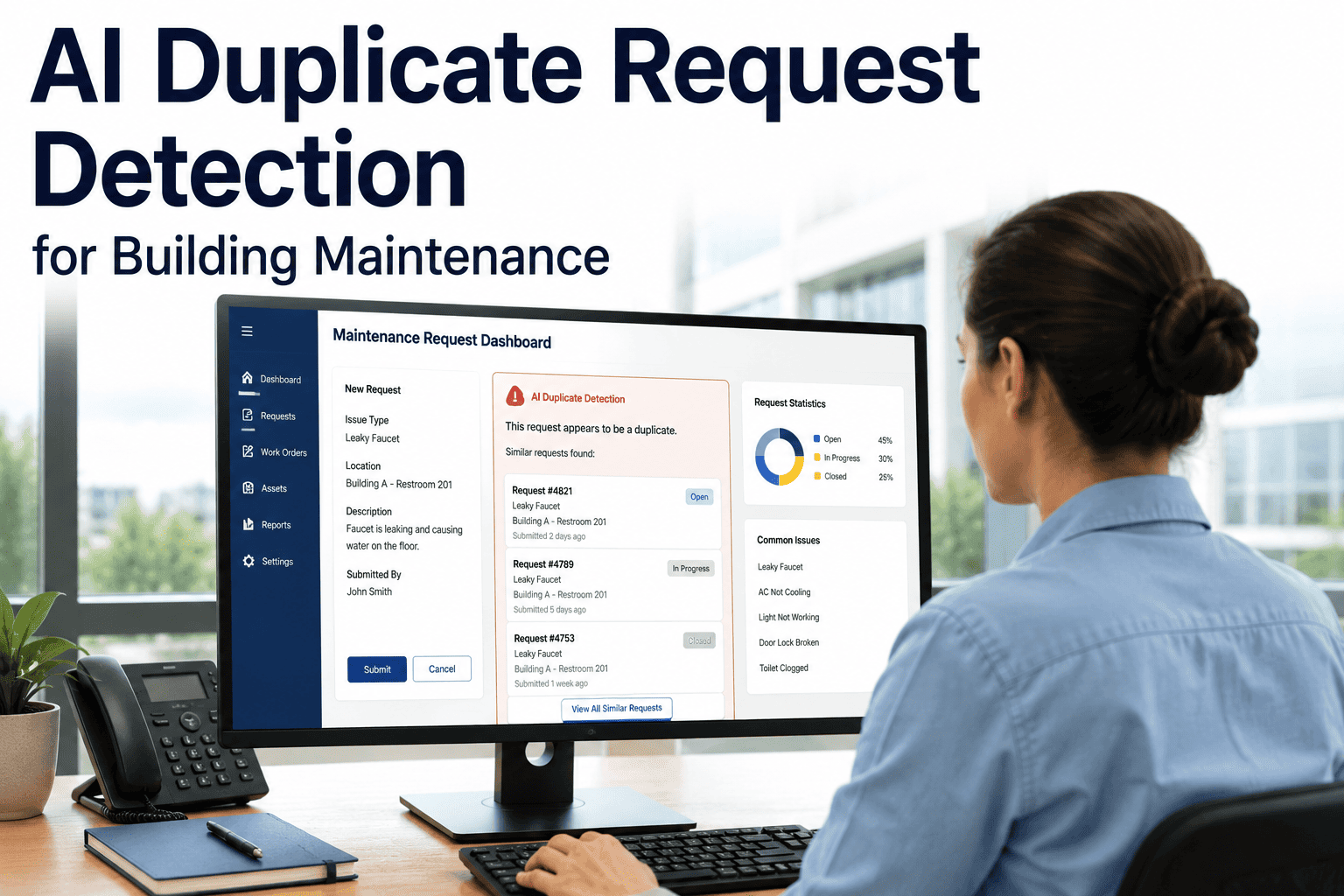
Walk any commercial building after a storm and the same ceiling stain will be written up by the night security patrol, the morning custodian, a tenant who phones the help desk and the HVAC technician who spots it during a filter change. Four people did the right thing, and the backlog now holds four work orders for one wet tile. Inspection duplicate detection is the discipline of recognising that situation before a second technician is dispatched. This guide sets out the matching logic, the outcomes and the edge cases, and shows how a team can run that logic inside Oxmaint work order and inspection records.
Inspection Duplicate Detection: Stop the Same Work Order Being Raised Twice
For commercial facility teams whose inspections, rounds and occupant requests keep logging the same defect. Define the match rule once, check open work orders first, and link every repeat report to a single job.
Duplicate Detection Metrics Worth Tracking
These are the five measures a team should define before switching on any matching rule. Values are deliberately left blank because they depend on your own baseline.
Why the Same Defect Gets Logged Five Times
Duplicates are rarely careless. They are the predictable output of several honest sources observing one defect without seeing each other.
Multiple inspectors, one route
Security, custodial, engineering and a contracted vendor all walk the same corridors. Each has their own checklist, and each checklist has a line for the same visible fault.
Repeated rounds
A daily or weekly round finds the defect again on the next pass. If the earlier job is still open and the inspector cannot see it, a fresh one is raised.
Occupant requests
Tenants and staff report what they feel, such as a drip or a smell, not an asset ID. Several people in one suite each submit their own request.
Shift handoffs
A night note that says "leak on three" is not linked to the day team's task list. The day shift finds it again and starts from zero.
Contributing factors
- Free-text locations such as "3rd flr hall" and "Level 3 corridor east" that mean the same place
- Inspectors who cannot see open jobs from the field
- Different asset naming between inspection forms and the register
- No rule on how long a closed job still counts as a match
- Requests accepted from many channels with no shared queue
- Contractors raising their own tickets for the same fault
What a Duplicate Work Order Actually Costs
The cost shows up in four places, and only one of them is obvious on the day.
Wasted dispatch
Two technicians travel to one fault, or a second visit finds the first job already done. Travel, access coordination and tenant disruption are spent twice.
Skewed backlog and KPIs
Backlog counts, mean age and response-time figures are inflated by jobs that never needed to exist. Managers then plan labour against a number that is wrong.
Parts double-ordering
If each work order carries its own material request, the stockroom or a vendor may supply the same part twice, with the spare sitting on a shelf.
Lost trust in the data
Technicians who open duplicates stop believing the queue. Once the data is distrusted, workarounds appear and records get worse.
The Matching Logic as Six Gates
Treat each new inspection finding as passing through gates in order. A finding that fails an early gate is new work and can skip the rest. One that clears all six is a candidate duplicate for a human to confirm.
Asset ID match
Does the finding point to the same asset record as an existing job? Same asset is the strongest single signal. If no asset is stated, move to location and flag the gap.
Location hierarchy
Compare site, building, floor, zone and room. Match at the lowest level recorded. Two findings in the same room are close; two in the same building are weak by themselves.
Defect category
Is the failure type the same, such as leak, electrical fault or door hardware? A leak and a broken light in the same room are different work.
Description similarity
Read the key words, not the whole sentence. "Dripping", "stain" and "wet" point to the same condition. A reviewer decides when the wording is ambiguous.
Time window
How recent is the existing report? A window by category works best: hours for emergencies, days for routine defects, longer for slow-moving wear.
Open-status check
Is the earlier job still open, scheduled or awaiting parts? If it was closed as fixed, a new report is likely a recurrence and needs its own review.
Match Signal Weighting
The weights below are a starting point for discussion, not a standard. Each team should adjust them after reviewing its own false matches.
| Signal | Starting weight | Why it carries that weight | Typical weakness |
|---|---|---|---|
| Same asset ID | High | Points to one physical item and ends most debates | Defects on a shared system may not be tied to one asset |
| Same room or zone | High | Two reports in one small space usually share a cause | Large zones such as a warehouse floor cover many faults |
| Same defect category | Medium | Filters out unrelated work in the same place | Categories chosen inconsistently by different inspectors |
| Description keywords | Medium | Catches reports with no asset recorded | Vague phrases such as "not working" |
| Within time window | Medium | Old reports are less likely to be the same event | Slow defects are reported weeks apart |
| Existing job still open | Required | Linking only makes sense if a live job exists | Status not updated by the crew |
| Same reporter or source | Low | Same person repeating is often a round repeat | Shared logins hide who really reported |
See Your Open Work Orders Before You Raise Another
Set up your asset records, location hierarchy and inspection forms in Oxmaint, then trial a matching rule on one building.
Merge, Link or Reject
Finding a match is only half the job. The team also needs to agree what happens next, and the three outcomes protect different things.
Merge
Use when the report adds nothing new. Fold it into the existing job so there is one record, one owner and one set of notes.
Best for: round repeats and same-person resubmissionsLink
Use when the report adds evidence such as a photo, a new time or an occupant impact. Keep the report, attach it to the parent job and leave one dispatch.
Best for: occupant requests and a second inspectorReject or keep separate
Use when the matching signals were coincidental, or the earlier job was closed and the fault has returned. Raise a new work order and reference the old one.
Best for: recurrences and neighbouring assetsIn most commercial programmes, linking is the safest default because it keeps the evidence. Deleting a report should be a last resort, because the reporter's record and the timing both have audit value.
Worked Example: One Leak, Five Reports
This scenario is hypothetical and is used only to show the gates in action. Asset IDs, times and locations are invented.
| Report | Source | Recorded location | Gate result | Outcome |
|---|---|---|---|---|
| Ceiling stain growing | Night security round | Bldg B, Level 3, Corridor 3-East | First report, no open job | Raises the parent work order |
| Wet tile by lift | Morning custodial round | Bldg B, Level 3, Lift lobby | Same floor, adjacent zone, same category, open | Reviewer confirms, link as evidence |
| Water dripping on desks | Tenant call | Suite 305 | Room under the corridor, same category, open | Link, flag occupant impact |
| Moisture above ceiling grid | HVAC technician | Roof drain RD-B3-07 area | Asset match to likely source | Link, update parent with probable cause |
| Leak note in handoff log | Shift handoff | Level 3 | Wide location, keyword match, open | Merge, no new information |
What the team gets
- One dispatch with the probable source noted
- Four supporting records instead of four jobs
- One parts request for the drain or tile repair
- A parent job that shows how many people noticed
- A clean audit trail from first sighting to closure
- No technician walking into an already-fixed fault
Before and After: The Backlog View
The figures below are illustrative for a single hypothetical week and are not benchmarks. They show how the same real workload looks with and without a matching process.
Without matching
- Backlog appears 28 percent larger than the real workload
- Planners schedule visits that find nothing to do
- Parts requests are repeated per ticket
With matching and linking
- Backlog equals the real workload
- Each parent job shows its report count
- Material requests live on one record
Edge Cases That Break Simple Rules
A rule that only compares text and location will get these wrong. Each needs a deliberate decision.
Recurring true failure
A chiller fault reported again two weeks after closure is not a duplicate. It is evidence that the fix failed, and it should open a new job linked to the history for root cause review.
Same defect, different asset
Six identical emergency lights failing in one stairwell look like one defect but are six assets. Keep separate asset records, and link them under a shared batch or project job.
Shared systems
A hot room and a cold room on one air handler may share a cause. Link at the parent system and let the team confirm, rather than merge by room.
Escalating condition
A crack reported as minor, then later as widening, should not be absorbed. A change in severity is new information and may need a higher priority on the parent.
Deferred jobs
If the existing job is deferred for budget, repeat reports build the case for action. Link them so decision makers see the count rather than losing it.
Missing asset on the report
Occupant reports rarely carry an asset ID. Rely on location and category, then let the reviewer attach the asset when the true source is found.
Risk Matrix: False Positives and False Negatives
Any matching rule can be wrong in two directions. The cost of each differs by defect type, so tune the rule accordingly.
Correct link
One dispatch, evidence kept, backlog accurate.
False positive
A new defect is hidden under an old job and may go unrepaired. Highest risk for safety items.
False negative
A repeat job is created. Costs a dispatch and distorts the backlog, but is easily fixed later.
Correct new job
Distinct defect is raised and scheduled on its own.
How to tune
- Safety, fire and life safety categories: favour false negatives and require reviewer confirmation
- Cosmetic and routine comfort items: allow broader matching
- Review a sample of linked reports each month for false merges
- Keep every linked report so any decision can be reversed
Running the Process in Oxmaint
Oxmaint is a maintenance management platform, and the matching described here is a rule and process the team defines around its records. It supplies the records a reviewer needs to apply that rule.
Asset records
A clean asset register gives gate one something to match against. Consistent naming is the base of every other signal.
Location hierarchy
Structuring site, building, floor and zone lets reviewers compare findings at the same level every time.
Inspection forms
Digital inspections capture category, notes and photos in a standard shape, which gives the reviewer comparable evidence.
Open work order review
Reviewing open work orders for the same asset or location before creating a new one is the central habit this process depends on.
Mobile workflows
Technicians checking the open queue from the field can add a note to the existing job rather than start another.
Reporting
Dashboards on backlog and repeat reports help the team see whether the rule is working or needs tuning.
A Five-Step Rollout
Start small, with one building and one defect category, and widen only once reviewers agree on the outcomes.
Clean the register
Fix duplicate asset names and unclear locations first. Matching on bad data multiplies the errors.
Write the rule
Record the gates, time windows by category and who may confirm a link. Keep it to one page.
Name a reviewer
Assign a planner or dispatcher per shift so someone owns each decision and handoffs include open matches.
Pilot and sample
Run for a month on one building. Check linked reports for false merges and note missed matches.
Tune and extend
Adjust windows and weights, then add buildings and categories. Share the repeat-report counts with the team.
Frequently Asked Questions
What is inspection duplicate detection?
It is a rule for checking each new finding against open work orders on the same asset, location and defect category. Matches are linked to one job instead of starting another.
Does Oxmaint automatically detect duplicate work orders?
The matching is a process your team defines around asset records, location hierarchy and open work order review. You can see how to set that up in a demo.
Should a duplicate be merged or deleted?
Prefer linking or merging so the report stays on record as evidence. Deleting loses timing and reporter detail that matter for audits.
How is a duplicate different from a recurring failure?
A duplicate describes a fault that an open job already covers. A recurrence appears after closure and should open a new job for root cause review.
What time window should we use for matching?
Set it by category: short for emergencies, longer for routine or slow-developing defects. Review misses and false matches monthly, then adjust.
One Defect, One Work Order, One Clear Record
Give inspectors, dispatchers and technicians the same view of open work, and the same defect stops costing you five jobs.