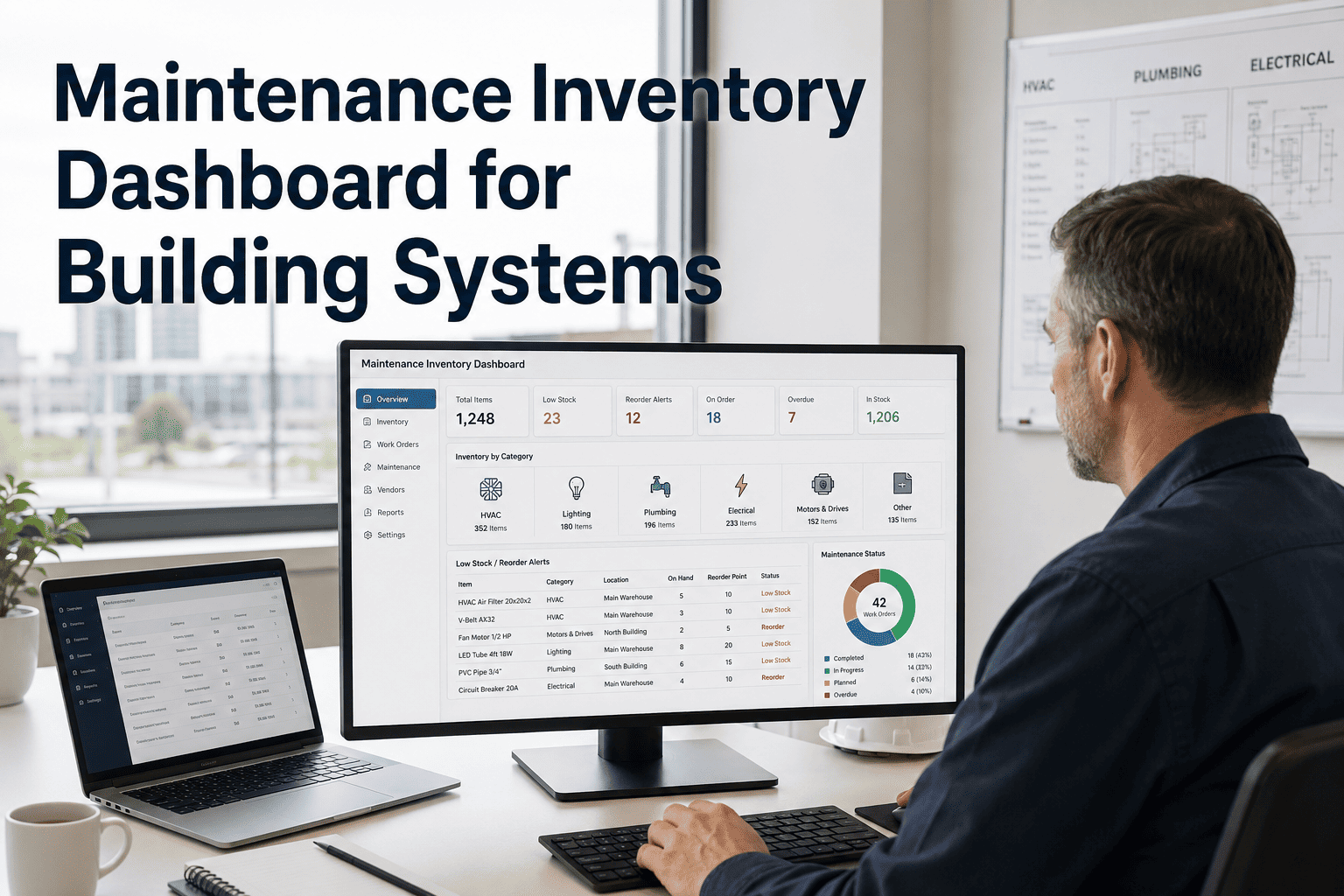
Maintenance Inventory Dashboard for Building Systems

By Lewis Abbott on June 26, 2026

maintenance-inventory-dashboard-for-building-systems

A technician arrives to replace a failed belt and finds the spare sitting in a different building's storeroom — or not ordered at all. Building systems inventory is easy to ignore until the day a part isn't there, and then it's the reason a one-hour repair turns into a three-day outage. A maintenance inventory dashboard ties stock levels for filters, belts, lamps, valves, batteries, and consumables directly to the work orders and PM schedules that consume them, so reordering happens before the shelf is empty, not after. This page covers how that tracking works inside OxMaint, or book a demo to see it against your own parts list.

Inventory & Vendor Control / Parts Tracking

Maintenance Inventory Dashboard for Building Systems

Track HVAC filters, belts, lamps, valves, batteries, and consumables against the work orders and PM tasks that actually use them.

6
Part categories tracked automatically
0
Stockouts that go unnoticed until a job needs the part
100%
Of parts linked to the PM task or asset that needs them

Stock that runs out because nobody's watching it

Most facility teams find out a part is gone the same day a job needs it. Linking stock to the work orders and PM tasks that consume it catches the shortage while there's still time to reorder.

Category Example Items Linked To Reorder Trigger Status
HVAC Filters MERV-8, MERV-13 PM schedule 20% of par stock In Stock
Belts & Drives V-belts, timing belts Work orders + PM 2 units remaining Low Stock
Lighting LED lamps, ballasts Work orders 15% of par stock In Stock
Valves & Seals Gaskets, O-rings Work orders 1 unit remaining Reorder Now
Batteries Backup, sensor batteries PM schedule 25% of par stock In Stock

Why parts and work orders need to talk to each other

A reorder point only works if it knows what's about to consume the stock. Treating PM schedules and work orders as the source of demand is what makes the threshold accurate instead of a guess.

PM schedule
Generates expected demand for filters, lamps, and batteries ahead of time

Work orders
Consume stock in real time as belts, valves, and seals are used on repairs

Reorder point
Triggers a purchase request before the shelf actually hits zero

See your own parts list against real demand

Bring your current stockroom list and we'll show you exactly where reorder points should sit.

What the dashboard handles for the team

Auto reorder thresholds
Set once per part and recalculated as consumption patterns change across PM and work orders.
Vendor & lead time tracking
Know which supplier and how many days out a reorder needs to be placed before stock runs critical.
Consumption history per asset
See which equipment is burning through parts faster than expected, before it becomes a bigger failure.
Stockout cost visibility
Tie a missing part to the downtime or delay it caused, not just the part itself.

Needs attention this week

Instead of scanning a full inventory list, the dashboard surfaces only what's actually close to a problem.

Valves & Seals
1 unit remaining — reorder lead time 3 days
Belts & Drives
2 units remaining — reorder lead time 5 days
Expert Review

"Parts inventory is the part of maintenance nobody gets credit for until it fails. The teams that get it right aren't the ones with the biggest stockroom — they're the ones who tied reorder points to actual demand instead of a guess made a year ago. When a filter or a belt is linked to the PM task or work order that uses it, the system can tell you it's running low before a technician finds out the hard way, standing in front of a broken unit with no part on the shelf."

Reviewed by a Maintenance Operations Supervisor, managing parts and vendor relationships for commercial building systems for 11+ years.

Stop finding out a part is missing on the job

Walk through reorder thresholds, vendor lead times, and consumption history on a live OxMaint workspace.

Frequently asked questions

What is a maintenance inventory dashboard?
It's a tracked view of building systems parts — filters, belts, lamps, valves, batteries, and consumables — linked to the PM tasks and work orders that consume them, so stock levels reflect real demand instead of a static count. See it set up in OxMaint.
How are reorder points calculated?
Each part can be set to a percentage of par stock or a fixed unit count, based on how it's consumed — PM-driven parts use scheduled demand, while parts tied to work orders use historical usage rate. Book a demo to see the thresholds for your parts.
Can inventory be tracked across multiple buildings or storerooms?
Yes. Each location keeps its own stock levels and thresholds, while a portfolio view can show which sites are running low so parts can be transferred instead of separately reordered. Explore multi-site inventory in OxMaint.
Does the dashboard track vendor lead times?
Yes. Each part can carry a preferred vendor and typical lead time, so the reorder trigger accounts for how many days a purchase actually takes to arrive, not just how many units are left on the shelf. See vendor tracking in a demo.
Can I see which assets are consuming the most parts?
Yes. Consumption history rolls up by asset, so a unit going through belts or filters faster than expected shows up clearly, often before it turns into a larger failure. Try consumption history in OxMaint.
How long does it take to set up an existing stockroom?
Most teams load their current parts list and par levels within a few days, then refine reorder points as actual consumption data comes in from PM tasks and work orders. Start with a free trial.

Tie every part to the demand that actually uses it

Give your team reorder points that reflect real PM and work order activity, not a guess from last year's count.

Share This Story, Choose Your Platform!