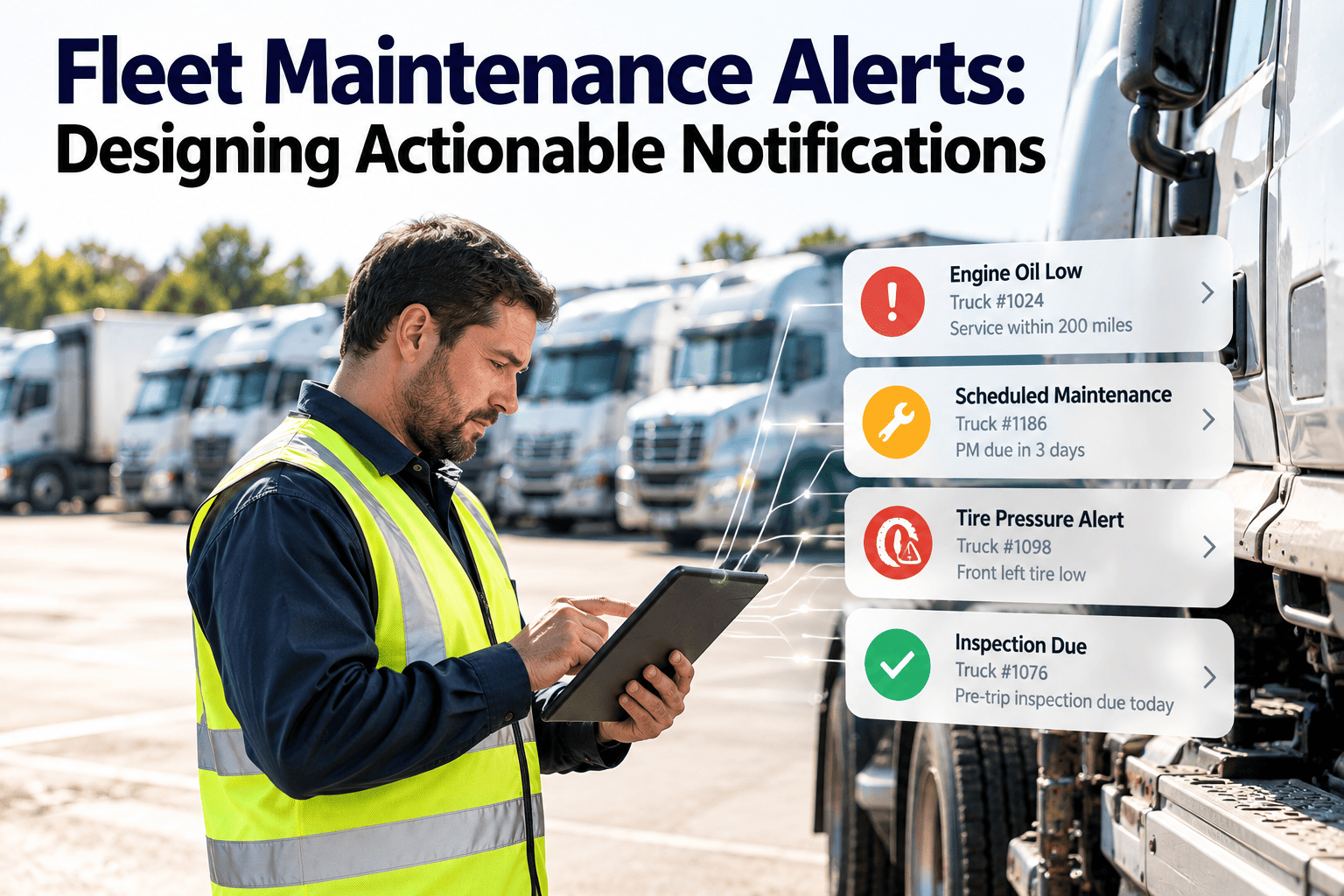
Fleet teams receive alerts from telematics, inspections, inventory, compliance calendars and preventive maintenance schedules, yet many of those messages never lead to a repair. The problem is rarely too little data. It is notifications that lack context, owner, urgency or a next step. Designing alerts around the work order that must follow is the fix, and a fleet maintenance system gives that design a place to live.
Fleet Maintenance Alerts: Designing Actionable Notifications
Replace noisy warnings with alerts that name the vehicle, the risk, the owner and the next action, so every notification ends in a closed work order.
Why most fleet alerts get ignored
- Alert fatigue is the leading failure. When a planner sees hundreds of low-value messages, important ones are dismissed with the rest.
- Alerts often arrive in separate tools, so nobody sees the full picture of a vehicle's open defects, schedule and parts.
- Many alerts describe a symptom but not a decision, leaving the reader to investigate before acting.
The anatomy of an actionable alert
- Every alert should answer five questions without opening another screen. If any answer is missing, the alert will create questions instead of repairs.
What
The specific condition, such as a coolant temperature trend or an expired certificate.
Which asset
Vehicle, trailer or equipment ID with depot, model and current meter reading.
How urgent
A defined severity with a response time, not a vague color.
Who acts
A named role or queue, with a backup when no one responds.
What next
A one-step path to create or open the related work order.
Severity and response matrix
- Define response rules once, then apply them consistently. Adjust the examples to your own safety policy and regulatory duties.
| Severity | Example condition | Response | Escalation |
|---|---|---|---|
| Critical | Failed safety inspection item | Remove from service, same shift | Maintenance manager if unacknowledged |
| High | Brake or tire wear at limit | Schedule within 48 hours | Depot supervisor after 24 hours |
| Medium | PM due within set mileage | Plan into next service slot | Weekly planning review |
| Low | Minor cosmetic defect | Bundle with next visit | Backlog report |
| Information | Part received for open order | Notify planner only | None |
Poor alert versus designed alert
Typical message
- "Engine warning on vehicle."
- No fault code, no mileage, no history
- Sent to a shared inbox
- Repeats every hour until someone deletes it
Designed message
- Fault code, vehicle ID and meter reading shown
- Similar repairs in the last 90 days attached
- Sent to the depot planner with a deadline
- Suppressed once a work order is open
Match the audience to the message
Driver
Needs plain instructions: stop, report, or continue and book service.
Technician
Needs fault detail, history, parts and the task list.
Planner
Needs severity, due date, bay and parts availability.
Manager
Needs trends, overdue counts and cost exposure.
Compliance lead
Needs expiries, open defects and audit gaps.
- Sending the same message to everyone guarantees that most recipients receive something irrelevant. Write role-specific versions of the same underlying event.
Choosing channels and timing
- Use push notifications on mobile for items requiring action within hours, and keep email for digests and records. Reserve phone calls or paging for true safety escalations.
- Respect shifts. An alert that fires at 02:00 to a planner who starts at 07:00 is noise, but the same alert routed to the night supervisor is useful.
- Batch low-priority items into a morning summary so planners can plan the day instead of reacting to interruptions.
- Avoid sending the same alert through every channel. Pick a primary channel and use others only for escalation.
The life of a single alert
Raised
A rule fires from a schedule, inspection, code or expiry date.
Routed
It reaches the owner for that depot, skill and shift.
Acknowledged
The owner confirms and either acts or reassigns it.
Resolved
A work order is completed and the vehicle record updated.
Reviewed
The outcome informs whether the rule should be kept or changed.
- If your process lacks the last step, thresholds never improve and noise accumulates over time.
Condition-based and predictive alerts
- Condition-based alerts act on measured state, such as brake wear, battery health or oil analysis results, rather than a fixed calendar. They reduce unnecessary service and catch early wear.
- Predictive alerts estimate when a limit will be reached from a trend. They are useful only when the underlying data is regular and the response can be scheduled in advance.
- Begin with a few well-understood components where you already record readings. Check predicted dates against actual findings before extending to more systems.
- Always attach the data behind the alert, such as the trend line or readings, so planners can judge confidence themselves.
Alert failures to look for in your own fleet
- Orphaned alerts: no one owns the depot or role, so messages sit unread. Audit routing tables whenever staff or sites change.
- Stale thresholds: a limit set for new vehicles fires constantly on older ones. Segment rules by age, duty cycle and model.
- Cascading duplicates: one failed sensor produces ten alerts. Group by root cause and show one actionable item.
- Silent closures: alerts are dismissed without a note. Require a reason so patterns can be reviewed.
- Late compliance warnings: expiry notices sent days before the deadline leave no time to book an inspection. Lead times should match real booking delays.
Governance: keep the rules healthy
- Assign one person to own the alert rule library. Without ownership, rules are added but never retired.
- Hold a short monthly review of the noisiest and slowest alerts. Decide to tune, merge, reroute or remove each one.
- Document why each rule exists and what decision it supports. This makes handovers easier and supports audits.
- Gather feedback from drivers and technicians, who quickly learn which alerts are useful and which are ignored.
Let every alert start a work order
Connect inspections, schedules and defects to assigned tasks so nothing relies on someone remembering to act.
Alert sources and what each should trigger
| Source | Useful trigger | Right outcome |
|---|---|---|
| Preventive maintenance | Mileage, hours or date window approaching | Draft work order with tasks and parts |
| Driver inspection | Failed item or repeated minor defect | Defect work order, safety hold if required |
| Telematics fault codes | Recurring or severe code | Diagnostic task linked to history |
| Inventory | Stock below reorder point for planned jobs | Purchase request before the booking date |
| Compliance calendar | Certificate or inspection nearing expiry | Renewal task with advance notice |
| Work order status | Overdue or waiting on parts | Planner review and re-prioritization |
An escalation ladder that works
Assigned owner
Receives the alert with a defined acknowledgment window.
Backup role
Notified automatically if the owner is absent or silent.
Supervisor
Sees overdue critical items and decides on resources.
Management review
Receives trends in missed alerts, not individual messages.
Design rules that reduce noise
Checklist for each new alert
- Name the decision the alert supports. If none exists, do not send it.
- Set thresholds from your own failure history, then review them quarterly.
- Group related signals into one alert per vehicle and fault.
- Suppress repeats while a work order is open.
- Route by depot, skill and shift, not to everyone.
- Offer a digest for low-priority items instead of instant messages.
- Record who acknowledged and when, for audit and review.
Measuring whether alerts help
- Track these per depot to find where routing or thresholds need adjustment.
How Oxmaint supports actionable alerts
- Preventive maintenance schedules generate due work from time, mileage or hours, with tasks and parts attached.
- Mobile inspections turn failed items into defects and work orders with photos and notes.
- Assignment and priority settings send work to the right technician or queue.
- Asset history shows prior repairs so planners judge each alert in context.
- Dashboards and reports expose overdue work, backlog and recurring failures for review.
A first-month plan
- Week 1: list current alerts and mark which ones lead to action.
- Week 2: define severity levels and owners for the top ten alert types.
- Week 3: link those alerts to work order templates.
- Week 4: review acknowledgment times and remove or merge noisy alerts.
Fleet maintenance alert FAQs
How many alerts should a planner see each day?
Only as many as they can act on. Merge, digest or retire alerts that never lead to work.
Should every alert create a work order?
No. Create orders for items needing action and keep informational messages in a digest.
How do we set thresholds?
Start from manufacturer guidance, then tune with your repair history and duty cycle.
Can we start without telematics?
Yes. Schedule, inspection and compliance alerts work well first. You can sign up and add telematics later.
How do we see this on our fleet?
A walkthrough with your vehicle types is fastest. You can schedule a demo.
Worked examples of alert design
Preventive maintenance due
- Trigger when a vehicle is within a defined distance or number of days of its service. Route to the depot planner with the task list and parts already attached.
- Escalate only if no work order is booked once the vehicle passes its due point, and stop reminders as soon as the order is scheduled.
Failed driver inspection item
- Notify the supervisor immediately for safety items, with the photo and driver note visible. Create a defect work order automatically and mark the vehicle for hold if policy requires.
- For minor items, notify the planner and bundle the repair into the next planned visit.
Recurring fault code
- Alert only when the same code appears more than a set number of times within a period, and show previous repairs for that code on the same vehicle.
- This turns a stream of repeated codes into one investigation task.
Alert design pitfalls and fixes
Common mistakes
- One severity for everything
- Alerts without vehicle context
- No quiet hours or shift logic
- Thresholds never reviewed
- No record of who responded
Better practice
- Defined levels with response times
- History and meter reading included
- Routing by shift and depot
- Monthly rule review
- Acknowledgment and outcome logged
Compliance and safety alerts need extra care
- Set lead times from real booking delays. If a roadworthiness test takes three weeks to book, an expiry warning ten days out is already too late.
- Show the consequence in the alert, such as a vehicle that cannot legally operate after a given date, so the urgency is clear without further lookup.
- Track open safety defects separately from routine work and review them at every shift handover.
- Keep an audit trail of alert, acknowledgment, work order and completion. Regulators and insurers care about what happened after the warning.
- Confirm legal requirements with your regulator, because intervals and record rules differ by region and vehicle class.
Parts and inventory alerts
- Alert when stock for a planned job falls below what the schedule will consume, not only when it reaches a generic reorder level.
- Include supplier lead time so the buyer knows how long they have to order.
- Flag parts received for vehicles waiting in the shop so work can resume without the planner chasing updates.
- Review slow-moving items quarterly to avoid alerts for parts the fleet no longer uses.
Questions to ask before switching an alert on
- Who is responsible for this alert, and who covers when they are away?
- What decision or task will follow, and how long should it take?
- What is the cost of a missed alert compared with a false one?
- How will we know in three months whether this alert is working?
Reporting on alert performance
- Report alert volume by type and depot so the noisiest rules are obvious at a glance.
- Show median acknowledgment and resolution times per severity, and highlight where they exceed the agreed response window.
- List alerts closed without action, with the reason given, to find rules worth retiring or tuning.
- Track repeat alerts on the same vehicle, which often point to a repair that did not address the root cause.
- Share a short monthly summary with managers so alert quality is treated as part of normal operations.
Keeping alerts useful over time
- Revisit severity levels whenever a new vehicle type, route or regulation changes what counts as urgent.
- Retire any rule that has produced no action for a full quarter, unless it covers a rare but serious event.
- Ask technicians monthly which alerts helped them and which wasted time, and act on the answers.
Build alerts your team will actually act on
Connect schedules, inspections and defects to clear owners and work orders, and keep the alerts that matter.