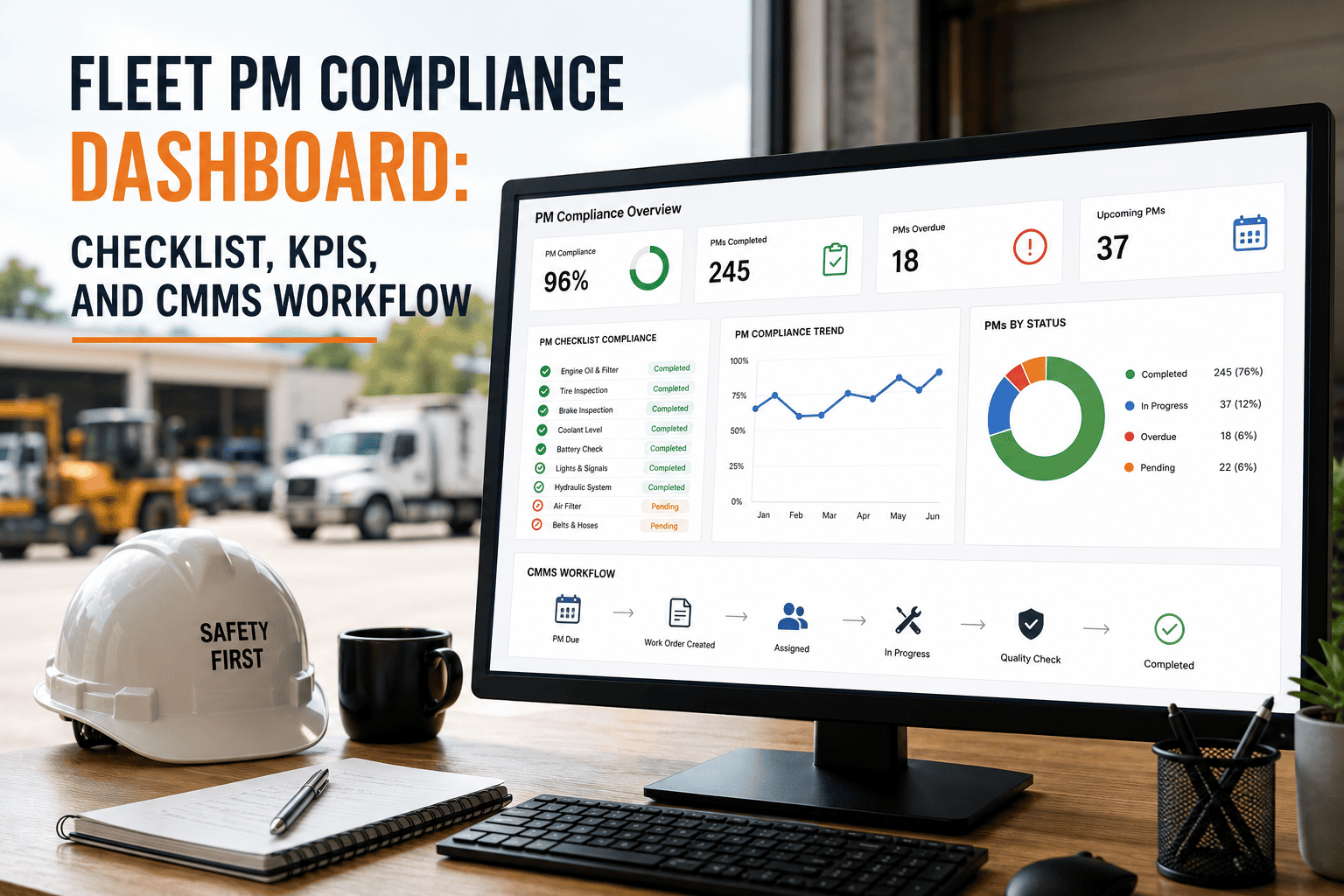
A fleet PM compliance dashboard without a connected CMMS workflow is a scoreboard with no players — it displays numbers that nobody acts on until a vehicle breaks down or a DOT inspection reveals a service overrun that the dashboard should have flagged three weeks earlier. The highest-performing fleet maintenance programmes treat the PM compliance dashboard, the underlying CMMS work order workflow, and the KPI reporting layer as a single integrated system: the CMMS captures the maintenance event, the workflow routes the work order to the right technician with the right parts available, and the dashboard surfaces the compliance result in real time for the manager who needs to dispatch a vehicle or approve a budget line. This page gives fleet maintenance directors, operations managers, and CMMS administrators a structured checklist for aligning the PM compliance dashboard, KPI framework, and CMMS workflow into a system that reduces unscheduled downtime, closes compliance gaps before they become DOT violations, and produces the audit documentation that insurance carriers and regulatory investigators expect to see. OxMaint connects your PM schedule, CMMS workflow, and compliance dashboard into one platform — so your maintenance manager sees the same real-time compliance picture as your fleet director, without manual report-pulling or spreadsheet reconciliation.
Fleet PM Compliance Dashboard: Checklist, KPIs, and CMMS Workflow
The complete operational guide for fleet maintenance teams building an integrated PM compliance system — from CMMS work order configuration to dashboard KPI selection, workflow design, and monthly audit readiness.
What Happens When Dashboard, CMMS, and KPIs Are Not Aligned
Odometer data is not feeding the CMMS in real time. The dashboard calculates PM due dates from stale mileage readings, marking vehicles as within interval when they have already passed their service due point.
CMMS allows work order closure without mandatory completion fields. Technicians close PMs without recording actual mileage, parts used, or deferred items — corrupting the next service interval calculation.
Compliance rate is reviewed at month-end in a report. By the time the 78% PM completion rate is visible to the manager, vehicles have been operating past their service interval for three weeks.
CMMS assigns work orders by availability rather than vehicle class competency. Class 8 PM work orders are assigned to technicians qualified only for light-duty vehicles, causing delays and deferred items.
PM Compliance Checklist: The 15 Steps Before Your Dashboard Goes Live
Launching a PM compliance dashboard into a maintenance environment where the underlying data processes are not structured will produce a dashboard that confirms the fleet's existing compliance problems in real time — without creating the workflow conditions to resolve them. These 15 steps establish the data, workflow, and accountability conditions that make a PM compliance dashboard operationally useful rather than visually impressive.
Every vehicle entered with VIN, odometer, and last PM mileage. No vehicle without a complete record is included in the compliance rate denominator — it is flagged as a data gap, not treated as compliant.
Separate PM intervals defined for each vehicle class, engine type, and operating route. OEM intervals adjusted for actual operating conditions based on the last 12 months of repair order history.
Telematics odometer data confirmed to update in CMMS within 24 hours of reading. Manual odometer entry protocol established for vehicles without telematics with a daily driver-reported entry requirement.
Historical PM records imported from prior CMMS or paper records. Each record includes completion date, mileage at completion, technician, and parts used. Gaps in history flagged for physical vehicle inspection before dashboard launch.
Pre-launch audit of all vehicles against their PM due points. Every vehicle more than 10% past its interval scheduled for service before the dashboard goes live. The baseline rate is the starting point the programme must improve from, not hide.
CMMS configured to require actual completion mileage, technician ID, all parts used, and deferred item notes before a PM work order can be marked closed. A work order that can be closed without these fields produces dashboard data that does not reflect what happened in the shop.
Alerts set at 500 miles or 14 days before due (shop foreman), at due point without scheduled work order (fleet manager), and at 10% overrun (operations director). Each alert triggers a specific action, not just a notification.
Each technician's vehicle class certifications recorded in CMMS. Work order routing rules configured to assign PM work orders only to technicians with verified competency for the vehicle class being serviced.
Required parts list defined for each PM type on each vehicle class. CMMS checks inventory when a PM work order is generated and flags parts shortfalls as a purchase order trigger, not a day-of-service discovery.
Fleet director sees fleet-wide compliance rate and overdue count. Shop foreman sees this week's PM queue and technician load. Dispatcher sees vehicle availability by PM status. One data source, three views relevant to each role's decisions.
Shop foreman reviews PM queue at shift start. Overdue vehicles confirmed as in-shop, scheduled same-day, or escalated to fleet manager for dispatch hold. The daily review is a named process with a named owner and a documented start time.
Any PM checklist item that cannot be completed in the scheduled service window creates a separate work order before the PM is closed. Deferred items tracked on the dashboard as open compliance items, not absorbed into the completed PM record.
Fleet maintenance manager and shop foreman review PM completion rate, overdue vehicle count, and upcoming PM queue every week. Decisions from the review documented in the CMMS as work order assignments, not as meeting notes.
CMMS configured to generate a monthly PM compliance report on the first business day of the following month. Report includes completion rate by vehicle class, overdue events, repeat failures, and downtime classification. Distributed to fleet director within 5 business days of month end.
Sample of 10% of fleet vehicles physically inspected and compared against dashboard compliance status each quarter. Discrepancies between physical condition and dashboard status trigger a data process review — not a data correction without root cause investigation.
OxMaint gives your team a connected PM compliance system — from automated work order generation and technician assignment to real-time dashboard visibility and one-click monthly compliance reports — without the configuration overhead of building it from scratch in a generic CMMS.
KPI Framework: Metrics That Drive PM Compliance Decisions, Not Just Reports
KPIs earn their place in a PM compliance dashboard when the metric triggers a named action by a named person within a defined timeframe. A metric that is reviewed once a month and produces a comment in a meeting does not drive compliance improvement — it documents compliance history. The framework below separates leading indicators (metrics that predict compliance problems before they occur) from lagging indicators (metrics that confirm the outcome of decisions already made).
CMMS Workflow: Connecting the PM Schedule to the Shop Floor to the Dashboard
The CMMS workflow is the operational mechanism that converts the PM schedule from a calendar of intentions into a series of completed work orders that update the compliance dashboard. Workflow design failures — missing mandatory fields, incorrect routing, disconnected parts ordering, or absent escalation rules — produce a dashboard that shows what was entered into the CMMS, not what actually happened in the shop. The workflow below describes each stage of the PM lifecycle and the specific CMMS configuration that ensures the dashboard reflects operational reality.
When a vehicle's odometer reading reaches within 500 miles (or 14 days) of its PM due point, the CMMS automatically generates a PM work order. The work order is pre-populated with vehicle data, PM type, required parts list, and estimated labour hours. The work order is assigned to the shop foreman's queue for technician assignment within 24 hours of generation.
On work order generation, the CMMS checks current parts inventory against the required parts list for this PM type and vehicle class. Parts at or below the minimum stock level trigger a purchase order automatically. The PM appointment is scheduled only after parts availability is confirmed — not booked for a date when the required parts may not have arrived.
The work order is assigned by the shop foreman to a technician with verified competency for this vehicle class. The CMMS displays the current workload for each qualified technician, enabling load-balanced assignment. The technician receives the work order in their mobile queue with vehicle location, parts staging confirmation, and estimated completion time.
The technician completes the PM checklist in the CMMS mobile app item by item. Any checklist item that cannot be completed creates a deferred work order before the PM can be closed. On completion, the technician records actual completion mileage, all parts used with part numbers and quantities, labour time, and any findings beyond the PM scope that require a follow-up work order.
On work order closure, the CMMS updates the vehicle's PM compliance status on the dashboard, calculates the next PM due point from the actual completion mileage, adjusts the upcoming PM queue, updates parts inventory for consumed items, and closes out the technician's time on that work order. The dashboard reflects the completed PM within minutes of work order closure — not in the next monthly report.
Fleet PM Compliance Dashboard: Complete KPI and Workflow Reference
| KPI | Type | Calculation | Target | Review | Action if Missed |
|---|---|---|---|---|---|
| PM Completion Rate | Lagging | PMs completed / PMs due | 100% | Weekly | Root cause each missed PM |
| Overdue Vehicle Count | Leading | Vehicles past interval by 10%+ | 0 | Daily | Same-day schedule or dispatch hold |
| PM Pre-Scheduling Rate | Leading | PMs booked 7+ days ahead / Total due | 90%+ | Weekly | Assign unscheduled PMs this week |
| Parts Stockout Events | Leading | PMs delayed for parts / Total PMs | 0 | Weekly | Revise minimum stock levels |
| Unscheduled Downtime Rate | Lagging | Unscheduled hours / Available hours | Below 5% | Monthly | Maintenance history review |
| Repeat Failure Rate | Lagging | Same-fault WOs in 90 days / Total WOs | Below 3% | Monthly | Component root cause investigation |
| Dashboard Accuracy Rate | Lagging | Vehicles where dashboard = physical status | 99%+ | Quarterly | Data process audit |
Frequently Asked Questions
What is the difference between a leading and lagging KPI in a fleet PM compliance dashboard?
A leading KPI measures something that will cause a future outcome if not addressed: vehicles approaching their PM due point, parts inventory falling below minimum stock for next week's schedule, or PMs not yet scheduled for the coming week. A lagging KPI measures the outcome of decisions already made: monthly PM completion rate, unscheduled downtime rate, or repeat failure rate. A dashboard that shows only lagging indicators tells you what went wrong last month. One that shows both tells you what to do today to prevent next month's problems. OxMaint's PM compliance dashboard surfaces both leading and lagging indicators in role-specific views.
How should CMMS work order mandatory fields be configured to protect PM compliance dashboard accuracy?
At minimum, a PM work order closure should require: actual completion mileage or hours, technician ID, parts used with part numbers and quantities, and a deferred items declaration (either none, or a linked follow-up work order number). If the CMMS allows closure without actual completion mileage, the next PM due calculation will be based on the estimated due mileage — which may be incorrect if the PM was completed early or late. Every mandatory field is a data quality gate that keeps the dashboard accurate. Book a demo to see how OxMaint enforces mandatory fields in its mobile technician workflow.
How many KPIs should a fleet PM compliance dashboard display?
A working fleet PM compliance dashboard should display no more than 6–8 KPIs across the combined leading and lagging categories. Each metric displayed should trigger a specific action when it falls outside its target range, and each metric should have a named owner who is responsible for that action. A dashboard with 20 metrics and no named actions for any of them is a reporting interface, not an operational tool. Reduce the metric count until every number on the dashboard is owned by someone who acts on it weekly.
How does PM compliance dashboard data connect to FMCSA CSA scoring?
The FMCSA's Vehicle Maintenance BASIC score accumulates violations identified at roadside inspections — most of which reflect deferred or missed maintenance that a functioning PM compliance programme would have addressed before the inspection. Fleets with PM completion rates consistently at or above 95% typically see lower Vehicle Maintenance BASIC percentile rankings over time, reducing DOT intervention risk. Your PM compliance dashboard, when properly maintained, is also the audit documentation that demonstrates a functioning maintenance programme to a DOT investigator.
What causes a fleet PM compliance dashboard to show compliant vehicles that are actually overdue?
The most common cause is stale odometer data — telematics feeds that update weekly rather than daily, or manual odometer entries that are recorded only at PM completion rather than at each dispatch. A vehicle that drives 800 miles between odometer updates will appear to be within its interval for the full 800 miles it has already overrun it. The second most common cause is work order closure without actual completion mileage, which resets the PM due calculation from the wrong starting point. Both failures produce dashboards that give operations managers false confidence in fleet compliance status.
Checklist. KPIs. CMMS Workflow. All Connected in One Platform.
OxMaint delivers a fleet PM compliance system where the PM schedule drives work order generation, the work order workflow enforces data quality, the parts integration prevents stockout delays, and the compliance dashboard shows real-time status to every role — from shop foreman to fleet director. No manual report-pulling. No stale data. No compliance surprises.