Parts are where maintenance plans meet the supply chain. A truck waiting on a brake chamber, a purchase made twice, or an invoice that does not match what arrived all trace back to the same weak point: a purchase order process disconnected from the work order. A clear PO workflow links each part request to a vehicle, a budget, and a receipt. This guide walks through that workflow and shows how a fleet maintenance CMMS keeps parts, repairs, and approvals in the same record.
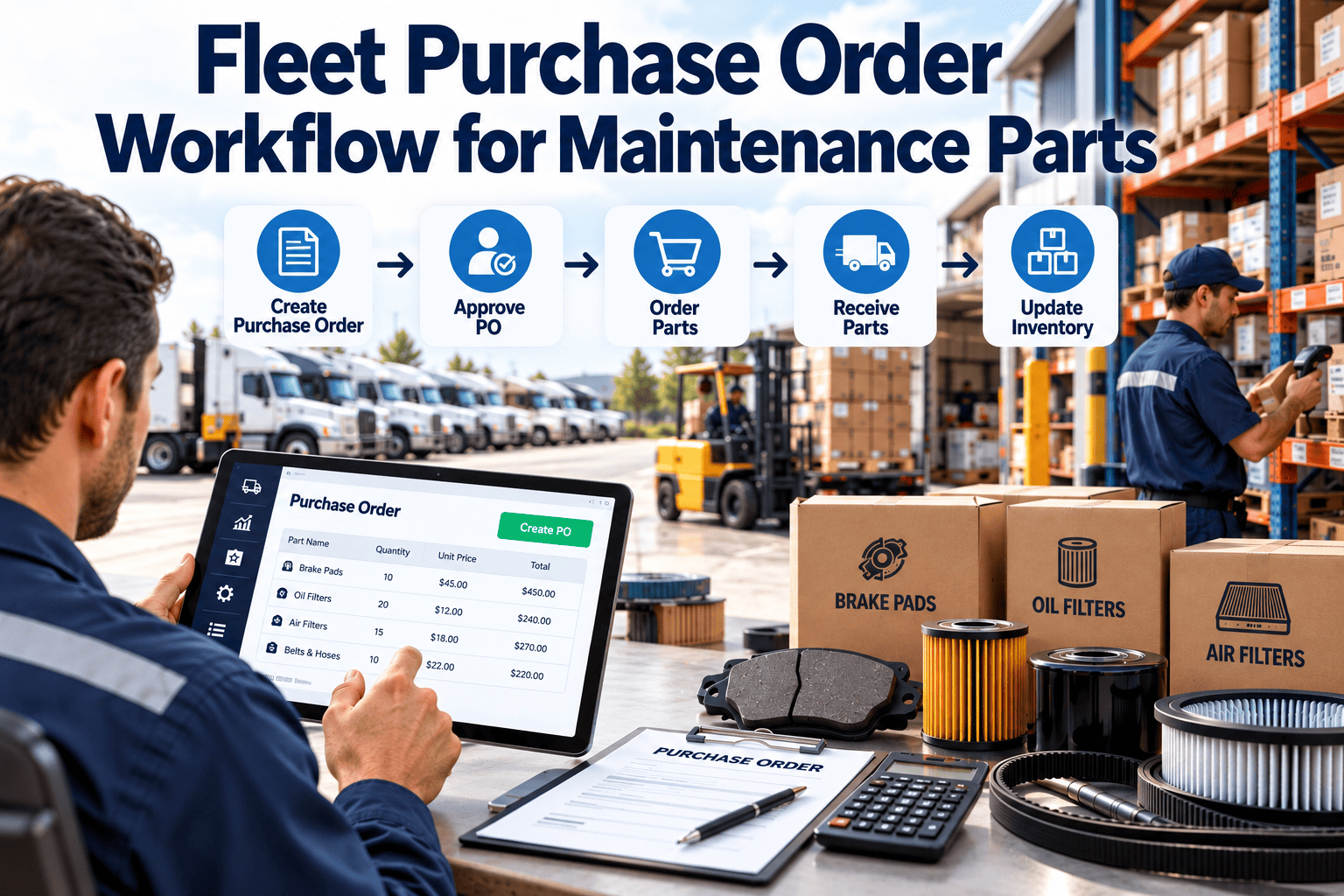
Fleet Purchase Order Workflow for Maintenance Parts
Move from part request to paid invoice with approvals, receiving, and cost allocation tied to the work order, so vehicles spend less time waiting on parts.
Signs your parts purchasing is working against maintenance
Units sit in bays because the part was ordered late, ordered wrong, or never confirmed.
Two technicians order the same part because nobody can see open orders.
Accounts payable cannot tell which repair an invoice belongs to.
Card purchases and counter sales bypass the budget, so vehicle cost looks lower than it is.
The nine-step PO workflow for maintenance parts
Every step should leave a record that can be traced from the vehicle back to the vendor invoice.
Need identified
A technician finds the need during a PM, inspection, or repair and links it to a work order and VIN.
Stock check
The system shows on-hand quantity and bin location. If stock exists, the part is issued, and no PO is needed.
Requisition
A request is created with part number, quantity, urgency, and required date.
Vendor selection
The buyer picks a preferred or contracted vendor, comparing price, lead time, and warranty terms.
Approval
The request routes to the right approver based on value, category, or vehicle.
PO issued
The purchase order goes to the vendor with a PO number that appears on every receipt and invoice.
Receiving
Staff count and inspect the delivery against the PO, record shortages or damage, and put the stock away.
Invoice match
Accounts payable compares invoice, PO, and receipt before payment.
Cost allocation
The part cost posts to the work order and vehicle, so cost per unit reports are complete.
Who does what across the workflow
| Step | Technician | Parts or buyer | Supervisor | Accounts payable |
|---|---|---|---|---|
| Request | Creates and links to work order | Reviews for completeness | - | - |
| Sourcing | - | Selects vendor and price | - | - |
| Approval | - | Routes request | Approves within limit | - |
| Receiving | Confirms part is correct | Records receipt | - | - |
| Invoice | - | Resolves discrepancies | - | Matches and pays |
Choose vendors on more than the lowest price
The cheapest quote can cost more if the part arrives late, fails early, or arrives with the wrong specification.
| Criterion | What to check | Evidence |
|---|---|---|
| Price and terms | Contract price, payment terms, freight rules | Price list and agreement |
| Availability | Stock location, lead time, same-day options | Order history |
| Quality | Return rate, warranty claims, early failures | Work order failure notes |
| Accuracy | Correct part, correct invoice | Receiving and invoice exceptions |
| Support | Technical help, returns, core handling | Service level agreement |
- Keep a short list of preferred vendors by category, such as brakes, filters, electrical, and body parts.
- Rank vendors twice a year using your own receiving and failure data.
- Use blanket purchase orders for high-volume items with agreed pricing, and release against them as needed.
A tiered approval ladder that does not slow repairs
Approvals protect budget, but a slow approval keeps a vehicle off the road. Tier them by value and urgency.
- Set value limits from your own spend history rather than copying another fleet's numbers.
- Name a backup approver for every tier so approvals continue during absences.
- Track the time spent waiting for approval as its own metric.
Connect every part to the repair that needed it
Link requests, stock, and costs to the work order and see where vehicles lose time waiting on parts.
Receiving is where purchasing errors are cheapest to catch
Once a wrong part is on a vehicle, the cost includes labor twice. Check before it leaves the dock.
Match to the PO
Check part number, quantity, and condition against the open order, not only the packing slip.
Record exceptions
Log shortages, damage, and substitutions on the receipt and notify the buyer the same day.
Put away or issue directly
Stock items go to a bin location. Job-specific parts are issued to the work order at once.
Handle partials and backorders
Keep the PO open for the remainder and give the shop a revised expected date.
Recover money from cores, returns, and warranty claims
Track core charges on the PO and mark when the used unit has been returned to claim the credit.
Record return authorization numbers, ship dates, and the credit memo expected.
Flag parts under warranty at install and keep the failure evidence with the work order.
- Review open cores and pending credits at least monthly.
- Link every warranty claim to the original PO, install date, and vehicle meter.
- Reconcile vendor credit memos against what was claimed.
Treat outside repairs as purchase orders too
Body shops, specialty repairs, and dealer warranty work are purchases of labor and parts, and they belong in the same workflow.
- Create the PO before the vehicle leaves your yard, with a scope and a not-to-exceed value.
- Require an itemized invoice that separates parts, labor, and fees.
- Attach the vendor findings and photos to the work order.
- Compare outside repair cost with in-house cost for the same repair type each quarter.
Make sure parts cost lands on the correct vehicle
| Cost type | Allocate to | Common mistake |
|---|---|---|
| Parts used on a repair | Work order and VIN | Charged to a general shop account |
| Shop supplies and shared consumables | Overhead, or a per-job rate | Ignored, so unit cost is understated |
| Freight and expedite fees | The part line or work order | Left on the invoice header |
| Core charges and credits | Offset against the original part cost | Credits posted months later with no link |
| Warranty recoveries | Reduce work order cost when received | Booked as unrelated income |
Verify what you ordered, received, and were billed
A three-way match compares three documents before an invoice is paid. It catches overbilling, short shipments, and price drift.
Purchase order
Part, quantity, agreed price, terms
Receiving record
What actually arrived and in what condition
Vendor invoice
Quantity billed, price, freight, tax
| Mismatch | Common cause | Response |
|---|---|---|
| Price higher than PO | List price used instead of contract price | Hold invoice and request correction |
| Quantity billed above received | Backorder billed as shipped | Pay only for received quantity |
| Wrong part received | Cross-reference or catalog error | Return and raise a corrected request |
| Freight not on PO | Expedite charge not approved | Approve or dispute with buyer notes |
Standard PO versus emergency purchase
- Planned from PM or inspection findings
- Full approval route and vendor comparison
- Delivery scheduled before the vehicle enters the bay
- Receiving and invoice match before payment
- Used when a vehicle is down or a safety defect is found
- Verbal or fast-track approval, documented after the fact
- Pre-approved vendors and spend limits
- Reviewed weekly to confirm it is not becoming routine
Track emergency purchases as a percentage of all purchases. A rising share usually points to weak PM planning or stock gaps.
Reduce the need for urgent buying with better stock rules
The best PO is the one you do not have to raise at 4 p.m. for a unit that should have left at noon.
| Stock rule | How it works | Best for |
|---|---|---|
| Minimum and maximum levels | Reorder when on-hand falls below a minimum, up to a maximum | Filters, belts, bulbs, brake wear parts |
| PM kit staging | Pull parts for upcoming PMs ahead of the due date | Scheduled services across a vehicle class |
| Critical spares | Hold a defined quantity of parts with long lead times | Sensors, modules, specialty hoses |
| Vendor-managed stock | Supplier replenishes a shelf and bills on use | High-volume consumables |
| Just in time delivery | Order against a scheduled job | Large or expensive components |
- Use failure and PM history to set minimums, not guesses.
- Review dead stock and slow movers every quarter.
- Record cores and returns so core charges and warranty credits are claimed.
What every PO record should capture
PO number, vendor, buyer, date, terms, delivery location, total value
Part number, description, quantity, unit price, expected date, tax, freight
Work order, VIN, cost center, requester, approver, warranty flag
- Keep vendor part numbers next to your own so cross-references are reliable.
- Store receipt dates and quantities by line, to support partial deliveries.
- Retain approval history, so you can show who approved what and when.
Measure the workflow, not just the spend
| Metric | Definition | Why it matters |
|---|---|---|
| Request to PO time | Hours from requisition to issued PO | Shows approval and sourcing delays |
| Vendor on-time delivery | Lines received by promised date over lines ordered | Supplier reliability for planning |
| Fill rate from stock | Parts issued from stock over parts requested | Quality of stocking rules |
| Emergency purchase share | Urgent POs over total POs | Planning discipline |
| Invoice exception rate | Invoices that fail a match over total invoices | Price and receiving accuracy |
| Waiting-for-parts downtime | Hours a vehicle is held for parts | Direct effect on availability |
Light controls that prevent fraud and waste
- Separate duties so the person who orders does not also receive and approve payment.
- Require a work order or vehicle number on every purchase, including card purchases.
- Review one-time vendors and unusual price changes monthly.
- Count high-value stock on a cycle and investigate variances.
- Keep supplier agreements and price lists in one place and update them on a schedule.
Supporting the parts workflow with Oxmaint
Oxmaint maintenance management software gives technicians, parts staff, and managers one view of what a repair needs.
| Workflow need | Oxmaint capability |
|---|---|
| Parts tied to the repair | Work orders with parts planned and issued per task |
| Know what is on the shelf | Inventory with quantities, locations, and reorder levels |
| Plan parts ahead of PM | Preventive maintenance schedules showing upcoming needs |
| Spot recurring part use | Reports by vehicle, part, and failure |
| Review delays and spend | Dashboards for waiting-on-parts work and cost trends |
If purchasing and payment are handled in a finance system, Oxmaint still supplies the work order and parts data that makes those approvals informed.
Roll out the PO workflow in phases
Map the current process, find who orders what, and list vendors and approval limits.
Clean the parts catalog, set stock levels, and link parts to vehicle classes.
Switch requests to work-order-linked requisitions and train staff on receiving.
Start monthly metric reviews and adjust approval tiers and stock rules.
Why parts delays keep repeating
| Delay cause | Where it starts | Fix |
|---|---|---|
| Wrong part ordered | Weak parts-to-vehicle compatibility data | Link parts to VIN, engine, and axle specs |
| Late discovery of the need | Inspection findings not converted to work orders | Create corrective work orders at the point of inspection |
| Approval waits | No backup approver or tier limits | Define tiers and response times |
| Stock-outs | Minimums set by habit | Reset levels from usage history |
| Receiving gaps | Deliveries not logged the same day | Require receipt before invoice payment |
Keep a record you could hand to an auditor
- Every PO links to a work order, a vehicle, and an approver.
- Changes to price, quantity, or vendor after approval are logged with the user and date.
- Receipts and invoices are stored with the PO, not in a separate folder.
- Parts for safety-critical repairs, such as brakes and steering, are traceable to the vendor and the install date.
Use purchase data to forecast parts spend
Open POs, PM schedules, and usage history show what the next quarter will need.
| Forecast input | Source | Planning use |
|---|---|---|
| Upcoming PM parts | PM schedule and kit lists | Pre-order and stage stock |
| Typical corrective parts by class | Work order history | Set stock levels and budgets |
| Seasonal demand | Previous year usage by month | Time bulk purchases |
| Price changes | Vendor notices and contract terms | Adjust budget and approval limits |
- Compare budget to actual by vehicle class each month.
- Flag classes where parts spend rises faster than distance, and review their failure codes.
Fleet parts purchasing questions
Should every part purchase have a PO?
Set a clear policy. Most fleets require a PO or work order reference above a small value limit.
What is a three-way match?
It compares the PO, the receipt, and the invoice before payment to catch errors.
How do we handle emergency repairs?
Use pre-approved vendors and spend limits, then document the purchase and review it weekly.
Can parts be linked to work orders?
Yes. You can sign up and issue parts against each task.
How do we cut waiting-on-parts downtime?
Stage PM kits and set minimums. You can book a demo to see the workflow.
Get the right part to the right vehicle, once
Bring requests, stock, and repair costs into one maintenance record, and give your shop fewer reasons to wait.