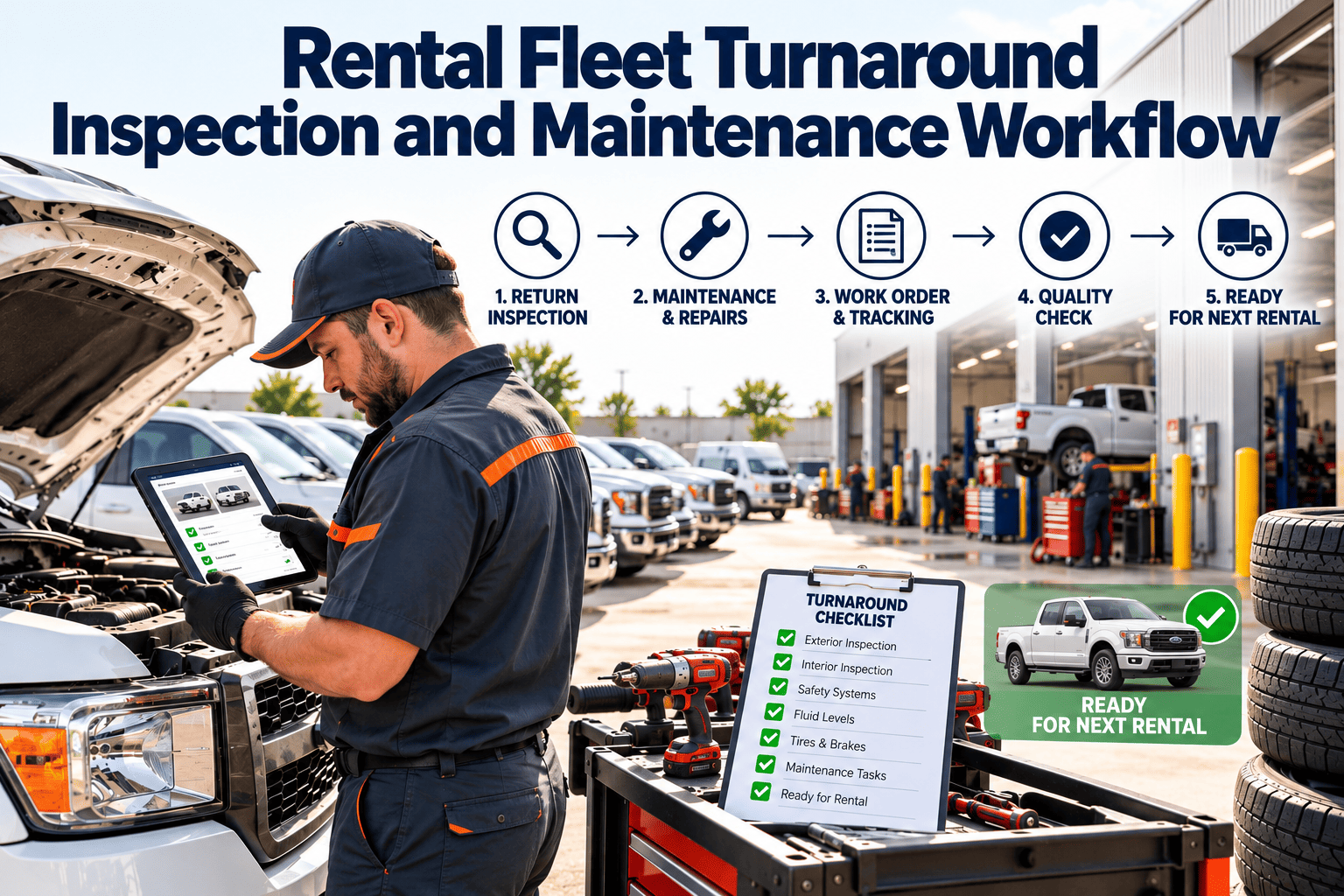
A rental vehicle earns money only while it is on the road, so every hour between return and the next pickup is lost revenue. In that window the fleet team must inspect, clean, check fluids and tires, record damage, handle any repair, and release the car with proof it is ready. When these steps run on paper forms and memory, vehicles get released with unrecorded damage, services get missed, and disputes drag on. This guide lays out a turnaround workflow that keeps inspection and maintenance in one record, and you can book a demo to see how Oxmaint structures it for a rental operation.
Rental Fleet Turnaround Inspection and Maintenance Workflow: Return to Ready Without Lost Days
A practical lane-by-lane process for checking in vehicles, separating quick turns from repair holds, and releasing every unit with a documented condition record.
The Rental Fleet Problem in Three Pressures
Rental operations are therefore judged on three things at once: how quickly a unit is back in the pool, how well its condition is documented, and how reliably it is serviced. A workflow that serves only one of them shifts cost to the other two.
Seven Stations Between Return and Release
Check-Out and Check-In Must Be Read Together
A rental condition record has value only as a pair. The check-out inspection sets the baseline, and the check-in inspection is compared against it. Collect the same fields at both points so differences are obvious.
| Inspection item | Captured at check-out | Compared at check-in | Why it matters |
|---|---|---|---|
| Exterior panels | Dated photos from set angles | Same angles, same order | Separates new damage from existing |
| Glass and mirrors | Chips and cracks noted | Any new chip or crack | Small damage is often missed |
| Tires and wheels | Tread condition and wheel damage | Wear, cuts, curb damage | Safety item and common claim |
| Interior | Cleanliness, upholstery, odors | Stains, burns, missing items | Drives cleaning or recovery charge |
| Odometer | Reading at handover | Reading at return | Billing and service interval tracking |
| Fuel or charge | Level at handover | Level at return | Fuel charges and readiness |
| Warning lights | Dashboard clear | Any light now showing | Early sign of a mechanical fault |
| Accessories | Child seats, cables, tools present | Anything missing | Replacement and revenue loss |
Photo Evidence Habits That Hold Up
- Use a fixed angle sequence so no panel is skipped.
- Capture the odometer and dashboard in the same set.
- Attach photos to the unit and booking, not to a personal phone gallery.
- Photograph existing damage at check-out, not only new damage at return.
Put Inspection and Maintenance in the Same Record
Oxmaint links mobile inspections, work orders, and preventive schedules to each vehicle, so a return becomes the start of the right job.
Deciding the Lane in Under a Minute
Triage is where turnaround time is won or lost. Write the rules down so any attendant reaches the same decision. The matrix below is a starting template to adapt to your own brand standards and risk tolerance.
Using Each Return to Drive Preventive Maintenance
The return is the best moment to refresh the vehicle's meter reading. Recording the odometer at check-in lets the maintenance system see whether a service is due, so the check happens in the turn window instead of after a breakdown.
Typical Service Items for a Rental Fleet
| Service item | Trigger basis | Where it fits |
|---|---|---|
| Oil and filter | Mileage or time, per manufacturer guidance | Service turn |
| Tire rotation and pressure | Mileage and every return check | Service turn |
| Brake inspection | Mileage and wear indicators | Service turn or hold |
| Battery and charging check | Calendar and warning signs | Service turn |
| Wipers, bulbs, fluids | Every return | Quick or service turn |
| Recall and campaign work | Open recall status | Repair hold if safety related |
| Annual or regulatory inspection | Calendar date | Planned downtime |
Always follow the intervals the vehicle manufacturer and your local rules specify. The table shows where each item sits in the workflow, not a recommended interval.
From Damage Found to Damage Resolved
- Damage is noted on paper and never matched to the booking
- Repairs are scheduled by memory and slip
- Unrepaired units are rented again with the same defect
- Claims depend on whoever remembers the vehicle
- Cost per vehicle is spread across spreadsheets
- Photos and findings attach to both unit and booking
- Damage opens a work order with a clear priority
- Units with open safety defects cannot be released
- Claims use dated side-by-side evidence
- Repair cost accrues to the vehicle automatically
A Simple Damage Lifecycle
- Detect the difference at check-in against the check-out record.
- Classify it as cosmetic, functional, or safety related.
- Decide whether to repair now, schedule it, or hold the vehicle.
- Log estimated and actual repair cost against the unit.
- Close the work order only after verification and release sign-off.
How Turnaround Differs by Vehicle Type
One checklist rarely suits every unit. Passenger cars, cargo vans, trucks, and electric vehicles share a common frame, but each adds checks that change the time needed in the turn window.
| Vehicle type | Extra checks at return | Common turn risk |
|---|---|---|
| Passenger cars | Interior condition, glass, wheel rims, accessories | Cleaning time and cosmetic damage disputes |
| Cargo vans | Cargo area, load restraints, rear doors, tires under load | Hidden cargo area damage and tire wear |
| Moving and box trucks | Ramp or lift gate, roll door, height markings, fluid levels | Door, ramp, and brake wear |
| Electric vehicles | Charge level, charging cable and port, battery warnings | Charging time stretching the window |
Common Bottlenecks and Practical Fixes
- Slow check-in because forms are rewritten by hand: use a mobile checklist with fixed fields and photo prompts.
- Cars waiting for a free bay: reserve a short-service slot each shift for turn-window work.
- Missing wipers, bulbs, or fluids: keep a small stock sized to your most frequent replacements.
- Unclear ownership of a held vehicle: assign every hold to a named person with a target date.
- Services discovered late: refresh the odometer at every return so due work appears immediately.
- Damage argued from memory: photograph at both ends of every rental using the same angles.
Who Does What During a Busy Turn
Clear lot roles keep the lanes moving when several vehicles return together. Without them, one attendant becomes the bottleneck and the whole window slips.
Keeping the Workflow Steady When Demand Spikes
Holiday weekends, local events, and tourist seasons compress turn windows and tempt teams to skip steps. The goal in a surge is not to do less checking, but to move the right checks earlier and keep the lanes strict.
- Pull forward planned services into low demand weeks so fewer units need work during the peak.
- Pre-stage consumables such as wipers, bulbs, and fluids before the surge begins.
- Keep the repair hold rule firm, because a failure on the road costs more than a delayed release.
- Add temporary check-in staff rather than shortening the photo sequence.
- Review turn time by lane every day during the peak and adjust staffing to the slowest station.
- After the surge, review which holds lasted longest and why, then fix those causes before the next season.
Which Oxmaint Capabilities Support the Turnaround
The workflow above is software-agnostic. These Oxmaint capabilities are the ones that map to it. Confirm exact configuration for your rental brand and locations in a demonstration.
What to Keep on File for Each Vehicle
A turnaround process produces records that are useful long after the car leaves the lot. Keep them together under the vehicle so claims, audits, and resale decisions draw on one history.
- Check-out and check-in condition reports with dated photos for every rental.
- Odometer, fuel or charge level, and warning light status at each handover.
- Every work order, with labor, parts, findings, and release sign-off.
- Recall and campaign status, including the date of completion.
- Damage history with repair cost and who approved the work.
- Annual or regulatory inspection results where your location requires them.
Metrics That Show Whether Turnaround Is Improving
| Metric | How to calculate | What to watch for |
|---|---|---|
| Average turn time | Return time to release time, averaged by lane | Long service turns that should be quick turns |
| Quick turn share | Quick turns ÷ Total returns | A falling share can signal missed upstream PM |
| Repair hold days | Days a unit stays out of the pool | Parts waits and parked damage |
| PM on-time completion | On-time PMs ÷ Scheduled PMs | Services slipping under high utilization |
| Damage documented rate | Damage with photo pair ÷ Total damage | Gaps that weaken claims |
| Repeat defect rate | Same defect within a set window ÷ Total repairs | Fixes that did not hold |
| Cost per vehicle | Labor + Parts + External service | Units that cost more than they earn |
A Four-Week Start Plan for One Location
Rental Turnaround Questions
Every return needs a documented check-in, but depth can scale by lane. Triage rules decide when a unit needs a fuller check.
Compare dated check-out and check-in photos from the same angles, tied to the booking. You can book a demo to see this record.
Short services can, if parts are stocked and the work order is ready when the car arrives. Longer jobs should be scheduled for low demand periods.
An open safety work order should block release until it is verified and signed off. Sign up to set up the release rule.
Start with average turn time by lane, since it shows where hours are lost. Add repair hold days and PM compliance next.
Turn Every Return Into a Documented, Maintained, Rentable Vehicle
Bring inspections, damage records, preventive schedules, and repair work orders into one system, and get more of your fleet back on the road sooner.