Best Manufacturing Plant Layout Design Strategies 2026
By oxmaint on February 10, 2026
Every square foot of your manufacturing floor either makes you money or costs you money — there is no neutral ground. In 2026, the difference between a thriving production facility and one bleeding cash often comes down to how intelligently the plant layout is designed. Poor layouts silently drain productivity through wasted operator movement, tangled material paths, and maintenance nightmares that compound month after month. Strategic layout redesign has been shown to cut material handling distances by over 35% and boost floor utilization by 25% or more. Schedule a free consultation to discover how Oxmaint helps manufacturing teams plan, track, and optimize their facility operations from a single platform.
What Makes a Plant Layout Succeed or Fail
A plant layout is not just a map of where machines sit. It is the invisible architecture that governs how materials, people, and information flow through your entire operation. When the layout works, production hums. When it does not, problems multiply — longer cycle times, higher injury rates, ballooning maintenance costs, and operators who spend more time walking than working.
Poorly Designed Layout
Operators travel 2-3x farther than necessary between stations
Materials backtrack and cross paths, creating bottlenecks
Equipment crammed together makes maintenance slow and risky
No room to grow — expansion requires complete teardown
Strategically Designed Layout
Workstations positioned to minimize travel and handling time
Unidirectional material flow with zero cross-traffic
Dedicated maintenance access zones around every critical asset
Built-in expansion capacity of 20-40% for future growth
The Numbers Behind Layout Optimization
Layout improvements deliver measurable results across industries. Here is what research and real-world deployments consistently show when manufacturers invest in strategic layout redesign.
35%
Reduction in operator travel distance through optimized workstation placement
40%
Fewer safety incidents and maintenance downtime with proper aisle design
25%
Improvement in usable floor space without adding square footage
Want results like these at your facility? Oxmaint gives you the asset tracking and maintenance tools to keep your optimized layout performing at peak efficiency.
There is no single best layout for every factory. The right choice depends on your production volume, product variety, and how often your lines need to change. Most modern facilities blend two or more approaches.
High Flexibility
Process Layout
Groups similar machines into departments. Materials route between departments based on each product's unique processing sequence. Ideal for job shops and custom manufacturing.
Best fit: Low-to-medium volume, high product variety, batch production
High Throughput
Product Layout
Arranges equipment in a sequential line matching the exact production order. Maximizes speed and minimizes material handling but offers limited flexibility when designs change.
Best fit: High volume, standardized products, automotive and electronics assembly
Best of Both
Cellular Layout
Machines grouped into self-contained cells, each producing a family of similar parts from start to finish. Teams manage quality within the cell, reducing defects and lead times.
Best fit: Medium volume and variety, lean manufacturing environments
Specialized
Fixed-Position Layout
The product stays stationary while workers, materials, and tools come to it. Used when the product is too large or heavy to move during assembly.
Best fit: Very large products, one-off builds, aerospace and shipbuilding
From Blank Floor to Optimized Facility
Effective plant layout design is a structured process, not guesswork. Following a proven methodology prevents costly mistakes and ensures the layout supports both current operations and future growth.
Phase 1
Map Your Value Stream
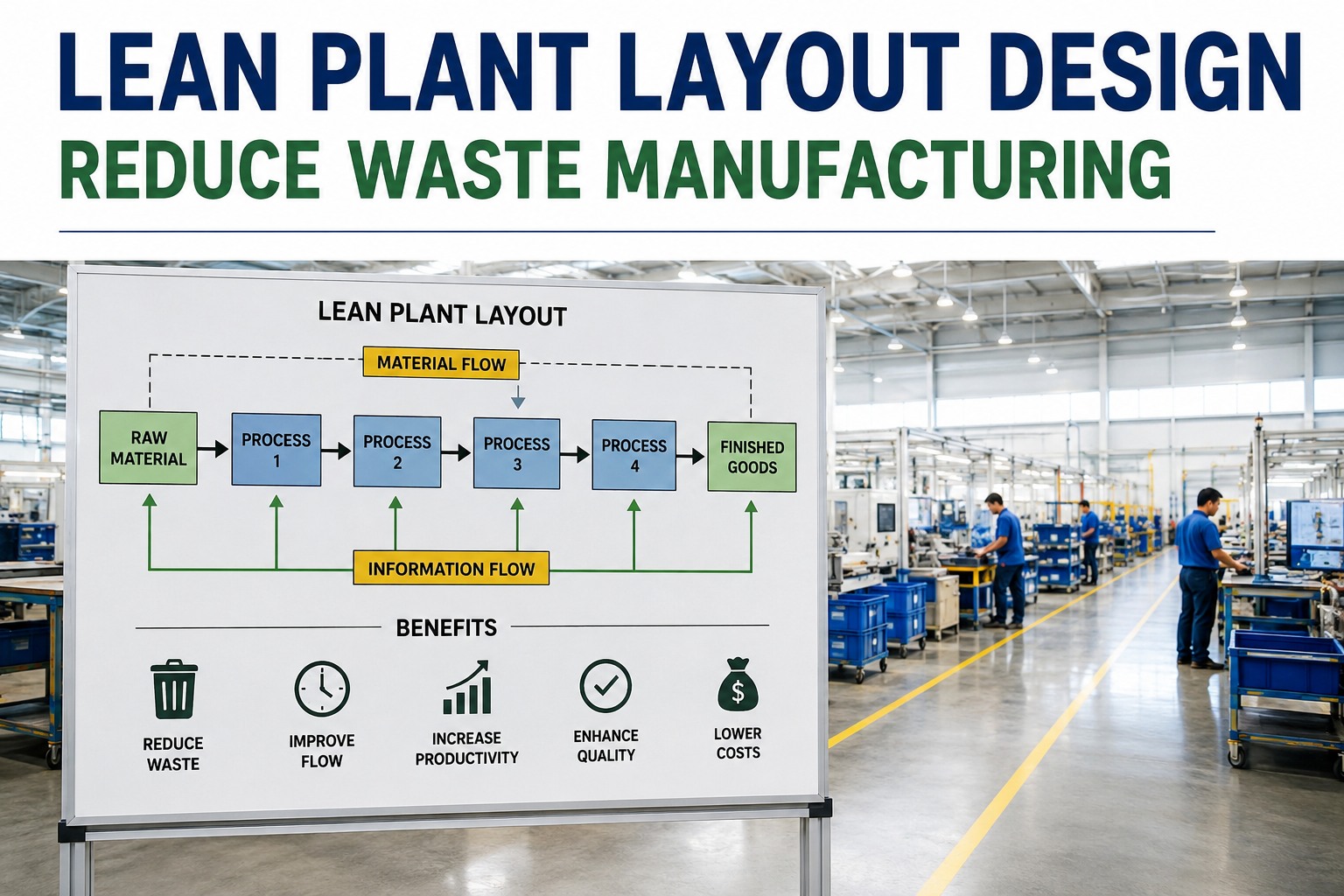
Document every step from raw material to finished product. Identify where value is added and where waste hides — unnecessary movement, waiting, overprocessing, and excess inventory.
Phase 2
Analyze Relationships & Proximity Needs
Determine which departments and machines must be close together based on material flow volume. Rank every relationship from absolutely necessary to undesirable.
Phase 3
Calculate Space & Plan for Growth
Size every workstation, aisle, and storage zone precisely. Build in 20-40% growth capacity from the start — retrofitting later is always more expensive than planning ahead.
Phase 4
Generate & Simulate Alternatives
Create multiple layout options and test each with simulation software. Compare alternatives on travel distance, throughput, flexibility, and safety before committing to physical changes.
Phase 5
Implement, Track & Continuously Improve
Roll out the layout in phases. Use a sign up with - CMMS platform like Oxmaint to track equipment locations, schedule maintenance around transitions, and monitor performance post-implementation.
Planning a facility redesign? See how Oxmaint coordinates equipment moves, reschedules maintenance, and tracks every asset location in real time.
Six Principles That Separate Great Layouts From Average Ones
These are the non-negotiable design principles that leading manufacturers build into every facility. Skip any one and the layout will underperform.
01
Shortest Path Material Flow
Materials should travel from receiving to shipping in the shortest, most direct route possible. Use value stream mapping to eliminate backtracking before a single machine is placed.
02
Built-In Scalability
Design with modular zones that can be reconfigured as demand changes. Use movable equipment where possible and leave strategic open areas for growth.
03
Safety by Design, Not by Signage
Wide aisles, separated pedestrian and vehicle traffic, ergonomic workstation heights, and clear emergency exits should be structural elements — not afterthoughts.
04
Maintenance-First Equipment Placement
Every critical asset needs clearance for inspection and repair. Use a CMMS like Oxmaint to map maintenance access requirements for every asset.
05
Lean Integration From Day One
Build single-piece flow, pull production, Kanban zones, and visual management boards directly into the layout from the start.
06
Automation-Ready Infrastructure
Design floor surfaces, electrical capacity, and aisle widths to accommodate robots and AGVs. Building in readiness now avoids costly retrofit projects later.
Matching Layout Type to Your Production Profile
Use this reference to quickly identify which layout strategy aligns with your manufacturing characteristics.
Layout Selection Matrix
Layout Type
Volume
Variety
Flexibility
Setup Cost
Process
Low–Med
High
Very High
Moderate
Product
Very High
Low
Low
High
Cellular
Medium
Medium
High
Moderate
Fixed-Pos
Very Low
Unique
Moderate
Variable
Hybrid
Mixed
Mixed
High
Higher
Most modern facilities use a hybrid approach — product lines for high-volume items and process or cellular zones for specialty runs.
Five Layout Mistakes That Quietly Drain Your Profits
These errors are common because they are not obvious on blueprints. They only reveal themselves once production is running.
1
Designing to Current Capacity Only
A layout built for today's volume forces a complete re-layout within 2-3 years. Always build in expansion capacity.
2
Squeezing Equipment Too Close Together
Tight spacing maximizes floor use on paper but makes maintenance impossible in practice. Every PM event takes longer and technicians work in unsafe conditions.
3
Skipping Material Flow Simulation
Moving heavy equipment based on intuition is a gamble. Digital simulation reveals bottlenecks invisible on static floor plans.
4
Excluding Operators From Planning
Engineers design layouts on screens. Operators live in them daily. Involving floor staff catches practical issues that simulations miss.
5
Treating Layout as a One-Time Project
Layouts must evolve with products and technology. Build a continuous review cycle using CMMS performance data to identify which zones need adjustment.
Stop losing productivity to layout problems. Sign up for Oxmaint and start tracking asset performance, work orders, and maintenance schedules across every zone.
How a CMMS Keeps Your Layout Performing After Day One
The best layout degrades without proper maintenance management. A CMMS becomes the operational backbone that ensures every asset continues to deliver the performance the design intended.
Asset Location Mapping
Link every piece of equipment to its floor location. When layouts change, update records instantly so maintenance crews always know where to go.
Zone-Based PM Scheduling
Schedule preventive maintenance by production zone so PM windows align with production breaks. Coordinate across zones to prevent blocking material flow.
Location-Based Performance Analytics
Identify which floor zones generate the most work orders, longest downtimes, and highest repair costs. This data informs future layout adjustments.
Transition Work Order Management
During layout changes, track relocation work orders, equipment reconnection tasks, and post-move validation checks so nothing is missed.
Your Layout Is Only as Good as the System Behind It
A strategic plant layout sets the stage — but Oxmaint keeps the performance going. Real-time asset tracking, automated work orders, preventive maintenance scheduling, and analytics that show exactly where your floor is winning and where it needs work.
Which layout works best for a factory producing multiple product families?
A cellular or hybrid layout is typically the strongest choice. Cellular layouts group machines into self-contained cells for part families. Most multi-product facilities use a hybrid approach — product lines for high-volume items and process or cellular zones for specialty runs. Book a demo to see how Oxmaint manages complex multi-zone facilities.
How frequently should we revisit our plant layout?
Conduct a formal review at least annually and whenever major changes occur — new products, demand shifts above 20%, or equipment additions. Use CMMS data to monitor zone performance continuously.
What role does CMMS software play in layout optimization?
A CMMS like Oxmaint tracks asset locations, maintenance history, and performance by zone — revealing which areas have the most breakdowns and highest costs. During redesigns, it coordinates equipment moves and ensures continuity. Sign up for free to see the difference.
What are the biggest cost drivers in a layout redesign?
Equipment relocation, production downtime, utility infrastructure changes, and floor modifications. Phased implementation and simulation can reduce costs by 30-50% compared to a full-stop approach.
How do I integrate safety and ergonomics into the layout?
Make safety structural, not an afterthought. Design OSHA-compliant aisles, separate pedestrian from vehicle traffic, and configure ergonomic workstations. Schedule a consultation to discuss how Oxmaint supports safety compliance tracking.