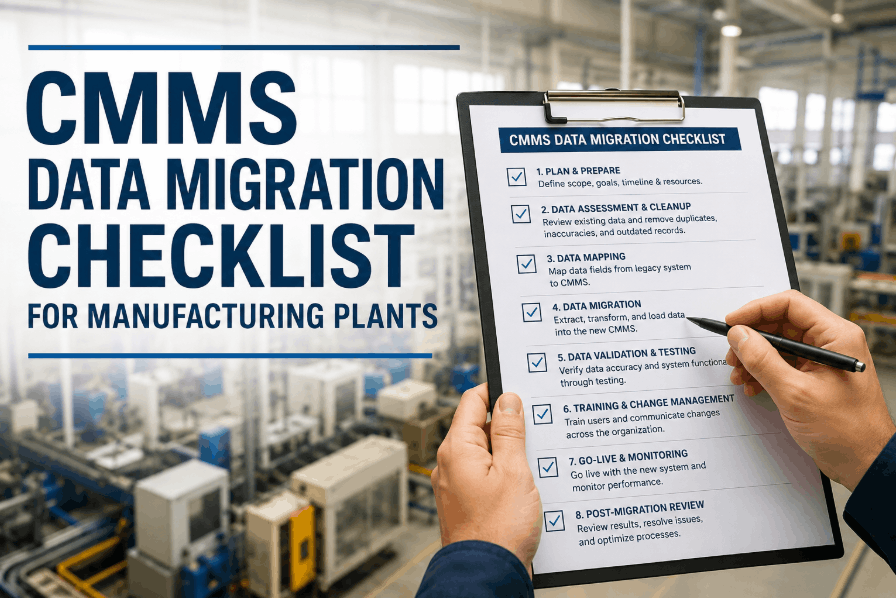
CMMS Data Migration Checklist for Manufacturing Plants
By Josh Turly on June 1, 2026
A CMMS data migration checklist is the structured foundation for moving your manufacturing plant's maintenance records, asset history, work order data, and preventive maintenance schedules into a new system without losing compliance traceability or operational continuity — a failed migration that corrupts equipment history, drops PM schedules, or breaks asset-to-work-order linkages can stall production, void OEM warranties, and expose your plant to audit gaps the moment your new CMMS goes live. Manufacturing plants managing hundreds of assets, multi-line PM schedules, spare parts inventory, and regulatory inspection records face migration complexity that ad hoc spreadsheet exports cannot safely handle. This CMMS data migration checklist covers asset register cleanup and field mapping, historical work order and PM data preparation, parts inventory reconciliation, user and role configuration, data validation testing, and go-live cutover planning — organized in execution sequence so your maintenance team migrates to platforms like Sign Up Free Oxmaint without losing a single preventive maintenance trigger or asset service record. Book a Demo to see how Oxmaint's onboarding team structures plant-level data imports, maps your legacy fields to Oxmaint's asset and work order schema, and validates your migrated PM schedules before your team ever logs in for the first time.
CMMS MIGRATION FOR MANUFACTURING
Your Plant Has Years of Asset History, PM Schedules, and Work Orders. Don't Lose Them in the Move.
Oxmaint's structured onboarding process maps your legacy maintenance data to a modern CMMS schema, validates PM triggers before go-live, and preserves asset service history so your maintenance team operates with full context from day one — no data gaps, no missed PMs, no compliance risk.
CMMS Asset Register Cleanup and Field Mapping Checklist
The asset register is the backbone of every CMMS migration for manufacturing plants — equipment records with missing category tags, duplicate asset IDs, unresolved parent-child relationships, or absent criticality ratings will corrupt PM schedule generation and asset performance reporting in your new system from the first day of operation. Book a Demo to see how Oxmaint structures asset import templates for manufacturing plants, maps equipment hierarchy from your legacy system, and validates asset records before any PM data is loaded.
Asset Register Preparation and CleanupISO 55001 / CMMS Best Practice
PM Schedule and Maintenance Plan Data Migration Checklist
Preventive maintenance schedule migration is the highest-risk phase of any manufacturing CMMS transition — a PM trigger that fails to carry over, a frequency that migrates incorrectly, or a task list that loses its procedure steps will cause real equipment to miss scheduled service after go-live without any alert to the maintenance team. Sign Up Free to explore how Oxmaint's PM module imports time-based, meter-based, and condition-based triggers from your legacy maintenance system with full task list structure preserved for every asset.
Migration Phase 03 — Work Order History and Records
Historical Work Order and Maintenance Record Migration Checklist
Historical work order data migration preserves the asset service history that drives Oxmaint's maintenance analytics, MTBF calculations, and AI-powered failure predictions — losing historical records means starting asset performance analysis from zero, missing warranty claim evidence, and forfeiting the audit trail that insurance and compliance reviewers require. Book a Demo to see how Oxmaint imports legacy work order history linked to asset records, preserves completion timestamps, and immediately feeds historical data into maintenance KPI dashboards after go-live.
Work Order History MigrationCMMS Best Practice / Audit Compliance
Migration Phase 04 — Parts Inventory and Spare Parts Data
Spare Parts Inventory and Storeroom Data Migration Checklist
Parts inventory migration accuracy directly determines whether your maintenance team can generate work orders with correct parts requirements, trigger reorder alerts at the right stock levels, and process purchase requests from the new CMMS from day one. Sign Up Free to see how Oxmaint's inventory module imports storeroom stock records, links parts to asset and PM plan records, and activates reorder point alerts immediately after your inventory data is loaded.
Spare Parts and Inventory MigrationMRO Best Practice / Storeroom Management
Migration Phase 05 — User Configuration and Access Roles
User Accounts, Roles, and Permission Configuration Checklist
User configuration for a manufacturing CMMS migration is not just account creation — it determines which technicians can close work orders, which supervisors can approve PM deferrals, and which managers have access to maintenance analytics and compliance records from the moment the system goes live.
User Roles and Access ConfigurationCMMS Security / Role-Based Access Control
Migration Phase 06 — Data Validation and Testing
CMMS Migration Data Validation and Pre-Go-Live Testing Checklist
Data validation testing after import and before go-live is the phase that catches field mapping errors, PM trigger failures, and inventory linkage gaps before they affect production maintenance operations. Book a Demo to see how Oxmaint's implementation team conducts structured validation testing of asset records, PM schedules, and work order history before your manufacturing plant transitions from the legacy system.
Data Validation and Pre-Go-Live TestingCMMS UAT / Data Integrity Verification
Migration Phase 07 — Go-Live Cutover Planning
CMMS Go-Live Cutover and Cutover Freeze Checklist
Go-live cutover planning determines whether your manufacturing plant transitions to the new CMMS with zero operational gaps or spends its first week reconciling work orders logged in two systems simultaneously. Sign Up Free to begin your Oxmaint migration with a structured go-live plan that sets a hard cutover date, freezes legacy system changes, and confirms every pre-go-live condition is met before your team begins using the new CMMS for production maintenance.
Go-Live Cutover Planning and ExecutionCMMS Implementation Best Practice
Reference Guide
CMMS Data Migration Phase Summary and Oxmaint Feature Alignment
Migration Phase
Key Activity
Risk If Skipped
Oxmaint Feature
Asset Register Prep
Deduplication, field mapping, hierarchy build
Orphaned PMs, broken work order routing
Asset Management, QR Workflows
PM Schedule Migration
Trigger type mapping, task list import, last-completed dates
Missed PMs, work order surge on day one
Preventive Maintenance Module
Work Order History
Status mapping, asset linkage, cost field import
Broken MTBF analytics, zero cost history
Work Order Management, Analytics
Parts Inventory
Physical count, reorder points, asset linkage
Stock-outs, missing reorder alerts
Parts & Inventory, Purchase Management
User Configuration
Role mapping, team assignment, mobile access
Routing failures, technician lockouts
Team Management, Mobile App
Data Validation
Record count check, PM sampling, workflow test
Silent data errors enter production use
Inspection Management, Reporting
Go-Live Cutover
Legacy freeze, delta migration, open WO transfer
Dual-system gap, missing active work orders
CMMS Platform Onboarding
Post-Go-Live Archive
Legacy read-only retention for 60–90 days
Audit and warranty gaps before cutoff date
Smart Document Management
CMMS MIGRATION SUPPORT
Ready to Migrate Your Manufacturing Plant to a Modern CMMS Without Losing a Single PM Schedule or Asset Record?
Oxmaint's onboarding team provides structured data migration support for manufacturing plants — asset import templates, PM schedule mapping, work order history validation, and go-live cutover planning — so your maintenance team operates in a fully populated CMMS from day one, not a blank system they must rebuild from scratch.
Frequently Asked Questions — CMMS Data Migration for Manufacturing Plants
How long does a CMMS data migration take for a manufacturing plant?
Most manufacturing plant CMMS migrations take 4–12 weeks depending on asset register size, PM schedule complexity, and the quality of data in the legacy system. Plants with clean, structured legacy data and fewer than 500 assets can migrate in as little as 3–4 weeks; facilities with multiple production lines, complex asset hierarchies, and unstructured legacy records typically require 8–12 weeks for full migration and validation.
What data should always be migrated versus what can be rebuilt in the new CMMS?
Always migrate: active asset records, all active PM schedules with last-completed dates, open work orders, spare parts inventory with quantities and reorder points, and 3–5 years of closed work order history. Rebuild in the new system: user notification preferences, report layouts, and custom dashboard configurations — these are faster to configure from scratch than to migrate and validate.
What is the biggest risk in a manufacturing CMMS migration and how is it avoided?
The biggest risk is PM schedules that migrate without their last-completed dates, which causes the new CMMS to generate every PM as immediately overdue — overwhelming the maintenance queue with hundreds of false-urgent work orders on day one. Populate last-completed date for every PM plan from legacy completion records before import, and validate next-due dates in the test environment before go-live.
Does Oxmaint provide migration support for importing data from legacy CMMS systems?
Yes. Oxmaint's onboarding team provides structured import templates for asset records, PM plans, work order history, and spare parts inventory. The team reviews field mapping, validates imported data against source files, and supports go-live cutover planning to ensure manufacturing plants transition to Oxmaint with complete, accurate maintenance data from day one.
How should manufacturing plants handle work orders that are open at the time of CMMS cutover?
Open work orders at cutover must be transferred to the new CMMS before technicians begin using it — not left in the legacy system. Export all in-progress and unstarted work orders from the legacy system, import them into the new CMMS with original asset linkage, priority level, and assigned technician, and confirm each technician can see their transferred work before the legacy system is locked.
CMMS IMPLEMENTATION — MANUFACTURING
Every Asset. Every PM Schedule. Every Work Order Record — Migrated, Validated, and Live in Oxmaint.
Oxmaint makes manufacturing plant CMMS migration the most structured part of your system transition — not the data gap that surfaces six months later when a PM is missed, a warranty claim is rejected, or an auditor asks for maintenance records that were never successfully imported from your legacy system.