Rolling out a CMMS without a structured implementation plan is like assembling machinery without a blueprint — you'll eventually get there, but the inefficiencies, data errors, and user resistance compound into months of rework. A successful CMMS implementation in a manufacturing plant requires methodical preparation across five critical phases: data preparation, system configuration, asset loading, user training, and go-live execution. This checklist walks your IT and maintenance teams through every decision point, from selecting which legacy work orders to migrate to confirming your technicians can log a PM completion from their mobile devices on Day One. OxMaint's CMMS platform is designed for rapid deployment — most manufacturing plants complete their implementation in 4–6 weeks using this exact framework.
CMMS Deployment · Manufacturing Implementation · Project Checklist
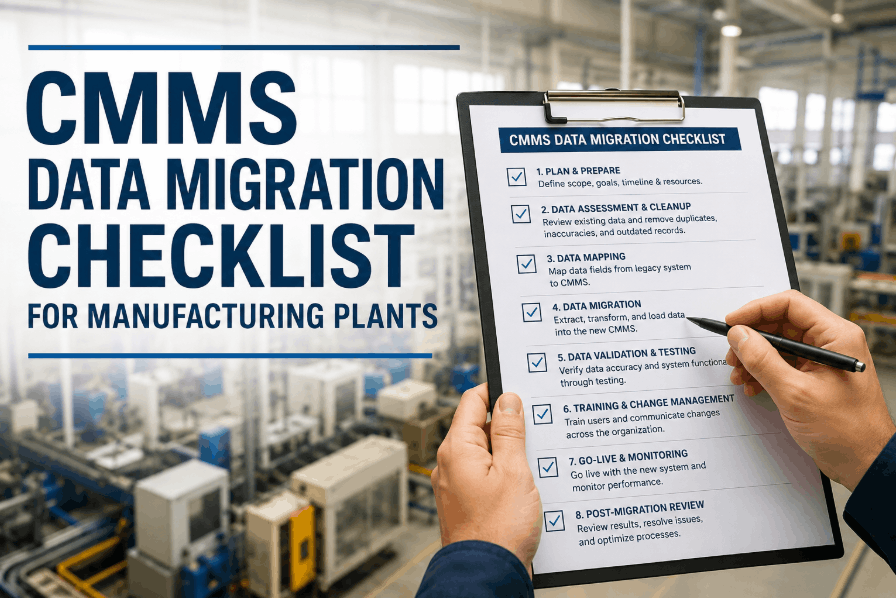
CMMS Implementation Checklist for Manufacturing Plants
Five-phase deployment roadmap covering pre-launch data prep, system configuration, asset migration, team training, and go-live validation — built for IT managers and maintenance directors.
4–6 weeks
Typical implementation timeline for mid-sized plants
73%
Of CMMS failures are due to poor data preparation
90%+
User adoption rate when training is hands-on
ISO 55000
Asset management standard for CMMS structure
Phase 1: Data Preparation
Phase 2: System Configuration
Phase 3: Asset & PM Loading
Phase 4: User Training
Phase 5: Go-Live & Validation
Week 1–2
Data Prep & Audit
Phase 01
Data Preparation & Legacy Audit
The quality of your CMMS output is determined by the quality of data you load at implementation. Garbage in, garbage out. This phase identifies what equipment records, maintenance histories, and vendor documentation must be digitized before configuration begins.
Asset Data Inventory
Create master equipment list with asset tags, descriptions, locations, and criticality ratings — this becomes your CMMS asset register foundation
Deliverable: Equipment master file (Excel/CSV) · Owner: Maintenance Manager · Timeline: Week 1
Audit existing equipment nameplates and record manufacturer, model number, serial number, installation date, and warranty expiration for critical assets
Deliverable: Asset specification database · Owner: Reliability Engineer · Timeline: Week 1
Define asset hierarchy structure — facility → department → line → machine — to match your operational org chart and enable location-based work order filtering
Deliverable: Hierarchical asset tree diagram · Owner: Maintenance Planner · Timeline: Week 1
Historical Work Order Review
Identify which legacy work orders to migrate — typically last 12 months of completed PMs and corrective actions; older records archived separately
Deliverable: Work order migration scope document · Owner: CMMS Project Lead · Timeline: Week 1
Extract failure mode history from paper logs or spreadsheets — convert free-text descriptions into standardized failure codes aligned with ISO 14224 taxonomy
Deliverable: Failure code mapping table · Owner: Reliability Engineer · Timeline: Week 2
Review spare parts consumption data and create initial inventory list with part numbers, descriptions, reorder points, and preferred vendors
Deliverable: MRO inventory master list · Owner: Stores Supervisor · Timeline: Week 2
Vendor & Documentation Consolidation
Collect and digitize equipment manuals, PM procedures, and technical drawings — upload as asset-linked documents in CMMS for technician reference
Deliverable: Digital document library · Owner: Technical Documentation Specialist · Timeline: Week 2
Compile vendor contact database with service agreements, warranty terms, and emergency contact details for OEM support escalation
Deliverable: Vendor master file · Owner: Procurement Coordinator · Timeline: Week 2
Phase 02
System Configuration & User Setup
CMMS configuration determines how work flows through your maintenance operation. Every dropdown menu, every required field, every automated notification must reflect how your team actually works — not generic out-of-box settings that force workarounds.
User Roles & Permissions
Define user role matrix — technician, planner, supervisor, reliability engineer, admin — with create/read/update/delete permissions per module
Deliverable: Role-based access control (RBAC) matrix · Owner: IT Security Lead · Timeline: Week 3
Create user accounts for all maintenance personnel with correct role assignment, email addresses, and mobile numbers for SMS/push notifications
Deliverable: User provisioning list · Owner: CMMS Administrator · Timeline: Week 3
Work Order Workflow Configuration
Configure work order status sequence — Draft → Approved → Assigned → In Progress → Completed → Closed — with approval gates at status transitions
Deliverable: Workflow state diagram · Owner: Maintenance Manager · Timeline: Week 3
Set up priority levels (Emergency, Urgent, Routine, Planned) with corresponding SLA response times and escalation rules
Deliverable: Priority matrix with SLA definitions · Owner: Maintenance Planner · Timeline: Week 3
Define custom fields for work order capture — downtime duration, root cause category, corrective action taken — to enable KPI reporting
Deliverable: Custom field specification · Owner: Reliability Engineer · Timeline: Week 3
Notification & Integration Setup
Configure automated email and SMS alerts for overdue PMs, high-priority work order assignments, and parts stockouts
Deliverable: Notification rule set · Owner: CMMS Administrator · Timeline: Week 3
Integrate CMMS with existing ERP, SCADA, or IoT sensor platforms via API or middleware for automated meter reading and condition monitoring data feed
Deliverable: Integration specification document · Owner: IT Systems Analyst · Timeline: Week 3
OxMaint's configuration wizard pre-loads manufacturing-standard workflows, so your setup takes hours, not weeks — and your team starts with best-practice templates instead of blank forms.
Phase 03
Asset Loading & PM Schedule Build
This phase transforms your equipment list into a living CMMS asset register with maintenance plans attached. Each asset must have at least one preventive maintenance task assigned before go-live, or it becomes a dead record that technicians ignore.
Asset Import & Verification
Bulk import asset master file via CSV upload — verify asset tag uniqueness, location hierarchy mapping, and criticality classification post-import
Deliverable: CMMS asset register · Owner: CMMS Administrator · Timeline: Week 4
Attach equipment photos, nameplates, and technical drawings to each asset record for technician visual reference during field work
Deliverable: Asset image library · Owner: Maintenance Technician Lead · Timeline: Week 4
Link spare parts to parent assets using bill of materials (BOM) structure — enables accurate parts forecasting and auto-reservation on PM generation
Deliverable: Asset-part linkage table · Owner: Stores Supervisor · Timeline: Week 4
PM Task Template Creation
Build PM checklists from OEM manuals and tribal knowledge — convert paper forms into digital step-by-step procedures with pass/fail checkpoints
Deliverable: PM procedure library · Owner: Maintenance Planner · Timeline: Week 4
Assign PM frequencies per asset type — daily operator checks, weekly lubrication rounds, monthly inspections, quarterly alignments, annual overhauls
Deliverable: PM frequency matrix · Owner: Reliability Engineer · Timeline: Week 4
Schedule initial PM generation dates staggered across calendar to prevent Week 1 work order backlog — aim for 15–20 PMs per week as steady state
Deliverable: PM generation calendar · Owner: Maintenance Planner · Timeline: Week 5
Meter & Condition Monitoring Setup
Configure meter-based PM triggers for runtime-dependent maintenance — oil changes every 2000 hours, belt replacements every 500 cycles, filter changes every 1000 units produced
Deliverable: Meter-based PM rules · Owner: Reliability Engineer · Timeline: Week 5
Set alarm thresholds for vibration, temperature, and pressure sensors if condition monitoring is integrated — auto-generate work orders when readings exceed baseline
Deliverable: Sensor alarm configuration · Owner: Vibration Analyst · Timeline: Week 5
Phase 04
User Training & Adoption Preparation
The best CMMS in the world fails if technicians bypass it. Training must be hands-on, role-specific, and conducted on actual production equipment — not generic demos with dummy data in a conference room.
Role-Based Training Sessions
Conduct technician training on mobile app usage — how to view assigned work orders, log time and materials, upload photos, and mark tasks complete from the shop floor
Deliverable: Technician training sign-off sheet · Owner: Training Coordinator · Timeline: Week 5
Train planners on PM scheduling, work order creation, resource allocation, and backlog management — emphasize weekly schedule optimization workflow
Deliverable: Planner certification checklist · Owner: Maintenance Manager · Timeline: Week 5
Train reliability engineers on KPI dashboards, failure trend analysis, and custom report generation for MTBF, MTTR, and PM compliance tracking
Deliverable: Analytics training module · Owner: Reliability Engineer Lead · Timeline: Week 5
Documentation & Support Materials
Create quick reference guides (QRGs) for common tasks — 1-page laminated cards for work order completion, PM checkout, and parts issue/return
Deliverable: QRG library (PDF/printed) · Owner: Technical Writer · Timeline: Week 5
Record video walkthroughs for mobile app and desktop workflows — store in shared drive for on-demand reference and new hire onboarding
Deliverable: Training video repository · Owner: Training Coordinator · Timeline: Week 5
Designate CMMS super-users (1 per shift or department) who receive advanced training and serve as first-line support before escalating to IT helpdesk
Deliverable: Super-user roster with contact list · Owner: Maintenance Supervisor · Timeline: Week 5
Phase 05
Go-Live Execution & Post-Launch Validation
Go-live is not the finish line — it's the start of continuous improvement. The first two weeks post-launch expose every data error, workflow bottleneck, and user confusion point that testing in a sandbox environment never revealed.
Pre-Launch Final Checks
Run full system smoke test — verify user login, work order creation, PM generation, mobile app sync, notification delivery, and report export all function correctly
Deliverable: Go-live readiness checklist · Owner: CMMS Administrator · Timeline: Week 6 Day 1
Freeze legacy system at midnight before go-live — all new work orders created in CMMS only; legacy system switched to read-only archive mode
Deliverable: System cutover plan · Owner: IT Manager · Timeline: Week 6 Day 1
Communicate go-live date to all stakeholders with clear instructions — production operators know how to submit work requests, supervisors know how to approve
Deliverable: Go-live announcement email · Owner: Maintenance Manager · Timeline: Week 6 Day 1
Week 1 Post-Launch Monitoring
Track daily work order completion rate and technician login frequency — target 80% system usage by Day 3, 95% by Day 7
Deliverable: Daily adoption metrics report · Owner: CMMS Project Lead · Timeline: Week 6 Days 2–7
Hold daily stand-up meetings with super-users to triage issues — classify bugs vs training gaps vs workflow redesign needs
Deliverable: Issue log with resolution tracking · Owner: Maintenance Supervisor · Timeline: Week 6 Days 2–7
Audit data quality on completed work orders — verify labor hours, parts consumed, and downtime duration are being captured accurately
Deliverable: Data quality scorecard · Owner: Reliability Engineer · Timeline: Week 6 Day 7
30-Day Performance Review
Generate Month 1 KPI dashboard — PM completion rate, mean time to resolve work orders, backlog growth/reduction, parts stockout incidents
Deliverable: 30-day performance report · Owner: Maintenance Manager · Timeline: Day 30
Conduct user feedback survey to identify pain points — mobile app performance, PM checklist clarity, parts lookup speed, report usability
Deliverable: User satisfaction survey results · Owner: Training Coordinator · Timeline: Day 30
Schedule quarterly optimization reviews to refine workflows, retire unused custom fields, and adjust PM frequencies based on actual failure data
Deliverable: Continuous improvement roadmap · Owner: CMMS Steering Committee · Timeline: Day 30
Success Metrics
CMMS Implementation KPIs to Track
| Metric |
Measurement Method |
Target (Month 1) |
Target (Month 3) |
| User Adoption Rate |
Active users / Total users |
85% |
98% |
| PM Compliance |
Completed PMs on schedule / Total PMs due |
75% |
90% |
| Work Order Closure Time |
Average days from created to closed |
< 5 days |
< 3 days |
| Data Entry Accuracy |
Work orders with complete required fields |
80% |
95% |
| Mobile App Usage |
Work orders completed via mobile / Total WOs |
60% |
80% |
| Asset Coverage |
Assets with active PM plans / Total assets |
100% |
100% |
Implementation Lessons
What Implementation Experts Know
01
The single biggest implementation mistake is trying to replicate your legacy system exactly in the new CMMS. Use implementation as an opportunity to fix broken workflows, not preserve them digitally. If a process required three paper forms and five signatures, the CMMS version shouldn't either.
CMMS Implementation Consultant, 40+ Manufacturing Rollouts
02
We went live with 60% of our PMs built and added the rest over the next three months. Trying to have every procedure perfect before launch delayed our original timeline by four months. Get the critical equipment online first, then iterate.
Maintenance Director, Automotive Parts Manufacturing
03
Technician buy-in came from showing them how the mobile app eliminated paperwork, not from PowerPoint decks about digital transformation. Let them test it on real work orders during training, and they'll advocate for it themselves.
Reliability Manager, Food Processing Plant
Common Questions
CMMS Implementation FAQs
How long does CMMS implementation take for a manufacturing plant?
Mid-sized manufacturing plants typically complete implementation in 4–6 weeks following this phased approach. Larger multi-site operations may extend to 8–12 weeks, while smaller facilities can go live in 3 weeks with focused data preparation.
What data must be ready before CMMS implementation starts?
At minimum, you need a complete equipment list with asset tags and locations, a basic PM schedule per asset type, and a list of active maintenance personnel with role assignments. Historical work orders and detailed parts inventory improve value but aren't blockers for go-live.
Should we migrate historical work orders into the new CMMS?
Migrate the most recent 12 months of completed work orders to preserve failure history and enable trend analysis. Older records can remain in the legacy system as an archive — migrating 5+ years of data creates noise without analytical value.
How do we ensure technicians actually use the CMMS after go-live?
Make the mobile app the only way to access PM checklists and close work orders. Paper backups encourage bypass behavior. Combine this with hands-on training using real equipment and immediate supervisor reinforcement during Week 1.
What is the most common reason CMMS implementations fail?
Poor data quality at launch. Loading incomplete asset records, vague PM procedures, or incorrect equipment hierarchies forces users to work around the system instead of through it, creating a cycle of low adoption and data decay.
Deploy Your CMMS in Weeks, Not Months
OxMaint's implementation team has guided 200+ manufacturing plants through successful rollouts. We handle data templates, configuration workshops, and onsite training so your internal team focuses on operations, not project management.





.png)