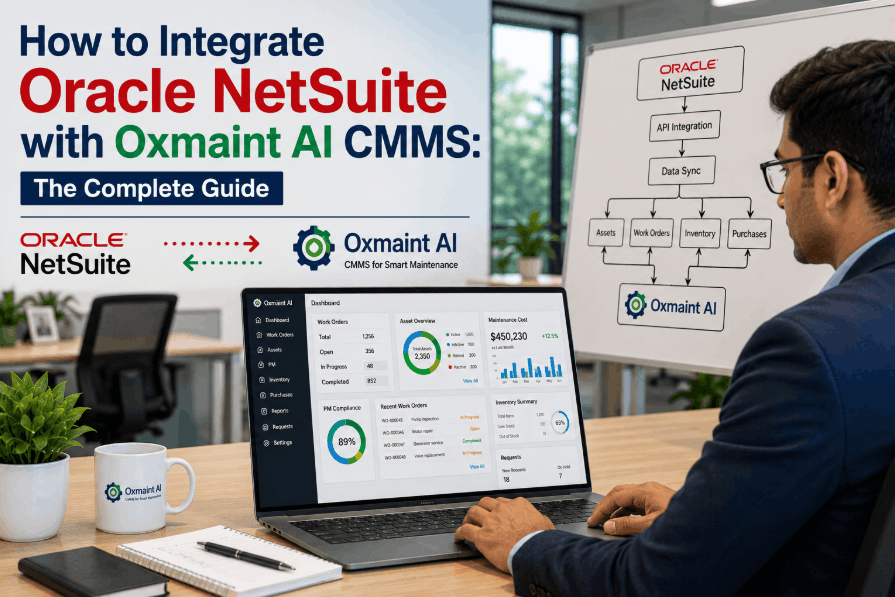
Maintenance teams and finance departments have historically operated in separate systems — work orders living in a CMMS while purchase orders, vendor records, and asset depreciation sit locked inside Oracle NetSuite ERP. That disconnection creates approval delays, duplicate data entry, inventory blind spots, and reconciliation headaches that compound across every shift. Integrating Oracle NetSuite with Oxmaint AI CMMS closes that gap permanently. Sign Up Free to connect your NetSuite financial data directly to Oxmaint's AI-powered work order, asset management, and procurement workflows — eliminating manual handoffs between your ERP and maintenance execution layer. This guide covers the full integration architecture: REST API connection, data mapping strategy, purchase order automation, asset synchronisation, and go-live best practices for IT managers and ERP admins running NetSuite in manufacturing, facilities, or multi-site operations. Book a Demo to see the live NetSuite-Oxmaint data flow before you plan your integration project.
Connect Oracle NetSuite to Oxmaint AI CMMS — Without Custom Dev Work
Oxmaint syncs work orders, assets, purchase orders, and inventory directly with NetSuite — eliminating dual-entry, approval delays, and financial reconciliation gaps between your ERP and maintenance teams.
Why Oracle NetSuite and Oxmaint CMMS Need to Be Connected
The ERP–CMMS Data Silo Problem
Oracle NetSuite manages financial operations — vendor invoices, purchase orders, asset registers, GL accounts, and procurement approvals. Oxmaint AI CMMS manages maintenance execution — work orders, asset health, preventive schedules, inspections, and spare parts consumption. Without integration, every maintenance purchase requires manual re-entry into NetSuite, every asset must be managed in two systems, and finance never sees real-time maintenance spend until month-end reconciliation.
What NetSuite Integration with Oxmaint Solves
When Oxmaint connects to NetSuite via REST API, maintenance work orders automatically trigger PO creation in NetSuite, parts consumption updates inventory valuations in real time, asset records stay synchronised between both systems, and maintenance cost data flows into NetSuite project accounting without manual export. Book a Demo to see how Oxmaint eliminates the finance-maintenance reconciliation cycle entirely.
NetSuite REST API Architecture: How Oxmaint Connects
01
OAuth 2.0 Authentication
Oxmaint authenticates to NetSuite using OAuth 2.0 token-based auth via NetSuite's REST Web Services endpoint — no stored credentials, full audit trail of API activity, and role-scoped access permissions per integration user.
→
02
Record Type Mapping
Oxmaint maps its internal entities to NetSuite record types — assets to Fixed Asset records, work orders to Transaction records, vendors to Vendor records, and inventory items to Inventory Item records — with configurable field-level mapping per customer NetSuite schema.
→
03
Bidirectional Sync Engine
Changes originating in NetSuite (new vendors, approved POs, GL account updates) sync into Oxmaint automatically. Changes originating in Oxmaint (completed work orders, parts consumed, new assets added) push back to NetSuite — maintaining a single source of truth across both platforms. Sign Up Free to configure your sync rules.
→
04
Event-Driven Triggers
Integration events fire on business logic triggers — not timed batch imports. A work order approval in Oxmaint immediately triggers a PO draft in NetSuite. A PO approval in NetSuite immediately unlocks the associated work order in Oxmaint. No overnight batch lag.
Core Data Objects Mapped Between NetSuite and Oxmaint
Assets
NetSuite Fixed Asset ↔ Oxmaint Asset Record
Asset acquisition date, cost, depreciation class synced
Asset retirement and disposal events reflected in both systems
Procurement
Oxmaint parts request → NetSuite Purchase Order draft
NetSuite PO approval status reflected in Oxmaint work order
Vendor records and preferred supplier data pulled from NetSuite
Inventory
Spare parts consumed in Oxmaint update NetSuite inventory valuation
Reorder point triggers visible across both platforms
Multi-location inventory balances synchronised per storeroom
Cost & Finance
Work order labour and material cost posted to NetSuite GL accounts
Maintenance spend coded to cost centres, projects, or departments
Month-end accruals generated automatically from open Oxmaint WOs
Zero
Duplicate data entry — NetSuite and Oxmaint share a single synchronised record set across assets, vendors, and inventory
Real-Time
PO status updates from NetSuite reach Oxmaint work orders instantly — no batch import lag between approval and execution
REST API
Oxmaint connects to NetSuite via native REST Web Services — no middleware required, no proprietary connector licensing
Auto PO
Parts requests raised in Oxmaint AI CMMS automatically generate NetSuite purchase orders — routed to the correct approval workflow
NetSuite + Oxmaint vs Disconnected ERP-CMMS Operation
NetSuite Standalone — No CMMS Integration
Maintenance technicians manually enter completed work data into NetSuite for cost capture
PO creation requires finance team involvement for every maintenance parts request
Asset records diverge — NetSuite shows financial data, CMMS shows operational data, neither is complete
Month-end maintenance cost reconciliation takes days of manual extraction and matching
Inventory consumption in the storeroom is invisible to NetSuite until periodic physical count
No real-time maintenance spend visibility for project managers or finance controllers
NetSuite + Oxmaint AI CMMS Integrated
Work order completion in Oxmaint automatically posts labour and materials to NetSuite GL — Sign Up Free
Parts requests in Oxmaint trigger NetSuite PO drafts routed to the correct approval workflow automatically
Single asset record shared across both platforms — financial and operational data unified
Month-end close accelerated — maintenance costs pre-coded to GL accounts throughout the period
Every parts issue from Oxmaint storeroom updates NetSuite inventory valuation in real time
Finance and maintenance leadership share the same live maintenance spend dashboard
Step-by-Step: NetSuite Integration with Oxmaint CMMS
STEP 01
NetSuite Integration Role Setup
Create a dedicated NetSuite integration user with a custom role scoped to the record types Oxmaint needs: Fixed Assets, Purchase Orders, Vendors, Inventory Items, and Transactions. Restrict permissions to the minimum required — read for reference data, read/write for transaction records.
Prerequisites
STEP 02
OAuth 2.0 Credential Configuration
In NetSuite Setup, create an Integration record for Oxmaint and generate Client ID and Client Secret credentials. Configure token-based authentication in Oxmaint's ERP integration settings — entering your NetSuite Account ID, Consumer Key, and token credentials.
Authentication
STEP 03
Field Mapping & Schema Configuration
Map NetSuite custom fields to Oxmaint data fields — particularly asset classifications, cost centre codes, GL account assignments, and department hierarchies. Oxmaint's mapping editor displays your NetSuite schema and Oxmaint schema side by side for visual field alignment. Book a Demo to walk through field mapping live.
Data Mapping
STEP 04
Initial Data Migration & Sync
Run the initial bulk sync — pulling existing NetSuite assets, vendors, inventory items, and open POs into Oxmaint. Oxmaint deduplicates against any existing CMMS records and flags conflicts for manual review before committing the master data merge.
Data Migration
STEP 05
Business Rule & Workflow Configuration
Define which Oxmaint events trigger NetSuite actions — and vice versa. Configure approval thresholds (e.g. POs above a certain value require NetSuite manager approval before Oxmaint releases the work order), cost centre routing rules, and GL account auto-assignment logic.
Workflow Design
STEP 06
UAT, Go-Live & Continuous Monitoring
Run parallel operation for two to three weeks — comparing NetSuite financial records against Oxmaint transaction logs to validate data integrity. After sign-off, disable manual data entry bridges and activate full bidirectional sync. Oxmaint's integration health dashboard monitors API call success rates and flags sync errors in real time.
Go-Live
NetSuite ERP and Oxmaint CMMS — Connected in Days, Not Months.
Oxmaint's NetSuite integration connects your ERP financial layer to your maintenance execution layer via REST API — assets, POs, inventory, and GL costs synchronised automatically across both platforms. Book a Demo to see the full integration workflow with a live NetSuite sandbox.
Industries Running NetSuite + Oxmaint AI CMMS Integration
Manufacturing
Plant Asset Management & Maintenance Cost Control
Manufacturers running NetSuite for financial management and multi-site inventory control gain full maintenance cost visibility when Oxmaint is connected. Work order labour costs flow to the correct production cost centre in NetSuite automatically. Spare parts consumed on the shop floor update NetSuite inventory valuations without warehouse reconciliation cycles. Sign Up Free to configure manufacturing-specific GL routing.
Facilities Management
Multi-Site Maintenance Spend & Vendor Management
Facilities operations across multiple properties need vendor invoices, contract renewals, and maintenance spend consolidated in NetSuite while technicians execute work orders in Oxmaint. Integration ensures every completed Oxmaint work order maps to the correct NetSuite property entity, department code, and vendor record — eliminating the AP team's manual monthly reconciliation against FM reports.
Food & Beverage
Regulatory Compliance & Audit-Ready Maintenance Records
Food and beverage manufacturers using NetSuite for financials and Oxmaint for maintenance gain a fully auditable record trail from purchase order to completed maintenance task to GL entry. Every regulatory inspection requiring proof of maintenance activity and associated costs is supported by Oxmaint's linked work order and NetSuite transaction records. Book a Demo for compliance-focused integration configuration.
Healthcare
Medical Equipment Maintenance & Capital Asset Tracking
Healthcare organisations tracking capital equipment in NetSuite's Fixed Asset module can sync those records directly into Oxmaint for preventive maintenance scheduling, inspection management, and work order execution. Equipment service history, parts cost, and labour records in Oxmaint feed back into NetSuite for accurate capital asset lifecycle costing and depreciation planning.
Go-Live Best Practices for IT Managers and ERP Admins
01
Scope the Integration Before You Connect
Define exactly which NetSuite subsidiaries, locations, and record types are in scope. Multi-subsidiary NetSuite accounts require explicit subsidiary scoping in the Oxmaint integration settings to prevent cross-entity data contamination.
02
Clean Master Data Before Sync
Duplicate vendor records, inconsistent asset naming conventions, and unmapped GL accounts in NetSuite will replicate into Oxmaint. Run a NetSuite data quality audit — particularly vendor deduplication and asset register validation — before initiating the first bulk sync.
03
Use a NetSuite Sandbox for Testing
Configure and test the full Oxmaint integration against a NetSuite sandbox environment before connecting to production. Validate PO creation, inventory deductions, GL posting, and error handling scenarios in sandbox before go-live sign-off.
04
Define Ownership of Conflict Resolution
Bidirectional sync creates potential write conflicts when the same record is updated in both systems simultaneously. Define a clear "system of record" policy per data type — NetSuite owns vendor financial terms; Oxmaint owns asset maintenance schedules — and configure conflict resolution rules accordingly.
05
Train Both Finance and Maintenance Teams
Integration success requires both teams to understand how their actions propagate across the other system. Finance teams need to understand that PO approvals in NetSuite unlock maintenance work orders. Maintenance teams need to understand that work order closure triggers GL postings — so accuracy matters.
06
Monitor Integration Health Post Go-Live
Oxmaint's integration dashboard tracks API call success rates, sync failure counts, and record conflict logs in real time. Set alert thresholds for sync failure rates and review the integration health report weekly for the first 90 days post go-live.
Frequently Asked Questions
Does Oxmaint connect to Oracle NetSuite via REST API or SuiteTalk?
Oxmaint integrates with NetSuite via NetSuite REST Web Services using OAuth 2.0 token-based authentication. This is NetSuite's modern API layer, requiring no legacy SuiteTalk SOAP configuration or third-party middleware.
Which NetSuite record types does Oxmaint sync with?
Oxmaint syncs with NetSuite Fixed Assets, Purchase Orders, Vendors, Inventory Items, Transactions (for GL cost posting), Subsidiaries, and Departments. Custom record types and custom fields are also mappable via Oxmaint's field mapping configuration.
Can Oxmaint automatically create NetSuite purchase orders from maintenance work orders?
Yes. When a maintenance work order in Oxmaint requires parts procurement, Oxmaint generates a NetSuite PO draft automatically — pre-populated with vendor, item, quantity, cost centre, and GL account — routed to the correct NetSuite approval workflow.
How does the Oxmaint–NetSuite integration handle multi-subsidiary NetSuite accounts?
Oxmaint's integration supports multi-subsidiary NetSuite configurations. Each Oxmaint site or location can be mapped to the corresponding NetSuite subsidiary, ensuring POs, GL entries, and inventory transactions are scoped correctly to the right entity.
Does integrating with NetSuite require a data science or development team?
No. Oxmaint's NetSuite integration is configured through a no-code field mapping UI. IT admins with NetSuite administrator access and Oxmaint admin rights can complete the integration setup without custom development. Oxmaint's integration team provides guided configuration support.
How long does a typical NetSuite–Oxmaint integration go-live take?
Most organisations complete configuration and initial data sync within one to two weeks. Parallel testing adds another two to three weeks before full production go-live. Complex multi-subsidiary environments with extensive custom field mapping may extend the timeline to six weeks.
Your NetSuite Data and Oxmaint Maintenance Records Belong in Sync.
Connect Oracle NetSuite to Oxmaint AI CMMS — automated PO creation, real-time inventory sync, GL cost posting, and unified asset records across your ERP and maintenance execution layer. Sign Up Free and start your NetSuite integration today.

.png)

