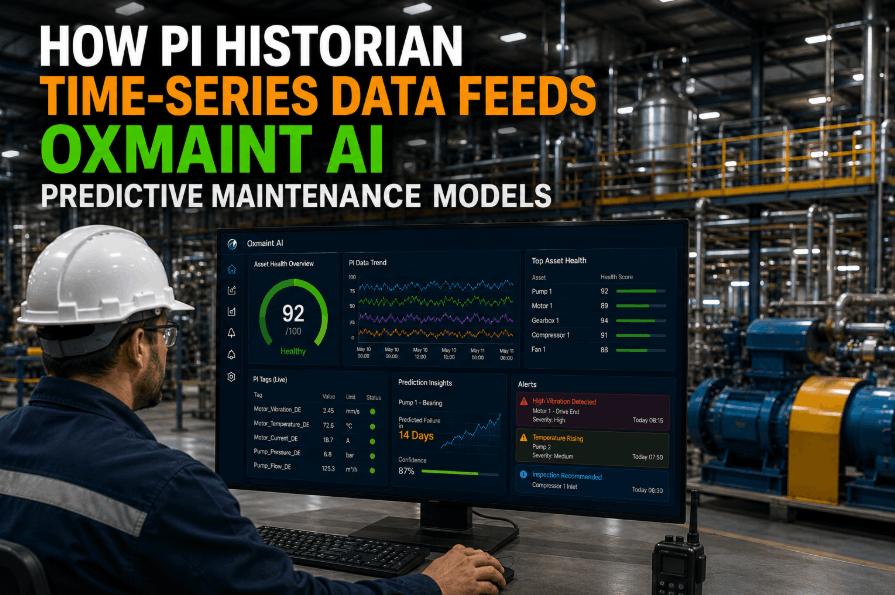
Manufacturing plants running OSI PI Historian — now AVEVA PI System — sit on a goldmine of real-time process data. Pressure readings, flow rates, temperature curves, vibration signals — all captured at millisecond resolution across thousands of PI tags. Yet most plants run their maintenance operations on a completely separate system, disconnected from this data stream. The result: maintenance teams make work order decisions based on schedules and gut instinct, while the historian already knows a pump is trending toward failure. Integrating Oxmaint AI with OSI PI Historian closes this gap, enabling PI tag data to automatically trigger predictive work orders, feed AI diagnostic models, and give plant managers a unified view of process health and asset maintenance — all in real time. This guide covers the full integration architecture, PI tag mapping strategy, AI model feeds, and automated work order workflows, so you can plan and execute the integration with confidence. You can Sign Up Free and connect your PI environment within days, not months.
Why OSI PI + CMMS Integration Matters for Manufacturing Plants
PI Historian captures what is happening inside your equipment at a granularity no manual inspection can match. A CMMS manages what your maintenance team does about it. Without integration, these two systems operate in silos — the historian logs a developing fault, and nobody acts on it until a work order is raised manually, often after the failure has already occurred. With Oxmaint AI bridging the gap, PI tag readings become the trigger for maintenance action. When a monitored variable crosses a defined threshold or an AI model identifies a degradation pattern, a work order is created automatically, assigned to the right technician, and linked to the asset's full maintenance history. If your operation is ready to close this loop, Book a Demo to walk through how the integration maps to your specific PI environment.
Oxmaint continuously polls PI Server for configured tag values — pressure, temperature, vibration, flow — and evaluates each reading against maintenance thresholds defined per asset.
Historical PI tag data streams into Oxmaint's predictive models, enabling anomaly detection and remaining useful life estimation that improve with every new data point.
When PI data signals a fault condition or predictive alert, Oxmaint auto-generates a prioritized work order with asset context, tag readings, and recommended corrective actions attached.
Each PI tag maps to a specific asset record in Oxmaint, so tag readings, work orders, and maintenance history are unified in a single asset timeline — not scattered across two systems.
Define high, low, rate-of-change, and statistical deviation thresholds per tag per asset — no vendor professional services required. Operations teams configure directly in the Oxmaint UI.
PI-sourced process data and Oxmaint maintenance KPIs appear on unified dashboards — MTBF, MTTR, tag health scores, and open work orders in a single operational view.
Integration Architecture: How Oxmaint Connects to PI Historian
The Oxmaint–PI integration is built on a lightweight connector layer that communicates with PI Server via the PI Web API or PI OLEDB Enterprise — the method that works best in your network environment. No historian schema changes are required, and the integration does not write to PI Server — it reads only. This makes the connection safe to deploy in process-critical environments without change control risk. If your plant uses PI Asset Framework (PI AF), Oxmaint can consume AF element hierarchies to auto-populate its asset tree, dramatically reducing the manual work of building your CMMS asset registry from scratch. To see how this maps to your PI deployment, Sign Up Free and connect your PI test environment on the first session.
Oxmaint connector authenticates to PI Server via PI Web API REST endpoint. Configured polling interval (1s to 15min) retrieves current and historical tag values. Supports PI AF hierarchy for automatic asset import.
Each PI tag is mapped to an Oxmaint asset and a specific measurement attribute. Mapping is managed via the Oxmaint Tag Registry UI — bulk import via CSV supported. PI AF element mapping auto-populates asset hierarchy where available.
Tag readings flow into Oxmaint's AI engine, where multivariate models evaluate combinations of tag values against learned baseline signatures. Anomaly scores, fault pattern matches, and RUL estimates are generated continuously.
Both rule-based thresholds and AI-model alerts are evaluated. When a condition is met, the alert engine triggers the work order automation pipeline — applying priority rules, team assignments, and notification routing defined per asset class.
Oxmaint creates a fully populated work order — asset record, triggering tag readings, fault description, recommended actions — and routes it to the assigned technician on mobile. PI tag context travels with the work order throughout its lifecycle.
PI Tag Mapping Strategy: Building a Maintainable Tag Registry
Tag sprawl is the most common failure mode in PI–CMMS integrations. Plants with 50,000+ PI tags cannot map everything to maintenance thresholds — and attempting to do so produces alert noise that trains technicians to ignore notifications. Oxmaint recommends a tiered tagging strategy: identify the 200 to 500 tags directly correlated with maintenance-relevant failure modes, map these to specific assets in the Oxmaint registry, and build threshold logic around equipment-specific operating envelopes. The remaining tags can be pulled on demand into work order context without being part of the active monitoring registry. If you want a methodology walkthrough specific to your asset classes, Book a Demo with the Oxmaint integration team.
| Tag Category | Monitoring Priority | Threshold Type | Work Order Trigger | AI Model Input |
|---|---|---|---|---|
| Vibration (velocity, acceleration) | Critical | Absolute + rate-of-change | Immediate | Yes |
| Bearing temperature | Critical | Absolute + deviation from baseline | Immediate | Yes |
| Motor current / power draw | High | Statistical deviation (3σ) | Scheduled review | Yes |
| Process flow / differential pressure | Medium | Operating envelope bounds | Conditional | Yes |
| Lube oil pressure / temperature | High | Absolute low threshold | Immediate | Selective |
| Product quality / analyzer tags | Medium | Spec limit violation | Quality alert work order | No |
| Process temperature (non-bearing) | Low–Medium | Operating envelope bounds | On demand | Selective |
| Utility consumption (steam, water) | Low | Trend monitoring only | Manual review | No |
AI Model Feeds: Turning PI Data Into Predictive Maintenance Actions
The most powerful outcome of the Oxmaint–PI integration is not threshold alerting — it is multivariate AI-driven detection that identifies developing failures before any single tag crosses an alarm limit. Most equipment failures have a signature: a subtle combination of rising bearing temperature, increased vibration at a specific frequency, and marginal change in motor current that no single threshold would catch but that an AI model trained on historical PI data recognizes as a precursor pattern. Oxmaint's AI engine ingests this multi-tag data stream and returns anomaly scores at the asset level, not the individual tag level — giving maintenance planners a meaningful signal rather than a dashboard full of tag-level alerts. You can Sign Up Free and connect your first critical asset class to see anomaly scoring in action within your PI environment.
Oxmaint ingests 3–24 months of historical PI tag data for each monitored asset to learn normal operating signatures across production modes, load conditions, and seasonal variations. Models are retrained as new PI data accumulates.
Rather than evaluating tags in isolation, Oxmaint's models evaluate tag combinations — correlating vibration with temperature with motor load in the context of process state. Fault signatures that are invisible in single-tag views emerge clearly in multivariate space.
For assets with sufficient historical failure data linked in the Oxmaint CMMS, the AI produces RUL estimates — giving maintenance planners a probability window for intervention that enables parts pre-staging and scheduled downtime rather than emergency response.
PI data includes production mode tags that Oxmaint uses to condition its models — anomaly thresholds for a compressor running at 40% load differ from those at 100% load. Context-aware models dramatically reduce false positive alert rates.
When a technician closes a work order in Oxmaint with a confirmed fault finding, that label feeds back into the AI model as a confirmed event — continuously improving detection precision for that asset class and plant environment.
Work Order Automation Workflows Driven by PI Data
A PI alert with no automatic action path is just a notification — it still requires a human to create, prioritize, assign, and schedule a work order. Oxmaint's work order automation layer eliminates this manual chain. When a configured PI condition or AI anomaly alert fires, Oxmaint executes a pre-defined workflow: work order type selection, priority assignment, technician routing, parts pre-check, and mobile notification — all without dispatcher intervention. Plants that have implemented this workflow report that PI-triggered work orders are actioned 4–6 hours faster than manually created ones. Book a Demo to see a live walkthrough of a PI threshold firing through to mobile technician dispatch.
PI AF Integration: Importing Your Asset Hierarchy Automatically
Plants that have built a structured PI Asset Framework are well positioned for rapid Oxmaint deployment. PI AF defines asset hierarchy — equipment classes, parent-child relationships, tag-to-element bindings, and attribute templates — in exactly the form Oxmaint needs to populate its asset registry. The Oxmaint PI AF importer reads element hierarchy and attribute definitions from PI AF, creates matching asset records in Oxmaint with parent-child structure preserved, and binds the relevant PI tags to each asset record automatically. A plant with 2,000 equipment records in PI AF can have a fully populated Oxmaint asset registry in hours rather than the weeks a manual entry project would require. If your PI environment uses PI AF, Sign Up Free and run the AF import on your first session to see your asset hierarchy appear immediately.
Network and Security Architecture for PI–CMMS Integration
PI Server deployments in manufacturing plants typically sit on process networks (Level 2 or Level 3 in the Purdue model) with controlled access to corporate and cloud networks. Oxmaint's connector is designed to work within these constraints. The connector runs as a lightweight service on a machine within the PI Server network zone and initiates outbound-only HTTPS connections to Oxmaint's cloud platform — no inbound firewall rules, no VPN client software, no changes to PI Server configuration. For plants requiring on-premise data residency, Oxmaint supports a hybrid architecture where the connector processes tag data locally and sends only aggregated signals and metadata to the cloud platform, keeping raw process values within the plant network. To review how this fits your specific network topology, Book a Demo with the Oxmaint integration team.