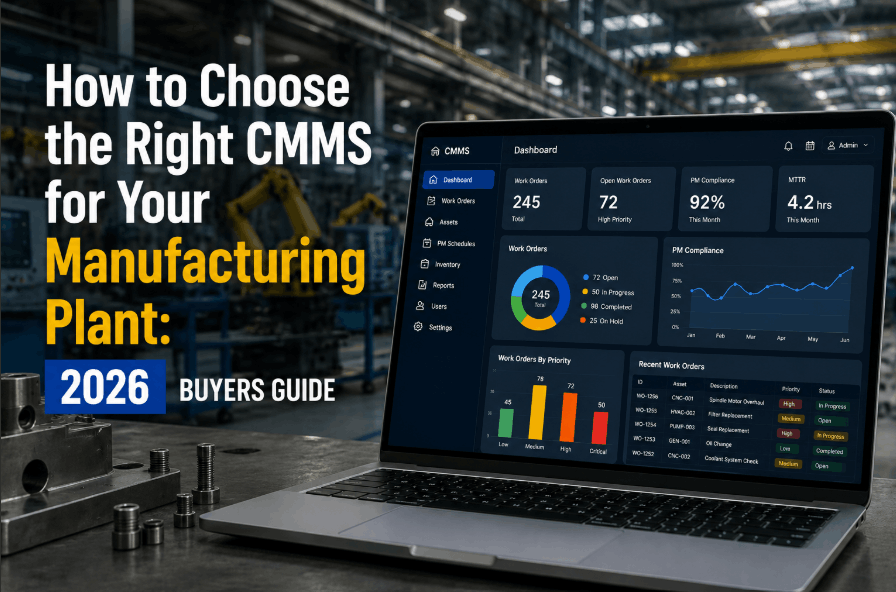
Choosing the wrong CMMS costs manufacturing plants more than the software license — it costs months of failed adoption, lost maintenance data, and operational disruption. In 2026, with over 200 CMMS platforms on the market, the decision framework matters as much as the product features. This guide walks maintenance managers, reliability engineers, and operations leaders through every dimension of CMMS evaluation — from must-have features and integration requirements to vendor questions and total cost of ownership — so your plant selects a system your team will actually use. Teams evaluating modern platforms frequently Book a Demo with Oxmaint to benchmark what fast, mobile-first CMMS deployment looks like before finalising vendor shortlists.
Built for manufacturing maintenance teams — mobile-first, no-code setup, PM scheduling, and live KPI dashboards. See why plants choose Oxmaint over legacy CMMS.
The 6-Dimension CMMS Evaluation Framework for Manufacturing Plants
Most CMMS purchasing decisions fail because buyers evaluate on features alone. A system with every feature on a checklist that your technicians refuse to use delivers zero ROI. The right framework evaluates six dimensions together — not features in isolation. Plants that Sign Up Free on Oxmaint typically validate all six dimensions within their first two-week trial before committing to full deployment.
Is the mobile experience built for a technician on a shop floor — or for a desktop user in a corner office? Mobile-first CMMS drives 3–5x higher daily active use than desktop-primary systems.
Can the system handle calendar-based, meter-based, and condition-based PM triggers simultaneously? Static scheduling misses runtime-driven maintenance windows on high-utilisation equipment.
Does it support multi-level asset hierarchies — plant, line, equipment, component — with parent-child work order relationships? Flat asset lists fail for complex manufacturing environments.
Can supervisors see Planned Maintenance Ratio, Schedule Compliance, Mean Time to Repair, and work order backlog without waiting for an IT-generated report? Real-time dashboards drive accountability.
Does it connect to your ERP, sensor platforms, and spare parts inventory systems through documented APIs? Integration gaps create data silos that undermine the business case for CMMS.
What is the realistic time-to-value for a plant your size? Systems requiring 6–12 month IT-led implementations lose the business case before the first PM work order runs.
CMMS Features That Actually Matter in a Manufacturing Environment
Not all CMMS feature lists are equal. Some capabilities are table stakes for any credible system. Others are differentiators that separate platforms built for manufacturing from platforms adapted for it. Use this table to score every vendor on your shortlist against requirements that drive real operational outcomes. Maintenance teams evaluating options are encouraged to Book a Demo to see these capabilities demonstrated on live manufacturing use cases.
| Feature Area | Must-Have | Strong Differentiator | Why It Matters |
|---|---|---|---|
| Work Order Management | Required | Mobile capture, photo attach, QR scan | Work orders not captured digitally become invisible to planners and KPI dashboards |
| Preventive Maintenance Scheduling | Required | Meter-based + condition-based triggers | Calendar-only PM misses runtime-driven maintenance needs on shift-variable equipment |
| Asset Register | Required | Multi-level hierarchy, criticality tiering | Without structured asset data, work orders cannot be properly assigned or trended |
| Mobile Application | Required | Offline mode, barcode/QR scanning | Technicians without mobile access revert to paper — defeating the CMMS investment |
| Spare Parts / Inventory Tracking | Important | Min/max alerts, asset-linked parts | Untracked parts consumption inflates MRO spend and causes emergency downtime |
| KPI Dashboards | Important | Real-time, role-based, no-code | Supervisors without live KPI visibility cannot drive PM compliance or respond to backlogs |
| Predictive Maintenance Integration | Optional | Sensor data triggers, anomaly alerts | Enables shift from time-based to condition-based maintenance for critical assets |
| ERP / SCADA Integration | Optional | Documented REST API, bidirectional sync | Eliminates manual data re-entry between maintenance and financial / production systems |
Cloud vs On-Premise CMMS: What Manufacturing Plants Choose in 2026
The deployment model decision shapes your total cost of ownership, IT resource requirements, and update cycle for the life of the system. In 2026, the majority of new manufacturing CMMS deployments are cloud-based — driven by mobile access requirements, faster implementation timelines, and elimination of server infrastructure costs. Plants on air-gapped networks or with strict data residency requirements evaluate hybrid or on-premise options. Sign Up Free on Oxmaint to evaluate the cloud deployment model with your own asset data.
- No server infrastructure — IT burden eliminated
- Mobile-ready from Day 1 — iOS, Android, browser
- Automatic updates — no version lock risk
- 30–60 day implementation timelines achievable
- Subscription pricing — predictable OpEx model
- API-first integrations with modern ERP platforms
- Required for air-gapped or high-security networks
- Data residency mandates may require local hosting
- Higher IT resource and server cost commitment
- Update cycles managed internally — version lag risk
- Longer implementation — 90–180 days typical
- Higher TCO over 3–5 year horizon for most plants
20 Questions to Ask Every CMMS Vendor Before You Sign
Vendor demonstrations are designed to show you what works — not what breaks under real plant conditions. These questions surface implementation realities, total cost of ownership, and support quality before you commit. Maintenance leaders who Book a Demo with Oxmaint receive direct, documented answers to all of these questions during the evaluation process.
- What is the average time to first live PM work order for a plant our size?
- Who owns the data migration — your team or ours?
- Is onboarding support included in the contract or billed separately?
- What does technician training look like — and how long does it take?
- Can we import our existing asset data via CSV or Excel?
- Does your mobile app work offline on the plant floor?
- Can PM triggers be meter-based or condition-based, not just calendar intervals?
- How many asset hierarchy levels does the system support?
- What KPIs are available out-of-the-box without custom configuration?
- What inspection and compliance checklist capabilities are included?
- What ERP systems do you have pre-built integrations with?
- Is there a documented REST API with rate limit and authentication specs?
- How is sensor or IoT data ingested for condition-based triggers?
- How does the system perform at 10,000+ assets and 500+ daily work orders?
- What is the multi-site management capability for enterprise deployments?
- What is the total contract cost over 3 years including implementation and training?
- Are mobile users priced separately from desktop users?
- What is your average support response time for critical issues?
- How are price increases handled at contract renewal?
- What is the data export format if we decide to migrate away?
CMMS TCO: What Vendor Pricing Pages Don't Tell You
Per-user or per-asset subscription fees are the line item that gets budgeted. Watch for tiered pricing that scales steeply with technician headcount or asset volume at renewal.
Some vendors quote implementation at zero — then bill hourly for data migration, configuration, and custom workflow builds. Get a fixed-scope implementation agreement in writing.
Low-adoption CMMS implementations cost more in lost productivity than the licence fee. Budget for role-based training, not just admin setup. Mobile-first systems reduce this cost significantly.
Custom ERP or sensor integrations built on undocumented APIs become ongoing maintenance liabilities. Prioritise vendors with pre-built connectors and documented public APIs.
On-premise deployments carry server, DBA, and upgrade project costs that compound over a 5-year horizon. Cloud SaaS eliminates infrastructure costs but check annual price escalation clauses.
A single prevented unplanned downtime event on a critical production line often recovers the full annual CMMS cost. Quantify this with your plant's cost-per-hour of downtime before the final vendor decision.
Why Manufacturing Plants Choose Oxmaint in 2026
Oxmaint is built for the way manufacturing maintenance actually works — field technicians on mobile, planners managing PM backlogs, and supervisors who need live KPIs without waiting for IT reports. Unlike legacy CMMS platforms built in a desktop era, Oxmaint is mobile-first by architecture — not by adaptation. Plants that Sign Up Free typically run live PM work orders within 30 days of account creation.
60-day implementation framework with structured onboarding support. Most plants are live with PM schedules, work orders, and KPI dashboards within 30–45 days — not 6 months.
Technician mobile app built for plant floor use — QR/barcode asset scanning, photo capture on work orders, offline capability, and shift-based task management.
Calendar, meter-based, and condition-triggered PM scheduling with reusable task libraries, multi-step inspection checklists, and automated work order generation.
Planned Maintenance Ratio, Schedule Compliance, MTTR, and work order backlog dashboards — live, role-based, and accessible without custom reporting configuration.
Build your asset hierarchy, assign criticality tiers, and link spare parts without IT involvement. Import via CSV or configure directly in the platform — your team owns the setup.
Every work order, PM completion, and inspection checklist is timestamped and attributed — giving maintenance leaders the audit trail needed for ISO, OSHA, and customer compliance reviews.
See mobile-first CMMS built for manufacturing — PM scheduling, work order management, KPI dashboards, and 60-day implementation. No IT project required.
CMMS Buyer's Guide 2026 — Questions Manufacturing Leaders Ask
If your team is managing PM schedules in spreadsheets, losing work order history, or unable to report planned vs reactive maintenance ratio, you are ready. The business case is typically proven within 90 days of go-live through reduced emergency work orders and improved schedule compliance.
CMMS focuses on maintenance execution — work orders, PM schedules, asset history, and technician workflows. EAM (Enterprise Asset Management) adds financial asset lifecycle management. Most manufacturing plants get full value from a CMMS; EAM is relevant when asset depreciation and capital planning are managed in the same system.
License for all active technicians who will close work orders, plus planners and supervisors. Avoid systems that charge per asset — per-user pricing scales more predictably as plant headcount changes over time.
Modern CMMS platforms with open APIs can receive sensor data and trigger condition-based work orders when thresholds are breached. Evaluate vendors on API documentation quality and whether sensor-triggered PM is a native feature or a custom integration project.
Plants with structured implementations typically see measurable ROI within 3–6 months through reduction in unplanned downtime, lower reactive maintenance labour costs, and improved parts inventory accuracy. A single prevented critical failure often covers the annual licence cost.
Yes. Oxmaint supports multi-site asset hierarchies, site-specific user roles, and consolidated KPI reporting across plants — allowing maintenance leaders to benchmark performance across facilities from a single dashboard. Book a Demo to see the multi-site configuration.
Oxmaint gives manufacturing plants mobile-first CMMS with PM scheduling, work order management, asset tracking, and live KPI dashboards — go live in 60 days, not 6 months.
.png)

.png)